1
Page 6
INSTALLATON
Camera Installation
Camera Removal
CAUTION
Make sure Main Power Switch on the
light fixture Wall Control is in the OFF
position before installing or removing
the camera.
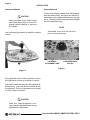
Use the following procedure to install the camera
system.
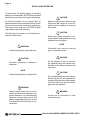
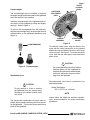
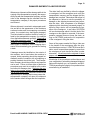
To remove the camera assembly from the lighthead,
hold the camera firmly, and press the camera release button on the lighthead attachment ring (figure 3). Carefully pull the camera assembly straight
out of the attachment ring.
NOTE
Sterilizable cover must be removed
prior to removing camera.
LIGHTHEAD
ATTACHMENT RING
CAMERA RELEASE
BUTTON
Figure 3.
Figure 2.
Move lighthead to the full down position, and turn
the lighthead so it faces up as shown in figure 2.
Insert the Camera Assembly into the lighthead attachment ring. Push and twist the camera to lock
it into position. Pull out on the camera to verify that
it is fully locked into position.
`
CAUTION
Make sure Camera Assembly is securely locked in lighthead before moving
lighthead into use position.
PrecisionHD HANDLE CAMERA SYSTEM • REV5