1
Page 7
Counterweight
The counterweight must be installed to maintain
the proper weight required to balance the lighthead
when the camera is not installed.
COVER
LOCKING
PINS
LIGHTHEAD
ATTACHMENT
RING
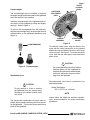
Install the counterweight in the lighthead and ensure that it is fully engaged by pulling and slightly
turning it. Refer to figure 4.
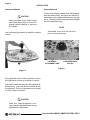
To remove the counterweight from the lighthead,
hold the counterweight firmly, and press the camera
release button on the lighthead attachment ring
(figure 3).
STERILIZABLE
COVER
CAMERA
ASSEMBLY
COUNTERWEIGHT
Figure 5.
To install the sterile cover, align the holes in the
cover with the cover locking pins on the camera
attachment ring and slide the cover on until it locks
on the two pins. See figure 5. To remove the sterile
cover, push the two white pins in and remove the
sterile cover.
CAUTION
Figure 4. Counterweight
Sterilizable Cover
`
CAUTION
Do not attempt to focus or position
the lighthead using the camera body.
Damage to the camera rotation motor
may result.
The camera has a sterilizable cover that, when installed, allows sterile positioning and focus control
for the lighthead. There is also a non-sterile focus
knob on the lighthead.
PrecisionHD HANDLE CAMERA SYSTEM • REV5
Do not accidentally push in the Camera
Release Button on the Lighthead Attachment Ring above the sterile handle,
as this will cause the camera to disengage from the lighthead.
Recommended sterilization parameters for
sterilizable handle:
Steam Sterilization:
132°C (270°F) for 4 minutes
NOTE
Always follow the AAMI and sterilizer manufacturer recommendations for proper sterilization
procedures.