1
LBI-39135
LBI-39135
Editable Tx/Rx Diagnostic Variables
The radio operates according to the values of the diagnostic variables
while in the Diagnostic menu. After exiting the menu (by pressing
CLEAR) the radio operation is no longer affected by the values of the
diagnostic variables.
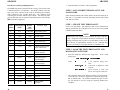
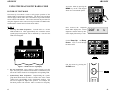
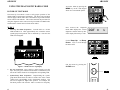
To modify or change the value of an editable diagnostic variable,
press the MENU key when the desired variable is being displayed.
This puts the radio in the Entry Mode.
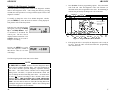
Enter the new value directly from
the keypad or by using the Ramp
Up
and Ramp Down
keys
to increment or decrement the
value by one. The new value is
displayed on the bottom line. The
OPTION button can be used to
backspace for editing.
Ù
Ú
3.
ÚÄEricsson GE Mobile Communications Inc.ÄÄÄÄÄÄÄÄÄÄÄÄÄÄÄÄÄÄÄÄÄÄÄÄÄÄÄÄÄÄÄÄÄÄÄÄÄÄÄ¿
³ÚÄÄÄÄÄÄÄÄÄÄÄÄÄÄÄÄÄÄÄÄÄÄÄÄÄÄÄÄÄÄÄÄÄÄÄÄÄÄÄÄÄÄÄÄÄÄÄÄÄÄÄÄÄÄÄÄÄÄÄÄÄÄÄÄÄÄÄÄÄÄÄÄÄÄÄÄ¿³
³³
Personalities
EDACS RADIO PROGRAMMER - 3
TQ-3374
³³
³ÀÄÄÄÄÄÄÄÄÄÄÄÄÄÄÄÄÄÄÄÄÄÄÄÄÄÄÄÄÄÄÄÄÄÄÄÄÄÄÄÄÄÄÄÄÄÄÄÄÄÄÄÄÄÄÄÄÄÄÄÄÄÄÄÄÄÄÄÄÄÄÄÄÄÄÄÄÙ³
ÀÄÄÄÄÄÄÄÄÄÄÄÄÄÄÄÄÄÄÄÄÄÄÄÄÄÄÄÄÄÄÄÄÄÄÄÄÄÄÄÄÄÄÄÄÄÄÄÄÄÄÄÄÄÄÄÄÄÄÄÄÄÄÄÄÄÄÄÄÄÄÄÄÄÄÄÄÄÄÙ
ÚÄÄÄÄÄÄÄÄÄÉÍÍÍÍÍÍÍÍÍÍÍÍÍÍÍÍÍÍÍÍÍÍÍÍÍÍÍÍÍÍÍÍÍÍÍÍÍÍÍÍÍÍÍÍÍÍÍÍÍÍÍÍÍÍÍÍÍÍ»ÄÄÄÄÄÄÄÄÄ¿
³
º
Program Radio
º
³
³
º
º
³
Enter Diagnostic
³
º
Personality name:
Testpers
º
³
³
º
Radio Code:
SAME
º
³
Radio CodeºFile
³
º
ADI Code:
SAME
³
³
º
Unit ID.:
SAME
³
Name Here º
³
º
ORION Keypad File: NONE
º
³
³
º
ORION CU ID:
NONE
º
³
³
º
º
³
³
º
F1 - Program
F2 - Copy
º
³
³
º
F10 - Back - don't program radio.
º
³
³
º
º
³
³
º
Please be sure the radio is connected to COMM1
º
³
³
º
and the radio is turned on before Pressing F1.
º
³
³ Use theº Enter the personality to program
º
³
ÀÄÄÄÄÄÄÄÄÄÈÍÍÍÍÍÍÍÍÍÍÍÍÍÍÍÍÍÍÍÍÍÍÍÍÍÍÍÍÍÍÍÍÍÍÍÍÍÍÍÍÍÍÍÍÍÍÍÍÍÍÍÍÍÍÍÍÍͼÄÄÄÄÄÄÄÄÄÙ
F1
F2
F3
F4
F5
F6
F7
F8
F9
F10
Prog
File
Help
Back
Press F9 for field help, Shift F9 for window help
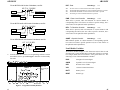
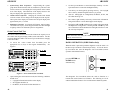
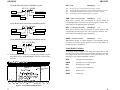
Figure 2 - Program Radio (More) Window
4.
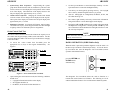
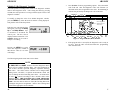
Pressing the MENU key again
causes the diagnostic variable to
take the new value (if it is in the
valid range).
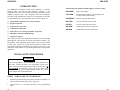
Press F2 More for more programming options. Tab to the Radio
Code field and enter the Diagnostic radio code filename (as
described earlier) that is applicable to the radio. Press F1 Prog to
write the test personality and Diagnostic code to the radio.
If the program radio is successful, the diagnostic code is ready to
be used. Turn the radio off and disconnect the programming
cable from the radio.
The following diagnostic menu items can be edited:
NOTE
The PWR, DEV and SQWT variables from the Diagnostic Menu
can be used to Calibrate Tracking Data. The value displayed for
each of these variables represent temporary equivalent Tracking
Data values. The values in these variables can be changed while
making Power, Deviation, or Squelch measurements which will
assist in finding the desired tracking data values. As stated before
the radio only operates according to these variables while in the
Diagnostic Menu. THE TRACKING DATA FOR THE RADIO
CANNOT BE CHANGED USING THE DIAGNOSTIC RADIO
CODE. Once the desired values are found, the Tracking Data must
be changed using the PC Programmer. Refer to the Tracking Data
section in the appropriate Service Manual.
14
7