1
LBI-39135
LBI-39135
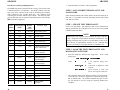
For an M-RK II with Version 2 Hardware, use file:
M2 T 16 2 99.BIN
M-RK II
Diag/Test Revision
Test Radio Code
DAT - Data
"0"
"1"
"2"
"3"
Valid Range:
0-3
Tx Clear Voice on current channel when PTT is pressed
Tx Random High Speed Data on current channel when PTT is pressed
Tx Random GE-STAR on current channel when PTT is pressed
Tx Dotting on current channel when PTT is pressed
Version 2 Hardware
Group 16
PWR - Power Level Override
For an M-RK I radio with Version 3 hardware, use file:
M1 T 16 3 99.BIN
M-RK I
Diag/Test Revision
Test Radio Code
Version 3 Hardware
Valid Range:
0-255
When PTT is pressed, radio will transmit on current channel at
corresponding Power Level (does not reflect a specific wattage, but a
value relative to the particular radio capabilities).
DEV - Tx Deviation Override
Valid Range:
0-63
When PTT is pressed, radio will transmit on current channel with
corresponding Deviation (does not reflect a specific deviation, but a
value relative to the particular radio capabilities).
Group 16
SQWT - Squelch Override
For an ORION radio with Version 3 hardware, use file:
O T 16 3 99.BIN
ORION
0-255
Mute/Unmute speaker on current channel at corresponding squelch
level (does not reflect a specific squelch level, but a value relative to
the particular radio capabilities).
Diag/Test Revision
Test Radio Code
Version 3 Hardware
Group 16
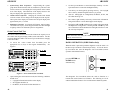
2.
Valid Range:
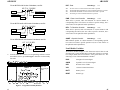
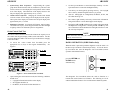
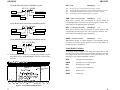
From the EDACS-3/CONV-1 PC Programming Software Current
Personalities Screen, press F5 Progrm. Enter the test Personality
file name.
ÚÄEricsson GE Mobile Communications Inc.ÄÄÄÄÄÄÄÄÄÄÄÄÄÄÄÄÄÄÄÄÄÄÄÄÄÄÄÄÄÄÄÄÄÄÄÄÄÄÄ¿
³ÚÄÄÄÄÄÄÄÄÄÄÄÄÄÄÄÄÄÄÄÄÄÄÄÄÄÄÄÄÄÄÄÄÄÄÄÄÄÄÄÄÄÄÄÄÄÄÄÄÄÄÄÄÄÄÄÄÄÄÄÄÄÄÄÄÄÄÄÄÄÄÄÄÄÄÄÄ¿³
³³ Personalities
EDACS RADIO PROGRAMMER - 3
TQ-3374
³³
³ÀÄÄÄÄÄÄÄÄÄÄÄÄÄÄÄÄÄÄÄÄÄÄÄÄÄÄÄÄÄÄÄÄÄÄÄÄÄÄÄÄÄÄÄÄÄÄÄÄÄÄÄÄÄÄÄÄÄÄÄÄÄÄÄÄÄÄÄÄÄÄÄÄÄÄÄÄÙ³
ÀÄÄÄÄÄÄÄÄÄÄÄÄÄÄÄÄÄÄÄÄÄÄÄÄÄÄÄÄÄÄÄÄÄÄÄÄÄÄÄÄÄÄÄÄÄÄÄÄÄÄÄÄÄÄÄÄÄÄÄÄÄÄÄÄÄÄÄÄÄÄÄÄÄÄÄÄÄÄÙ
ÚÄÄÄÄÄÄÄÄÄÄÄÄÄÄÄÄÉÍÍÍÍÍÍÍÍÍÍÍÍÍÍÍÍÍÍÍÍÍÍÍÍÍÍÍÍÍÍÍÍÍÍÍÍÍÍÍÍÍÍÍÍ»ÄÄÄÄÄÄÄÄÄÄÄÄÄÄÄÄ¿
³
º
Program Radio
º Enter Test
³
³
º
º
³
³
º
º Personality file ³
³
º
Personality name:
º name
³
³
º
º
³
³
º
º
³
³
º
F1 - Program Personality.
º
³
³
º
F2 - Programming options.
º
³
³
º
F10 - Back - don't program radio.
º
³
³
º
º
³
³
º Please be sure the radio is connected
º
³
³
º to COM1 and that the radio is turned
º
³
³
º on before pressing F1.
º
³
³
º
º
³
³ Use the cursorº Enter the personality to program
º
³
ÀÄÄÄÄÄÄÄÄÄÄÄÄÄÄÄÄÈÍÍÍÍÍÍÍÍÍÍÍÍÍÍÍÍÍÍÍÍÍÍÍÍÍÍÍÍÍÍÍÍÍÍÍÍÍÍÍÍÍÍÍͼÄÄÄÄÄÄÄÄÄÄÄÄÄÄÄÄÙ
F1
F2
F3
F4
F5
F6
F7
F8
F9
F10
Prog
More
Help
Back
Press F9 for field help, Shift F9 for window help
Non-Editable Variables
All of these variables display a value between 0 and 255 that is read
from the radio. Some variables have a limit that will not be exceeded.
For example, RSSI will never indicate a value greater than 130. The
following is a list of the Non-Editable Variables:
RSSI
Strength Of Current Signal
SQRD
Squelch Level of Current Signal
UDC
Resistor Value of UDC
VOL
Current Volume Knob Value
BATT
Battery Level
BRDT
Board Type
Figure 1 - Program Personality Window
6
15