1
CONTROLS
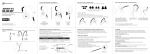
The Runaway can control media and phone calls from a smartphone or tablet.
1. ADJUSTING THE VOLUME
FUNCTION
OPERATION
Increase volume
Press the Volume Up
button
Decrease volume
Press the Volume
Down button
NOTES
When the volume reaches
the minimum or maximum
level the Runaway will
produce a short tone.
Note: Volume can be adjusted only while media is playing or during a phone call.
With most devices, volume adjustments will change the volume of the headphones
independently of the connected device while playing media. Adjust device volume
as needed to further increase or decrease the volume. During a phone call the
headphones will directly control device volume.
2. CONTROLLING PHONE CALLS
STATUS
Incoming call
Call in progress
FUNCTION
OPERATION
Answer call
Press the Multifunction button
Reject call
Press and hold the Multifunction button
for 2 seconds
End call
Press the Multifunction button
Transfer call
between
headphones
and phone*
Press and hold the Multifunction button
for 2 seconds until you hear a tone
Mute /
unmute call
Double press the Multifunction button
to mute; double press again to unmute
(continues on page 7)
6