1
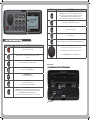
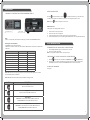
BUTTON
DESCRIPTION
Forward/Next
Short Press: To select the next track in CD/MP3 or iPod mode.
Start automatic tuning up the frequency spectrum in Tuner mode.
Press and hold: Fast-forward in CD/MP3 or iPod mode.
Start manual tuning up the frequency spectrum in the Tuner mode
Play/Pause
Play/Pause track in CD/MP3 and iPod mode.
Mute
Mutes all sound in all zones
Clock
Displays the clock
Display Brightness
Press to enter display brightness setting. Turn the Rotary Encoder to adjust
BUTTON DESCRIPTION
BUTTON
DESCRIPTION
Rotary Encoder
The rotary encoder operates similar the click wheel on an iPod.
Power
Press to turn the unit ON/OFF
Turn to adjust volume or move up or down a menu structure.
Menu
Press to enter menu system and press again to return to previous
screen
Press the Rotary Encoder to select a highlighted option.
Radio
Press to access the Radio source FM - AM - SAT
CD (MS-CD500 only)
Press to access the CD/MP3 source
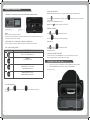
RESET BUTTON
- Press the Reset button to reset the unit to the factory settings
AUX (MS-IP500 only)
Press to access Auxiliary source
iPod.
Press to access the iPod source
Press again to access AUX (MS-CD500)
Back/Previous.
Short Press: To select the previous track in CD/MP3 or iPod mode.
Start automatic tuning down the frequency spectrum in the Tuner mode.
Press and hold: Rewind in CD/MP3 or iPod mode.
Start manual tuning down the frequency spectrum in the Tuner mode.
Reset Button
4
5