1
17
Operation Manual
PROFORMANCE CONTROLS
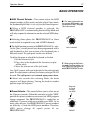
■ CONTROL FOOTSWITCHES
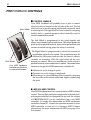
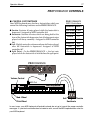
Your MIDI keyboard may also have footswitches which can
control the following functions on the PROFORMANCE.
● Sustain- Sustains all notes played while the footswitch is
depressed. Assigned to MIDI controller #64
● Sostenuto- Sustains all notes which are being held at the
time of the footswitch depression, but all subsequent notes
played will decay normally. Assigned to MIDI controller
#66.
● Soft - Slightly mutes the volume and tone of all notes played
after the footswitch is depressed. Assigned to MIDI
controller #67.
● Split Point - On the PROFORMANCE +, the last note
played while the footswitch is held defines the split point.
PROFORMANCE
MIDI Controllers
Controller MIDI #
Pitch Wheel PWH
Mod. Wheel
#1
Volume
#7
Sustain
#64
Sostenuto
#66
Soft
#67
Split Point
#70
(Plus Only)
PROFORMANCE
PRO formance
Plus
POWER/MIDI
VOLUME
FINE TUNE
TRANSPOSE
MIDI CHANNEL
DEMO 1 2
-oct C +oct
+2oct OMNI
-2oct
3
4
SPLIT
C
B
5
D
13
A
A
6
12
D
7
11
G
E
G F F
10 9 8
PRESET
MIDI 1 2
3
15
4
14
5
13
12
6
7
11
10 9 8
MIDI In
Volume Control
MIDI Out
MIDI Keyboard
Mod. Wheel
Pitch Wheel
Soft
Sustain
Sostenuto
In most cases, your MIDI keyboard will probably already be set up to transmit the proper controller
messages. If a particular controller does not seem to work, consult the MIDI implementation chart for
your MIDI keyboard.