1
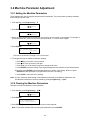
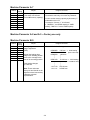
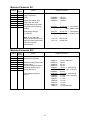
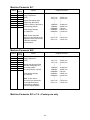
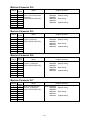
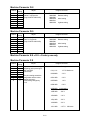
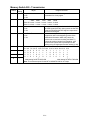
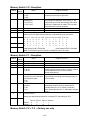
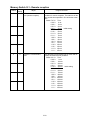
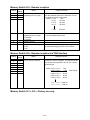
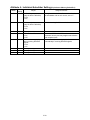
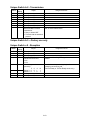
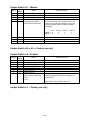
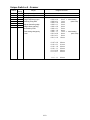
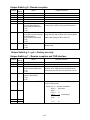
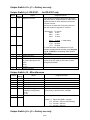
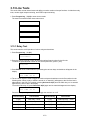
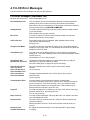
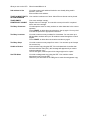
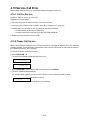
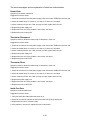
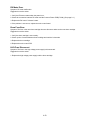
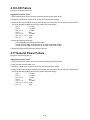
What you see on the LCD
What it means/What to do
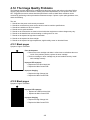
Document Stored
You tried to erase a batch box which contains at least one document. Erase
the document(s), then try again.
Drum Near End
Your drum will need to be replaced soon.
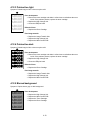
Enter No. (0-32)
You tried to enter a call group number greater than 32. Your machine can
maintain 32 call groups, numbered 1-32 (call group 0 covers all the groups).
Determine the correct call group identifier number and enter it, instead.
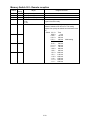
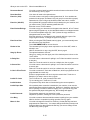
Enter No. (000-255)
If the optional NIC (network interface card) is attached to your machine, and
you tried to enter a TCP/IP address greater than 255.
Enter the correct TCP/IP address.
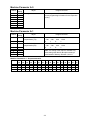
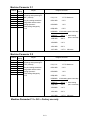
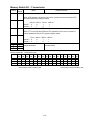
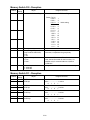
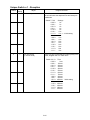
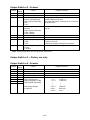
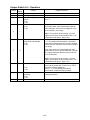
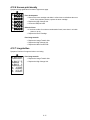
Enter Reduce/Enlarge
You tried to copy your document on the paper other than A4, A5 or F4 sized
paper using the bypass tray, or the calculated reduction or enlargement ratio
is out of the acceptable range (50 – 200 %) when the copy reduction or
enlargement ratio is set to “Auto”.
Enter the reduction or enlargement ratio manually although a part of the
image might be lacked, or change the paper for copying.
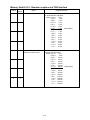
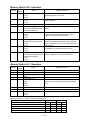
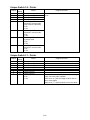
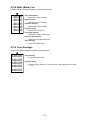
Enter Scan Size
When you using the FBS (Flatbed scanner) glass, you must manually enter
the scan size of your document.
Press DOCUMENT SIZE to choose the size.
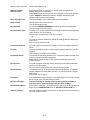
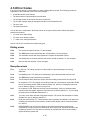
Feeder In Use
The command you’re trying to enter requires the use of the ADF, which is
already in use.
Wait for the machine to stop using the ADF, then try again.
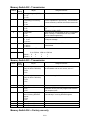
Hang Up Phone
The optional handset is off-hook.
Hang it up, making sure the upper part of the handset presses down on the
“hook” button.
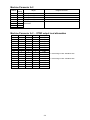
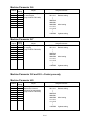
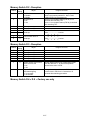
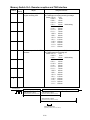
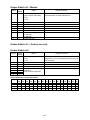
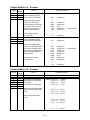
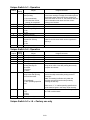
In Relay Box
You tried to store a document for polling in an F-Code box which is set to be
a relay box.
Select an F-Code box which is set to be a bulletin box, then try again.
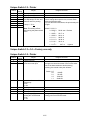
In Secure Box
You tried to store a document for polling in an F-Code box which is set to be
a security box.
Select an F-Code box which is set to be a bulletin box, then try again.
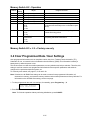
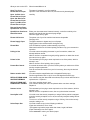
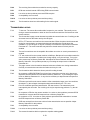
In Use in P OneTouch
You tried to erase the F-Code box or Batch box, which is programmed in the
programmable one-touch key.
Erase the programmable one-touch key that contains the F-Code box or
Batch box you want to erase, then try again.
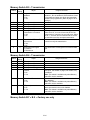
Invalid I.D. Code
The F-Code box I.D. code you entered isn’t valid.
Try re-entering your F-Code box I.D. code.
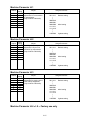
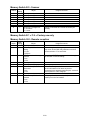
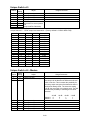
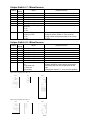
Invalid Number
You pressed a key which has no function during the current operation.
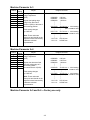
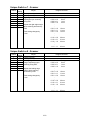
Invalid Paper Size
If the optional printer controller is attached to your machine, it can use the
special sized paper with the bypass tray. However, it should be used only for
the PC printing, it cannot be used for copying. So, if you tried to copy onto
the special sized paper with bypass tray, this message will appear.
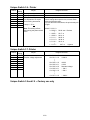
Invalid Passcode
The protection passcode you entered isn’t valid.
Repeat the operation, entering the correct protection passcode.
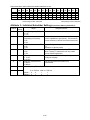
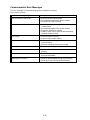
Line Busy
You tried to erase a document which someone is polling from your machine.
Wait for the fax to complete the polling operation, then try again.
Macro In Use
You tried to change the function for a Soft key, but that Soft key has been
programmed in a Macro key. You cannot change the Soft key function until
erase the Macro key that contains the Soft key you want to change. Erase
the Macro key, then try again.
4-14