1
Your VS-66HDCP
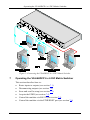
Table 1: VS-66HDCP 6 x 6 DVI Matrix Switcher Front Panel Features
#
1
Feature
IR Receiver LED
2
3
4
5
6
7
8
9
POWER Switch
ALL Button
OFF Button
SELECT IN Buttons
SELECT OUT Buttons
STO Button
RCL Button
LOCK Button
10
11
EDID Button
7-segment Display
1
Function
The red LED is illuminated when receiving signals from the Infrared
remote control transmitter
Illuminated switch for turning the unit ON or OFF
Use ALL to select all inputs or all outputs (see section 7.1)
Use OFF to disconnect one or all outputs (see section 7.2)
Press an INPUT selector button to select an input (from 1 to 6)
Press an OUTPUT selector button to select an output (from 1 to 6)
Press to store an input setup
Press to recall an input setup
Press to toggle disengaging the front panel buttons and to acquire the
EDID (see section 7.1)
Press to acquire the EDID
Displays the selected audio or video input switched to the output
(marked above each input)
Table 2: VS-66HDCP 6 x 6 DVI Matrix Switcher Rear Panel Features
#
12
13
14
15
16
Feature
INPUT DVI Connectors
OUTPUT DVI Connectors
RS-232 DB-9F Port
ETHERNET Connector
RESET Button
17
REMOTE IR
3.5mm Connector
Power Connector with Fuse
18
Function
Connect to the DVI sources (from 1 to 6)
Connect to the DVI acceptors (from 1 to 6)
Connects to the PC or the RS-232 Remote Controller
Connects to the PC or other Ethernet Controller
Press the reset button to reset to the ETHERNET factory default
definitions 2:
IP number − 192.168.1.39
Mask – 255.255.255.0
Gateway – 192.168.1.1
Connect to an external IR receiver unit for controlling the machine via
an IR remote controller (instead of using the front panel IR receiver)
AC connector enabling power supply to the unit
1 Illuminates when configuring the EDID
2 First disconnect the power cord and then connect it again while pressing the RESET button. The unit will power up and load
its memory with the factory default definitions
6
KRAMER: SIMPLE CREATIVE TECHNOLOGY