1
Table of Contents
Important Safety Instructions! . . . . . . . . . . . . . . . . . . . . . . . . . . . . . . . . . . . . . . . . . . 2
Table of Contents. . . . . . . . . . . . . . . . . . . . . . . . . . . . . . . . . . . . . . . . . . . . . . . . . . . . . 3
A DVS5.1 Overview . . . . . . . . . . . . . . . . . . . . . . . . . . . . . . . . . . . . . . . . . . . . . . . . . . . 4
A Description of the DVS5.1 . . . . . . . . . . . . . . . . . . . . . . . . . . . . . . . . . . . . . . . . . . . 4
Features . . . . . . . . . . . . . . . . . . . . . . . . . . . . . . . . . . . . . . . . . . . . . . . . . . . . . . . . . . . 4
Your DVS5.1 Purchase Includes:. . . . . . . . . . . . . . . . . . . . . . . . . . . . . . . . . . . . . . . . 4
Front Panel Operations . . . . . . . . . . . . . . . . . . . . . . . . . . . . . . . . . . . . . . . . . . . . . . . 5
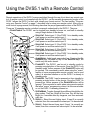
Using the DVS5.1 with a Remote Control . . . . . . . . . . . . . . . . . . . . . . . . . . . . . . . . . 6
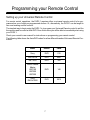
Programming your Remote Control . . . . . . . . . . . . . . . . . . . . . . . . . . . . . . . . . . . . . . 7
Setting up your Universal Remote Control. . . . . . . . . . . . . . . . . . . . . . . . . . . . . . . . . 7
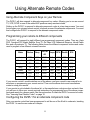
Using Alternate Remote Codes . . . . . . . . . . . . . . . . . . . . . . . . . . . . . . . . . . . . . . . . . 8
Using Alternate Component Keys on your Remote . . . . . . . . . . . . . . . . . . . . . . . . . . 8
Programming your remote to different components. . . . . . . . . . . . . . . . . . . . . . . . . . 8
Configuring the DVS5.1 for an alternate component code. . . . . . . . . . . . . . . . . . . . . 8
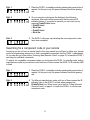
Searching for a component code in your remote . . . . . . . . . . . . . . . . . . . . . . . . . . . . 9
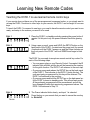
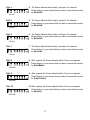
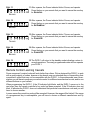
Learning New Remote Codes . . . . . . . . . . . . . . . . . . . . . . . . . . . . . . . . . . . . . . . . . . . 10
Teaching the DVS5.1 to use learned remote control keys. . . . . . . . . . . . . . . . . . . . . 10
Remote Control Learning Caveats. . . . . . . . . . . . . . . . . . . . . . . . . . . . . . . . . . . . . . . 12
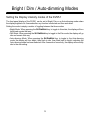
Bright / Dim / Auto-dimming Modes . . . . . . . . . . . . . . . . . . . . . . . . . . . . . . . . . . . . . . 13
Setting the Display intensity modes of the DVS5.1 . . . . . . . . . . . . . . . . . . . . . . . . . . 13
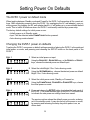
Setting Power On Defaults . . . . . . . . . . . . . . . . . . . . . . . . . . . . . . . . . . . . . . . . . . . . . 14
The DVS5.1 power on default mode . . . . . . . . . . . . . . . . . . . . . . . . . . . . . . . . . . . . . 14
Changing the DVS5.1 power on defaults . . . . . . . . . . . . . . . . . . . . . . . . . . . . . . . . . . 14
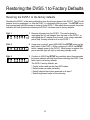
Restoring the DVS5.1 to Factory Defaults . . . . . . . . . . . . . . . . . . . . . . . . . . . . . . . . . 15
Restoring the DVS5.1 to the factory defaults . . . . . . . . . . . . . . . . . . . . . . . . . . . . . . . 15
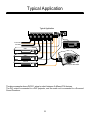
Typical Application . . . . . . . . . . . . . . . . . . . . . . . . . . . . . . . . . . . . . . . . . . . . . . . . . . . 16
Typical Applications (Cont’d) . . . . . . . . . . . . . . . . . . . . . . . . . . . . . . . . . . . . . . . . . . . 17
Some Notes on DVI Cable Lengths . . . . . . . . . . . . . . . . . . . . . . . . . . . . . . . . . . . . . . 17
Rack Mounting . . . . . . . . . . . . . . . . . . . . . . . . . . . . . . . . . . . . . . . . . . . . . . . . . . . . . . 17
Warranty Information. . . . . . . . . . . . . . . . . . . . . . . . . . . . . . . . . . . . . . . . . . . . . . . . . . 19
Warranty Policy . . . . . . . . . . . . . . . . . . . . . . . . . . . . . . . . . . . . . . . . . . . . . . . . . . . . . 19
Return & Exchange . . . . . . . . . . . . . . . . . . . . . . . . . . . . . . . . . . . . . . . . . . . . . . . . . . 19
Instructions for returning items. . . . . . . . . . . . . . . . . . . . . . . . . . . . . . . . . . . . . . . . . . 19
Customer Service Contact Information . . . . . . . . . . . . . . . . . . . . . . . . . . . . . . . . . . . 20
3