1
Reference Information
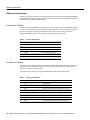
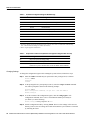
Table 9
System Console Terminal Baud Rate Settings
Baud
Bit 12
Bit 11
9600
0
0
4800
0
1
1200
1
0
2400
1
1
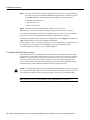
Bit 13 determines the server response to a bootload failure. Setting bit 13 causes the server to load
operating software from Flash memory after five unsuccessful attempts to load a boot file from the
network. Clearing bit 13 causes the server to continue attempting to load a boot file from the network
indefinitely. By factory default, bit 13 is cleared to 0.
Enabling Booting from Flash Memory
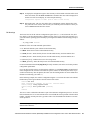
To enable booting from Flash memory, set configuration register bits 3, 2, 1, and 0 to a value between
2 and 15 in conjunction with the boot system flash [filename] configuration command.
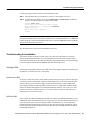
To enter configuration mode while in the system software image and specify a Flash filename from
which to boot, enter the configure terminal command at the enable prompt, as follows:
Router# configure terminal
Enter configuration commands, one per line. End with CNTL/Z.
Router(config)# boot system flash [filename]
To disable Break and enable the boot system flash command, enter the config-register command
with the value shown in the following example:
Router(config)# config-reg 0x0102
Router(config)# ^Z
Router#
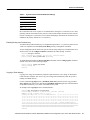
Copying to Flash Memory
Copying a new image to Flash memory might be required whenever a new image or maintenance
release becomes available. You cannot copy a new image into Flash memory while the system is
running from Flash memory.
Use the command copy tftp:filename [ bootflash | slot0 | slot1 ]:filename for the copy procedure.
Where tftp:filename is the source of the file and [ bootflash | slot0 | slot1 ]:filename is the destination
in onboard Flash memory or on either of the Flash memory cards.
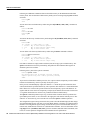
An example of the copy tftp:filename command follows:
Router# copy tftp:myfile1 slot0:myfile1
20575008 bytes available on device slot0, proceed? [confirm]
Address or name of remote host [1.1.1.1]?
Loading new.image from 1.1.1.1 (via Ethernet1/0): !!!!!!!!!!!!!!!!!!!!!!!!!!!!!!
!!!!!!!!!!!!!!!!!!!!!!!!!!!!!!!!!!!!!!!!!!!!!!!!!!!!!!!!!!!!!!!!!!!!!!!!!!!!!!!!
!!!!!!!!!!!!!!!!!!!!!!!!!!!!!!!!!!!!!!!!!!!!!!!!!!!!!!!!!!!!!!!!!!!!!!!!!!!!!!!!
!!!!!!!!!!!!!!!!!!!!!!!!!!!!!!!!!!!!!!!!!!!!!!!!!!!!!!!!!!!!!!!!!!!!!!!!!!!!!!!!
!!!!!!!!!!!!!!!!!!!!!!!!!!!!!!!!!!!!!!!!!!!!!!!!!!!!!!!!!!!!!!!!!!!!!!!!!!!!!!!!
!!!!!!!!!!!!!!!!!!!!!!!!!!!!!!!!!!!!!!!!!!!!!!![OK - 7799951/15599616 bytes]
CCCCCCCCCCCCCCCCCCCCCCCCCCCCCCCCCCCCCCCCCCCCCCCCCCCCCCCCCCCCCCCCCCCCCCCCCCCCCCCC
CCCCCCCCCCCCCCCCCCCCCCCCCCCCCCCCCCCCCCCCCCCCCCCCCCCCCCCCCCCCCCCCCCCCCCCCCCCCCCCC
CCCCCCCCCCCCCCCCCCCCCCCCCCCCCCCCCCCCCCCCCCCCCCCCCCCCCCCCCCCCCCCCCCCCCCCCCC
Router#
7000 Series Route Switch Processor (RSP7000) Installation and Configuration in the Cisco 7000 Series Routers
37