1
THE NX SYSTEM
THE POCKET GUIDE TO THE SAMSUNG NX
FILTERS: 2
Create coloured effects to your images after taking
them using the Photo Style Selector
THE POCKET GUIDE TO THE SAMSUNG NX
THE NX SYSTEM
HOW TO FIND THEM:
[3]
Press the Playback button
[1] and then the ‘Fn’ [2],
scrolling through to Photo
Style Selector [3]. The effect
is shown on the display. Press
‘OK’ and a new file is created.
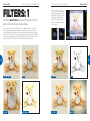
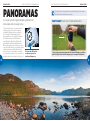
These effects are not too dissimilar to the Picture Wizard shooting options,
though the Photo Style Selector filters are applied to images after taking them,
processing them on the display. Again, the original file is kept intact and you
can apply each filter repeatedly to the same file or in a sequence, or combine
them. Some are more suited to certain types of scene so they enhance the
colours, for example, enhancing autumn colours with the Autumn Style option.
[1]
[2]
28
29
ORIGINAL IMAGE
AUTUMN
GLOOMY
MISTY
CLASSIC
FOREST
SOFT
VIVID