1
Setting Up Your System, continued
Step 1: Connect the active speaker to the passive speaker
Connect the two speakers together using the speaker wire provided. If you need a longer
length than is shipped with the system, we recommend 12 to16 gauge speaker wire.
! The speaker terminals on the active speaker are OUTPUTS. DO NOT connect
the output terminal of a stereo amplifier to these terminals. Doing so might
damage the stereo amplifier and/or the active speaker itself.
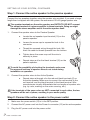
1. Connect the speaker wires to the Passive Speaker
a. Locate the red speaker input terminal (15) on the
passive speaker.
b. Loosen the screw cap to expose the hole in the
connector.
c. Thread the exposed wiring through the hole. We
think it’s easier to thread upwards from the bottom.
d. Tighten down the screw cap until the wire is
securely in place.
e. Repeat steps a-d for the black terminal (15) on the
passive speaker.
! To avoid the possibility of shorting the terminals, make sure
the exposed sections of speaker wire do not touch during
installation or operation.
2. Connect the speaker wires to the Active Speaker
a. Repeat steps a through e for the red and black terminals (7) on
the active speaker. Make sure to connect the red terminal to the
red terminal, and the black terminal to the black terminal. Wire
manufacturers visually differentiate the two lengths of speaker wire
(e.g. by color, marking on the outer covering, etc.).
! If the terminals of the same color are NOT connected to each other, the two
speakers will be out of phase, resulting in poor audio quality.
Step 2: Connect the active speaker to the power outlet
1. Make sure the power switch (12) is in the OFF position.
2. Connect the AC power cord into the Power In connector (13) on the active speaker.
3. Plug the AC power cord into the power outlet.
8 www.vanatoo.com