1
O
Onn--SSccrreeeenn D
Diissppllaayy M
Meennuu SSeettttiinnggss
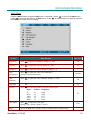
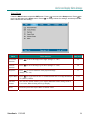
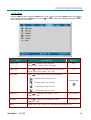
Main Menu
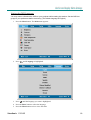
Press the Menu button to open the OSD menu. If necessary, press
to move to the Main menu.
to move up and down in the Main menu. Press
to change values for settings, and then
Press
press Enter to confirm the new setting.
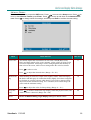
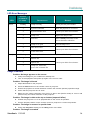
ITEM
DESCRIPTION
DEFAULT
Brightness
Press
to adjust the brightness. (Range: 0—100)
50
Contrast
Press
to adjust the contrast. (Range: 0—100)
50
Sharpness
Press
to adjust the display sharpness (Range: 1-5)
3
Color
Temperature
to adjust the video color temperature.
Press
(Range: Cool/Normal/Warm)
Color
Saturation
Press
to adjust the video saturation. (Range: 0—100)
Color Tint
Press
to adjust the video tint/hue. (Range: 0—100)
Gamma
Press
to adjust the gamma correction of the display.
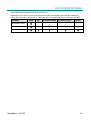
Input
Gamma
Brightness
PC
MAC
Video
Chart
B&W
2.2
1.8
2.4
2.2
2.4
High
High
Low
Low
High
Color Space
to adjust the color space.
Press
(Range: Auto—RGB—YpbPr—YCbCr)
Reset
Resets all Main items settings except Color Saturation to default values
ViewSonic PJ766D
Normal
50
50
PC
Auto
-
19