1
Troubleshooting
Read this section if trouble occurs when using OfficeBridge. Contact your local technical
representative if the following steps do not solve the problem.
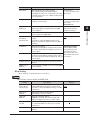
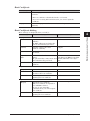
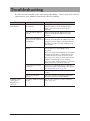
Status
Cannot connect to
OfficeBridge
Certificate error
occurs when
SSL(https) is
selected
Things to check
Countermeasure
Is the machine connected to
the network?
For details, see chapter 2, “Specifying the
network settings” in the Administrator’s
Guide, and connect the machine to the
network.
Is the entered IP address
correct?
When entering the IP address into your
browser, check the IP address set in the
machine.
Is the correct IP address
registered in the shortcut to
OfficeBridge?
If you are connecting to OfficeBridge using a
shortcut, check that the IP address set in the
properties screen displayed by right-clicking
the shortcut is the correct IP address set in
the machine.
Are the browser settings
correct?
If your environment is using a proxy, register
the IP address for OfficeBridge as an
exception.
If you are using Internet Explorer, click [LAN
Settings] in the [Tools] – [Internet Options]
– [Connections] tab of the menu bar, check
the proxy server settings, and register the IP
address of OfficeBridge as an exception.
If you are using another browser, see the help
for that browser to check the settings.
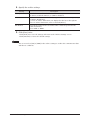
Is your user information
registered?
Contact your administrator to register the
user information in OfficeBridge. For details,
see “Registering users” (page 2-2).
Are cookies enabled?
See the help, etc. for your browser to enable
cookies.
Is the login password
correct?
Correctly enter the password registered in
the user information of OfficeBridge.
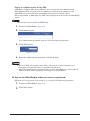
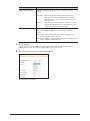
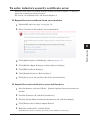
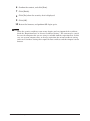
Is security certificate setting See “To solve website’s security certificate
set up?
error” (page 6-3).
6-2 Troubleshooting