1
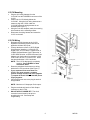
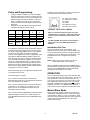
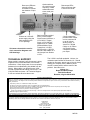
V-CCU Mounting Plug the 24V wiring harness from the V-C6124P into the POWER IN connector of the V-CCU. Position the V-CCU directly below the V-C6124P. Using the 24V wiring harness as a measure, align the V-CCU under the V-C6124P where the wiring harness is not stressed (See Figure 1). Using the unit as a template, mark the mounting hole locations on the mounting surface. Disconnect the wiring harness and mount the V-CCU to the wall. V-CCU Wiring Re-attach the 24V harness to the V-CCU. Dipswitch functionality requires that 24V be applied to all three 24V inputs. Connect the data out from a V-DCPI Digital Clock Protocol Interface, a V-D11025 2.5” Digital Clock, a V-D11040 4.0” Digital Clock, a V-WMC Wireless Master Clock Transceiver, a V-GPS GPS Receiver, a VERCA Remote Card Adapter or a clock output from another V-CCU to the “DATA IN” RJ-11 on the V-CCU. Dress the wires behind the V-CCU as shown. NOTE: The V-CCU data input is not polarity sensitive. See FIGURE 2 for data connection detail. Dress the peripheral clocks home run wiring behind the V-CCU as shown (See Figure 1). If your system will use more than one V-CCU, you must connect a common ground. Simply connect one of the negative (-) outputs of each V-CCU’s V-C6124P power supply together. Connect the home runs to the plug-in terminal strip provided. NOTE: Maximum of 2 Amps per Clock output. Plug the terminal strip into the Clock Output connector on the V-CCU. DO NOT APPLY POWER YET! The clock correction interval must be set prior to energizing the unit. See Setup and Programming. 2 947036