1
Appendix
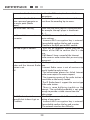
In case of non receiving on the Internet, refer to the table here under:
What has been done with success
The IP Radio is booted normally.
BUT
NO SIGNAL BAR ON THE SCREEN.
What could be the trouble ?
The IP Radio does not obtain an IP
address.
1. No DHCP server enabled. Please
confirm the setting of your router.
2. Incorrect WiFi encryption key is
entered. Please double confirm the key
and re-enter.
3. The network interface has difficulty.
1. The network interface of the IP 1. Cannot access the Internet radio
Radio is good.
server.
2. The connection between IP
2. The DNS lookup for the IP address of
Radio and router was OK.
the radio station failed.
3. The IP Radio already obtained 3. Cannot obtain access to the router or
an IP address.
Internet.
BUT
ONLY ONE BAR SHOWED.
Connection between IP Radio and 1. Cannot obtain access to the radio
Internet radio server is OK.
station.
BUT
2. The radio station rejected the
ONLY TWO BARS SHOWED
connection request.
Connection between IP Radio and 1. The streaming service of the radio
radio station is OK.
station is unavailable or too heavily
BUT
loaded.
ONLY THREE BARS SHOWED.
2. The IP Radio does not support the
service type of the radio station.
The connection between IP Radio There is some buffering difficulty on the
and the radio station was OK.
internet. The available bandwidth is not
BUT
good enough to obtain a stable stream
ONLY FOUR BARS SHOWED.
from the radio station.
39