1
Programming Functions (cont'd)
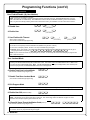
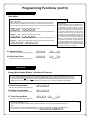
Scheduled Group 4 Enable (Group 1 Activated)
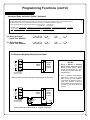
Functions 92 and 93 allow you to set up a window of time where if any Group 1 User Code is entered within this window, Group 4 members will be enabled. (Group 4 members will still need to enter their User Codes to enter). For additional information, see "Group 1 Activated Features" on page 27.
3
• For day enter: 1 for Sunday, 2 for Monday, 3 for Tuesday, 4 for Wednesday, 5 for Thursday, 6 for Friday, 7 for Saturday, 8 for Monday to Friday, 9 for Saturday and Sunday, and 0 for all days of week.
• Enter time of day in 24 hour format (for example, for 2:15 PM, enter 14:15).
92. Enable Group 4
(Open Time Window)
;92
;[_]
(Day)
;[____]:
(Time)
(This Function enabled through keypad only)
93. Enable Group 4
(Close Time Window)
;93
;[_]
(Day)
;[____]:
(Time)
(This Function enabled through keypad only)
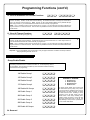
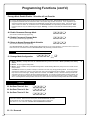
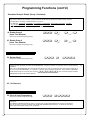
DISABLE RADIO SIGNAL
94. Disable Radio
(This Function enabled through keypad only)
;94
;
000:
Disables the radio signal (RF) link inside the NETWORXPANEL, rendering all wireless communication with the selected Gateway
inoperative.
3
When using a NETWORXPANEL without the DL-Windows RF link, it is highly recommended to enter this feature to disable all radio access to the NETWORXPANEL. If enrollment in a wireless system should be desired later, simply restart the NETWORXPANEL either through the use of Function 99 (press ;99; 000:), then enroll and reprogram the NETWORXPANEL through the DL-Windows interface.
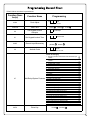
95 - 98. Reserved
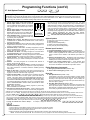
CLEAR ALL PROGRAMMING
99. Clear All Lock Programming
(This Function enabled through keypad only)
;99
;000:
Clears all programming, and returns the NETWORXPANEL to factory default settings. Audit Trail / Log contents are
maintained.
If two NETDK or NETPDK keypads are used in one system, with one keypad designated as the "primary" keypad and the
other as "secondary", Function 99 will NOT clear the NETDK / NETPDK keypad memories. To restore the "secondary"
keypad to its factory default "primary" state, see WI1856.
26
M