1
Terminology Used in this Manual (cont'd)
this list will determine its Programming Level, and therefore the
User's programming abilities. Because the location within this list is
the determining factor, the terms User Number, User Location and
Location Number are often used interchangeably. In some DLWindows screens, the word "Slot" is also used. They all mean the
same thing.
Example: John Smith is assigned a User Code located at User
Number 452 (or "User 452"). Because John's User Code is located
at User Number 452, he is a "Basic User", and thus is unable to perform programming tasks. If his User Code was assigned to User
Number 4, he would be permitted those programming tasks allowed
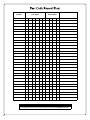
for "Managers". See the chart on page 8 to help visualize this User
Number list.
What is a Group?
With many applications, it is convenient for large numbers of similar
Users to be grouped together. Placing Users into Groups (by assigning them specific User Numbers) allows large numbers of Users
to be controlled all at once rather than individually--saving time and
effort. Groups are controlled via schedules, and a typical example
involves enabling or disabling a Group at a certain time. Default
Group associations are specified in the table on page 8. For example, if you wish to add a User to Group 1, assign this User a User
Number between 51 and 100. These default Group associations
can be changed if needed to allow Groups larger than the default
number of 50 (by using keypad Function 35). (See page 16 for
some Group function examples).
What is DL-Windows?
ning to allow these "Emergency" commands to be initiated; any
wireless keypad can be used to disseminate these commands
throughout the system.
Who are Users 297-300?
Users assigned to User Numbers 297, 298, 299 and 300 have special abilities, as follows:
User 297: Quick Enable User 300
User 297 possesses the unique ability to enable the User Code
associated with User 300. User 297 does this by first entering
their own User 297 User Code at the keypad. When User 300
subsequently enters their User 300 User Code, the keypad allows access (for one time) and then the User 300 User Code
becomes disabled.
For example, you wish to allow one-time access to a temporary
worker. Simply press the User 297 User Code at the NETPDK
keypad. Later, when the temporary worker presses the User
300 User Code into the keypad, the User 300 User Code allows
access (for one time only) and then becomes disabled. Later, if
you wish to grant the temporary worker re-access, simply reenter the User 297 User Code and the User 300 User Code will
be re-enabled (again for one time only). Note: From the factory,
the User 300 User Code is blank; when the User 300 User Code
is added, it is automatically enabled by default. In addition, each
time Features or Users are uploaded from DL-Windows to the
NETWORXPANEL, the User 300 User Code is re-enabled for
ALL keypads in the DL-Windows Account.
DL-Windows is a computer program that allows you to program your
ALARM LOCK security device. You do not need DL-Windows to
program your system, but it makes programming much faster and
easier. With DL-Windows, you can quickly create Lock Profiles
(programs that make the system perform its many functions) add
multiple User Codes, add proximity cards and keyfobs, retrieve
event logs, create Schedules, etc. One benefit of DL-Windows is
that it allows you to set up all programming in advance (on your
computer), and then later send the information to the NETWORXPANEL at your convenience.
DL-Windows software allows you to upload and download programming features wirelessly using the Trilogy Networx™ system and a
computer network. See OI352 for more information. Note: Within
DL-Windows, select lock type "NETWX PNL" for all NETPDK or
NETDK keypads.
User 298: Reserved for Future Use
In previous versions of the ALARM LOCK Trilogy series model
locksets, User Number 298 initiated the sending of data to or
from a door lock, and a special "AL-PCI" cable was used to
physically connect the door lock to a PC running DL-Windows.
With the wireless NETWORXPANEL no longer requiring a wired
connection, User Number 298 is consequently no longer required and has been removed as an active code. Note that the
User 298 User Code does provide a "Guard Tour" type function
(logging the Code entry with a time and date stamp in the Event
Log / Audit Trail), but to ensure compatibility with previous Trilogy model versions, the use of User 298 is not recommended.
Note: User 298 is not an "access code" (it is a "non-pass" code)
and therefore does not allow passage through a protected door.
See "User 299: Guard Tour Code" below.
How do the Emergency Commands work?
User 299: Guard Tour Code
A Guard Tour Code is used to log the movement of a security
guard as he or she makes rounds from one assigned guard tour
station to the next. Entering the User 299 code provides precise
verification and accountability of a guard's movements by logging the location with a time/date stamp in the Event Log (Audit
Trail). Note: User 299 is not an "access code" (it is a "nonpass" code) and therefore does not allow the security guard to
pass through a protected door.
™
For use with all keypads enrolled into the Trilogy Networx wireless network, these wireless commands can be sent to all wireless
locking devices in an Account during a crisis or other urgent situation. Any User Code can be programmed to allow the use of these
Emergency Commands by simply adding that User Code to an
"emergency function list" within DL-Windows (User Numbers 2-9
are automatically on this list). At any wireless keypad:
• Press an enabled User Code, then press 911 to
issue "Global Lock Down", to lock all doors in the Account;
• Press an enabled User Code, then press 000 to
issue "Global Passage", to unlock all doors in the Account;
• Press an enabled User Code, then press 123 to
User 300: One-Time Only Service Code
This is a One-Time Only Service User Code enabled by User
297. In addition, User Code 300 is sometimes used for guard
tour duties. See "User 297: Quick Enable User 300", above.
return all devices in the Account to "normal" (nonemergency) operation.
Note: 3 chirps sound after each emergency command entry. See
the DL-Windows user guide OI352, "Emergency Lock Down" for
more information. Note: DL-Windows does not need to be run-
7