1
Groups and Scheduled Group 1 Examples (cont'd.)
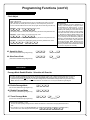
Functions 90/91:
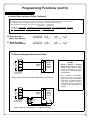
Use Function 90 and 91 (see page 25) to create a window of time where if any Group 1 User Code is entered within the
programmed window, the AUX Relay will be activated for 2 seconds. The Relay can be configured to disarm a Burglary Alarm control panel (see
page 25).
1. Enter Program Mode (if not in already).
2. Connect AUX Relay to a Burglary Alarm control panel with switch input for disarming.
3. Using Function 2, create User 4 with a User Code of "456789":
Press ; 2 ; 4 ; 4 5 6 7 8 9 :.
4. Because User 4 does not have a default Group association, make User 4 a member of Group 1 using Function 35:
Press ; 3 5 ; 4 ; 1 :.
5. Use Function 90 to set the time to open the window (8:30 A.M. all days of the week) allowing any Group 1 member to close the Relay for 2
seconds. Note: Only 1 Relay closure will occur even if another member of Group 1 enters their User Code. Use Function 91 to set the
time to close the window (10 A.M. for all days of the week):
Function 90 (Open Window Time) = 8:30 A.M.: Press ; 9 0 ; 0 ; 0 8 3 0 :
Function 91 (Close Window Time) = 10:00 A.M.: Press ; 9 1 ; 0 ; 1 0 0 0 :
6. Exit Program Mode.
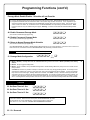
The Relay will close, one time only, when a member of Group 1 enters their User Code between 8:30AM and 10:00AM. If a Group 1
User does not enter their User Code during the specified window, Functions 90/91 remain inactive
• The alarm panel will have to be armed at night by the User or by an automatic schedule function of the alarm panel.
Functions 92/93:
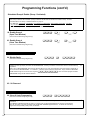
Use Function 92 and 93 (see page 26) to create a window of time where if any Group 1 User Code is entered within the
programmed window, Group 4 Users will be enabled.
1. Enter Program Mode (if not in already).
2. Using Function 2, create User 4 with a User Code of "456789":
Press ; 2 ; 4 ; 4 5 6 7 8 9 :.
3. Because User 4 does not have a default Group association, make User 4 a member of Group 1 using Function 35:
Press ; 3 5 ; 4 ; 1 :.
4. Using Function 17, disable Group 4. (Group 4 will need to be "disabled" before it can be "enabled" later).
Press ; 1 7 :.
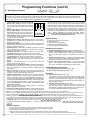
5. Use Function 92 to set the time to open the window (8:30 A.M. all days of the week) allowing any Group 1 member to enable Group 4. Use
Function 93 to set the time to close the window (10:00 A.M. all days of the week).
Function 92 (Open Window Time) = 8:30 A.M.: Press ; 9 2 ; 0 ; 0 8 3 0 :
Function 93 (Close Window Time) = 10:00 A.M.: Press ; 9 3 ; 0 ; 1 0 0 0 :
6. Exit Program Mode.
The system will now enable Group 4 User Codes if User 4 (or any Group 1 member) enters their User Code between 8:30 A.M. and
10 A.M. If no Group 1 member arrives to enter their User Code between 8:30 A.M. and 10 A.M., Group 4 User Codes will not be enabled
and will remain disabled all day.
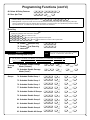
• The controlled door will have to be manually "locked" each night by entering the following command using Function 82:
;46:
• The system can also be programmed to automatically disable Group 4 members each night at 5 P.M. by using Function 82:
;82;0;1700:
• Test the system by creating User 222 (with User Code 466466) and adding User 222 to Group 4:
;2;222;466466:
;35;222;4:
• Remember to exit Function Mode when programming is complete.
28