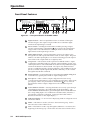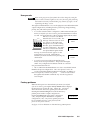
1
11
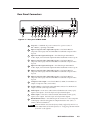
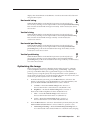
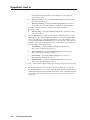
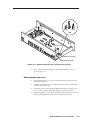
Vertical sizing — While the menu system’s LCD display is in the default
mode (see the Menu Flowchart section) and a window is active, rotating this
adjustment knob increases or decreases the vertical sizing of the window
image. This knob is also used to adjust other functions.
12
Horizontal sizing — While the menu system’s LCD display is in the default
mode (see the Menu Flowchart section) and a window is active, rotating this
adjustment knob increases or decreases the horizontal sizing of the window
image. This knob is also used to adjust other functions.
13
Vertical positioning — While the menu system’s LCD display is in the default
mode (see the Menu Flowchart section) and a window is active, rotating this
adjustment knob shifts the window image up or down.
14
Horizontal positioning — While the menu system’s LCD display is in the
default mode (see the Menu Flowchart section) and a window is active,
rotating this adjustment knob shifts the window image left or right.
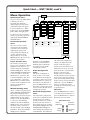
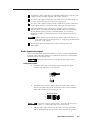
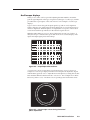
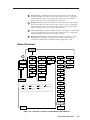
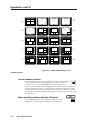
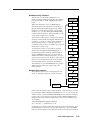
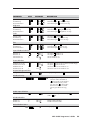
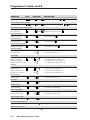
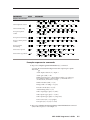
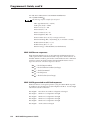
Menu Flowchart
Exit
Menu
Power
On
Extron
MVP 104GX
Multi Video
Processor
Picture
Controls
Contrast
1–4
000 – 150
Brightness
1–4
Bottom
1–4
000 – 100
Left
1–4
Background Color
Horizontal Phase
color
000 – 255
Window Priority
Subcarrier Phase
A<1> B3 C4 D2
1–4
000 – 016
000 – 032
Color
1–4
Top
Genlock
not detected
-15 – +09 dB
000 – 016
1–4
Tint
Audio Level
Blanking
Auto <Manual>
000 – 050
Advanced
Configuration
Audio
Configuration
Window
Blanking
Windows Text 1 – 4
1 – 16 characters
1–4
Text Style
solid
1–4
Text Location
000 – 016
Right
top left
000 – 016
Position/Size
Window #1 – 4
000 – 255
Window Borders
ON
2 -second default cycle
press Freeze and Next
buttons simultaneously
press Menu button
press the Active window
selection button
press Next button
select <Manual> blanking
and press Next button
<OFF>
Video Format
<NTSC> PAL
16-second time-out
#1
Input Mode
mode
#2
mode
VCR Mode 1 – 4
Off On Off Off
Chroma 1 – 4
Off Off Off On
System Reset
Freeze and Next
System Resetting
Please Wait
Confirm Reset
Freeze and Next
Figure 3-2 — Flowchart of menus (shaded boxes) and submenus
MVP 104GX Operation
3-3