1
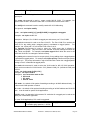
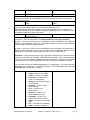
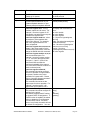
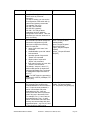
TABLE OF CONTENTS
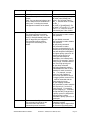
1.0
2.0
2.1
2.2
3.0
3.1
3.2
3.3
3.4
3.5
3.6
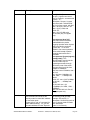
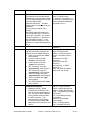
4.0
5.0
6.0
6.1
6.2
6.3
6.4
6.5
6.6
6.7
6.8
6.9
6.10
6.11
6.12
6.13
6.14
6.15
6.16
6.17
6.18
6.19
6.20
6.21
6.22
6.23
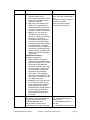
7.0
7.1
7.2
7.3
7.4
SPECIFICATIONS ...................................................................................................1
PACKAGE CONTENTS - PROSWITCH®- 2600M ..................................................3
Product Description ............................................................................................3
Uplink Modules...................................................................................................3
INSTALLATION OF THE PROSWITCH®- 2600M..................................................3
Location of the ProSwitch®- 2600M....................................................................3
Rack Mounting the ProSwitch®- 2600M .............................................................4
Powering the 2600M ..........................................................................................4
The Modules ......................................................................................................4
Connecting the ProSwitch® – 2600M .................................................................5
Status of LEDs ...................................................................................................6
MANAGING THE SWITCH ......................................................................................6
CONSOLE MANAGEMENT INTERFACE (CMI).....................................................9
WEB MANAGEMENT............................................................................................26
System Configuration Page..............................................................................27
PORT CONFIGURATION ......................................................................................28
Spanning Tree..................................................................................................31
Dynamic MAC Address Table ..........................................................................32
Static MAC Address Table ...............................................................................33
MAC Security Configuration .............................................................................34
Port-based VLANs............................................................................................35
802.1Q VLAN Configuration.............................................................................36
Static 802.1Q VLAN .........................................................................................37
802.1Q VLAN Table .........................................................................................39
802.1x Configuration ........................................................................................39
Protected Port Configuration ............................................................................41
Trunking ...........................................................................................................42
Mirror Settings ..................................................................................................43
QoS Settings ....................................................................................................44
Ingress/Egress Rate Control ............................................................................45
Storm Control ...................................................................................................46
SNMP ...............................................................................................................47
IGMP ................................................................................................................48
Statistics ...........................................................................................................48
Maintenance Tools ...........................................................................................49
Telnet and SNMP .............................................................................................49
Software Update and Backup...........................................................................50
TROUBLESHOOTING...........................................................................................51
Before Calling for Assistance ...........................................................................51
Return Material Authorization (RMA) Procedure..............................................52
Shipping and Packaging Information ...............................................................52
Warranty...........................................................................................................53
WATERS NETWORK SYSTEMS™
ProSwitch
®
- 2600M, User’s Manual, 02/07
Page 2