1
Tsunami MP.11 Installation and Management Guide
Model 5012-SUI
Model 5054-SUI
Version 4.0.0
Tsunami MP.11 5012/5054-SUI Installation and Management
IMPORTANT!
Before installing and using this product, see the
Safety and Regulatory Compliance Guide located on the product CD.
Copyright
©2007 Proxim Wireless Corporation, San Jose, CA. All rights reserved. Covered by one or more of the following U.S. patents: 5,231,634;
5,875,179; 6,006,090; 5,809,060; 6,075,812; 5,077,753. This manual and the software described herein are copyrighted with all rights
reserved. No part of this publication may be reproduced, transmitted, transcribed, stored in a retrieval system, or translated into any language
in any form by any means without the written permission of Proxim Wireless Corporation.
Trademarks
Tsunami, Proxim, and the Proxim logo are trademarks of Proxim Wireless Corporation. All other trademarks mentioned herein are the property
of their respective owners.
Tsunami MP.11 5012/5054-SUI Installation and Management Guide
P/N 73879 June 2007
2
Tsunami MP.11 5012/5054-SUI Installation and Management
Contents
1
Introduction . . . . . . . . . . . . . . . . . . . . . . . . . . . . . . . . . . . . . . . . . . . . . . . . . . . . . . . . . . . . . . . . . . 8
About This Book . . . . . . . . . . . . . . . . . . . . . . . . . . . . . . . . . . . . . . . . . . . . . . . . . . . . . . . . . . . . . . . . . . . . . . 8
Reference Manual . . . . . . . . . . . . . . . . . . . . . . . . . . . . . . . . . . . . . . . . . . . . . . . . . . . . . . . . . . . . . . . . . . . . 9
Wireless Network Topologies . . . . . . . . . . . . . . . . . . . . . . . . . . . . . . . . . . . . . . . . . . . . . . . . . . . . . . . . . . . 10
Point-to-Point Link . . . . . . . . . . . . . . . . . . . . . . . . . . . . . . . . . . . . . . . . . . . . . . . . . . . . . . . . . . . . . . . . . . . . . . . . . 10
Point-to-Multipoint Network . . . . . . . . . . . . . . . . . . . . . . . . . . . . . . . . . . . . . . . . . . . . . . . . . . . . . . . . . . . . . . . . . . 10
Management and Monitoring Capabilities . . . . . . . . . . . . . . . . . . . . . . . . . . . . . . . . . . . . . . . . . . . . . . . . . 12
Web Interface . . . . . . . . . . . . . . . . . . . . . . . . . . . . . . . . . . . . . . . . . . . . . . . . . . . . . . . . . . . . . . . . . . . . . . . . . . . . . 12
Command Line Interface . . . . . . . . . . . . . . . . . . . . . . . . . . . . . . . . . . . . . . . . . . . . . . . . . . . . . . . . . . . . . . . . . . . . 12
SNMP . . . . . . . . . . . . . . . . . . . . . . . . . . . . . . . . . . . . . . . . . . . . . . . . . . . . . . . . . . . . . . . . . . . . . . . . . . . . . . . . . . . 12
2
Installation and Initialization . . . . . . . . . . . . . . . . . . . . . . . . . . . . . . . . . . . . . . . . . . . . . . . . . . . 14
Hardware Overview . . . . . . . . . . . . . . . . . . . . . . . . . . . . . . . . . . . . . . . . . . . . . . . . . . . . . . . . . . . . . . . . . . 14
LED Indicators . . . . . . . . . . . . . . . . . . . . . . . . . . . . . . . . . . . . . . . . . . . . . . . . . . . . . . . . . . . . . . . . . . . . . . . . . . . . 15
Power-over-Ethernet . . . . . . . . . . . . . . . . . . . . . . . . . . . . . . . . . . . . . . . . . . . . . . . . . . . . . . . . . . . . . . . . . . . . . . . 15
Product Package . . . . . . . . . . . . . . . . . . . . . . . . . . . . . . . . . . . . . . . . . . . . . . . . . . . . . . . . . . . . . . . . . . . . 16
Installation Procedure . . . . . . . . . . . . . . . . . . . . . . . . . . . . . . . . . . . . . . . . . . . . . . . . . . . . . . . . . . . . . . . . . 18
Step 1: Find a Suitable Location. . . . . . . . . . . . . . . . . . . . . . . . . . . . . . . . . . . . . . . . . . . . . . . . . . . . . . . . . . . . . . . 19
Step 2: Unpack Shipping Box . . . . . . . . . . . . . . . . . . . . . . . . . . . . . . . . . . . . . . . . . . . . . . . . . . . . . . . . . . . . . . . . . 19
Step 3: Attach Cables . . . . . . . . . . . . . . . . . . . . . . . . . . . . . . . . . . . . . . . . . . . . . . . . . . . . . . . . . . . . . . . . . . . . . . . 20
Step 4: Install the Security Cover (Optional). . . . . . . . . . . . . . . . . . . . . . . . . . . . . . . . . . . . . . . . . . . . . . . . . . . . . . 21
Step 5: Mount the Unit . . . . . . . . . . . . . . . . . . . . . . . . . . . . . . . . . . . . . . . . . . . . . . . . . . . . . . . . . . . . . . . . . . . . . . 22
Step 6: Power On the Unit . . . . . . . . . . . . . . . . . . . . . . . . . . . . . . . . . . . . . . . . . . . . . . . . . . . . . . . . . . . . . . . . . . . 23
Step 7: View LEDs . . . . . . . . . . . . . . . . . . . . . . . . . . . . . . . . . . . . . . . . . . . . . . . . . . . . . . . . . . . . . . . . . . . . . . . . . 23
Step 8: Connect the Pigtail Cable. . . . . . . . . . . . . . . . . . . . . . . . . . . . . . . . . . . . . . . . . . . . . . . . . . . . . . . . . . . . . . 24
Step 9: Align the Antenna . . . . . . . . . . . . . . . . . . . . . . . . . . . . . . . . . . . . . . . . . . . . . . . . . . . . . . . . . . . . . . . . . . . . 25
Step 10: Install Documentation and Software. . . . . . . . . . . . . . . . . . . . . . . . . . . . . . . . . . . . . . . . . . . . . . . . . . . . . 25
Initialization . . . . . . . . . . . . . . . . . . . . . . . . . . . . . . . . . . . . . . . . . . . . . . . . . . . . . . . . . . . . . . . . . . . . . . . . . 26
ScanTool. . . . . . . . . . . . . . . . . . . . . . . . . . . . . . . . . . . . . . . . . . . . . . . . . . . . . . . . . . . . . . . . . . . . . . . . . . . . . . . . . 26
Setting the IP Address with ScanTool. . . . . . . . . . . . . . . . . . . . . . . . . . . . . . . . . . . . . . . . . . . . . . . . . . . . . . . . . . . 26
Logging in to the Web Interface . . . . . . . . . . . . . . . . . . . . . . . . . . . . . . . . . . . . . . . . . . . . . . . . . . . . . . . . . 28
3
System Overview . . . . . . . . . . . . . . . . . . . . . . . . . . . . . . . . . . . . . . . . . . . . . . . . . . . . . . . . . . . . 29
Basic Configuration Information . . . . . . . . . . . . . . . . . . . . . . . . . . . . . . . . . . . . . . . . . . . . . . . . . . . . . . . . . 29
Country and Related Settings. . . . . . . . . . . . . . . . . . . . . . . . . . . . . . . . . . . . . . . . . . . . . . . . . . . . . . . . . . . . . . . . . 30
Dynamic Frequency Selection (DFS) . . . . . . . . . . . . . . . . . . . . . . . . . . . . . . . . . . . . . . . . . . . . . . . . . . . . . . . . . . . 30
Transmit Power Control . . . . . . . . . . . . . . . . . . . . . . . . . . . . . . . . . . . . . . . . . . . . . . . . . . . . . . . . . . . . . . . . . . . . . 31
SU Registration . . . . . . . . . . . . . . . . . . . . . . . . . . . . . . . . . . . . . . . . . . . . . . . . . . . . . . . . . . . . . . . . . . . . . 33
Dynamic Data Rate Selection (DDRS) . . . . . . . . . . . . . . . . . . . . . . . . . . . . . . . . . . . . . . . . . . . . . . . . . . . . 34
Virtual Local Area Networks (VLANs) . . . . . . . . . . . . . . . . . . . . . . . . . . . . . . . . . . . . . . . . . . . . . . . . . . . . . 35
3
Tsunami MP.11 5012/5054-SUI Installation and Management
VLAN Modes . . . . . . . . . . . . . . . . . . . . . . . . . . . . . . . . . . . . . . . . . . . . . . . . . . . . . . . . . . . . . . . . . . . . . . . . . . . . . 35
Q-in-Q (VLAN Stacking) . . . . . . . . . . . . . . . . . . . . . . . . . . . . . . . . . . . . . . . . . . . . . . . . . . . . . . . . . . . . . . . . . . . . . 36
VLAN Forwarding. . . . . . . . . . . . . . . . . . . . . . . . . . . . . . . . . . . . . . . . . . . . . . . . . . . . . . . . . . . . . . . . . . . . . . . . . . 36
VLAN Relaying. . . . . . . . . . . . . . . . . . . . . . . . . . . . . . . . . . . . . . . . . . . . . . . . . . . . . . . . . . . . . . . . . . . . . . . . . . . . 36
Management VLAN . . . . . . . . . . . . . . . . . . . . . . . . . . . . . . . . . . . . . . . . . . . . . . . . . . . . . . . . . . . . . . . . . . . . . . . . 36
BSU and SU in Transparent Mode. . . . . . . . . . . . . . . . . . . . . . . . . . . . . . . . . . . . . . . . . . . . . . . . . . . . . . . . . . . . . 36
BSU in Trunk Mode and SU in Trunk/Access Mode . . . . . . . . . . . . . . . . . . . . . . . . . . . . . . . . . . . . . . . . . . . . . . . 37
BSU in Mixed Mode and SU in Mixed, Access, or Trunk Mode . . . . . . . . . . . . . . . . . . . . . . . . . . . . . . . . . . . . . . . 39
Quality of Service (QoS) . . . . . . . . . . . . . . . . . . . . . . . . . . . . . . . . . . . . . . . . . . . . . . . . . . . . . . . . . . . . . . 42
Concepts and Definitions . . . . . . . . . . . . . . . . . . . . . . . . . . . . . . . . . . . . . . . . . . . . . . . . . . . . . . . . . . . . . . . . . . . . 42
4
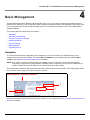
Basic Management . . . . . . . . . . . . . . . . . . . . . . . . . . . . . . . . . . . . . . . . . . . . . . . . . . . . . . . . . . . 47
Navigation . . . . . . . . . . . . . . . . . . . . . . . . . . . . . . . . . . . . . . . . . . . . . . . . . . . . . . . . . . . . . . . . . . . . . . . . . 47
Rebooting and Resetting . . . . . . . . . . . . . . . . . . . . . . . . . . . . . . . . . . . . . . . . . . . . . . . . . . . . . . . . . . . . . . 48
Rebooting. . . . . . . . . . . . . . . . . . . . . . . . . . . . . . . . . . . . . . . . . . . . . . . . . . . . . . . . . . . . . . . . . . . . . . . . . . . . . . . . 48
Resetting Hardware . . . . . . . . . . . . . . . . . . . . . . . . . . . . . . . . . . . . . . . . . . . . . . . . . . . . . . . . . . . . . . . . . . . . . . . . 48
Soft Reset to Factory Default . . . . . . . . . . . . . . . . . . . . . . . . . . . . . . . . . . . . . . . . . . . . . . . . . . . . . . . . . . . . . . . . . 48
General Configuration Settings . . . . . . . . . . . . . . . . . . . . . . . . . . . . . . . . . . . . . . . . . . . . . . . . . . . . . . . . . 50
Monitoring Settings . . . . . . . . . . . . . . . . . . . . . . . . . . . . . . . . . . . . . . . . . . . . . . . . . . . . . . . . . . . . . . . . . . 51
Security Settings . . . . . . . . . . . . . . . . . . . . . . . . . . . . . . . . . . . . . . . . . . . . . . . . . . . . . . . . . . . . . . . . . . . . 52
Encryption . . . . . . . . . . . . . . . . . . . . . . . . . . . . . . . . . . . . . . . . . . . . . . . . . . . . . . . . . . . . . . . . . . . . . . . . . . . . . . . 52
Passwords . . . . . . . . . . . . . . . . . . . . . . . . . . . . . . . . . . . . . . . . . . . . . . . . . . . . . . . . . . . . . . . . . . . . . . . . . . . . . . . 52
Default Settings . . . . . . . . . . . . . . . . . . . . . . . . . . . . . . . . . . . . . . . . . . . . . . . . . . . . . . . . . . . . . . . . . . . . . 53
Upgrading the Unit . . . . . . . . . . . . . . . . . . . . . . . . . . . . . . . . . . . . . . . . . . . . . . . . . . . . . . . . . . . . . . . . . . . 55
5
System Status. . . . . . . . . . . . . . . . . . . . . . . . . . . . . . . . . . . . . . . . . . . . . . . . . . . . . . . . . . . . . . . 56
Status . . . . . . . . . . . . . . . . . . . . . . . . . . . . . . . . . . . . . . . . . . . . . . . . . . . . . . . . . . . . . . . . . . . . . . . . . . . . . 56
System Status . . . . . . . . . . . . . . . . . . . . . . . . . . . . . . . . . . . . . . . . . . . . . . . . . . . . . . . . . . . . . . . . . . . . . . . . . . . . 56
Systems Traps . . . . . . . . . . . . . . . . . . . . . . . . . . . . . . . . . . . . . . . . . . . . . . . . . . . . . . . . . . . . . . . . . . . . . . . . . . . . 56
Event Log . . . . . . . . . . . . . . . . . . . . . . . . . . . . . . . . . . . . . . . . . . . . . . . . . . . . . . . . . . . . . . . . . . . . . . . . . . 57
6
Configuration . . . . . . . . . . . . . . . . . . . . . . . . . . . . . . . . . . . . . . . . . . . . . . . . . . . . . . . . . . . . . . . 58
System Parameters . . . . . . . . . . . . . . . . . . . . . . . . . . . . . . . . . . . . . . . . . . . . . . . . . . . . . . . . . . . . . . . . . . 58
Bridge and Routing Modes. . . . . . . . . . . . . . . . . . . . . . . . . . . . . . . . . . . . . . . . . . . . . . . . . . . . . . . . . . . . . . . . . . . 59
Network Parameters . . . . . . . . . . . . . . . . . . . . . . . . . . . . . . . . . . . . . . . . . . . . . . . . . . . . . . . . . . . . . . . . . 62
IP Configuration . . . . . . . . . . . . . . . . . . . . . . . . . . . . . . . . . . . . . . . . . . . . . . . . . . . . . . . . . . . . . . . . . . . . . . . . . . . 62
Roaming. . . . . . . . . . . . . . . . . . . . . . . . . . . . . . . . . . . . . . . . . . . . . . . . . . . . . . . . . . . . . . . . . . . . . . . . . . . . . . . . . 63
DHCP Server . . . . . . . . . . . . . . . . . . . . . . . . . . . . . . . . . . . . . . . . . . . . . . . . . . . . . . . . . . . . . . . . . . . . . . . . . . . . . 65
Spanning Tree (Bridge Mode Only) . . . . . . . . . . . . . . . . . . . . . . . . . . . . . . . . . . . . . . . . . . . . . . . . . . . . . . . . . . . . 67
IP Routes (Routing Mode only) . . . . . . . . . . . . . . . . . . . . . . . . . . . . . . . . . . . . . . . . . . . . . . . . . . . . . . . . . . . . . . . 68
DHCP Relay Agent (Routing Mode Only) . . . . . . . . . . . . . . . . . . . . . . . . . . . . . . . . . . . . . . . . . . . . . . . . . . . . . . . 70
Interface Parameters . . . . . . . . . . . . . . . . . . . . . . . . . . . . . . . . . . . . . . . . . . . . . . . . . . . . . . . . . . . . . . . . . 72
4
Tsunami MP.11 5012/5054-SUI Installation and Management
Wireless . . . . . . . . . . . . . . . . . . . . . . . . . . . . . . . . . . . . . . . . . . . . . . . . . . . . . . . . . . . . . . . . . . . . . . . . . . . . . . . . . 72
Ethernet . . . . . . . . . . . . . . . . . . . . . . . . . . . . . . . . . . . . . . . . . . . . . . . . . . . . . . . . . . . . . . . . . . . . . . . . . . . . . . . . . 75
SNMP Parameters . . . . . . . . . . . . . . . . . . . . . . . . . . . . . . . . . . . . . . . . . . . . . . . . . . . . . . . . . . . . . . . . . . . 77
Trap Host Table . . . . . . . . . . . . . . . . . . . . . . . . . . . . . . . . . . . . . . . . . . . . . . . . . . . . . . . . . . . . . . . . . . . . . . . . . . . 77
Management Parameters . . . . . . . . . . . . . . . . . . . . . . . . . . . . . . . . . . . . . . . . . . . . . . . . . . . . . . . . . . . . . . 79
Passwords . . . . . . . . . . . . . . . . . . . . . . . . . . . . . . . . . . . . . . . . . . . . . . . . . . . . . . . . . . . . . . . . . . . . . . . . . . . . . . . 79
Services . . . . . . . . . . . . . . . . . . . . . . . . . . . . . . . . . . . . . . . . . . . . . . . . . . . . . . . . . . . . . . . . . . . . . . . . . . . . . . . . . 79
Security Parameters . . . . . . . . . . . . . . . . . . . . . . . . . . . . . . . . . . . . . . . . . . . . . . . . . . . . . . . . . . . . . . . . . . 82
MAC Authentication (BSU Only) . . . . . . . . . . . . . . . . . . . . . . . . . . . . . . . . . . . . . . . . . . . . . . . . . . . . . . . . . . . . . . 82
Encryption . . . . . . . . . . . . . . . . . . . . . . . . . . . . . . . . . . . . . . . . . . . . . . . . . . . . . . . . . . . . . . . . . . . . . . . . . . . . . . . 82
Filtering Parameters . . . . . . . . . . . . . . . . . . . . . . . . . . . . . . . . . . . . . . . . . . . . . . . . . . . . . . . . . . . . . . . . . . 83
Overview . . . . . . . . . . . . . . . . . . . . . . . . . . . . . . . . . . . . . . . . . . . . . . . . . . . . . . . . . . . . . . . . . . . . . . . . . . . . . . . . 83
Ethernet Protocol . . . . . . . . . . . . . . . . . . . . . . . . . . . . . . . . . . . . . . . . . . . . . . . . . . . . . . . . . . . . . . . . . . . . . . . . . . 84
Static MAC Address Filtering . . . . . . . . . . . . . . . . . . . . . . . . . . . . . . . . . . . . . . . . . . . . . . . . . . . . . . . . . . . . . . . . . 85
Storm Threshold. . . . . . . . . . . . . . . . . . . . . . . . . . . . . . . . . . . . . . . . . . . . . . . . . . . . . . . . . . . . . . . . . . . . . . . . . . . 88
Broadcast Protocol Filtering . . . . . . . . . . . . . . . . . . . . . . . . . . . . . . . . . . . . . . . . . . . . . . . . . . . . . . . . . . . . . . . . . . 88
IP Access Table Filtering . . . . . . . . . . . . . . . . . . . . . . . . . . . . . . . . . . . . . . . . . . . . . . . . . . . . . . . . . . . . . . . . . . . . 89
RIP Parameters (Routing Mode Only) . . . . . . . . . . . . . . . . . . . . . . . . . . . . . . . . . . . . . . . . . . . . . . . . . . . . 91
RIP Example . . . . . . . . . . . . . . . . . . . . . . . . . . . . . . . . . . . . . . . . . . . . . . . . . . . . . . . . . . . . . . . . . . . . . . . . . . . . . 92
RIP Notes. . . . . . . . . . . . . . . . . . . . . . . . . . . . . . . . . . . . . . . . . . . . . . . . . . . . . . . . . . . . . . . . . . . . . . . . . . . . . . . . 92
NAT (Routing Mode Only) . . . . . . . . . . . . . . . . . . . . . . . . . . . . . . . . . . . . . . . . . . . . . . . . . . . . . . . . . . . . . 93
NAT Static Port Mapping Table . . . . . . . . . . . . . . . . . . . . . . . . . . . . . . . . . . . . . . . . . . . . . . . . . . . . . . . . . . . . . . . 93
Supported Session Protocols. . . . . . . . . . . . . . . . . . . . . . . . . . . . . . . . . . . . . . . . . . . . . . . . . . . . . . . . . . . . . . . . . 94
7
Monitoring . . . . . . . . . . . . . . . . . . . . . . . . . . . . . . . . . . . . . . . . . . . . . . . . . . . . . . . . . . . . . . . . . . 96
Wireless . . . . . . . . . . . . . . . . . . . . . . . . . . . . . . . . . . . . . . . . . . . . . . . . . . . . . . . . . . . . . . . . . . . . . . . . . . . 97
General . . . . . . . . . . . . . . . . . . . . . . . . . . . . . . . . . . . . . . . . . . . . . . . . . . . . . . . . . . . . . . . . . . . . . . . . . . . . . . . . . 97
WORP . . . . . . . . . . . . . . . . . . . . . . . . . . . . . . . . . . . . . . . . . . . . . . . . . . . . . . . . . . . . . . . . . . . . . . . . . . . . . . . . . . 97
ICMP . . . . . . . . . . . . . . . . . . . . . . . . . . . . . . . . . . . . . . . . . . . . . . . . . . . . . . . . . . . . . . . . . . . . . . . . . . . . . 99
Per Station . . . . . . . . . . . . . . . . . . . . . . . . . . . . . . . . . . . . . . . . . . . . . . . . . . . . . . . . . . . . . . . . . . . . . . . . 100
Features . . . . . . . . . . . . . . . . . . . . . . . . . . . . . . . . . . . . . . . . . . . . . . . . . . . . . . . . . . . . . . . . . . . . . . . . . . 101
Link Test . . . . . . . . . . . . . . . . . . . . . . . . . . . . . . . . . . . . . . . . . . . . . . . . . . . . . . . . . . . . . . . . . . . . . . . . . . 102
Interfaces . . . . . . . . . . . . . . . . . . . . . . . . . . . . . . . . . . . . . . . . . . . . . . . . . . . . . . . . . . . . . . . . . . . . . . . . . 103
IP ARP Table . . . . . . . . . . . . . . . . . . . . . . . . . . . . . . . . . . . . . . . . . . . . . . . . . . . . . . . . . . . . . . . . . . . . . . 104
IP Routes . . . . . . . . . . . . . . . . . . . . . . . . . . . . . . . . . . . . . . . . . . . . . . . . . . . . . . . . . . . . . . . . . . . . . . . . . 105
Learn Table . . . . . . . . . . . . . . . . . . . . . . . . . . . . . . . . . . . . . . . . . . . . . . . . . . . . . . . . . . . . . . . . . . . . . . . 106
RIP . . . . . . . . . . . . . . . . . . . . . . . . . . . . . . . . . . . . . . . . . . . . . . . . . . . . . . . . . . . . . . . . . . . . . . . . . . . . . . 107
8
Commands . . . . . . . . . . . . . . . . . . . . . . . . . . . . . . . . . . . . . . . . . . . . . . . . . . . . . . . . . . . . . . . . 108
Download . . . . . . . . . . . . . . . . . . . . . . . . . . . . . . . . . . . . . . . . . . . . . . . . . . . . . . . . . . . . . . . . . . . . . . . . . 108
5
Tsunami MP.11 5012/5054-SUI Installation and Management
Upload . . . . . . . . . . . . . . . . . . . . . . . . . . . . . . . . . . . . . . . . . . . . . . . . . . . . . . . . . . . . . . . . . . . . . . . . . . . 109
Reboot . . . . . . . . . . . . . . . . . . . . . . . . . . . . . . . . . . . . . . . . . . . . . . . . . . . . . . . . . . . . . . . . . . . . . . . . . . . 110
Reset . . . . . . . . . . . . . . . . . . . . . . . . . . . . . . . . . . . . . . . . . . . . . . . . . . . . . . . . . . . . . . . . . . . . . . . . . . . . 111
Help Link . . . . . . . . . . . . . . . . . . . . . . . . . . . . . . . . . . . . . . . . . . . . . . . . . . . . . . . . . . . . . . . . . . . . . . . . . 112
Downgrade . . . . . . . . . . . . . . . . . . . . . . . . . . . . . . . . . . . . . . . . . . . . . . . . . . . . . . . . . . . . . . . . . . . . . . . . 113
9
Procedures . . . . . . . . . . . . . . . . . . . . . . . . . . . . . . . . . . . . . . . . . . . . . . . . . . . . . . . . . . . . . . . . 114
TFTP Server Setup . . . . . . . . . . . . . . . . . . . . . . . . . . . . . . . . . . . . . . . . . . . . . . . . . . . . . . . . . . . . . . . . . 115
Web Interface Image File Download . . . . . . . . . . . . . . . . . . . . . . . . . . . . . . . . . . . . . . . . . . . . . . . . . . . . 116
Configuration Backup . . . . . . . . . . . . . . . . . . . . . . . . . . . . . . . . . . . . . . . . . . . . . . . . . . . . . . . . . . . . . . . . 117
Configuration Restore . . . . . . . . . . . . . . . . . . . . . . . . . . . . . . . . . . . . . . . . . . . . . . . . . . . . . . . . . . . . . . . 118
Soft Reset to Factory Default . . . . . . . . . . . . . . . . . . . . . . . . . . . . . . . . . . . . . . . . . . . . . . . . . . . . . . . . . . 119
Hard Reset to Factory Default . . . . . . . . . . . . . . . . . . . . . . . . . . . . . . . . . . . . . . . . . . . . . . . . . . . . . . . . . 120
Forced Reload . . . . . . . . . . . . . . . . . . . . . . . . . . . . . . . . . . . . . . . . . . . . . . . . . . . . . . . . . . . . . . . . . . . . . 121
Image File Download with the Bootloader . . . . . . . . . . . . . . . . . . . . . . . . . . . . . . . . . . . . . . . . . . . . . . . . 122
Download with ScanTool . . . . . . . . . . . . . . . . . . . . . . . . . . . . . . . . . . . . . . . . . . . . . . . . . . . . . . . . . . . . . . . . . . . 122
Download with CLI . . . . . . . . . . . . . . . . . . . . . . . . . . . . . . . . . . . . . . . . . . . . . . . . . . . . . . . . . . . . . . . . . . . . . . . . 122
10 Troubleshooting . . . . . . . . . . . . . . . . . . . . . . . . . . . . . . . . . . . . . . . . . . . . . . . . . . . . . . . . . . . . 124
Connectivity Issues . . . . . . . . . . . . . . . . . . . . . . . . . . . . . . . . . . . . . . . . . . . . . . . . . . . . . . . . . . . . . . . . . 124
5012/5054-SUI Does Not Boot. . . . . . . . . . . . . . . . . . . . . . . . . . . . . . . . . . . . . . . . . . . . . . . . . . . . . . . . . . . . . . . 124
Ethernet Link Does Not Work. . . . . . . . . . . . . . . . . . . . . . . . . . . . . . . . . . . . . . . . . . . . . . . . . . . . . . . . . . . . . . . . 124
Cannot use the Web Interface . . . . . . . . . . . . . . . . . . . . . . . . . . . . . . . . . . . . . . . . . . . . . . . . . . . . . . . . . . . . . . . 124
Communication Issues . . . . . . . . . . . . . . . . . . . . . . . . . . . . . . . . . . . . . . . . . . . . . . . . . . . . . . . . . . . . . . . 125
Two Units Are Unable to Communicate Wirelessly . . . . . . . . . . . . . . . . . . . . . . . . . . . . . . . . . . . . . . . . . . . . . . . 125
Setup and Configuration Issues . . . . . . . . . . . . . . . . . . . . . . . . . . . . . . . . . . . . . . . . . . . . . . . . . . . . . . . . 126
Lost Password . . . . . . . . . . . . . . . . . . . . . . . . . . . . . . . . . . . . . . . . . . . . . . . . . . . . . . . . . . . . . . . . . . . . . . . . . . . 126
The 5012/5054-SUI Responds Slowly . . . . . . . . . . . . . . . . . . . . . . . . . . . . . . . . . . . . . . . . . . . . . . . . . . . . . . . . . 126
TFTP Server Does Not Work . . . . . . . . . . . . . . . . . . . . . . . . . . . . . . . . . . . . . . . . . . . . . . . . . . . . . . . . . . . . . . . . 126
Online Help Is Not Available . . . . . . . . . . . . . . . . . . . . . . . . . . . . . . . . . . . . . . . . . . . . . . . . . . . . . . . . . . . . . . . . 126
Changes Do Not Take Effect . . . . . . . . . . . . . . . . . . . . . . . . . . . . . . . . . . . . . . . . . . . . . . . . . . . . . . . . . . . . . . . . 126
VLAN Operation Issues . . . . . . . . . . . . . . . . . . . . . . . . . . . . . . . . . . . . . . . . . . . . . . . . . . . . . . . . . . . . . . 127
Link Problems . . . . . . . . . . . . . . . . . . . . . . . . . . . . . . . . . . . . . . . . . . . . . . . . . . . . . . . . . . . . . . . . . . . . . 128
General Check . . . . . . . . . . . . . . . . . . . . . . . . . . . . . . . . . . . . . . . . . . . . . . . . . . . . . . . . . . . . . . . . . . . . . . . . . . . 128
Statistics Check . . . . . . . . . . . . . . . . . . . . . . . . . . . . . . . . . . . . . . . . . . . . . . . . . . . . . . . . . . . . . . . . . . . . . . . . . . 128
Analyzing the Spectrum . . . . . . . . . . . . . . . . . . . . . . . . . . . . . . . . . . . . . . . . . . . . . . . . . . . . . . . . . . . . . . . . . . . . 129
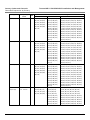
A Country Codes and Channels . . . . . . . . . . . . . . . . . . . . . . . . . . . . . . . . . . . . . . . . . . . . . . . . . 130
Channels/Frequencies by Country . . . . . . . . . . . . . . . . . . . . . . . . . . . . . . . . . . . . . . . . . . . . . . . . . . . . . . 130
B Technical Specifications . . . . . . . . . . . . . . . . . . . . . . . . . . . . . . . . . . . . . . . . . . . . . . . . . . . . . 147
6
Tsunami MP.11 5012/5054-SUI Installation and Management
Part Numbers . . . . . . . . . . . . . . . . . . . . . . . . . . . . . . . . . . . . . . . . . . . . . . . . . . . . . . . . . . . . . . . . . . . . . . 147
5012-SUI . . . . . . . . . . . . . . . . . . . . . . . . . . . . . . . . . . . . . . . . . . . . . . . . . . . . . . . . . . . . . . . . . . . . . . . . . . . . . . . 147
5054-SUI . . . . . . . . . . . . . . . . . . . . . . . . . . . . . . . . . . . . . . . . . . . . . . . . . . . . . . . . . . . . . . . . . . . . . . . . . . . . . . . 147
Accessories . . . . . . . . . . . . . . . . . . . . . . . . . . . . . . . . . . . . . . . . . . . . . . . . . . . . . . . . . . . . . . . . . . . . . . . . . . . . . 148
Regulatory Approval and Frequency Ranges . . . . . . . . . . . . . . . . . . . . . . . . . . . . . . . . . . . . . . . . . . . . . 149
Radio and Transmission Specifications . . . . . . . . . . . . . . . . . . . . . . . . . . . . . . . . . . . . . . . . . . . . . . . . . . 150
Receive Sensitivity . . . . . . . . . . . . . . . . . . . . . . . . . . . . . . . . . . . . . . . . . . . . . . . . . . . . . . . . . . . . . . . . . . 150
Maximum Throughput . . . . . . . . . . . . . . . . . . . . . . . . . . . . . . . . . . . . . . . . . . . . . . . . . . . . . . . . . . . . . . . 151
5012-SUI . . . . . . . . . . . . . . . . . . . . . . . . . . . . . . . . . . . . . . . . . . . . . . . . . . . . . . . . . . . . . . . . . . . . . . . . . . . . . . . 151
5054-SUI . . . . . . . . . . . . . . . . . . . . . . . . . . . . . . . . . . . . . . . . . . . . . . . . . . . . . . . . . . . . . . . . . . . . . . . . . . . . . . . 151
Transmit Power Settings . . . . . . . . . . . . . . . . . . . . . . . . . . . . . . . . . . . . . . . . . . . . . . . . . . . . . . . . . . . . . 151
Management . . . . . . . . . . . . . . . . . . . . . . . . . . . . . . . . . . . . . . . . . . . . . . . . . . . . . . . . . . . . . . . . . . . . . . 151
Interfaces . . . . . . . . . . . . . . . . . . . . . . . . . . . . . . . . . . . . . . . . . . . . . . . . . . . . . . . . . . . . . . . . . . . . . . . . . 152
Input Power Requirements . . . . . . . . . . . . . . . . . . . . . . . . . . . . . . . . . . . . . . . . . . . . . . . . . . . . . . . . . . . . 152
LEDs . . . . . . . . . . . . . . . . . . . . . . . . . . . . . . . . . . . . . . . . . . . . . . . . . . . . . . . . . . . . . . . . . . . . . . . . . . . . 152
Software Features . . . . . . . . . . . . . . . . . . . . . . . . . . . . . . . . . . . . . . . . . . . . . . . . . . . . . . . . . . . . . . . . . . 152
Hardware Specifications . . . . . . . . . . . . . . . . . . . . . . . . . . . . . . . . . . . . . . . . . . . . . . . . . . . . . . . . . . . . . 153
Physical and Environmental Specifications . . . . . . . . . . . . . . . . . . . . . . . . . . . . . . . . . . . . . . . . . . . . . . . 153
MTBF and Warranty . . . . . . . . . . . . . . . . . . . . . . . . . . . . . . . . . . . . . . . . . . . . . . . . . . . . . . . . . . . . . . . . . 154
C Technical Services and Support . . . . . . . . . . . . . . . . . . . . . . . . . . . . . . . . . . . . . . . . . . . . . . . 155
Obtaining Technical Services and Support . . . . . . . . . . . . . . . . . . . . . . . . . . . . . . . . . . . . . . . . . . . . . . . 155
Support Options . . . . . . . . . . . . . . . . . . . . . . . . . . . . . . . . . . . . . . . . . . . . . . . . . . . . . . . . . . . . . . . . . . . . 156
Proxim eService Web Site Support . . . . . . . . . . . . . . . . . . . . . . . . . . . . . . . . . . . . . . . . . . . . . . . . . . . . . . . . . . . 156
Telephone Support . . . . . . . . . . . . . . . . . . . . . . . . . . . . . . . . . . . . . . . . . . . . . . . . . . . . . . . . . . . . . . . . . . . . . . . . 156
ServPak Support . . . . . . . . . . . . . . . . . . . . . . . . . . . . . . . . . . . . . . . . . . . . . . . . . . . . . . . . . . . . . . . . . . . . . . . . . 156
D Statement of Warranty . . . . . . . . . . . . . . . . . . . . . . . . . . . . . . . . . . . . . . . . . . . . . . . . . . . . . . . 157
Warranty Coverage . . . . . . . . . . . . . . . . . . . . . . . . . . . . . . . . . . . . . . . . . . . . . . . . . . . . . . . . . . . . . . . . . 157
Repair or Replacement . . . . . . . . . . . . . . . . . . . . . . . . . . . . . . . . . . . . . . . . . . . . . . . . . . . . . . . . . . . . . . 157
Limitations of Warranty. . . . . . . . . . . . . . . . . . . . . . . . . . . . . . . . . . . . . . . . . . . . . . . . . . . . . . . . . . . . . . . . . . . . . 157
Support Procedures . . . . . . . . . . . . . . . . . . . . . . . . . . . . . . . . . . . . . . . . . . . . . . . . . . . . . . . . . . . . . . . . . . . . . . . 157
Other Information . . . . . . . . . . . . . . . . . . . . . . . . . . . . . . . . . . . . . . . . . . . . . . . . . . . . . . . . . . . . . . . . . . . 158
Search Knowledgebase . . . . . . . . . . . . . . . . . . . . . . . . . . . . . . . . . . . . . . . . . . . . . . . . . . . . . . . . . . . . . . . . . . . . 158
Ask a Question or Open an Issue . . . . . . . . . . . . . . . . . . . . . . . . . . . . . . . . . . . . . . . . . . . . . . . . . . . . . . . . . . . . 158
Other Adapter Cards . . . . . . . . . . . . . . . . . . . . . . . . . . . . . . . . . . . . . . . . . . . . . . . . . . . . . . . . . . . . . . . . . . . . . . 158
7
Tsunami MP.11 5012/5054-SUI Installation and Management
Introduction
1
The Tsunami MP.11 5012-SUI and 5054-SUI are a flexible wireless indoor client that let you design solutions for point-topoint links and point-to-multipoint networks. It is the client or satellite side in a wireless link.
The 5012-SUI and 5054-SUI are part of the Tsunami MP.11 product family, which is comprised of several additional
products, including:
•
The 5054 Base Station (BSU) and the 5054 Subscriber Unit (SU) for indoor installation.
•
The 954-R, 2454-R, 4954-R, 5054-R, and 5054-R-LR Base Station and Subscriber Station Units for outdoor
installation
•
5012-SUR Subscriber Unit for outdoor installation
Some of the key features of the product family are:
•
The use of a highly optimized protocol for outdoor applications
•
Routing and bridging capability
•
Asymmetric bandwidth management
•
Management through a Web Interface, a Command Line Interface (CLI), or Simple Network Management Protocol
(SNMP)
•
Software and configuration upgrade through file transfer (TFTP)
•
VLAN support
About This Book
Before installing and using the 5012/5054-SUI, Proxim recommends you review the following chapters of this manual:
•
Chapter 1 “Introduction” (this chapter): Provides an overview of the content of this manual as well as wireless
network topologies and combinations that can be built with the unit.
•
Chapter 2 “Installation and Initialization”: Provides detailed installation instructions and explains how to access
the unit for configuration and maintenance.
•
Chapter 3 “System Overview”: Provides a high-level overview of system features.
•
Chapter 4 “Basic Management”: Explains how to navigate the user interface, and discusses the most common
settings used to manage the unit.
•
Chapter 5 “System Status”: Depicts the Web Interface’s “Status” options, including System Status and Event Logs.
•
Chapter 6 “Configuration”: Depicts the Web Interface’s “Configure” options in a hierarchical manner, so you can
easily find details about each item.
•
Chapter 7 “Monitoring”: Depicts the Web Interface’s “Monitor” options in a hierarchical manner, so you can easily
find details about each item
•
Chapter 8 “Commands”: Depicts the Web Interface’s “Commands” options in a hierarchical manner, so you can
easily find details about each item
•
Chapter 9 “Procedures”: Provides a set of procedures, including TFTP Server Setup, Configuration Backup,
Restore, and Download, Forced Reload, and Reset to Factory Defaults.
•
Chapter 10 “Troubleshooting”: Helps you to isolate and solve problems with your radio unit.
The appendixes contain supplementary information you may not need immediately, including Country Code Tables and
Technical Support information.
NOTE: If you are already familiar with this type of product, you can use the Quick Install Guide to install the unit.
8
Introduction
Reference Manual
Tsunami MP.11 5012/5054-SUI Installation and Management
Reference Manual
As a companion to the Installation and Management manual, the Tsunami MP.11/QB.11 Reference Manual provides the
following supplemental information:
•
Command Line Interface: Documents the text-based configuration utility’s keyboard commands and parameters.
•
Event Log Error Messages: Documents the error messages that you may see in your Event Log.
•
Alarm Traps: Documents the alarm traps that can be set.
•
Microsoft Windows IAS Radius Server Configuration: Provides information to assist you in setting up the IAS
Radius Server.
•
Addition of Units to a Routed Network: Describes how to add more units to your routed network.
•
Glossary: Describes terms used in the Tsunami MP.11 documentation and in the wireless industry.
9
Introduction
Wireless Network Topologies
Tsunami MP.11 5012/5054-SUI Installation and Management
Wireless Network Topologies
The unit can be used in various network topologies and combinations. The required equipment depends upon the
wireless network topology you want to build. Make sure all required equipment is available before installing the unit.
You can set up the following types of topologies:
•
Point-to-Point Link
•
Point-to-Multipoint Network
Each unit is set up as either a Base Station Unit (BSU) or a Subscriber Unit (SU). A link between two locations always
consists of a BSU and an SU. A BSU can, depending upon its configuration, connect to one or more SUs. An SU,
however, can connect only to one BSU at a time. The 5012/5054-SUI can be configured only as an SU.
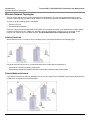
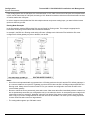
Point-to-Point Link
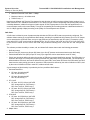
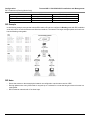
With a BSU and an SU, it is easy to set up a wireless point-to-point link as depicted in the following figure.
A point-to-point link lets you set up a connection between two locations as an alternative to:
•
Leased lines in building-to-building connections
•
Wired Ethernet backbones between wireless access points in difficult-to-wire environments
Point-to-Multipoint Network
If you want to connect more than two buildings, you can set up a single point-to-multipoint network with a single BSU and
multiple SUs, as depicted in the following figure.
10
Introduction
Wireless Network Topologies
Tsunami MP.11 5012/5054-SUI Installation and Management
Up to 250 SUs can be connected to a BSU. If a BSU already has 250 SU, a new SU cannot be connected to the BSU. In
this figure, the system is designed as follows:
•
The central building B is equipped with a BSU, connected to either an omni-directional, or a wide angle antenna.
•
The two other buildings A and C are both equipped with an SU connected to a directional antenna.
11
Introduction
Management and Monitoring Capabilities
Tsunami MP.11 5012/5054-SUI Installation and Management
Management and Monitoring Capabilities
There are several management and monitoring interfaces available to the network administrator to configure and
manage the unit:
Web Interface
The Web interface (HTTP) provides easy access to configuration settings and network statistics from any computer on
the network. You can access the Web interface over your network, over the Internet, or with a crossover Ethernet cable
connected directly to your computer’s Ethernet port.
Command Line Interface
The Command Line Interface (CLI) is a text-based configuration utility that supports a set of keyboard commands and
parameters to configure and manage the 5012/5054-SUI unit. You enter command statements, composed of CLI
commands and their associated parameters. You can issue commands from the keyboard for real-time control or from
scripts that automate configuration. See “Command Line Interface” in the Tsunami MP.11/QB.11 Reference Manual for
more information.
SNMP
In addition to the Web interface and the CLI, you also can manage and configure your unit using the Simple Network
Management Protocol (SNMP). Note that this requires an SNMP manager program, such as Hewlett Packard’s
OpenView or Castelrock’s SNMPc. The 5012/5054-SUI supports several Management Information Base (MIB) files that
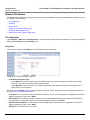
describe the parameters that can be viewed and configured using SNMP:
mib802.mib
orinoco.mib
rfc1213.mib
rfc1493.mib
rfc1643.mib
Proxim provides these MIB files on the CD included with your unit. You must compile one or more of these MIB files into
your SNMP program’s database before you can manage your unit using SNMP. See the documentation that came with
your SNMP manager for instructions about how to compile MIBs.
NOTE: When you update the software in the unit, you must also update the MIBs to the same release. Because the
parameters in the MIB may have changed, you will not otherwise have full control over the features in the new
release.
The enterprise MIB (orinoco.mib) defines the read and read/write objects you can view or configure using SNMP. These
objects correspond to most of the settings and statistics that are available with the other management interfaces. See the
enterprise MIB for more information; the MIB can be opened with any text editor, such as Microsoft Word, Notepad, and
WordPad. See SNMP Parameters for setup procedures.
IMPORTANT!
Using a serial connection, you can access the CLI of the unit through a terminal emulation program such as
HyperTerminal. (See “HyperTerminal Connection Properties” in the Tsunami MP.11/QB.11 Reference Manual.)
For all other modes of connection, you will need the IP address of the unit in order to use the Web Interface,
SNMP, or the CLI via telnet. See Setting the IP Address with ScanTool for more information.
12
Introduction
Management and Monitoring Capabilities
Tsunami MP.11 5012/5054-SUI Installation and Management
IMPORTANT!
The remainder of this User Guide discusses installing the unit and managing it using the Web interface only.
For information on managing the unit via the CLI, see the Tsunami MP.11/QB.11 Reference Manual.
13
Tsunami MP.11 5012/5054-SUI Installation and Management
Installation and Initialization
2
This chapter describes the steps required to install and mount the 5012/5054-SUI, including installing, mounting, and
aligning the antenna. The installation procedure does not include the mounting and connection of antennas. See the
Tsunami MP.11 Antenna Installation Guide for this information.
If you are already familiar with this type of product, you can use the Quick Install Guide for streamlined installation
procedures.
See the following sections:
•
Hardware Overview
•
Product Package
•
Installation Procedure
•
•
–
Step 1: Find a Suitable Location
–
Step 2: Unpack Shipping Box
–
Step 3: Attach Cables
–
Step 4: Install the Security Cover (Optional)
–
Step 5: Mount the Unit
–
Step 6: Power On the Unit
–
Step 7: View LEDs
–
Step 8: Connect the Pigtail Cable
–
Step 9: Align the Antenna
–
Step 10: Install Documentation and Software
Initialization
–
ScanTool
–
Setting the IP Address with ScanTool
Logging in to the Web Interface
Hardware Overview
The 5012/5054-SUI is an full-featured indoor Subscriber Unit (SU) that is fully compatible with Tsunami MP.11 Model
5054, 954-R, 5054-R, and 5054-R-LR Base Station Units (BSUs).
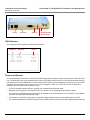
The unit is designed for desk-, wall-, or ceiling mounting. It is powered either through DC power or through Power-OverEthernet (see Power-over-Ethernet), and is equipped with the following connectors and controls:
•
Ethernet port
•
RS-232 serial port
•
Reset button: Reboots the hardware and software
•
Reload button: Resets the unit to factory defaults
14
Installation and Initialization
Hardware Overview
Power
Ethernet
Tsunami MP.11 5012/5054-SUI Installation and Management
RS-232
Reload button
Reset button
LED Indicators
The top panel of the unit has the following LED indicators:
Ethernet
Wireless
Power
Power-over-Ethernet
The 5012/5054-SUI comes with a 110/220 VAC Power Supply that has a barrel plug for the power jack in the back of the
unit. The 5012/5054-SUI is also equipped with a Power-over-Ethernet (PoE) module so it can also be powered through a
PoE adapter such as the ORiNOCO 1-Port Active Ethernet DC Injector (ordered separately). Using PoE, you can provide
electricity and wired connectivity to the unit over a single Category 5 cable. If you use PoE, there is no difference in
operation; the only difference is the power source.
•
The PoE integrated module receives –48 VDC over a standard Cat5 Ethernet cable.
•
Maximum power supplied to the 5012/5054-SUI is 11 Watts. The units typically draw less than 9 Watts.
•
You must have an PoE DC Injector connected to the network to use Active Ethernet. The DC Injector is not a repeater
and does not amplify the Ethernet data signal.
•
If connected to an PoE DC Injector and an AC power supply simultaneously, the radio draws power from PoE.
•
The cable length between the PoE DC Injector and the radio should not exceed 100 meters (approximately 325 feet).
15
Installation and Initialization
Product Package
Tsunami MP.11 5012/5054-SUI Installation and Management
Product Package
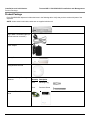
Each 5012/5054-SUI shipment includes the items in the following table. Verify that you have received all parts of the
shipment.
NOTE: Unless noted in this table, cables are not supplied with the unit.
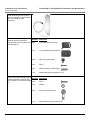
5012-SUI or 5054-SUI
N-type Male Terminated Pigtail (for
external antenna connection)
Power Adaptor
Security Cover
Ceiling/Wall Mount Plate
Unit Wall- or Ceiling-Mounting
Hardware
Quantity Description
2 ea
Mounting Plug
2 ea.
Pan-head Screw
Installation CD and Quick Installation
Guide
16
Installation and Initialization
Product Package
Tsunami MP.11 5012/5054-SUI Installation and Management
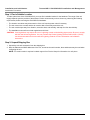
15 dBi Window Antenna (included
with 5012-SUI-WA-xx and 5054-SUIWA-xx; available for order
separately)
Outdoor Antenna Mounting
Hardware and Documentation
(included with 5012-SUI-WA-xx and
5054-SUI-WA-xx)
Quantity Description
2 ea
L-Type Mounting Plate (top)
2 ea
L-Type Mounting Plate (bottom)
6 ea.
M5 Screw (with washer)
2 ea
Screw
2 ea.
Wall Mounting Plug (Wall-Tiger)
1 ea.
Outdoor Mounting Configuration Flyer
Indoor Antenna Mounting Hardware
Quantity Description
and Documentation (included with
5012-SUI-WA-xx and 5054-SUI-WA- 2 ea
Screw
xx)
2 ea
Washer
2 ea.
Suction Cup/Rotation Bar
1 ea.
Indoor Mounting Configuration Flyer
17
Installation and Initialization
Installation Procedure
Tsunami MP.11 5012/5054-SUI Installation and Management
Installation Procedure
The following installation procedure provides instructions for attaching both the power and Ethernet connectors. In
situations without an external antenna (for example, during a desk tryout), the antenna cable is not required. If you are
already familiar with this type of product, you can use the Quick Install Guide for streamlined installation procedures.
IMPORTANT:
Before installing and using this product, see Safety and Regulatory Compliance Information on the
product CD.
IMPORTANT:
All units must be installed by a suitably trained professional installation technician or by a qualified
installation service.
NOTES:
• The Configure System window provides a selectable Country field that automatically provides the allowed
bandwidth and frequencies for the selected country/band as well as, where applicable, Dynamic Frequency
Selection (DFS) and Transmit Power Control (TPC).
• Be sure to read the Release Notes file on the product CD as it contains software version and driver information
that may not have been available when this document was produced.
See the following steps:
•
Step 1: Find a Suitable Location
•
Step 2: Unpack Shipping Box
•
Step 3: Attach Cables
•
Step 4: Install the Security Cover (Optional)
•
Step 5: Mount the Unit
•
Step 6: Power On the Unit
•
Step 7: View LEDs
•
Step 8: Connect the Pigtail Cable
•
Step 9: Align the Antenna
•
Step 10: Install Documentation and Software
18
Installation and Initialization
Installation Procedure
Tsunami MP.11 5012/5054-SUI Installation and Management
Step 1: Find a Suitable Location
To make optimal use of the 5012/5054-SUI, you must find a suitable location for the hardware. The range of the unit
largely depends upon the position of the antenna. Proxim recommends you do a site survey, observing the following
requirements, before mounting the 5012/5054-SUI hardware.
•
The location must allow easy disconnection of the unit from the power outlet if necessary.
•
The unit must not be covered and the air must be able to flow freely around the unit.
•
The unit must be kept away from vibration, excessive heat, and humidity, and kept free from dust buildup.
•
The installation must conform to local regulations at all times.
CAUTION: Local regulations may require the use of a lightning arrestor at the building ingress point. Be sure to comply
with this and all local regulations. You can purchase the Proxim Lightning Protector MP.11/QB.11 (70251);
see the documentation that comes with the Lightning Protector for more information and installation
instructions.
Step 2: Unpack Shipping Box
1. Unpack the unit and accessories from the shipping box.
2. Note the Ethernet and MAC addresses of the unit, as well as the serial number; these addresses may be used when
configuring the unit.
NOTE: The serial number is required to obtain support from Proxim. Keep this information in a safe place.
19
Installation and Initialization
Installation Procedure
Tsunami MP.11 5012/5054-SUI Installation and Management
Step 3: Attach Cables
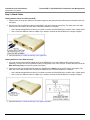
Cabling without Power Over Ethernet (PoE)
1. Plug the barrel of the power cable from the power supply into the power jack (the leftmost port in the back of the unit,
see figure).
2. Connect one end of an Ethernet cable (not supplied) to the unit’s LAN port (see figure). The other end of the cable
should not be connected to another device until after installation is complete:
•
Use a straight-through Ethernet cable if you intend to connect the 5012/5054-SUI to a switch, hub, or patch panel.
•
Use a cross-over Ethernet cable or adapter if you intend to connect the 5012/5054-SUI to a single computer.
3. Continue with Step 4: Install the Security Cover (Optional).
Cabling with Power Over Ethernet (PoE)
1. You must use an Active Ethernet adapter such as the ORiNOCO 1-Port Active Ethernet DC Injector (ordered
separately). Connect one end of an Ethernet cable (not supplied) to the unit’s LAN port. Connect the other end to the
Data and Power Out port of the DC Injector (see figure).
2. Connect one end of a second Ethernet cable (not supplied) to the Data In port of the DC Injector (see figure). The
other end of the cable should not be connected to another device until after installation is complete:
•
Use a straight-through Ethernet cable if you intend to connect the 5012/5054-SUI to a switch, hub, or patch panel.
•
Use a cross-over Ethernet cable or adapter if you intend to connect the 5012/5054-SUI to a single computer.
3. Continue with Step 4: Install the Security Cover (Optional) below.
20
Installation and Initialization
Installation Procedure
Tsunami MP.11 5012/5054-SUI Installation and Management
Step 4: Install the Security Cover (Optional)
You can optionally install a security cover to deter unauthorized access to the 5012/5054-SUI. The security cover is a
plastic enclosure that prevents access to the cabling and the Reset and Reload buttons.
1. Open the split end of the security cover just enough to slide the power cable (if not using PoE) and the Ethernet cable
through the opening until they fit inside the straight clamping portion of the cover. Exercise care as you slide the
cable(s) so you do not accidentally break the cover (see figure).
2. Slide the hinging end of the security cover into the hole on the rear panel of the 5012/5054-SUI to the left of the
connectors. Once in place, pivot the right side of the cover to bring it close to the rear panel of the 5012/5054-SUI.
3. Use the two attached screws to fasten the security cover onto the rear panel of the 5012/5054-SUI.
21
Installation and Initialization
Installation Procedure
Tsunami MP.11 5012/5054-SUI Installation and Management
Step 5: Mount the Unit
The following are the mounting options for the 5012/5054-SUI:
•
Wall Mounting
•
Ceiling Mounting
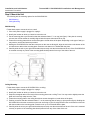
Wall Mounting
Follow these steps to mount the unit on a wall:
1. If the unit’s power supply is plugged in, unplug it.
2. Identify the location at which you intend to mount the unit.
3. Put the mounting plate up to the wall so that the embossed letter “L” is on top (see figure). If the plate is correctly
oriented, the circular tab that is vertically aligned with the square hole should be on top.
4. Fasten the mounting plate with two screws through the circular holes of the plate. Depending on the type of wall you
may need to use the two fasteners provided.
5. Holding the 5012/5054-SUI so that the connectors on the rear are facing left, align the two holes on the bottom of the
unit with the two tabs on the mounting plate. Press the unit down so it is flushed with the plate.
6. Carefully slide the unit to your right until the tabs snap securely onto the narrow holes of the unit. If the 5012/5054-SUI
is mounted correctly no portion of the mounting plate should protrude from any of the sides of the unit.
Ceiling Mounting
Follow these steps to mount the 5012/5054-SUI to a ceiling:
1. If the unit’s power supply is plugged in, unplug it.
2. Identify the location at which you intend to mount the unit.
3. Snap the rectangular tabs on the back of the mounting plate onto a ceiling T-bar. You may need to slightly rotate the
plate until it securely snaps onto the T-bar.
4. Fasten the mounting plate to the ceiling tile with two screws through the circular holes of the plate.
5. Position yourself so that the embossed letter “L” on the mounting plate is facing up (see previous figure). Holding the
5012/5054-SUI so that the connectors on the rear are facing to your left, align the two holes on the bottom of the unit
with the two tabs on the mounting plate. Press the unit up so it is flushed with the plate.
6. Carefully slide the unit to your right until the tabs snap securely onto the narrow holes of the unit. If the unit is mounted
correctly no portion of the mounting plate should protrude from any of the sides of the unit.
22
Installation and Initialization
Installation Procedure
Tsunami MP.11 5012/5054-SUI Installation and Management
Step 6: Power On the Unit
The 5012/5054-SUI can be powered by a power supply (just plug the power adaptor into an AC power outlet), or by
Active Ethernet (connect an Active Ethernet DC injector to the Ethernet cable).
WARNING: For your own safety, use only the power adaptor supplied with the unit.
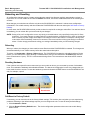
Step 7: View LEDs
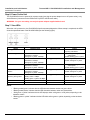
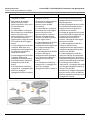
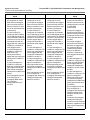
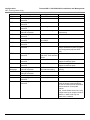
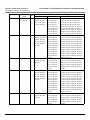
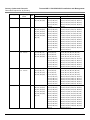
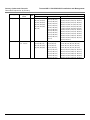
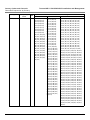
When the unit is powered on, the 5012/5054-SUI performs startup diagnostics. When startup is completed, the LEDs
show the operational state of the 5012/5054-SUI (see the following figure).
Status
Ethernet Link
Wireless Link
Starting up
N/A
N/A
Radio scanning
Off: No Ethernet
Solid amber: 10 Mbps
Solid green or yellow: 100 Mbps
Off: No Ethernet
Solid amber: 10 Mbps
Solid green or yellow: 100 Mbps
Off: No Ethernet
Solid amber: 10 Mbps
Solid green or yellow: 100 Mbps
Off: No Ethernet
Solid amber: 10 Mbps
Solid green or yellow: 100 Mbps
Off: No Ethernet
Blinking amber: 10 Mbps
Blinking green or yellow: 100 Mbps
N/A
N/A
N/A
WORP link is up
No WORP link
WORP linked, no traffic on
interface
WORP linked, normal
operation; passing traffic
System failure
Bootloader mode
Blinking green or yellow
N/A
Blinking green or yellow
Power
Three red blinks followed by
temporary solid amber
US: Blinking amber/green or
amber/yellow
EU/WD: Blinking green or yellow
US: Solid green or yellow
EU/WD: Solid green or yellow
US: Blinking amber/green or
amber/yellow
EU/WD: Blinking green or yellow
US: Solid green or yellow
EU/WD: Solid green or yellow
Blinking green or yellow
US: Solid green or yellow
EU/WD: Solid green or yellow
N/A
N/A
Solid red
Permanent solid amber
NOTE:
• “Blinking amber/green” indicates that the LED alternates between amber and green blinks.
• “Blinking amber/yellow” indicates that the LED alternates between amber and yellow blinks.
• “Solid green or yellow” indicates that the LED displays either solid green or solid yellow, depending on the
hardware variant.
• “Blinking green or yellow” indicates that the LED blinks either green or yellow, depending on the hardware
variant.
23
Installation and Initialization
Installation Procedure
Tsunami MP.11 5012/5054-SUI Installation and Management
Step 8: Connect the Pigtail Cable
The pigtail cable has a sub-miniature A-type (SMA) connector on one end and an N-type connector on the other. It is
used to connect an external antenna to the 5012/5054-SUI (see figure).
To install the pigtail cable:
1. Place the 5012/5054-SUI on a table. The compartment cover closer to the LED panel contains the antenna connector.
Press down near the center of the compartment cover and slide it forward to open the antenna compartment. The two
small plastic caps on the front will fall out at the same time (see figure).
2. Plug the SMA connector end of the pigtail cable onto the antenna jack inside the compartment (see figure). Exercise
caution when pressing down the connector to avoid breaking it accidentally. Make sure the cable rests on the notch
across the jack so you will be able to close the cover.
3. Replace the cover by aligning the two bottom tabs inside the holes (A) on each side of the compartment. Ensure that
the cable will not get pinched by the cover. Slide the cover towards the center of the unit until it snaps on place.
Replace one of the small plastic caps onto the remaining open hole on the front.
4. Refer to the Tsunami MP.11 Antenna Installation Guide for information on how to cable the pigtail to the antenna, as
well as for the mounting and connection of antennas.
24
Installation and Initialization
Installation Procedure
Tsunami MP.11 5012/5054-SUI Installation and Management
Step 9: Align the Antenna
Antenna Alignment Display (AAD) provides a measurement of signal quality in an easy-to-interpret manner—a numeric
printed signal value at the CLI. The SNR is numerically displayed on the CLI by two decimal characters representing a
number from 00 to 99.
To start the display, you must enable AAD and a wireless link must be established between the BSU and the SU.
Aiming is complete if moving in any direction results in a falling SNR value.
Antenna Alignment Commands
set aad enable local: Enables display of the local SNR. Local SNR is the SNR measured by the receiver at the
near end.
set aad enable remote: Enables display of the remote SNR. Remote SNR is the SNR as measured by the receiver
at the far end.
set aad enable average: Enables display of the average SNR. The average SNR is the average of the local and
remote SNR.
set aad disable: Disables Antenna Alignment Display (Ctrl-C also disables AAD).
Step 10: Install Documentation and Software
To install the documentation and software on a computer or network:
1. Place the CD in a CD-ROM drive. The installer normally starts automatically. (If the installation program does not start
automatically, click setup.exe on the installation CD.)
2. Click the Install Software and Documentation button and follow the instructions displayed on the installer windows.
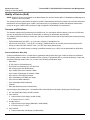
The following documentation and software products are installed:
–
Available from Start > All Programs > Tsunami > MP.11 [Model Name]:
•
Documentation (in Docs subdirectory):
–
Installation and Management Guide
–
Quick Installation Guide
–
Reference Manual
–
Safety and Regulatory Guide
–
Recommended Antenna Guide
–
Antenna Installation Guide
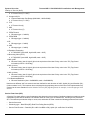
•
Online Help
•
Scan Tool (in Scan Tool subdirectory)
•
TFTP Server (in TFTP Server subdirectory)
NOTE: All of these items are also available from C:\Program Files\Tsunami\MP.11 [Model Name].
–
Available from C:\Program Files\Tsunami\MP.11 [Model Name]:
•
Documentation (in Docs folder): See list above
•
Help files (in Help folder; click on index.htm to access)
•
TFTP Server and Scan Tool program (in Extras folder)
•
MIBs (in MIBs folder)
25
Installation and Initialization
Initialization
Tsunami MP.11 5012/5054-SUI Installation and Management
Initialization
Connecting to the unit requires either:
•
A direct physical connection with an Ethernet cross-over cable or with a serial RS232C cable
•
A network connection
Connecting with a serial connection, allows you to configure and manage the unit with the CLI. Connecting with the other
connections allows you to use of the Web Interface and SNMP in addition to the CLI.
Using a serial connection, you can access the unit through a terminal emulation program such as HyperTerminal. (See
“HyperTerminal Connection Properties” in the Tsunami MP.11/QB.11 Reference Manual.)
For all other modes of connection, you will need the IP address of the unit in order to use the Web Interface, SNMP, or the
CLI. Because each network is different, an IP address suitable for your network must be assigned to the unit. You must
know this IP address to configure and manage the unit through its Web Interface, SNMP, or the CLI. The unit can use
either a static or dynamic IP address. The unit either obtains its IP address automatically through DHCP (dynamic IP
address) or it must be set manually (static IP address).
ScanTool
With ScanTool (a software utility that is included on the product installation CD), you can find out the current IP address of
the unit and, if necessary, change it so that is appropriate for your network. The units are shipped with the static IP
address 10.0.0.1 configured.
ScanTool lets you find the IP address of a Tsunami MP.11 5012/5054-SUI by referencing the MAC address in a Scan List,
or to assign an IP address if the correct one has not been assigned. The tool automatically detects the units installed on
your network segment, regardless of IP address, and lets you configure each unit’s IP settings. In addition, you can use
ScanTool to download new software to a unit that does not have a valid software image installed.
Setting the IP Address with ScanTool
To discover and set/change the IP address of the unit:
1. Run ScanTool on a computer connected to the same LAN subnet as the unit, or a computer directly connected to the
unit with a cross-over Ethernet cable. Double-click the ScanTool icon on the Windows desktop to launch the program.
If the icon is not on your desktop, click Start > All Programs > Tsunami > MP.11 [Model Name] > Scan Tool.
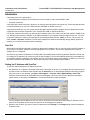
ScanTool scans the subnet for 5012/5054-SUI unit and displays a list of the units it finds in the Scan List window
(shown below). If necessary, click Rescan to re-scan the subnet and update the display.
You can assign a new IP address to one unit, even if more than one unit has the same (default) IP address 10.0.0.1,
but the new IP address must be unique to allow use of the management interfaces.
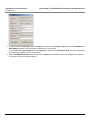
2. Select the unit for which you want to set the IP address and click Change. The Change dialog window is displayed,
as shown below.
26
Installation and Initialization
Initialization
Tsunami MP.11 5012/5054-SUI Installation and Management
3. To set the IP address manually, ensure that Static is selected as the IP Address Type and fill in the IP Address and
Subnet Mask suitable for the LAN subnet to which the unit is connected.
To set the IP address dynamically, ensure that Dynamic is selected as the IP Address Type. The unit will request its
IP address from a DHCP server on your network.
4. Enter the Read/Write Password (the default value is public) and click OK to confirm your changes. The respective
unit reboots to make the changes effective.
27
Installation and Initialization
Logging in to the Web Interface
Tsunami MP.11 5012/5054-SUI Installation and Management
Logging in to the Web Interface
The Web Interface provides a graphical user interface through which you can easily configure and manage the 5012/
5054-SUI. This section describes only how to access the Web Interface; the Web Interface itself described in Basic
Management.
To use the Web Interface, you need only the IP address of the 5012/5054-SUI. (See Setting the IP Address with
ScanTool for details).
NOTE: If the connection is slow or you are not able to connect, use the Internet Explorer Tools option to ensure you are
not using a proxy server for the connection with your Web browser.
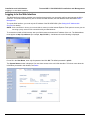
To access the unit with a Web browser, start your Web browser and enter the IP address of the unit. The Web address
must appear as http://<ip address> (for example, http://10.0.0.1). A window such as the following is displayed.
Do not fill in the User Name, enter only the password and click OK. The default password is public.
The System Status window is displayed. You now have access to the unit’s Web Interface. To find out more about the
information presented in this window, see Status.
28
Tsunami MP.11 5012/5054-SUI Installation and Management
System Overview
3
This chapter provides an overview of the system. See the following sections:
•
Basic Configuration Information
–
Country and Related Settings
–
Dynamic Frequency Selection (DFS)
–
Transmit Power Control
•
SU Registration
•
Dynamic Data Rate Selection (DDRS)
•
Virtual Local Area Networks (VLANs)
•
–
VLAN Modes
–
Q-in-Q (VLAN Stacking)
–
VLAN Forwarding
–
VLAN Relaying
–
Management VLAN
–
BSU and SU in Transparent Mode
–
BSU in Trunk Mode and SU in Trunk/Access Mode
Quality of Service (QoS)
–
Concepts and Definitions
Basic Configuration Information
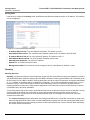
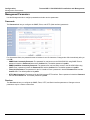
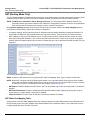
To view or change basic system information, click the Configure button on the left side of the Web interface window,
then click the System tab. See System Parameters for detailed information about the fields and selections in this
window.
NOTE: System Name by default contains the actual model number. The following screenshot is for information only.
29
System Overview
Basic Configuration Information
Tsunami MP.11 5012/5054-SUI Installation and Management
Country and Related Settings
The unit’s Configure System window provides a selectable Country field that automatically provides the allowed
bandwidth and frequencies for the selected country/band.
Units sold only in the United States are pre-configured to scan and display only the outdoor frequencies permitted by the
FCC. No other Country can be configured. Units sold outside of the United States support the selection of a Country by
the professional installer.
NOTE: Non-US installers should not add an antenna system until the Country is selected, the unit is rebooted, and the
proper power level is configured. The output power level of the final channel selected by DFS scan can be found
in the Event Log.
The Dynamic Frequency Selection (DFS) feature is enabled automatically when you choose a country and band that
require it. The Transmit Power Control (TPC) feature is always available.
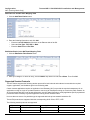
Click Configure > System; then select the appropriate country/band for your regulatory domain from the Country dropdown box.
Continue configuring settings as desired; then click Commands> Reboot tab to save and activate the settings.
Alternatively, if you want to save the configuration settings to the flash memory but not activate the settings, use the save
config CLI command.
Dynamic Frequency Selection (DFS)
The Tsunami 5012/5054-SUI supports Dynamic Frequency Selection (DFS) for FCC, IC, and ETSI regulatory domains
per FCC Part 15 Rules for U-NII devices, IC RSS-210, and ETSI EN 301-893 and 302-502 regulations, respectively.
These rules and regulations require that 802.11a devices use DFS to prevent interference with radar systems and other
devices that already occupy the 5 GHz band.
During boot-up, the unit scans the available frequency and selects the best channel. If the unit subsequently detects
interference on its channel, it rescans to find a better channel. Upon finding a new channel, the unit is required to wait 60
seconds to ensure that the channel is not busy or occupied by radar, and then commences normal operation. (In Canada,
if the channel was previously blacklisted, the unit scans for 600 seconds before commencing normal operation if the
selected channel frequency is in the 5600 - 5650 MHz range).
If you are using the unit in a country and band that require DFS, keep in mind the following:
•
DFS is not a configurable parameter; it is always enabled and cannot be disabled.
•
You cannot manually select the device’s operating channel; you must let the unit select the channel. You may make
channels unavailable by manually “blacklisting” them and preventing those channels being selected, in accordance
with local regulations or interference. You can also display the Channel Blacklist Table to view the channels that have
been blacklisted.
•
In compliance with FCC regulations, the unit uses ATPC (Automatic Transmit Power Control) to automatically adapt
transmit power when the quality of the link is more than sufficient to maintain a good communication with reduced
transmit power. See Transmit Power Control for more information.
Dynamic Frequency Selection (DFS) is enabled automatically based upon the country and band you select. You can tell
DFS is in use because the Frequency Channel field on the Interfaces page displays only the DFS-selected frequency.
DFS scans all available frequencies, starting with the DFS preferred channel (when configured) and skipping blacklisted
channels, to select the operating frequency automatically.
A country/band selection with DFS enabled causes the Base Station to come up in scan mode. It scans the available
frequencies and channels to avoid radar and selects a channel with the least interference.
NOTE: Scanning is performed only on the frequencies allowed in the regulatory domain of the country/band selected
when it is required for radar detection and avoidance.
30
System Overview
Basic Configuration Information
Tsunami MP.11 5012/5054-SUI Installation and Management
The SU also comes up in scan mode to scan all available frequencies to find a BSU with which it can register. Scanning
may take several minutes. After establishing a wireless link, the wireless LED stops flashing and continues to shine
green.
NOTE: Because DFS may need to scan for radar on multiple channels, you must allow a sufficient amount of time for the
units to start up. This is considerably longer than when the unit is not using DFS. This is expected behavior.
Startup time is within four minutes if no radar is detected, but up to one minute is added for every selected
channel that results in radar detection.
DFS is required for three purposes:
1. Radar avoidance both at startup and while operational. To meet these requirements, the BSU scans available
frequencies at startup. If a DFS-enabled channel is busy or occupied with radar, the system will blacklist the channel
for a period of 30 minutes in accordance with FCC, IC, and ETSI regulations. Once fully operational on a frequency,
the BSU actively monitors the occupied frequency. If interference is detected, the BSU blacklists the channel, logs a
message and rescans to find a new frequency that is not busy and is free of radar interference.
Radar detection is performed only by the BSU and not by the SU. When an SU is set to a country/band in which DFS
is used, it scans all available channels upon startup looking for a BSU that best matches its connection criteria (such
as Base Station System Name, Network Name, and Shared Secret). The SU connects to the BSU automatically on
whatever frequency the BSU has selected. Because of this procedure, it is best to set up the BSU and have it fully
operational before installing the SU, although this is not required. If a BSU rescans because of radar interference, the
SU loses its wireless link. The SU waits 30 seconds (when the Mobility feature is enabled, the SU starts scanning for
a BSU instantly rather than waiting 30 seconds); if it finds that it could not receive the BSU in this amount of time, it
rescans the available frequencies for an available BSU.
2. Guarantee the efficient use of available frequencies by all devices in a certain area. To meet this requirement, the
BSU scans each available frequency upon startup and selects a frequency based upon the least amount of noise and
interference detected. This lets multiple devices operate in the same area with limited interference. This procedure is
done only at startup; if another UNII device comes up on the same frequency, the BSU does not detect this or rescan
because of it. It is expected that other devices using these frequencies also are in compliance with country/band
regulations, so this should not happen.
3. Uniform Channel Spreading. To meet this requirement, the MP.11-R randomly selects operating channel from the
available channels with least interference. If the DFS Preferred Channel is configured, the unit begins by scanning
that channel. If no interference is detected, the unit makes this channel operational. If the channel is busy or occupied
by radar, the unit blacklists that channel and scans other available channels for the one with least interference. This
implements the Uniform Channel Spreading requirement by either automatically selecting the channel with least
interference or allowing the installer to manually select a channel with least interference from a channel plan.
Transmit Power Control
Transmit Power Control is a manual configuration selection to reduce the unit’s output power. The maximum output
power level for the operating frequency can be found in the event log of the unit’s embedded software.
ATPC (Automatic Transmit Power Control) is a feature to automatically adapt transmit power when the quality of the link
is more than sufficient to maintain a good communication with reduced transmit power. This feature is required for FCC
DFS. It works by monitoring the quality of the link and reducing the output power of the radio by up to 6 dB when good link
quality can still be achieved. When link quality reduces, the output power is automatically increased up to the original
power level to maintain a good link. For a full discussion of DFS, see Dynamic Frequency Selection (DFS) above.
By default, the unit lets you transmit at the maximum output power that the radio can sustain for data rate and frequency
selected. However, with Transmit Power Control (TPC), you can adjust the output power of the unit to a lower level in
order to reduce interference to neighboring devices or to use a higher gain antenna without violating the maximum
radiated output power allowed for your country/band. Also, some countries that require DFS also require the transmit
power to be set to a 6 dB lower value than the maximum allowed EIRP when link quality permits, as part of the DFS
requirements.
31
System Overview
Basic Configuration Information
Tsunami MP.11 5012/5054-SUI Installation and Management
NOTE: When the system is set to transmit at the maximum power, professional installers must ensure that the maximum
EIRP limit is not exceeded. To achieve this, they may have to add attenuation between the device and the
antenna when a high gain antenna is used.
NOTE: You can see your unit’s current output power for the selected frequency in the event log. The event log shows the
selected power for all data rates, so you must look up the relevant data rate to determine the actual power level.
NOTE: This feature only lets you decrease your output power; you cannot increase your output power beyond the
maximum the radio allows for your frequency and data rate.
See System Parameters to configure Country. See Interface Parameters to configure Transmit Power Control.
32
System Overview
SU Registration
Tsunami MP.11 5012/5054-SUI Installation and Management
SU Registration
The list of parameters you must configure for registration of the SU on a BSU are:
•
Network Name
•
Base Station System Name (when used; otherwise, leave blank)
•
Network Secret
•
Encryption (when used)
•
Frequency Channel (when available)
See System Parameters to see the description of these fields and to configure them.
NOTES:
• The frequency channel must be the same for the BSU and the SU in order to register the SU when roaming is
not enabled and DFS is not required.
• Channel Bandwidth and Turbo mode (when available) must be the same for the BSU and SU in order to register
the SU.
• Roaming will automatically select a channel on the SU corresponding to the BSU channel. Roaming is the
procedure in which an SU terminates the session with the current BSU and starts the registration procedure with
another BSU when it finds the quality of the other BSU to be better.
33
System Overview
Dynamic Data Rate Selection (DDRS)
Tsunami MP.11 5012/5054-SUI Installation and Management
Dynamic Data Rate Selection (DDRS)
NOTE: DDRS is configured on the BSU. See the Tsunami MP.11-R Installation and Management Guide for more
information.
The WORP Dynamic Data Rate Selection (DDRS) lets the BSU and SUs monitor the remote average signal-to-noise
ratio (SNR) and the number of retransmissions between the BSU and SUs and adjust the transmission data rate to an
optimal value to provide the best possible throughput according to the current communication conditions and link quality.
With DDRS enabled, a BSU can maintain different transmission data rates to different SUs, optimizing the data rate
based on the link quality of each SU independently.
Both the BSU and the SUs monitor the remote SNR and number of retransmissions. The BSU monitors these values for
each SU that is registered. An SU monitors these values for the BSU. When necessary, based on this information, the
data rate is dynamically adjusted.
Note that DDRS is enabled or disabled on the BSU only. This operation requires the BSU to be rebooted. After rebooting,
the BSU sends a multicast announcement to all SUs to begin the registration process. During registration, an SU is
informed by the BSU whether DDRS is enabled or disabled and it sets its DDRS status accordingly.
34
System Overview
Virtual Local Area Networks (VLANs)
Tsunami MP.11 5012/5054-SUI Installation and Management
Virtual Local Area Networks (VLANs)
NOTE: VLANs are configured on the Base Station Unit. See the Tsunami MP.11-R Installation and Management Guide
for more information.
Virtual Local Area Networks (VLANs) are logical groupings of network hosts. Defined by software settings, other VLAN
members or resources appear (to connected hosts) to be on the same physical segment, no matter where they are
attached on the logical LAN or WAN segment. They simplify allowing traffic to flow between hosts and their frequentlyused or restricted resources according to the VLAN configuration.
Tsunami MP.11 5012/5054-SUI units are fully VLAN-ready; however, by default, VLAN support is disabled. Before
enabling VLAN support, certain network settings should be configured and network resources such as VLAN-aware
switches should be available, dependent upon the type of configuration.
VLANs are used to conveniently, efficiently, and easily manage your network in the following ways:
•
Manage VLAN configuration from a single window
•
Define groups
•
Reduce broadcast and multicast traffic to unnecessary destinations
•
Improve network performance and reduce latency
•
Increase security
•
Secure network restricts members to resources on their own VLAN
VLAN tagged data is collected and distributed through a unit’s Ethernet interface. The units can communicate across a
VLAN-capable switch that analyzes VLAN-tagged packet headers and directs traffic to the appropriate ports when the
units are working in their Transparent mode.
VLAN features can be managed via:
•
The BSU’s Web interface
•
The Command Line Interface (see “Command Line Interface” in the Tsunami MP.11/QB.11 Reference Manual)
•
SNMP (see the MIBs provided on the product CD)
VLAN Modes
Transparent Mode
Transparent mode is available on both the SU and the BSU. This mode is equivalent to NO VLAN support and is the
default mode. It is used when the devices behind the SU and BSU are both VLAN aware and unaware. The SU/BSU
transfers both tagged and untagged frames received on the Ethernet or WORP interface. Both tagged and untagged
management frames can access the device.
Trunk Mode
Trunk mode is available on both the SU and the BSU. It is used when all devices behind the SU and BSU are VLAN
aware. The SU and BSU transfer only tagged frames received on the Ethernet or WORP interface. Both tagged and
untagged management frames can access the device.
Access Mode
Access mode is available only on the SU. It is used when the devices behind the SU are VLAN unaware. Frames to and
from the Ethernet interface behind the SU map into only one VLAN segment.
Frames received on the Ethernet interface are tagged with the configured Access VLAN ID before forwarding them to the
WORP interface. Both tagged and untagged management frames can access the device from the WORP interface.
However, only untagged management frames can access the device from the Ethernet Interface.
35
System Overview
Virtual Local Area Networks (VLANs)
Tsunami MP.11 5012/5054-SUI Installation and Management
Mixed Mode
Mixed mode is available on both the SU and the BSU. It is used when the devices behind the SU send both tagged and
untagged data. Frames to and from the Ethernet interface behind the SU can be tagged or untagged.
Tagged frames received on the Ethernet interface are compared against the SU’s trunk table, and only packets whose
VLAN ID matches the trunk table are forwarded. All other packets are dropped. Untagged traffic is forwarded without any
restrictions. If the BSU is in Mixed mode, the SU can be in Trunk, Access, or Mixed mode.
Q-in-Q (VLAN Stacking)
The Q-in-Q mechanism allows Service Providers to maintain customer-assigned VLANs while avoiding interference with
the Service Providers’ VLANs. Using the Q-in-Q mechanism, an Outer VLAN ID and Priority are added to VLAN tagged
packets on top of the existing VLAN ID, such that interference is avoided and traffic is properly routed.
VLAN Forwarding
The VLAN Trunk mode provides a means to configure a list of VLAN IDs in a Trunk VLAN Table. The SU and BSU only
forward frames (between Ethernet and WORP interface) tagged with the VLAN IDs configured in the Trunk VLAN Table.
Up to 256 VLAN IDs can be configured for the BSU and up to 16 VLAN IDs can be configured for the SU (depending
upon the capabilities of your switching equipment).
VLAN Relaying
The VLAN Trunk mode for BSU operation provides an option to enable and disable a VLAN relaying flag; when enabled,
the BSU shall relay frames between SUs on the same BSU having the same VLAN ID.
Management VLAN
The BSU and SU allow the configuration of a separate VLAN ID and priority for SNMP, ICMP, Telnet, and TFTP
management frames for device access.
The management VLAN ID and management VLAN priority may be applied in any mode. The management stations tag
the management frames they send to the BSU or SU with the management VLAN ID configured in the device. The BSU
and SU tag all the management frames from the device with the configured management VLAN and priority.
BSU and SU in Transparent Mode
When the BSU is in Transparent mode, all associated SUs must be in Transparent mode.
How the BSU and SUs function in Transparent mode is described in the following table.
36
System Overview
Virtual Local Area Networks (VLANs)
Tsunami MP.11 5012/5054-SUI Installation and Management
BSU Function – Transparent Mode
SU Function – Transparent Mode
• SU forwards both tagged and untagged frames
• BSU forwards both tagged and untagged
received from the Ethernet interface or from
frames received from the Ethernet interface or
the BSU.
from any of the associated SUs.
• If a valid management VLAN ID is configured, • If a valid management VLAN ID is configured,
SU allows only management frames tagged
BSU allows only management frames tagged
with the configured management VLAN ID to
with the configured management VLAN ID to
access it.
access it.
• If a valid management VLAN ID is configured, • If a valid management VLAN ID is configured,
SU tags all management frames generated by
BSU tags all management frames generated
the SU with the configured management VLAN
by the BSU with the configured management
ID and priority.
VLAN ID and priority.
• If the management VLAN ID is configured as - • If the management VLAN ID is configured as 1 (untagged), SU allows only untagged
1 (untagged), BSU allows only untagged
management frames to access them.
management frames to access it.
BSU in Trunk Mode and SU in Trunk/Access Mode
When the BSU is in Trunk mode, the associated SUs must be in either Trunk mode or Access mode. When an SU
associates to a BSU that is in Trunk mode, it gets the VLAN mode from the BSU.
How the BSU and SU function in Trunk mode, and the SU in Access mode, is described in the following table.
37
System Overview
Virtual Local Area Networks (VLANs)
BSU Function – Trunk Mode
• Up to 256 VLAN IDs can be
configured on a BSU.
Tsunami MP.11 5012/5054-SUI Installation and Management
SU Function – Trunk Mode
• Up to 16 VLAN IDs can be
configured on an SU.
SU Function – Access Mode
• SU discards all tagged frames received
from the Ethernet interface and all
untagged frames received from the
• SU discards all untagged frames
• BSU discards all untagged
BSU (unexpected).
received from the Ethernet
frames received from the
• SU tags all untagged frames received
interface or from the BSU
Ethernet interface or from any of
from the Ethernet interface with the
(unexpected).
the associated SUs
configured Access VLAN ID and
(unexpected).
• If a valid VLAN ID is configured,
forwards them to the BSU.
SU forwards only VLAN-tagged
• If a valid VLAN ID is configured,
• SU untags all tagged frames received
frames received from the
BSU forwards only VLAN-tagged
from the BSU that are tagged with the
Ethernet interface or from the
frames received from the
configured Access VLAN ID and
BSU that are tagged with the
Ethernet interface or from any of
forwards them to the Ethernet
configured VLAN ID; it discards
the associated SUs that are
interface; it discards all other tagged
all other tagged frames.
tagged with the configured VLAN
frames from the BSU.
ID; it discards all other tagged
• If a valid management VLAN ID is
frames.
• If a valid management VLAN ID is
configured, SU allows only
configured, SU allows only
management frames tagged with
• If a valid management VLAN ID is
management frames tagged with the
the configured management
configured, BSU allows only
configured management VLAN ID to
VLAN ID to access it.
management frames tagged with
access it from the BSU.
the configured management
• If a valid management VLAN ID is
VLAN ID to access it.
• If a valid management VLAN ID is
configured, SU tags all
configured, SU tags all management
management frames generated
• If a valid management VLAN ID is
frames generated by the SU with the
by the SU with the configured
configured, BSU tags all
configured management VLAN ID and
management VLAN ID and
management frames generated
priority and forwards them to the BSU.
priority.
by the BSU with the configured
management VLAN ID and
• If the management VLAN ID is
• If the management VLAN ID is
priority.
configured as -1 (untagged), SU allows
configured as -1 (untagged), SU
only untagged management frames to
allows only untagged
• If the management VLAN ID is
access it from the BSU.
management frames to access it.
configured as -1 (untagged), BSU
allows only untagged
• SU allows only untagged management
management frames to access it.
frames to access it from the Ethernet
interface, regardless of the value of the
management VLAN ID.
38
System Overview
Virtual Local Area Networks (VLANs)
Tsunami MP.11 5012/5054-SUI Installation and Management
BSU in Mixed Mode and SU in Mixed, Access, or Trunk Mode
When the BSU is in Mixed mode, the associated SUs can be in Trunk, Access, or Mixed mode.
How the BSU and SU function in Trunk mode, and the SU in Access mode and Mixed mode, is described in the following
table:
39
System Overview
Virtual Local Area Networks (VLANs)
BSU Function – Mixed
Mode
• Up to 256 VLAN IDs can
be configured on a BSU.
Tsunami MP.11 5012/5054-SUI Installation and Management
SU Function – Mixed Mode SU Function – Trunk Mode
•
•
• BSU allows all untagged
frames received from the
Ethernet interface or from
any of the associated SUs
(unexpected).
•
• If a valid VLAN ID is
configured, BSU forwards
only VLAN-tagged frames
received from the Ethernet
interface or from any of the
associated SUs that are
tagged with the configured
VLAN IDs; it discards all
other tagged frames.
•
SU Function – Access
Mode
Up to 16 VLAN IDs can be • Up to 16 VLAN IDs can be • SU discards all tagged
frames received from the
configured on an SU.
configured on an SU.
Ethernet interface and all
• SU discards all untagged
SU accepts all untagged
untagged frames received
frames received from the
frames received from the
from the BSU
Ethernet interface or from
Ethernet interface or from
(unexpected).
the BSU (unexpected).
the BSU (unexpected).
• SU tags all untagged
• If a valid VLAN ID is
If a valid VLAN ID is
frames received from the
configured, SU forwards
configured, SU forwards
Ethernet interface with the
only VLAN-tagged frames
only VLAN-tagged frames
configured Access VLAN
received from the Ethernet
received from the Ethernet
ID and forwards them to
interface or from the BSU
interface or from the BSU
the BSU.
that are tagged with the
that are tagged with the
• SU untags all tagged
configured VLAN IDs; it
configured VLAN IDs; it
frames received from the
discards all other tagged
discards all other tagged
BSU that are tagged with
frames.
frames.
the configured Access
• If a valid management
If a valid management
VLAN ID and forwards
VLAN ID is configured, SU
VLAN ID is configured, SU
them to the Ethernet
allows only management
allows only management
interface; it discards all
frames tagged with the
frames tagged with the
other tagged frames from
configured management
configured management
the BSU.
VLAN ID to access it.
VLAN ID to access it.
• If a valid management
VLAN ID is configured,
BSU allows only
management frames
tagged with the configured
• If a valid management
management VLAN ID to • If a valid management
• If a valid management
VLAN ID is configured, SU
access it.
VLAN ID is configured, SU
VLAN ID is configured, SU
allows only management
tags all management
tags all management
• If a valid management
frames tagged with the
frames generated by the
frames generated by the
VLAN ID is configured,
configured management
SU with the configured
SU with the configured
BSU tags all management
VLAN ID to access it from
management VLAN ID and
management VLAN ID and
frames generated by the
the BSU.
priority.
priority.
BSU with the configured
management VLAN ID and • If the management VLAN • If the management VLAN • If a valid management
VLAN ID is configured, SU
priority.
ID is configured as -1
ID is configured as -1
tags all management
(untagged), SU allows only
(untagged), SU allows only
• If the management VLAN
frames generated by the
untagged management
untagged management
ID is configured as -1
SU with the configured
frames to access it.
frames to access it.
(untagged), BSU allows
management VLAN ID and
only untagged
priority and forwards them
management frames to
to the BSU.
access it.
• If the management VLAN
ID is configured as -1
(untagged), SU allows only
untagged management
frames to access it from
the BSU.
• SU allows only untagged
management frames to
access it from the Ethernet
interface, regardless of the
value of the management
VLAN ID.
40
System Overview
Virtual Local Area Networks (VLANs)
Tsunami MP.11 5012/5054-SUI Installation and Management
41
System Overview
Quality of Service (QoS)
Tsunami MP.11 5012/5054-SUI Installation and Management
Quality of Service (QoS)
NOTE: Quality of Service is configured on the Base Station Unit. See the Tsunami MP.11-R Installation and Management
Guide for more information.
The Quality of Service (QoS) feature is based on the 802.16 standard and defines the classes, service flows, and packet
identification rules for specific types of traffic. QoS main priority is to guarantee a reliable and adequate transmission
quality for all types of traffic under conditions of high congestion and bandwidth over-subscription.
Concepts and Definitions
The software supports QoS provisioning from the BSU only. You may define different classes of service on a BSU that
can then be assigned to the SUs that are associated, or that may get associated, with that BSU.
The software provides the ability to create, edit, and delete classes of service that are specified by the following hierarchy
of parameters:
•
Packet Identification Rule (PIR) – up to 64 rules, including 17 predefined rules
•
Service Flow class (SFC) – up to 32 SFs, including 7 predefined SFCs; up to 8 PIRs may be associated per SFC
•
Priority for each rule within each SF class – 0 to 255, with 0 being lowest priority
•
QoS class – up to 8 QoS classes, including 4 predefined classes; up to 4 SFCs may be associated per QoS class
Packet Identification Rule (PIR)
A Packet Identification Rule is a combination of parameters that specifies what type of traffic is allowed or disallowed.
The software allows to create up to 64 different PIRs, including 17 predefined PIRs. It provides the ability to create, edit,
and delete PIRs that contain none, one, or more of the following classification fields:
•
Rule Name
•
IP ToS (Layer 3 QoS identification)
•
IP Protocol List containing up to 4 IP protocols
•
802.1p tag (layer 2 QoS identification)
•
Up to 4 pairs of Source IP address + Mask
•
Up to 4 pairs of Destination IP address + Mask
•
Up to 4 source TCP/UDP port ranges
•
Up to 4 destination TCP/UDP port ranges
•
Up to 4 source MAC addresses
•
Up to 4 destination MAC addresses
•
VLAN ID
•
Ether type (Ethernet protocol identification)
A good example is provided by the 17 predefined PIRs. Note that these rules help to identify specific traffic types:
1. All – No classification fields, all traffic matches
2. Cisco VoIP UL
a. Protocol Source Port Range (16,000-32,000)
b. IP Protocol List (17 = UDP)
3. Vonage VoIP UL
a. Protocol Source Port Range (8000-8001, 10000-20000)
b. IP Protocol List (17 = UDP)
4. Cisco VoIP DL
a. Protocol Destination Port Range (16,000-32,000)
42
System Overview
Quality of Service (QoS)
Tsunami MP.11 5012/5054-SUI Installation and Management
b. IP Protocol List (17 = UDP)
5. Vonage VoIP DL
a. Protocol Destination Port Range (8000-8001, 10000-20000)
b. IP Protocol List (17 = UDP)
6. TCP
a. IP Protocol List (6)
7. UDP
a. IP Protocol List (17)
8. PPPoE Control
a. Ethertype (type 1, 0x8863)
9. PPPoE Data
a. Ethertype (type 1, 0x8864)
10.IP
a. Ethertype (type 1, 0x800)
11. ARP
a. Ethertype (type 1, 0x806)
12.Expedited Forwarding
a. IP TOS/DSCP (low=0x2D, high=0x2D, mask = 0x3F)
13.Streaming Video (IP/TV)
a. IP TOS/DSCP (low=0x0D, high=0x0D, mask = 0x3F)
14.802.1p BE
a. Ethernet Priority (low=0, high=0) (this is the equivalent of the User Priority value in the TCI (Tag Control
Information) field of a VLAN tag)
15.802.1p Voice
a. Ethernet Priority (low=6, high=6) (this is the equivalent of the User Priority value in the TCI (Tag Control
Information) field of a VLAN tag)
16.802.1p Video
a. Ethernet Priority (low=5, high=5) (this is the equivalent of the User Priority value in the TCI (Tag Control
Information) field of a VLAN tag)
17.L2 Broadcast/Multicast
a. Ethernet Destination (dest = 0x80000000, mask = 0x80000000)
Note that two different VoIP rule names have been defined for each direction of traffic, Uplink (UL) and Downlink (DL),
(index numbers 2 to 5). This has been done to distinguish the proprietary nature of the Cisco VoIP implementation as
opposed to the more standard Session Initiation Protocol (SIP) signaling found, for example, in the Vonage-type VoIP
service.
Service Flow Class (SFC)
A Service Flow class defines a set of parameters that determines how a stream of application data that matches a certain
classification profile will be handled. The software allows to create up to 32 different SFs, including seven predefined
SFs. The software provides the ability to create, edit, and delete SFs that contain the following parameters and values:
•
Service flow name
•
Scheduling type – Best Effort (BE); Real-Time Polling Service (RtPS)
•
Service Flow Direction – Downlink (DL: traffic from BSU to SU); Uplink (UL: traffic from SU to BSU)
43
System Overview
Quality of Service (QoS)
Tsunami MP.11 5012/5054-SUI Installation and Management
•
Maximum sustained data rate (or Maximum Information Rate, MIR) – specified in units of 1 Kbps from 8 Kbps up to he
maximum rate of 108000 Kbps per SU
•
Minimum reserved traffic rate (or Committed Information Rate, CIR) – specified in units of 1 Kbps from 0 Kbps up to
the maximum rate of 10000 Kbps per SU
•
Maximum Latency – specified in increments of 5 ms steps from a minimum of 5 ms up to a maximum of 100 ms
•
Tolerable Jitter – specified in increments of 5 ms steps from a minimum of 0 ms up to the Maximum Latency (in ms)
•
Traffic priority – zero (0) to seven (7), 0 being the lowest, 7 being the highest
•
Maximum number of data messages in a burst – one (1) to four (4), which affects the percentage of the maximum
throughput of the system
•
Activation state – Active; Inactive
Note that traffic priority refers to the prioritization of this specific Service Flow.
The software tries to deliver the packets within the specified latency and jitter requirements, relative to the moment of
receiving the packets in the unit. For delay-sensitive traffic the jitter must be equal to or less than the latency. A packet is
buffered until an interval of time equal to the difference between Latency and Jitter (Latency – Jitter) has elapsed. The
software will attempt to deliver the packet within a time window starting at (Latency – Jitter) until the maximum Latency
time is reached. If the SFC’s scheduling type is real-time polling (rtPS), and the packet is not delivered by that time, it will
be discarded. This can lead to loss of packets without reaching the maximum throughput of the wireless link. For
example, when the packets arrive in bursts on the Ethernet interface and the wireless interface is momentarily maxed
out, then the packets at the “end” of the burst may be timed out before they can be sent.
Users are able to set up their own traffic characteristics (MIR, CIR, latency, jitter, etc.) per service flow class to meet their
unique requirements. A good example is provided by the seven predefined SFCs:
1. UL-Unlimited BE
a. Scheduling Type = Best Effort
b. Service Flow Direction = Uplink
c. Initialization State = Active
d. Maximum Sustained Data Rate = 20 Mbps
e. Traffic Priority = 0
2. DL-Unlimited BE (same as UL-Unlimited BE, except Service Flow Direction = Downlink)
3. UL-G711 20 ms VoIP rtPS
a. Schedule type = Real time Polling
b. Service Flow Direction = Uplink
c. Initialization State = Active
d. Maximum Sustained Data Rate = 88 Kbps
e. Minimum Reserved Traffic Rate = 88 Kbps
f.
Maximum Latency = 20 milliseconds
g. Traffic Priority = 1
4. DL-G711 20 ms VoIP rtPS (same as UL-G711 20ms VoIP rtPS, except Service Flow Direction = Downlink)
5. UL-G729 20 ms VoIP rtPS (same as UL-G711 20ms VoIP rtPS, except Maximum Sustained Data Rate and Maximum
Reserved Traffic Rate = 64 Kbps)
6. DL-G729 20 ms VoIP rtPS (same as UL-G729 20ms VoIP rtPS, except Service Flow Direction = Downlink)
7. DL-2Mbps Video
a. Schedule type = Real time Polling
b. Service Flow Direction = Downlink
c. Initialization State = Active
d. Maximum Sustained Data Rate = 2 Mbps
44
System Overview
Quality of Service (QoS)
Tsunami MP.11 5012/5054-SUI Installation and Management
e. Minimum Reserved Traffic Rate = 2 Mbps
f.
Maximum Latency = 20 milliseconds
g. Traffic Priority = 1
Note that two different VoIP Service Flow classes for each direction of traffic have been defined (index numbers 3 to 6)
which follow the ITU-T standard nomenclatures: G.711 refers to a type of audio companding and encoding that produces
a 64 Kbps bitstream, suitable for all types of audio signals. G.729 is appropriate for voice and VoIP applications, but
cannot transport music or fax tones reliably. This type of companding and encoding produces a bitstream between 6.4
and 11.8 Kbps (typically 8 Kbps) according to the quality of voice transport that is desired.
QoS Class
A QoS class is defined by a set of parameters that includes the PIRs and SFCs that were previously configured. The
software allows creating up to eight different QoS classes, including four predefined QoS classes. Up to four SF classes
can be associated to each QoS class, and up to eight PIRs can be associated to each SF class. For example, a QoS
class called “G711 VoIP” may include the following SFCs: “UL-G711 20 ms VoIP rtPS” and “DL-G711 20 ms VoIP rtPS”.
In turn, the SFC named “UL-G711 20 ms VoIP rtPS” may include the following rules: “Cisco VoIP UL” and “Vonage VoIP
UL”.
The software provides the ability to create, edit, and delete QoS classes that contain the following parameters:
•
QoS class name
•
Service Flow (SF) class name list per QoS class (up to four SF classes can be associated to each QoS class)
•
Packet Identification Rule (PIR) list per SF class (up to eight PIRs can be associated to each SF class)
•
Priority per rule which defines the order of execution of PIRs during packet identification process. The PIR priority is a
number in the range 0-63, with priority 63 being executed first, and priority 0 being executed last. The PIR priority is
defined within a QoS class, and can be different for the same PIR in some other QoS class. If all PIRs within one QoS
class have the same priority, the order of execution of PIR rules will be defined by the order of definition of SFCs, and
by the order of definition of PIRs in each SFC, within that QoS class.
A good example of this hierarchy is provided by the four predefined QoS classes:
1. Unlimited Best Effort
a. SF class: UL-Unlimited BE
PIR: All; PIR Priority: 0
b. SF class: DL-Unlimited BE
PIR: All; PIR Priority: 0
2. G711 VoIP
a. SF class: UL-G711 20 ms VoIP rtPS
PIR: Vonage VoIP UL; PIR Priority: 1
PIR: Cisco VoIP UL; PIR Priority: 1
b. SF class: DL-G711 20 ms VoIP rtPS
PIR: Vonage VoIP DL; PIR Priority: 1
PIR: Cisco VoIP DL; PIR Priority: 1
3. G729 VoIP
a. SF class: UL-G729 20 ms VoIP rtPS
PIR: Vonage VoIP UL; PIR Priority: 1
PIR: Cisco VoIP UL; PIR Priority: 1
b. SF class: DL-G729 20 ms VoIP rtPS
PIR: Vonage VoIP DL; PIR Priority: 1
PIR: Cisco VoIP DL; PIR Priority: 1
4. 2Mbps Video
45
System Overview
Quality of Service (QoS)
Tsunami MP.11 5012/5054-SUI Installation and Management
a. SF class: DL-2Mbps Video
PIR: Streaming Video (IP/TV); PIR Priority: 1
46
Tsunami MP.11 5012/5054-SUI Installation and Management
4
Basic Management
This chapter describes basic features and functionality of the unit. In most cases, configuring these basic features is
sufficient. The “Glossary” in the Tsunami MP.11/QB.11 Reference Manual provides a brief explanation of the terms used.
For CLI commands you can use for basic management, see “Command Line Interface” in the Tsunami MP.11/QB.11
Reference Manual.
The following topics are discussed in this chapter:
•
Navigation
•
Rebooting and Resetting
•
General Configuration Settings
•
Monitoring Settings
•
Security Settings
•
Default Settings
•
Upgrading the Unit
Navigation
To use the Web Interface for configuration and management, you must access the unit. With ScanTool you can
determine the unit’s current IP address. Then enter http://<ip address> in your Web browser (for example http://
10.0.0.1). See Setting the IP Address with ScanTool for details.
NOTE: If you have your Security Internet Options set to High, you may not be able to access the Web interface
successfully; a high security setting disables JavaScript, which is required for running Proxim’s Web browser
interface. Adding the radio’s IP address as a Trusted site should fix this problem.
The Web Interface consists of Web page buttons and tabs. A tab can also contain sub-tabs. The following figure shows
the convention used to guide you to the correct tab or sub-tab.
Click Configure > Interfaces > Wireless:
2
1
3
The Web Interface also provides online help, which is stored on your computer (see Step 10: Install Documentation and
Software for details).
47
Basic Management
Rebooting and Resetting
Tsunami MP.11 5012/5054-SUI Installation and Management
Rebooting and Resetting
All configuration changes require a restart unless otherwise stated. New features explicitly state whether a reboot is
required or not. You can restart the unit with the Reboot command; see the first method described in the following subsections.
Most changes you make become effective only when the 5012/5054-SUI is rebooted. A reboot stores configuration
information in non-volatile memory and then restarts the 5012/5054-SUI with the new values (see Soft Reset to Factory
Default).
In some cases, the 5012/5054-SUI reminds you that a reboot is required for a change to take effect. You need not reboot
immediately; you can reboot after you have made all your changes.
NOTE: Saving of the unit’s configuration occurs only during a controlled reboot or by specifically issuing the CLI Save
command. If you make changes to settings without a controlled reboot (command) and you have not issued the
Save command, a power outage would wipe out all changes since the last reboot. For example, entering static
routes takes effect immediately; however, the routes are not saved until the unit has gone through a controlled
reboot. Proxim strongly recommends saving your settings immediately when you finish making changes.
Rebooting
When you reboot, the changes you have made become effective and the 5012/5054-SUI is restarted. The changes are
saved automatically in non-volatile memory before the actual reboot takes place.
To reboot, click Commands > Reboot > Reboot button. The 5012/5054-SUI restarts the embedded software. During
reboot, you are redirected to a page showing a countdown timer, and you are redirected to the Status page after the
timer counts down to 0 (zero). The CLI is disconnected during reboot. This means that a new telnet session must be
started.
Resetting Hardware
If the unit does not respond for some reason and you are not able to reboot, you can restart by means of a hardware
reset. This restarts the hardware and embedded software. The last saved configuration is used. Any changes that you
have made since then are lost. To reset the hardware, press and release the RESET button on the 5012/5054-SUI unit
with, for example, a pencil.
Reset button
Soft Reset to Factory Default
If necessary, you can reset the unit to the factory default settings. This must be done only when you are experiencing
problems. Resetting to the default settings requires you to reconfigure the unit. To reset to factory default settings:
1. Click Commands > Reset.
2. Click the Reset to Factory Default button. The device configuration parameter values are reset to their factory
default values.
48
Basic Management
Rebooting and Resetting
Tsunami MP.11 5012/5054-SUI Installation and Management
If you do not have access to the unit, you can use the procedure described in Hard Reset to Factory Default as an
alternative.
49
Basic Management
General Configuration Settings
Tsunami MP.11 5012/5054-SUI Installation and Management
General Configuration Settings
•
System Status: The status tab showing the system status is displayed automatically when you log into the Web
interface. It is also the default window displayed when you click the Status button on the left side of the window. See
Status for more information.
•
System Configuration: The System Configuration window lets you change the unit’s country, system name, location
name, and so on (see the window to the right). The Country selection is required to enable the correct radio
parameters. The other details help distinguish this unit from other routers, and let you know whom to contact in case
of problems. See System Parameters for more information.
•
IP Configuration: The IP Configuration window lets you change the unit’s IP parameters. These settings differ
between Routing and Bridge mode. See Network Parameters for more information.
•
Interface Configuration: The Interface configuration pages let you change the Ethernet and Wireless parameters.
The Wireless tab is displayed by default when you click the Interfaces tab.
•
Ethernet: To configure the Ethernet interface, click Configure > Interfaces > Ethernet. You can set the
Configuration parameter from this tab for the type of Ethernet transmission. The recommended setting is
auto-speed auto-duplex. See Ethernet for more information.
•
Wireless: To configure the wireless interface, click Configure > Interfaces > Wireless. For BSUs, the wireless
interface can be placed in either WORP Base or WORP Satellite mode (selected from the Interface Type drop-down
box). SUs can be placed only in WORP Satellite mode. (See Interface Parameters for more information.)
•
VLAN Configuration: VLANs are configured on the Base Station Unit only. See Virtual Local Area Networks (VLANs)
for an overview of VLAN functionality, and the Tsunami MP.11-R Installation and Management Guide for configuration
information.
50
Basic Management
Monitoring Settings
Tsunami MP.11 5012/5054-SUI Installation and Management
Monitoring Settings
The unit offers various facilities to monitor its operation and interfaces. Only the most significant monitoring categories
are mentioned here.
•
Wireless: To monitor the wireless interfaces, click Monitor > Wireless. This tab lets you monitor the general
performance of the radio and the performance of the WORP Base or WORP Satellite interfaces.
•
Interfaces: To monitor transmission details, click Monitor > Interfaces. The Interfaces tab provides detailed
information about the MAC-layer performance of the wireless network and Ethernet interfaces.
•
Per Station: Click Monitor > Per Station to view Station Statistics. On the SU, the Per Station page shows
statistics of the BSU to which the SU is registered. The page’s statistics refresh every 4 seconds.
51
Basic Management
Security Settings
Tsunami MP.11 5012/5054-SUI Installation and Management
Security Settings
To prevent misuse, the 5012/5054-SUI provides wireless data encryption and password-protected access. Be sure to set
the encryption parameters and change the default passwords.
In addition to Wired Equivalent Privacy (WEP), the units support Advanced Encryption Standard (AES) 128-bit
encryption. Two types of the AES encryption are available. Previous releases supported only the AEC-OCB; the AES
CCM protocol is now also supported.
Proxim highly recommends you change the Network Name, Encryption Key, and Shared Secret as soon as possible.
To do so, click Configure > Interfaces > Wireless. The encryption key is set using the Security tab. For systems that
will use roaming features, the Network Name, Encryption Key, and the Shared Secret should each be the same for all
SUs that are allowed to roam as well as for all BSUs to which these SUs are allowed to roam.
Encryption
You can protect the wireless data link by using encryption. Encryption keys can be 5 (64-bit), 13 (WEP 128-bit), or 16
(AES 128-bit) characters in length. Both ends of the wireless data link must use the same parameter values. In addition to
Wired Equivalent Privacy (WEP), the unit supports Advanced Encryption Standard (AES) 128-bit encryption.
To set the encryption parameters, click Configure > Security > Encryption. See Encryption.
Passwords
Access to the units are protected with passwords. The default password is public. For better security it is recommended
to change the default passwords to a value (6-32 characters) known only to you.
To change the unit’s HTTP, Telnet, or SNMP passwords, click Configure > Management > Password. See Passwords.
52
Basic Management
Default Settings
Tsunami MP.11 5012/5054-SUI Installation and Management
Default Settings
Feature
System Name
Mode of Operation
Routing
IP Address Assignment Type
IP Address
Subnet Mask
Default Router IP Address
Default TTL
RIPv2
Base Station System Name
Network Name
Frequency Channel
Default Setting
Tsunami MP.11 5012-SUI or Tsunami MP.11 5054-SUI
Bridge
Disabled
Static
10.0.0.1
255.255.255.0
10.0.0.1
64
Enabled when in Routing Mode
<blank>
OR_WORP
Channel 149, Frequency 5.745 GHz (FCC Only devices)
DFS Enabled (World Mode devices)
Transmit Power Control (TPC)
0 dB
Data Rate
36 Mbps
Turbo Mode
Disabled
Channel Bandwidth
20 MHz
Registration Timeout
5
Network Secret
public
Serial port Baud Rate (for factory use only)
9600
SNMP Management Interface
Enabled
Telnet Management Interface
Enabled
HTTP Management Interface
Enabled
HTTP Port
80
Telnet Port
23
Telnet Login Timeout
30
Telnet Session Timeout
900
Password
public
Maximum Satellites (per BSU)
250
MAC Authentication
Disabled
Radius Authentication
Disabled
Encryption
Disabled
Static MAC Address Filter
Disabled / No Entries
Ethernet Protocol Filtering
All Filters Disabled
DFS Priority Frequency Channel
Disabled
Announcement Period (when roaming enabled) 100 ms
Multi-Frame Bursting
Enabled
Storm Threshold
Broadcast/Multicast Unlimited
Broadcast Protocol Filtering
All Protocols Allowed
Dynamic Data Rate Selection
Disabled
Roaming
Disabled
NAT
Disabled
Intra-Cell Blocking
Disabled
Antenna Alignment
Disabled
53
Basic Management
Default Settings
Tsunami MP.11 5012/5054-SUI Installation and Management
Feature
Country Selection
DHCP Server
DHCP Relay
Spanning Tree Protocol
Antenna Gain
Satellite Density
VLAN Mode
Access VLAN ID
Access VLAN Priority
Management VLAN ID
Management VLAN Priority
Trunk VLAN ID
Default Setting
US-only device – US
World device – GB
Disabled
Disabled
Disabled
0 (For DFS Threshold compensation)
Large
BSU: Transparent Mode
SU: Transparent mode when BSU is in Transparent mode;
Trunk mode when the BSU is in Trunk mode.
BSU: N/A; SU: 1
BSU: N/A; SU: 0
BSU: -1; SU: -1
BSU: 0; SU: 0
BSU: N/A; SU: -1
54
Basic Management
Upgrading the Unit
Tsunami MP.11 5012/5054-SUI Installation and Management
Upgrading the Unit
The units are equipped with embedded software that can be updated when new versions are released. Updating the
embedded software is described Web Interface Image File Download. A TFTP server is provided on the Documentation
and Software CD; the server is required to transfer the downloaded file to the unit. See TFTP Server Setup.
To access all resolved problems in our solution database, or to search by product, category, keywords, or phrases, go to
http://support.proxim.com. You can also find links to drivers, documentation, and downloads at this link.
55
Tsunami MP.11 5012/5054-SUI Installation and Management
System Status
5
This section describes viewing system status and event log information from the unit’s Web Interface.
Click on the Status button to access system and event log information. See the following sections:
•
Status
•
Event Log
Help and Exit buttons also appear on each page of the Web interface; click the Help button to access online help; click
the Exit button to exit the application.
For an introduction to the basics of management, see Basic Management.
Status
The Status tab showing the system status is displayed automatically when you log into the Web Interface. It also is the
default window displayed when you click the Status button on the left side of the window.
The Status tab shows the System Status and the System Traps.
System Status
The basic system status is shown in this section, including the version number of the embedded software.
Systems Traps
The status of system traps is shown in this section. System traps occur when the 5012/5054-SUI encounters
irregularities. Deleting system traps has no effect on the operation of the 5012/5054-SUI. System traps also are sent to
an SNMP manager station (if so configured). See “Alarm Traps” in the Tsunami MP.11/QB.11 Reference Manual for a list
and description of the traps.
56
System Status
Event Log
Tsunami MP.11 5012/5054-SUI Installation and Management
Event Log
Click the Status button and the Event Log tab to view the contents of your Event Log. The Event Log keeps track of
events that occur during the operation of the 5012/5054-SUI. The Event Log displays messages that may not be
captured by System Traps, such as the Transmit Power for the Frequency Channel selected.
See “Event Log Error Messages” in the Tsunami MP.11/QB.11 Reference Manual for an explanation of messages that
can appear in the Event Log.
57
Tsunami MP.11 5012/5054-SUI Installation and Management
Configuration
6
This section describes configuring the 5012/5054-SUI’s settings using the unit’s Web Interface.
Click the Configure button to access configuration settings.
The following topics are discussed in this chapter:
•
System Parameters
•
Network Parameters
•
Interface Parameters
•
SNMP Parameters
•
Management Parameters
•
Security Parameters
•
Filtering Parameters
•
RIP Parameters (Routing Mode Only)
•
NAT (Routing Mode Only)
Help and Exit buttons also appear on each page of the Web interface; click the Help button to access online help; click
the Exit button to exit the application.
For an introduction to the basics of management, see Basic Management.
System Parameters
The System configuration page lets you change the unit’s System Name, Location, Mode of Operation, and so on.
These details help you to distinguish the unit from other routers and let you know whom to contact in case you
experience problems.
Click Configure > System; the following window is displayed.
You can enter the following details:
58
Configuration
System Parameters
Tsunami MP.11 5012/5054-SUI Installation and Management
•
System Name: This is the system name for easy identification of the SU. The System Name field is limited to a length
of 32 bytes. Use the system name of a BSU to configure the Base Station System Name parameter on an SU if you
want the SU to register only with this BSU. If the Base Station System Name is left blank on the SU, it can register
with any Base Station that has a matching Network Name and Network Secret.
•
Country: Upon choosing a country/band, the Dynamic Frequency Selection (DFS) and Transmit Power Control (TPC)
features are enabled automatically if the selected country/band has a regulatory domain that requires it. The Country
selection pre-selects and displays only the allowed frequencies for the selected country/band.
Click Configure > Interfaces > Wireless to see the channel/frequency list for the selected Country.
NOTE: If All Channels 5 GHz is selected from the Country drop-down menu, any channel in the 5 GHz range are
displayed for manual selection.
NOTE: Units sold only in the United States are pre-configured to scan and display only the outdoor frequencies
permitted by the FCC. No other Country selections, channels, or frequencies can be configured. Units sold
outside of the United States support the selection of a Country by the professional installer. If you change the
Country, a reboot of the unit is necessary for the upgrade to take place.
For a non US-only device, the default country selected is United Kingdom (GB).
Note the following:
–
The channel center frequencies are not regulated; only the band edge frequencies are regulated.
–
If, before upgrade, US was selected as a country for a non US-Only device (which is an incorrect configuration),
the country is changed automatically to United Kingdom upon upgrade.
See Country Codes and Channels for a list of country codes.
•
Location: This field can be used to describe the location of the unit, for example “Main Lobby.”
•
Contact Name, Contact Email, and Contact Phone: In these fields, you can enter the details of the person to
contact.
•
ObjectID: This read-only field shows the OID of the product name in the MIB.
•
Ethernet MAC Address: This read-only field shows the MAC address of the Ethernet interface of the device.
•
Descriptor: This read-only field shows the product name and firmware build version.
•
Up Time: This read-only field shows the length of time the device has been up and running since the last reboot.
•
Mode of Operation: This drop-down menu is used to set the unit as a bridge (layer 2) or as a router (layer 3). See
Bridge and Routing Modes for more information.
Bridge and Routing Modes
Bridge Mode
A bridge is a product that connects a local area network (LAN) to another LAN that uses the same protocol (for example,
Ethernet). You can envision a bridge as being a device that decides whether a message from you to someone else is
going to the local area network in your building or to someone on the local area network in the building across the street.
A bridge examines each message on a LAN, passing those known to be within the same LAN, and forwarding those
known to be on the other interconnected LAN (or LANs).
In bridging networks, computer or node addresses have no specific relationship to location. For this reason, messages
are sent out to every address on the network and are accepted only by the intended destination node. Bridges learn
which addresses are on which network and develop a learning table so that subsequent messages can be forwarded to
the correct network.
Bridging networks are generally always interconnected LANs since broadcasting every message to all possible
destination would flood a larger network with unnecessary traffic. For this reason, router networks such as the Internet
use a scheme that assigns addresses to nodes so that a message or packet can be forwarded only in one general
direction rather than forwarded in all directions.
59
Configuration
System Parameters
Tsunami MP.11 5012/5054-SUI Installation and Management
A bridge works at the data-link (physical) layer of a network, copying a data packet from one network to the next network
along the communications path.
The default Bridging Mode is Transparent Bridging.
This mode works if you do not use source routing in your network. If your network is configured to use source routing,
then you should use either Multi-Ring SRTB or Single-Ring SRTB mode.
In Multi-Ring SRTB mode, each unit must be configured with the Bridge number, Radio Ring number, and Token Ring
number. The Radio Ring number is unique for each Token Ring Access Point and the Bridge number is unique for each
Token Ring Access Point on the same Token Ring segment.
Alternatively, you may use the Single-Ring SRTB mode. In this mode, only the Token Ring number is required for
configuration.
Routing Mode
Routing mode can be used by customers seeking to segment their outdoor wireless network using routers instead of
keeping a transparent or bridged network. By default the unit is configured as a bridge device, which means traffic
between different outdoor locations can be seen from any point on the network.
By switching to routing mode, your network now is segmented by a layer 3 (IP) device. By using Routing mode, each
network behind the BSU and SUs can be considered a separate network with access to each controlled through routing
tables.
The use of a router on your network also blocks the retransmission of broadcast and multicast packets on your networks,
which can help to improve the performance on your outdoor network in larger installations.
The use of Routing mode requires more attention to the configuration of the unit and thorough planning of the network
topology of your outdoor network. BSU and SUs can use routing mode in any combination. For example, you may have
the BSU in Routing mode and the SU in Bridge mode, or vice versa.
When using Routing mode, pay close attention to the configuration of the default gateway both on your unit and on your
PCs and servers. The default gateway controls where packets with unknown destinations (Internet) should be sent. Be
sure that each device is configured with the correct default gateway for the next hop router. Usually this is the next router
on the way to your connection to the Internet. You can configure routes to other networks on your Intranet through the
addition of static routes in your router’s routing table.
Key Reasons to Use Routing Mode
One key reason why customers would use Routing mode is to implement virtual private networks (VPNs) or to let nodes
behind two different SUs communicate with each other. Many customers do this same thing in Bridging mode by using
secondary interfaces on the router at the BSU or virtual interfaces at the BSU in VLAN mode to avoid some of the
drawbacks of IP Routing mode.
Routing mode prevents the transport of non-IP protocols, which may be desirable for Service Providers.
Routing mode is usually more efficient because Ethernet headers are not transported and non-IP traffic is blocked.
Benefits of using Routing Mode
•
Enabling RIP makes the 5012/5054-SUI easier to manage for a Service Provider that uses RIP to dynamically
manage routes. RIP is no longer very common for Service Providers or Enterprise customers and an implementation
of a more popular routing protocol like OSPF would be desirable.
•
Routing mode saves bandwidth by not transporting non-IP protocols users might have enabled, like NetBEUI or IPX/
SPX, which eliminates the transmission of broadcasts and multicasts.
–
The MAC header is:
•
Destination MAC 6 bytes
•
Source MAC 6 bytes
•
Ethernet Type 2 bytes
60
Configuration
System Parameters
Tsunami MP.11 5012/5054-SUI Installation and Management
If the average packet size is 1000 bytes, the overhead saved is 1.5%; With a frame size of 64 bytes, the overhead saved
is 20%; and for frame sizes of 128 bytes, the saving is 10%. Network researches claim that most network traffic consists
of frames smaller than 100 bytes.
In order to support routers behind the SUs with multiple subnets and prevent routing loops, you want individual routes
(and more then one) per SU.
Routing Mode Examples
In the first example, both the BSU and the SUs are configured for Routing mode. This example is appropriate for
businesses connecting remote offices that have different networks.
In example 2, the BSU is in Routing mode and the SUs are in Bridge mode. Notice the PCs behind the SUs must
configure their default gateways to point to the BSU, not the SU.
Notes:
•
One of the most important details to pay attention to in Routing mode are the unit’s and the PC’s default gateways. It
is a common mistake to set up the PC’s gateway to point to the SU when the SU is in Bridge mode and the BSU is in
Routing mode. Always check to make sure the PCs on your network are configured to send their IP traffic to the
correct default gateway.
•
Be sure to reboot the unit to permanently save static routes. New routes take effect immediately without a reboot, but
are not permanently saved with your configuration until you do reboot the device. An unexpected power outage could
cause static routes you entered to “disappear” when the unit reboots if they have not been saved. You also should
save a copy of your unit’s configuration file in case the unit must be reloaded. This saves you from being required to
re-enter numerous static routes in a large network.
•
The routing table supports up to 500 static routes.
61
Configuration
Network Parameters
Tsunami MP.11 5012/5054-SUI Installation and Management
Network Parameters
The Network tab contains the following sub-tabs. Note that the availability of some sub-tabs depends on whether the unit
is in Bridge or Routing Mode.
•
IP Configuration
•
Roaming
•
DHCP Server
•
Spanning Tree (Bridge Mode Only)
•
IP Routes (Routing Mode only)
•
DHCP Relay Agent (Routing Mode Only)
IP Configuration
Click Configure > Network > IP Configuration to view and configure local IP address information. Configurable settings
differ between Bridge mode and Routing mode.
Bridge Mode
If the device is configured in Bridge mode, the following screen is displayed:
Configure or view the following parameters:
•
IP Address Assignment Type:
–
Select Static if you want to assign a static IP address to the unit. Use this setting if you do not have a DHCP
server or if you want to manually configure the IP settings
–
Select Dynamic to have the device run in DHCP client mode, which gets an IP address automatically from a
DHCP server over the network.
When the unit is in Bridge mode, only one IP address is required. This IP address also can be changed with ScanTool
(see Setting the IP Address with ScanTool).
IP Address: The unit’s static IP address (default IP address is 10.0.0.1). This parameter is configurable only if the IP
Address Assignment Type is set to Static.
•
Subnet Mask: The mask of the subnet to which the unit is connected (the default subnet mask is 255.255.255.0).
This parameter is configurable only if the IP Address Assignment Type is set to Static.
•
Default Router IP Address: The IP address of the default gateway. This parameter is configurable only if the IP
Address Assignment Type is set to Static.
•
Default TTL: The default time-to-live value.
62
Configuration
Network Parameters
Tsunami MP.11 5012/5054-SUI Installation and Management
Routing Mode
If the device is configured in Routing mode, both Ethernet and Wireless interfaces require an IP address. The following
screen is displayed:
Configure or view the following parameters:
•
IP Address Ethernet Port: The unit’s Ethernet IP address. The default is 10.0.0.1.
•
Subnet Mask Ethernet Port: The unit’s Ethernet IP address subnet mask.The default is 255.255.255.0.
•
IP Address Wireless Slot A: The unit’s wireless IP address. The default is 10.0.0.1.
•
Subnet Mask Wireless Slot A: The unit’s wireless IP address subnet mask.
•
Default Router IP Address: The router’s IP address.
•
Default TTL: The default time-to-live value.
•
Management Interface: The interface used to manage the device. Select Ethernet, Wireless, or Auto.
Roaming
Roaming Overview
Roaming is a feature by which an SU terminates the session with the current BSU and starts the registration procedure
with another BSU when it finds the quality of the other BSU to be better. Roaming provides MAC level connectivity to the
SU that roams from one BSU to another. Roaming takes place across the range of frequencies and channel bandwidths
(5, 10, or 20 MHz, as available) that are available per configuration. The current release offers handoff times of up to a
maximum of 80 ms. This is fast enough to allow the SU to seamlessly roam from one BSU to the other therefore
supporting session persistence for delay-sensitive applications. The feature also functions as BSU backup in case the
current BSU fails or becomes unavailable.
The Roaming feature lets the SU monitor local SNR and data rate for all frames received from the current BSU. As long
as the average local SNR for the current BSU is greater than the slow scanning threshold, and the number of
retransmitted frames is greater than the slow scanning threshold given in percentage, the SU does not scan other
channels for a better BSU.
•
The normal scanning procedure starts when the average local SNR for the current BSU is less than or equal to the
slow scanning threshold and the number of retransmitted frames is greater than the slow scanning threshold given in
percentage. During the normal scanning procedure the SU scans the whole list of active channels while maintaining
the current session uninterrupted.
63
Configuration
Network Parameters
•
Tsunami MP.11 5012/5054-SUI Installation and Management
Fast scanning is the scanning procedure performed when the average local SNR for the current BSU is very low
(below the fast scanning threshold) and the number of retransmitted frames is greater than the fast scanning
retransmission threshold given in%, so that the current session should terminate as soon as possible. During this
procedure, the SU scans other active channels as fast as possible.
Roaming can only occur if the normal scanning or fast scanning procedure is started under the following conditions:
1. If the roaming is started from the normal scanning procedure (after the SU scans all the active channels), the SU
selects the BSU with the best SNR value on all available channels. The SU roams to the best BSU only if the SNR
value for the current BSU is still below the slow scanning SNR threshold, and best BSU offers a better SNR value for
at least roaming threshold than the current BSU. The SU starts a new registration procedure with the best BSU
without ending the current session.
2. If the roaming is started from the fast scanning procedure, the SU selects the first BSU that offers better SNR than the
current BSU, and starts a new registration procedure with the better BSU without ending the current session.
Roaming with Dynamic Data Rate Selection (DDRS) Enabled
When an SU roams from BSU-1 to BSU-2 and DDRS is enabled, the data rate at which the SU connects to BSU-2 is the
default DDRS data rate. If this remains at the factory default of 6 Mbps, there can be issues with the application if it
requires more then 6 Mbps (for example multiple video streams).
Applications requiring a higher data rate could experience a slight data loss during the roaming process while DDRS
selects a higher rate (based upon link conditions).
When the applications re-transmit at a possibly slower rate, the WORP protocol initially services the data at 6 Mbps and
increases the data rate up to the "Maximum DDRS Data Rate" (ddrsmaxdatarate) one step at a time. Because the
applications are not being serviced at the best possible rate, they further slow down the rate of data send.
The DDRS algorithm requires data traffic (a minimum of 128 frames) to raise the rate to a higher value. Although roaming
occurs successfully, the previous scenario causes applications to drop their sessions; hence session persistence is not
maintained.
For a discussion on how to configure DDRS, see Dynamic Data Rate Selection (DDRS).
NOTE: You must know the data rate required for the applications running and you must ensure (during network
deployment) that the ranges and RF links can support the necessary data rate. You also must set the default
DDRS data rate at the capacity necessary for the application so that it connects to the next Base Station at the
required capacity if roaming occurs. Set the “Default DDRS Data Rate” (ddrsdefdatarate) to a greater value (24,
36, 48 or 54 Mbps, for example) for applications requiring session persistence when roaming occurs.
Roaming Configuration
Click Configure > Network > Roaming to configure Roaming.
Enable or disable the Roaming feature in the Roaming Status drop-down box. The default value is disabled.
64
Configuration
Network Parameters
Tsunami MP.11 5012/5054-SUI Installation and Management
NOTE: To enable roaming, you must enable Roaming Status on both the BSU and the SU.
An SU scans all available channels for a given bandwidth during roaming. In order to reduce the number of channels an
SU has to scan and thus decrease the roaming time, a channel priority list that tells the SU what channels to scan is
implemented. Each channel in the channel priority list is specified with its corresponding bandwidth and the priority with
which it should be scanned, either “Active” (standard priority), “Active High” (high priority), or “Inactive”.
An SU will scan all channels indicated as “Active” during roaming. However, it will scan active channels indicated as
“High Priority” before scanning active channels indicated as standard priority. Channels that are not going to be used in
the wireless network should be configured as “Inactive” so that the SU can skip over those channels during scanning
saving this way time.
A BSU broadcasts the channel priority list to all valid authenticated SUs in its sector. It re-broadcasts the channel priority
list to all SUs every time the list is updated on the BSU. For information for configuring the channel priority list on the BSU
see the Tsunami MP.11-R Installation and Management Guide.
Note that an SU may roam from one BSU with a bandwidth setting to another BSU with a different bandwidth setting.
Since in this case more channels need to be scanned than with only one channel bandwidth setting, it is important that
the channel priority list mentioned above is properly used to limit scanning time.
When Scanning Across Bandwidth on the SU is enabled (see Interface Parameters), the SU supports bandwidth
selection of the communications channel of either 20 MHz, 10 MHz, or 5 MHz, as available. This allows the BSUs in the
network to be set to different bandwidths while an SU can still roam from one BSU to the next, because it will not only
scan other frequencies (when the signal level or quality are lower than the threshold) but it will also switch to other
bandwidths to find a BSU that may be on another bandwidth than its current one.
During roaming, the SU will start scanning first the channels on its current bandwidth from the “Active” channel list
provided by the BSU in order to find a BSU to register, since that is the most likely setting for other BSUs in the network.
If the SU cannot find an acceptable roaming candidate, it will switch bandwidth and start scanning channels on that
corresponding bandwidth from the “Active” channel list provided by the BSU. The process is repeated until the SU finds
an appropriate BSU to register.
In the example above, an SU whose current bandwidth is 20 MHz will start scanning all active channels within the
bandwidth of 20 MHz. If it cannot find a suitable BSU, it will switch to a 10 MHz bandwidth and start scanning all active
channels within that bandwidth, in this case channel 56 first since it is configured as high priority and channel 60 next. No
channels will be scanned on the 5 MHz bandwidth since all those channels are configured as inactive.
DHCP Server
When enabled, the DHCP server allows allocation of IP addresses to hosts on the Ethernet side of the SU or BSU.
Specifically, the DHCP Server feature lets the SU or BSU respond to DHCP requests from Ethernet hosts with the
following information:
•
Host IP address
•
Gateway IP address
•
Subnet Mask
•
DNS Primary Server IP address
•
DNS Secondary Server IP
Click Configure > Network > DHCP Server to enable the unit on a DHCP Server.
65
Configuration
Network Parameters
Tsunami MP.11 5012/5054-SUI Installation and Management
The following parameters are configurable:
•
DHCP Server Status: Verify that DHCP Relay Agent is disabled. After you have made at least one entry in the DHCP
server IP Pool Table, enable DHCP Server by selecting Enable from the DHCP Server Status pull-down menu.
NOTE: There must be at least one entry in the DHCP server IP Pool Table to enable DHCP server. Also, DHCP
server cannot be enabled if DHCP Relay Agent is enabled.
•
Subnet Mask: The unit supplies this subnet mask in its DHCP response to a DHCP request from an Ethernet host.
Indicates the IP subnet mask assigned to hosts on the Ethernet side using DHCP.
•
Gateway IP Address: The unit supplies this gateway IP address in the DHCP response. It indicates the IP address of
a router assigned as the default gateway for hosts on the Ethernet side. This parameter must be set.
•
Primary DNS IP Address: The unit supplies this primary DNS IP address in the DHCP response. It indicates the IP
address of the primary DNS server that hosts on the Ethernet side uses to resolve Internet host names to IP
addresses. This parameter must be set.
•
Secondary DNS IP Address: The unit supplies this secondary DNS IP address in the DHCP response.
•
Number of IP Pool Table Entries: The number of IP pool table entries is a read-only field that indicates the total
number of entries in the DHCP server IP Pool Table. See Add Entries to the DHCP Server IP Pool Table.
Add Entries to the DHCP Server IP Pool Table
You can add up to 20 entries in the IP Pool Table. An IP address can be added if the entry’s network ID is the same as the
network ID of the device.
NOTE: After adding entries, you must reboot the unit before the values take effect.
1. To add an entry click Add Table Entries.
66
Configuration
Network Parameters
Tsunami MP.11 5012/5054-SUI Installation and Management
2. Enter the following parameters and click Add:
•
Start IP Address: Indicates the starting IP address that is used for assigning address to hosts on the Ethernet
side in the configured subnet.
•
End IP Address: Indicates the ending IP address that is used for assigning address to hosts on the Ethernet side
in the configured subnet.
•
Default Lease Time: Specifies the default lease time for IP addresses in the address pool. The value is 360086400 seconds.
•
Max Lease Time: The maximum lease time for IP addresses in the address pool. The value is 3600-86400
seconds.
•
Comment: The comment field is a descriptive field of up to 255 characters.
Edit/Delete Entries in the DHCP Server IP Pool Table Entries
1. Click Edit/Delete Table Entries to make changes
2. Enter your changes and click OK.
Spanning Tree (Bridge Mode Only)
NOTE: The unit must be in Bridge mode to configure Spanning Tree.
This protocol is executed between the bridges to detect and logically remove redundant paths from the network.
Spanning Tree can be used to prevent link-layer loops (broadcast is forwarded to all port where another device may
forward it and, finally, it gets back to this unit; therefore, it is looping). Spanning Tree can also be used to create redundant
links and operates by disabling links: hot standby customer is creating a redundant link without routing function.
67
Configuration
Network Parameters
Tsunami MP.11 5012/5054-SUI Installation and Management
If your network does not support Spanning Tree, be careful to avoid creating network loops between radios. For example,
creating a WDS link between two units connected to the same Ethernet network creates a network loop (if spanning tree
is disabled).
The Spanning Tree configuration options are advanced settings. Proxim recommends that you leave these parameters at
their default values unless you are familiar with the Spanning Tree protocol.
Click the Spanning Tree tab to change Spanning Tree values.
Edit/Disable Entries in the Priority and Path Cost Table
1. Click Edit Table Entries to make changes
2. Enter your changes and click OK.
IP Routes (Routing Mode only)
NOTE: The unit must be in Routing mode to configure IP Routes.
Click Configure > Network > IP Routes to configure.
68
Configuration
Network Parameters
Tsunami MP.11 5012/5054-SUI Installation and Management
Add IP Routes
1. Click the Add button; the following screen is displayed.
2. Enter the route information.
3. Click Add. The IP Address and Subnet Mask combination is validated for a proper combination.
NOTE: When adding a new entry, the IP address of the Route Destination must be in either the Ethernet subnet or in the
wireless subnet of the unit.
Edit/Delete IP Routes
1. Click the Edit/Delete Table Entries button to make changes to or delete existing entries.
2. Edit the route information.
3. Click OK. The IP address and subnet mask combination is validated for a proper combination.
69
Configuration
Network Parameters
Tsunami MP.11 5012/5054-SUI Installation and Management
DHCP Relay Agent (Routing Mode Only)
NOTE: The unit must be in Routing mode to configure DHCP Relay Agent.
Click Configure > Network > DHCP RA to enable the 5012/5054-SUI DHCP Relay Agent. When enabled, the DHCP
relay agent forwards DHCP requests to the set DHCP server. There must be at least one entry in the corresponding
Server IP Address table in order to enable the DHCP Relay Agent.
Note that DHCP Relay Agent parameters are configurable only in Routing mode. It cannot be enabled when NAT or
DHCP Server is enabled.
Add Entries to the DHCP Relay Agent Table
To add entries to the table of DHCP Relay Agents:
1. Click Add Table Entries; the following window is displayed:
2. Enter the Server IP Address and any optional comments, and click Add.
Edit/Delete Entries in the DHCP Relay Agent Table
To edit or delete entries in the table of DHCP Relay Agents:
1. Click Edit/Delete Table Entries. The following window is displayed:
70
Configuration
Network Parameters
Tsunami MP.11 5012/5054-SUI Installation and Management
2. Enter your changes, and click OK.
71
Configuration
Interface Parameters
Tsunami MP.11 5012/5054-SUI Installation and Management
Interface Parameters
•
Wireless
•
Ethernet
Wireless
To configure the wireless interface, click Configure > Interfaces > Wireless.
SUs can be placed only in WORP Satellite mode. The Wireless Outdoor Router Protocol (WORP) is a polling algorithm
designed for wireless outdoor networks. WORP takes care of the performance degradation incurred by the so-called
“hidden-node” problem, which can occur when wireless LAN technology is used for outdoor building-to-building
connectivity. In this situation, when multiple radios send an RTS, if another radio is transmitting, it corrupts all data being
sent, degrading overall performance. The WORP polling algorithm ensures that these collisions cannot occur, which
increases the performance of the overall network significantly.
WORP dynamically adapts to the number of SUs that are active on the network and the amount of data they have
queued to send.
The mandatory parameters to configure for registration of the SU on a Base Station are:
•
Network Name
•
Base Station System Name (when used)
•
Channel Frequency
•
Encryption (when used)
•
Network Secret
These and other parameters found on the SU’s Interfaces > Wireless page are described below.
•
Interface Type: The interface type is WORP Satellite.
•
MAC Address: The factory-assigned MAC address of the unit. This is a read-only field.
72
Configuration
Interface Parameters
•
Tsunami MP.11 5012/5054-SUI Installation and Management
Base Station System Name: The name found on the system page of the BSU to which this SU is connecting. This
parameter can be used as an added security measure, and when there are multiple BSUs in the network and you
want an SU to register with only one when it may actually have adequate signal strength for either. The System Name
field is limited to a length of 32 bytes.
If the Base Station System Name is left blank on the SU, it can register with any BSU with a matching Network Name
and Network Secret.
•
Operational Mode: This field indicates the operational mode of the unit, depending upon the specific Tsunami MP.11.
This operational mode cannot be changed as it is based upon a license file.
•
Network Name: A Network Name is a name given to a network so that multiple networks can reuse the same
frequency without problems. An SU can only register to its base if it has the same Network Name. The Network Name
is one of the parameters that allow a Subscriber Unit to register on a Base Station. The Base Station System Name
and Frequency Channel also are parameters to guide the SU to the proper BSU on the network, but they provide no
security. Basic security is provided through encryption, as it causes none of the messages to be sent in the clear.
Further security is provided by mutual authentication of the BSU and SU using the Network Secret. The Network
Name can be 2 to 32 characters in length.
•
Dynamic Data Rate Selection (DDRS) Status: For the WORP Satellite Mode, DDRS Status is read-only parameter
and its value is based upon the WORP Base to which this SU is associated.
When you enable or disable DDRS on the BSU, the BSU sends an announcement to the SUs and the SUs enable or
disable DDRS automatically.
•
Transmit Power Control (TPC): By default, the unit lets you transmit at the maximum output power for the country or
regulatory domain and frequency selected. However, with Transmit Power Control (TPC), you can adjust the output
power of the unit to a lower level in order to reduce interference to neighboring devices or to use a higher gain
antenna without violating the maximum radiated output power allowed for your country/band. Also, some countries/
bands that require DFS also require the transmit power to be set to a 6 dB lower value than the maximum allowed
EIRP when link quality permits. You can see your unit’s current output power for the selected frequency in the event
log.
The event log shows the selected power for all data rates, so you must look up the proper data rate to determine the
actual power level.
NOTE: This feature only lets you decrease your output power; it does not let you increase your output power beyond
the maximum allowed defaults for your frequency and country.
Select one of the following options and click OK at the bottom of the window. Your original output power is adjusted
relative to the value selected. The new setting takes effect immediately without rebooting:
TPC Selection (dB)
0 (default)
-3
-6
-9
-12
-15
-18 (minimum TPC level)
Maximum TX Power (dBm)
16
13
10
7
4
1
0
NOTE: 24 Mbps and lower modulation have maximum +16 dBm TX power, 36 Mbps has maximum +13 dBm TX
power, 48 Mbps has maximum +12 dBm TX power, and 54 Mbps has maximum +11 dBm TX power. Because
higher modulation has a lower maximum TX power, the total TPC range is smaller at a higher data rate.
Because the minimum TX power is equal for all data rates, each TPC selection has constant TX power for all
data rates except where the maximum TX power is limited.
•
Actual Transmit Power Control: The configured Transmit Power Control setting.
73
Configuration
Interface Parameters
•
Tsunami MP.11 5012/5054-SUI Installation and Management
Enable Turbo Mode (Non-DFS US Only): Check this box to enable Turbo Mode. Turbo Mode is supported only in
the United States. Enabling turbo mode, in its current implementation, allows the unit to use two adjacent frequency
channels to transmit and receive a signal. By enabling turbo mode, the receive sensitivity improves by 4 dB for the 36
Mbps data rate and by 2 dB for the 24 Mbps data rate.
NOTE: The additional sensitivity is provided with the impact of using twice as much spectrum and thus increasing the
opportunity of interference and decreased ability for system collocation. Generally, Turbo mode is not
recommended except when the extra sensitivity is absolutely required.
•
Frequency Channel: The frequency channel indicates the band center frequency the unit uses for communicating
with peers. This frequency channel can be set in several ranges, depending upon the regulatory domain. Refer to
Country Codes and Channels for channelization information. For countries in which DFS is not required, the
Frequency Channel list displays only the channels and frequencies allowed for the selected country/band.
For countries in which DFS is required, Frequency Channel is not configurable. Instead the channel is auto-selected
by the DFS process.
If All Channels 5 GHz is selected in the Country drop-down menu on the Configure > System page, any channel in
the 5 GHz range is manually selectable.
•
Scanning Across Bandwidth: Enable this field if you want the SU to scan across the whole range of channel
bandwidths (5, 10, or 20 MHz, as available) with or without roaming enabled. Disable this field if you wish the SU to
scan only across its configured channel bandwidth.
•
Multicast Rate: The rate at which data is to be transferred. All RF traffic between 5012/5054-SUI units is multicast.
This drop down box is unavailable when DDRS is enabled.
The default data rate for the 5012/5054-SUI is 36 Mbps. The SU must never be set to a lower data rate than the BSU,
because timeouts will occur at the BSU and communication will fail.
Selections for multicast rate are shown in the following table:
5 MHz
1.5
2.25
3
4.5
6
9
12
13.5
•
10 MHz
3
4.5
6
9
12
18
24
27
20 MHz
6
9
12
18
24
36
48
54
40 MHz
(Turbo Mode, Non-DFS US Only)
12
18
24
36
48
72
96
108
Channel Bandwidth: This field is used to change the bandwidth. Values are 5 MHz, 10 MHz, or 20 MHz, as well as
40 MHz when Turbo mode is enabled.
NOTE: The 5 MHz channel bandwidth is not available when the selected country is UNITED STATES DFS.
•
Satellite Density: The Satellite Density setting is a valuable feature for achieving maximum bandwidth in a wireless
network. It influences the receive sensitivity of the radio interface and improves operation in environments with a high
noise level. Reducing the sensitivity of the unit enables unwanted “noise” to be filtered out (it disappears under the
threshold).
You can configure the Satellite Density to be Large, Medium, Small, Mini, or Micro. The default value for this
setting is Large. The smaller settings are appropriate for high noise environments; a setting of Large would be for a
low noise environment.
A long distance link may have difficulty maintaining a connection with a small density setting because the wanted
signal can disappear under the threshold. Consider both noise level and distance between the peers in a link when
configuring this setting. The threshold should be chosen higher than the noise level, but sufficiently below the signal
level. A safe value is 10 dB below the present signal strength.
74
Configuration
Interface Parameters
Tsunami MP.11 5012/5054-SUI Installation and Management
If the Signal-to-Noise Ratio (SNR) is not sufficient, you may need to set a lower data rate or use antennas with higher
gain to increase the margin between wanted and unwanted signals. In a point-to-multipoint configuration, the BSU
should have a density setting suitable for all of its registered SUs, especially the ones with the lowest signal levels
(longest links).
Take care when configuring a remote interface; check the available signal level first, using Remote Link Test.
WARNING: When the remote interface accidentally is set at too small a value and communication is lost, it
cannot be reconfigured remotely and a local action is required to bring the communication back.
Therefore, the best place to experiment with the level is at the unit that can be managed without
going through the link; if the link is lost, the setting can be adjusted to the correct level to bring
the link back.
Make your density selection from the drop-down menu. This setting requires a reboot of the unit. Sensitivity threshold
settings related to the density settings for the 5012/5054-SUI are:
Satellite Density
Large
Medium
Small
Mini
Micro
•
Receive Sensitivity Threshold
-95 dBm
-86 dBm
-78 dBm
-70 dBm
-62 dBm
Defer Threshold
-62 dBm
-62 dBm
-52 dBm
-42 dBm
-36 dBm
Registration Timeout: This is the registration process time-out of an SU on a BSU. Default is 5 seconds.
•
Rx Activity Timeout: This is the activity time-out of an SU on a BSU. Default is 0 seconds.
•
Network Secret: A network secret is a secret password given to all nodes of a network. An SU can only register to a
BSU if it has the same Network Secret. The Network Secret is sent encrypted and can be used as a security option.
•
Input / Output Bandwidth Limit: These parameters limit the data traffic received on the wireless interface and
transmitted to the wireless interface, respectively. Selections are in steps of 64 Kbps from 64 Kbps to 12 Mbps on the
5012-SUI and from 64 Kbps to 108,064 Kbps on the 5054-SUI.
NOTE: For the 5012-SUI, the aggregate maximum bandwidth shared between input and output is 12 Mbps. If you
attempt to set the input/output bandwidth values so that the total exceeds 12 Mbps, the management interface
will automatically adjust the values to the available aggregate bandwidth of 12 Mbps. For example, the system
default is 6 Mbps for both input and output bandwidths. If you change the input to 8 Mbps, the management
interface will automatically adjust the output to 4 Mbps, for an aggregate bandwidth of 12 Mbps. The values
will not adjust automatically if the total is less than 12 Mbps.
Ethernet
To set the Ethernet speed, duplex mode, and input and output bandwidth limits, click Configure > Interfaces > Ethernet.
75
Configuration
Interface Parameters
Tsunami MP.11 5012/5054-SUI Installation and Management
You can set the desired speed and transmission mode by clicking on Configuration. Select from these settings for the
type of Ethernet transmission:
•
Half-duplex means that only one side can transmit at a time.
•
Full-duplex lets both sides transmit.
•
Auto-duplex selects the best transmission mode available when both sides are set to auto-select.
The recommended setting is auto-speed-auto-duplex.
76
Configuration
SNMP Parameters
Tsunami MP.11 5012/5054-SUI Installation and Management
SNMP Parameters
Click Configure > SNMP to enable or disable trap groups, and to configure the SNMP management stations to which the
5012/5054-SUI sends system traps. See “Trap Groups” in the Tsunami MP.11/QB.11 Reference Manual for a list of the
system traps.
•
Trap Groups: You can enable or disable different types of traps in the system. By default, all traps are enabled.
•
Trap Host Table: This table shows the SNMP management stations to which the 5012/5054-SUI sends system traps.
Trap Host Table
Add Entries to the Trap Host Table
Click the Add Table Entries button to add entries to the Trap Host Table.
Edit/Delete Entries to the Trap Host Table
Click the Edit/Delete Table Entries button to make changes to or delete existing entries.
77
Configuration
SNMP Parameters
Tsunami MP.11 5012/5054-SUI Installation and Management
78
Configuration
Management Parameters
Tsunami MP.11 5012/5054-SUI Installation and Management
Management Parameters
Use the Management tab to configure passwords and other service parameters.
Passwords
The Password tab lets you configure the SNMP, Telnet, and HTTP (Web Interface) passwords.
For all password fields, the passwords must be between 6 and 32 characters. Changes take effect immediately after you
click OK.
•
SNMP Read Community Password: The password for read access to the 5012/5054-SUI using SNMP. Enter a
password in both the Password field and the Confirm field. The default password is public.
•
SNMP Read/Write Community Password: The password for read and write access to the 5012/5054-SUI using
SNMP. Enter a password in both the Password field and the Confirm field. The default password is public.
•
Telnet (CLI) Password: The password for the CLI interface. Enter a password in both the Password field and the
Confirm field. The default password is public.
•
HTTP (Web) Password: The password for the Web browser HTTP interface. Enter a password in both the Password
field and the Confirm field. The default password is public.
Services
The Services tab lets you configure the SNMP, Telnet, HTTP, and Serial interface parameters. Changes to these
parameters require a reboot to take effect.
79
Configuration
Management Parameters
Tsunami MP.11 5012/5054-SUI Installation and Management
SNMP Configuration Settings
•
SNMP Interface Bitmask: Configure the interface or interfaces (All Interfaces, Only Ethernet, Only Slot A, None)
from which you will manage the unit using SNMP. You also can select Disabled to prevent a user from accessing the
unit through SNMP.
HTTP Configuration Settings
•
HTTP Interface Bitmask: Configure the interface or interfaces (All Interfaces, Only Ethernet, Only Slot A, None)
from which you will manage the unit through the Web interface. For example, to allow Web configuration through the
Ethernet network only, set HTTP Interface Bitmask to Ethernet. You can also select Disabled to prevent a user from
accessing the unit from the Web interface.
•
HTTP Port: Configure the HTTP port from which you will manage the unit through the Web interface. By default, the
HTTP port is 80.
•
HTTP Connections: The number of allowed HTTP connections (the maximum is 8).
Telnet Configuration Settings
NOTE: To use HyperTerminal for CLI access, make sure to check “Send line ends with line feeds” in the ASCII Setup
window (in the HyperTerminal window, click Properties; then select Setup > ASCII Setup. See “HyperTerminal
Connection Properties” in the Tsunami MP.11/QB.11 Reference Manual for more information).
•
Telnet Interface Bitmask: Select the interface (Ethernet, Wireless, All Interfaces) from which you can manage the
unit through telnet. This parameter can also be used to disable telnet management.
•
Telnet Port Number: The default port number for Telnet applications is 23. However, you can use this field if you want
to change the Telnet port for security reasons (but your Telnet application also must support the new port number you
select).
•
Telnet Login Timeout (seconds): Enter the number of seconds the system is to wait for a login attempt. The unit
terminates the session when it times out. The range is 1 to 300 seconds; the default is 30 seconds.
•
Telnet Session Timeout (seconds): Enter the number of seconds the system is to wait during a session while there is
no activity. The unit ends the session upon timeout. The range is 1 to 36000 seconds; the default is 900 seconds.
•
Telnet Connections: The number of allowed Telnet connections (the maximum is 8).
80
Configuration
Management Parameters
Tsunami MP.11 5012/5054-SUI Installation and Management
Serial Configuration Settings
The serial port interface on the unit is enabled at all times. See “Serial Port” in the Tsunami MP.11/QB.11 Reference
Manual for information about how to access the CLI interface through the serial port. You can configure and view
following parameters:
•
Serial Baud Rate: Select the serial port speed (bits per second). Choose between 2400, 4800, 9600, 19200, 38400,
or 57600; the default Baud Rate is 9600.
•
Serial Flow Control: Select either None (default) or Xon/Xoff (software controlled) data flow control. To avoid
potential problems when communicating with the unit through the serial port, Proxim recommends that you leave the
Flow Control setting at None (the default value).
•
Serial Data Bits: This is a read-only field and displays the number of data bits used in serial communication (8 data
bits by default).
•
Serial Parity: This is a read-only field and displays the number of parity bits used in serial communication (no parity
bits by default).
•
Serial Stop Bits: This is a read-only field that displays the number of stop bits used in serial communication (1 stop
bit by default).
The serial port bit configuration is commonly referred to as 8N1.
81
Configuration
Security Parameters
Tsunami MP.11 5012/5054-SUI Installation and Management
Security Parameters
MAC Authentication (BSU Only)
MAC authentication is available only for BSUs.
Encryption
NOTE: Be sure to set the encryption parameters and change the default passwords.
You can protect the wireless data link by using encryption. In addition to Wi-Fi Protected Access (WPA) and Wired
Equivalent Privacy (WEP), the unit supports Advanced Encryption Standard (AES) 128-bit encryption. To provide even
stronger encryption, the AES CCM Protocol is also supported.
Encryption keys can be 5 (64-bit), 13 (WEP 128-bit), or 16 (AES 128-bit) characters in length. Both ends of the wireless
data link must use the same parameter values.
Click Configure > Security > Encryption sub-tab to set encryption keys for the data transmitted and received by the
unit. Note that all devices in one network must use the same encryption parameters to communicate to each other.
82
Configuration
Filtering Parameters
Tsunami MP.11 5012/5054-SUI Installation and Management
Filtering Parameters
Overview
Click Configure > Filtering to configure packet filtering. Packet filtering can be used to control and optimize network
performance.
The Filtering feature can selectively filter specific packets based upon their Ethernet protocol type. Protocol filtering is
done at the Bridge layer.
Protocol filters are useful for preventing bridging of selected protocol traffic from one segment of a network to other
segments (or subnets). You can use this feature both to increase the amount of bandwidth available on your network and
to increase network security.
Increasing Available Bandwidth
It may be unnecessary to bridge traffic from a subnet using IPX/SPX or AppleTalk to a segment of the network with UNIX
workstations. By denying the IPX/SPX AppleTalk traffic from being bridged to the UNIX subnet, the UNIX subnet is free of
this unnecessary traffic.
Increasing Network Security
By bridging IP and IP/ARP traffic and blocking LAN protocols used by Windows, Novell, and Macintosh servers, you can
protect servers and client systems on the private local LAN from outside attacks that use those LAN protocols. This type
of filtering also prevents private LAN data from being bridged to an untrusted remote network or the Internet.
To prevent blocking your own access (administrator) to the unit, Proxim recommends that IP (0x800) and ARP (0x806)
protocols are always passed through.
Sample Use and Validation
Configure the protocol filter to let only IP and ARP traffic pass through the 5012/5054-SUI (bridge) from one network
segment to another. Then, attempt to use Windows file sharing across the bridge. The file should not allow sharing; the
packets are discarded by the bridge.
Setting the ARP Filter
There may be times when you need to set the ARP or Multicast. Usually, this is required when there are many nodes on
the wired network that are sending ARP broadcast messages or multicast packets that unnecessarily consume the
wireless bandwidth. The goal of these filters is to allow only necessary ARP and multicast traffic through the 1.6 Mbps
wireless pipe.
The TCP/IP Internet Protocol Suite uses a method known as ARP (Address Resolution Protocol) to match a device's
MAC (Media Access Control) address with its assigned IP address. The MAC address is a unique 48-bit identifier
assigned to each hardware device at the factory by the manufacturer. The MAC address is commonly represented as 6
pairs of hexadecimal digits separated by colons. For example, a RangeLAN2 device may have the MAC address of
00:20:A6:33:ED:45.
When devices send data over the network (Ethernet, Token Ring, or wireless), they use the MAC address to identify a
packet's source and destination. Therefore, an IP address must be mapped to a MAC address in order for a device to
send a packet to particular IP address. In order to resolve a remote node's IP address with its MAC address, a device
sends out a broadcast packet to all nodes on the network. This packet is known as an ARP request or ARP broadcast
and requests that the device assigned a particular IP address respond to the sender with its MAC address.
Because ARP requests are broadcast packets, these packets are forwarded to wireless nodes by default, even if the
packet is not meant for a wireless node. As the number of nodes on a network backbone increases, so does the number
of ARP broadcasts that are forwarded to the wireless nodes. Many of these ARP broadcasts are unnecessary and can
83
Configuration
Filtering Parameters
Tsunami MP.11 5012/5054-SUI Installation and Management
consume valuable wireless bandwidth. On some networks, there are so many ARP broadcasts that the performance of
the wireless network will degrade due to the amount of bandwidth being consumed by these messages.
To reduce the number of ARP broadcasts that are forwarded to the wireless nodes, you can enable ARP filtering. When
enabled, the ARP Filter allows the unit to forward only those ARP broadcasts destined for an IP address that falls within
the range specified by the ARP Filter Network Address and the ARP Filter Subnet Mask. The ARP Filter performs a
logical AND function (essentially keeping what is the same and discarding what is different) on the IP address of the ARP
request and the ARP Filter Subnet Mask. It then compares the result of the logical AND to the ARP Filter Network
Address. If the two values match, the ARP broadcast is forwarded to the wireless network by the unit.
Ethernet Protocol
The Ethernet Protocol filter blocks or forwards packets based upon the Ethernet protocols they support. Click Configure
> Filtering > Ethernet Protocol to enable or disable certain protocols in the table. Entries can be selected from a dropdown box.
Follow these steps to configure the Ethernet Protocol Filter:
1. Select the interfaces that will implement the filter from the Ethernet Protocol Filtering drop-down menu.
•
Ethernet: Packets are examined at the Ethernet interface
•
Wireless-Slot A or Wireless-Slot B: Packets are examined at the Wireless A or B interfaces
•
All Interfaces: Packets are examined at both interfaces
•
Disabled: The filter is not used
2. Select the Filter Operation Type.
•
If set to Block, the bridge blocks enabled Ethernet Protocols listed in the Filter Table.
•
If set to Passthru, only the enabled Ethernet Protocols listed in the Filter Table pass through the bridge.
3. Configure the Filter Table. See below.
NOTE: Entries must be enabled in order to be subject to the filter.
Add Entries to the Filter Table
1. Click Add Table Entries. You may add one of the supplied Ethernet Protocol Filters, or you may enter additional filters
by specifying the appropriate parameters:
•
To add one of the supplied Ethernet Protocol Filters to the filter table:
– Select the appropriate filter from the Specify Common Protocol drop-down menu. Protocol Name and
Protocol Number fields will be filled in automatically.
– Click Add
•
To add a new filter to the filter table:
84
Configuration
Filtering Parameters
Tsunami MP.11 5012/5054-SUI Installation and Management
– Enter the Protocol Number. See http://www.iana.org/assignments/ethernet-numbers for a list of protocol
numbers.
– Enter the Protocol Name.
– Click Add.
Edit/Delete Entries in the Filter Table
1. Click Edit and change the information, or select Enable, Disable, or Delete from the Status drop-down menu.
Static MAC Address Filtering
Overview
The Static MAC Address filter optimizes the performance of a wireless (and wired) network. When this feature is
configured properly, the unit can block traffic between wired devices on the wired (Ethernet) interface and devices on the
wireless interface based upon MAC address.
NOTE: The device on the wireless interface can be any device connected through the link. It can be directly connected to
the Ethernet interface of the peer unit, or it can be attached through multiple hops. The MAC address in the
packets arriving at the wireless interface is the important element.
The filter is an advanced feature that lets you limit the data traffic between two specific devices (or between groups of
devices based upon MAC addresses and masks) through the unit’s wireless interface. For example, if you have a server
on your network with which you do not want wireless clients to communicate, you can set up a static MAC filter to block
traffic between these devices. The Static MAC Filter Table performs bi-directional filtering. However, note that this is an
advanced filter and it may be easier to control wireless traffic through other filter options, such as Protocol Filtering.
Each MAC address or mask is comprised of 12 hexadecimal digits (0-9 and A-F) that correspond to a 48-bit identifier.
Each hexadecimal digit represents 4 bits (0 or 1).
Taken together, a MAC address/mask pair specifies an address or a range of MAC addresses that the unit looks for when
examining packets. The unit uses Boolean logic to perform an “and” operation between the MAC address and the mask
at the bit level. However, for most users, you do not need to think in terms of bits. It should be sufficient to create a filter
using only the hexadecimal digits 0 and F in the mask (where 0 is any value and F is the value specified in the MAC
address). A mask of 00:00:00:00:00:00 corresponds to all MAC addresses, and a mask of FF:FF:FF:FF:FF:FF:FF:FF
applies only to the specified MAC address.
For example, if the MAC address is 00:20:A6:12:54:C3 and the mask is FF;FF;FF;00:00:00, the unit examines the source
and destination addresses of each packet looking for any MAC address starting with 00:20:A6. If the mask is
FF;FF;FF;FF;FF;FF, the unit looks only for the specific MAC address (in this case, 00:20:A6:12:54:C3).
When creating a filter, you can configure the Wired parameters only, the Wireless parameters only, or both sets of
parameters. Which parameters to configure depends upon the traffic that you want to block:
•
To prevent all traffic from a specific wired MAC address from being forwarded to the wireless network, configure only
the Wired MAC address and Wired mask (leave the Wireless MAC and Wireless mask set to all zeros).
•
To prevent all traffic from a specific wireless MAC address from being forwarded to the wired network, configure only
the Wireless MAC and Wireless mask (leave the Wired MAC address and Wired mask set to all zeros).
•
To block traffic between a specific wired MAC address and a specific wireless MAC address, configure all four
parameters.
See Static MAC Filter Examples for more detailed examples.
Static MAC Filter Examples
Consider a network that contains a wired server and three wireless clients. The MAC address for each unit is as follows:
85
Configuration
Filtering Parameters
•
Wired Server: 00:40:F4:1C:DB:6A
•
Wireless Client 1: 00:02:2D:51:94:E4
•
Wireless Client 2: 00:02:2D:51:32:12
•
Wireless Client 3: 00:20:A6:12:4E:38
Tsunami MP.11 5012/5054-SUI Installation and Management
Prevent Two Specific Devices from Communicating
Configure the following settings to prevent the Wired Server and Wireless Client 1 from communicating:
•
Wired MAC Address: 00:40:F4:1C:DB:6A
•
Wired Mask: FF:FF:FF:FF:FF:FF
•
Wireless MAC Address: 00:02:2D:51:94:E4
•
Wireless Mask: FF:FF:FF:FF:FF:FF
Result: Traffic between the Wired Server and Wireless Client 1 is blocked. Wireless Clients 2 and 3 still can
communicate with the Wired Server.
Prevent Multiple Wireless Devices From Communicating With a Single Wired Device
Configure the following settings to prevent Wireless Clients 1 and 2 from communicating with the Wired Server:
•
Wired MAC Address: 00:40:F4:1C:DB:6A
•
Wired Mask: FF:FF:FF:FF:FF:FF
•
Wireless MAC Address: 00:02:2D:51:94:E4
•
Wireless Mask: FF:FF:FF:00:00:00
Result: When a logical “AND” is performed on the Wireless MAC Address and Wireless Mask, the result corresponds to
any MAC address beginning with the 00:20:2D prefix. Since Wireless Client 1 and Wireless Client 2 share the same
prefix (00:02:2D), traffic between the Wired Server and Wireless Clients 1 and 2 is blocked. Wireless Client 3 can still
communicate with the Wired Server since it has a different prefix (00:20:A6).
Prevent All Wireless Devices From Communicating With a Single Wired Device
Configure the following settings to prevent all three Wireless Clients from communicating with Wired Server:
•
Wired MAC Address: 00:40:F4:1C:DB:6A
•
Wired Mask: FF:FF:FF:FF:FF:FF
•
Wireless MAC Address: 00:00:00:00:00:00
•
Wireless Mask: 00:00:00:00:00:00
Result: The unit blocks all traffic between the Wired Server and all wireless clients.
Prevent A Wireless Device From Communicating With the Wired Network
Configure the following settings to prevent Wireless Client 3 from communicating with any device on the Ethernet:
•
Wired MAC Address: 00:00:00:00:00:00
•
Wired Mask: 00:00:00:00:00:00
•
Wireless MAC Address: 00:20:A6:12:4E:38
•
Wireless Mask: FF:FF:FF:FF:FF:FF
Result: The unit blocks all traffic between Wireless Client 3 and the Ethernet network.
Prevent Messages Destined for a Specific Multicast Group from Being Forwarded to the Wireless LAN
If devices on your Ethernet network use multicast packets to communicate and these packets are not required by your
wireless clients, you can set up a Static MAC filter to preserve wireless bandwidth. For example, if routers on your
86
Configuration
Filtering Parameters
Tsunami MP.11 5012/5054-SUI Installation and Management
network use a specific multicast address (such as 01:00:5E:00:32:4B) to exchange information, you can set up a filter to
prevent these multicast packets from being forwarded to the wireless network:
•
Wired MAC Address: 01:00:5E:00:32:4B
•
Wired Mask: FF:FF:FF:FF:FF:FF
•
Wireless MAC Address: 00:00:00:00:00:00
•
Wireless Mask: 00:00:00:00:00:00
Result: The unit does not forward any packets that have a destination address of 01:00:5E:00:32:4B to the wireless
network.
Static MAC Filter Configuration
Click Configure > Filtering > Static MAC to access the Static MAC Address filter.
Add Entries to the Static MAC Filter Table
To add the entries to Filter table, click the Add Table Entries button.
The following fields are may be configured or viewed:
•
Wired MAC Address: Enter the MAC address of the device on the Ethernet network that you want to prevent from
communicating with a device on the wireless network.
•
Wired Mask: Enter the appropriate bit mask to specify the range of MAC addresses to which this filter is to apply. To
specify only the single MAC address you entered in the Wired MAC Address field, enter 00:00:00:00:00:00 (all
zeroes).
•
Wireless MAC Address: Enter the MAC address of the wireless device on the wireless interface that you want to
prevent from communicating with a device on the wired network.
87
Configuration
Filtering Parameters
Tsunami MP.11 5012/5054-SUI Installation and Management
•
Wireless Mask: Enter the appropriate bit mask to specify the range of MAC addresses to which this filter is to apply.
To specify only the single MAC address you entered in the Wireless MAC Address field, enter 00:00:00:00:00:00 (all
zeroes).
•
Comment: Enter related information.
•
Status: The Status field can show Enable, Disable, or Delete.
After entering the data, click the Add button. The entry is enabled automatically when saved.
Edit/Delete Entries to the Static MAC Filter Table
To edit an entry, click Edit. To disable or remove an entry, click Edit and change the Status field from Enable to Disable
or Delete.
Storm Threshold
Click Configure > Filtering > Storm Threshold to use threshold limits to prevent broadcast/multicast overload.
Storm Threshold is an advanced Bridge setup option that you can use to protect the network against data overload by
specifying:
•
A maximum number of frames per second as received from a single network device (identified by its MAC address).
•
An absolute maximum number of messages per port.
The Storm Threshold parameters let you specify a set of thresholds for each port of the 5012/5054-SUI, identifying
separate values for the number of broadcast messages per second and multicast messages per second.
When the number of frames for a port or identified station exceeds the maximum value per second, the 5012/5054-SUI
ignores all subsequent messages issued by the particular network device, or ignores all messages of that type.
The following parameters are configurable:
•
Per Address Threshold: Enter the maximum allowed number of packets per second.
•
Ethernet Threshold: Enter the maximum allowed number of packets per second.
•
Wireless Threshold: Enter the maximum allowed number of packets per second.
Broadcast Protocol Filtering
Click Configure > Filtering > Broadcast Protocol to deny specific IP broadcast, IPX broadcast, and multicast traffic.
88
Configuration
Filtering Parameters
Tsunami MP.11 5012/5054-SUI Installation and Management
Click the Edit Table Entries button to display an editable window such as the following. You can configure whether this
traffic must be blocked for Ethernet to wireless, wireless to Ethernet, or both.
IP Access Table Filtering
Click Configure > Filtering > IP Access Table to limit in-band management access to the IP addresses or range of IP
addresses specified in the table.
For example, 172.17.23.0/255.255.255.0 allows access from all wireless stations with an IP address in the 172.17.23.xxx
range.
This feature applies to all management services (SNMP, HTTP, and CLI), except for CLI management over the serial
port.
89
Configuration
Filtering Parameters
Tsunami MP.11 5012/5054-SUI Installation and Management
Add Entries to the IP Access Table
To add an entry, click the Add Table Entries button, specify the IP address and mask of the wireless stations to which
you want to grant access, and click Add.
CAUTION: Ensure that the IP address of the management PC you use to manage the unit is within the first entry in the
table, as this filter takes effect immediately. Otherwise, you will have locked yourself out.
If you do lock yourself out, you may try to give the PC the correct IP address for management; otherwise you
must reset the unit via the CLI over the serial port.
Edit/Delete Entries in the IP Access Table
To edit or delete table entries, click the Edit/Delete Table Entries button, make your changes, and click OK.
90
Configuration
RIP Parameters (Routing Mode Only)
Tsunami MP.11 5012/5054-SUI Installation and Management
RIP Parameters (Routing Mode Only)
Routing Internet Protocol (RIP) is a dynamic routing protocol you can use to help automatically propagate routing table
information between routers. The unit can be configured as RIPv1, RIPv2, RIPv1 Compatible, or a combination of the
three versions while operating in Routing mode. In general, the unit’s RIP module is based upon RFC 1389.
NOTE: The RIP tab is available for SUs in Routing mode only. RIP is configurable only when the unit is in Routing
Mode and Network Address Translation (NAT) is disabled.
Note the following:
•
RIPv2 is enabled by default when routing mode is selected.
•
You may turn RIP off by clearing the Enable RIP Interface check box for the Ethernet or the wireless interface. Any
RIP advertisements that are received on the designated interface are ignored. All other options on the page are
dimmed.
•
If the Enable RIP Interface check box is selected, the unit sends RIP requests and “listens” for RIP updates coming
from RIP-enabled devices advertising on the network. You may configure the Receive field for RIPv1, RIPv2, or a
combination of both. Although the unit receives and processes these updates, it does not further propagate these
updates unless configured to advertise RIP. Again, you may configure the Advertize field for RIPv1, RIPv2, or a
combination of both.
•
The ability to enable or disable default route propagation is not user configurable. Once initialized, the 5012/5054-SUI
uses its static default route and does not advertise this route in RIP updates. If another router on your network is
configured to advertise its default route, this route overwrites the static default route configured on the 5012/5054-SUI.
The 5012/5054-SUI then also propagates the new dynamic default route throughout the network.
Be aware that, once a dynamic default route is learned, it behaves just as any other dynamic route learned through RIP.
This means if the device sending the default route stops sending RIP updates, the default route times out and the unit
has no default route to the network. Workarounds for this condition include rebooting or re-entering a static default route.
In general, the best approach is to disable the propagation of default routes on the other routers in your network unless
you understand the risks.
The following table describes the properties and features of each version of RIP supported.
RIPv1
Broadcast
No Authentication
Class routing
Distance-vector protocol
RIPv2
Multicast
Authentication
Classless routing (VLSM)
Distance-vector protocol
RIPv1 Compatible
Broadcast
Authentication
Classless routing (VLSM)
Distance-vector protocol
91
Configuration
RIP Parameters (Routing Mode Only)
RIPv1
Metric-Hops
Maximum Distance 15
IGP
Tsunami MP.11 5012/5054-SUI Installation and Management
RIPv2
Metric-Hops
Maximum Distance 15
IGP
RIPv1 Compatible
Metric-Hops
Maximum Distance 15
IGP
RIP Example
In the following example, assume that both the BSU and the SUs all are configured in Routing mode with RIP enabled to
send and receive on both the Ethernet and Wireless interfaces. The network converges through updates until each unit
has the following routing table:
RIP Notes
•
Ensure that routers on the same physical network are configured to use the same version of RIP.
•
Routing updates occur every 30 seconds. It may take up to 3 minutes for a route that has gone down to timeout in a
routing table.
•
RIP is limited to networks with 15 or fewer hops.
92
Configuration
NAT (Routing Mode Only)
Tsunami MP.11 5012/5054-SUI Installation and Management
NAT (Routing Mode Only)
The NAT (Network Address Translation) feature lets hosts on the Ethernet side of the SU transparently access the public
network through the BSU. All hosts in the private network can have simultaneous access to the public network.
NOTE: The NAT tab is available for SUs in Routing mode only. The SU supports NAPT (Network Address Port
Translation) where all private IP addresses are mapped to a single public IP address, and does not support Basic
NAT (where private IP addresses are mapped to a pool of public IP addresses).
Both dynamic mapping (allowing private hosts to access hosts in the public network) and static mapping (allowing
public hosts to access hosts in the private network) are supported.
•
In dynamic mapping, the SU maps the private IP addresses and its transport identifiers to transport identifiers of a
single Public IP address as they originate sessions to the public network. This is used only for outbound access.
•
Static mapping is used to provide inbound access. The SU maps a private IP address and its local port to a fixed
public port of the global IP address. This is used to provide inbound access to a local server for hosts in the public
network. Static port mapping allows only one server of a particular type. Up to 1000 ports (500 UDP and 500 TCP) are
supported.
The following parameters are configurable:
NOTE: Changes to NAT parameters, including the NAT Static Port Mapping Table, require a reboot to take effect.
NOTE: When NAT is enabled, the DHCP Relay Agent feature is not supported (DHCP Relay Agent must be disabled
before NAT is enabled) and RIP updates are not sent or received. You can configure a DHCP server to allocate
IP addresses to hosts on the Ethernet side of the SU/ BSU (see DHCP Server).
•
NAT Status: Enables or disables the NAT feature. NAT can be enabled only for SUs in Routing mode. The default is
disabled.
•
NAT Static Bind Status: Enables or disables the NAT Static Bind status (static mapping) allowing public hosts to
access hosts in a private network. The default is disabled.
•
Public IP Address: The NAT Public IP address is the wireless interface IP address.
NAT Static Port Mapping Table
Adding entries to the NAT Static Mapping Table lets configured hosts in a private address realm on the Ethernet side of
the SU access hosts in the public network using Network Address Port Translation (NAPT). Up to 1000 entries can be
configured (500 UDP ports and 500 TCP ports).
93
Configuration
NAT (Routing Mode Only)
Tsunami MP.11 5012/5054-SUI Installation and Management
Add Entries to the NAT Static Mapping Table
1. Click the Add Table Entries button.
2. Enter the following information, and click Add:
•
Enter the Local IP Address of the host on the Ethernet side of the SU.
•
Select the Port Type: TCP, UDP, or Both.
•
Enter the Start Port and End Port.
Edit/Delete Entries in the NAT Static Mapping Table
1. Click the Edit/Delete Table Entries button.
2. Enter your changes. To delete an entry, click the Status drop-down box and select Delete. Then Click OK.
Supported Session Protocols
The NAT feature supports the following session protocols for both inbound and outbound access with the required
support, applications, and limitations given in the following table.
Certain Internet applications require an Application Level Gateway (ALG) to provide the required transparency for an
application running on a host in a private network to connect to its counterpart running on a host in the public network. An
ALG may interact with NAT to set up state information, use NAT state information, modify application specific payload and
perform the tasks necessary to get the application running across address realms.
No more than one server of a particular type is supported within the private network behind the SU.
These VPN protocols are supported with their corresponding ALGs: IPsec, PPTP, L2TP.
The following session protocols are supported:
Protocol
ICMP
FTP
Support
ICMP ALG
FTP ALG
Applications
Ping
File transfer
Limitations
94
Configuration
NAT (Routing Mode Only)
Protocol
H.323
HTTP
TFTP
Telnet
CUSeeMe
IMAP
PNM
POP3
SMTP
RTSP
Tsunami MP.11 5012/5054-SUI Installation and Management
Support
H.323 ALG
Port mapping for inbound
connection.
Port mapping for inbound
connection.
Port mapping for inbound
connection.
Port mapping for inbound and
outbound connection.
Port mapping for inbound
connection.
Port mapping for inbound
connection.
Port mapping for inbound
connection.
Port mapping for inbound
connection.
Applications
Multimedia conferencing
Web browser
Limitations
File transfer
Remote login
Video conferencing
One user is allowed for video
conferencing
Mail
Streaming media with
Real Player
E-mail
E-mail
Mails with IP addresses of MTAs or
using IP addresses in place of FQDN
are not supported (requires SMTP
ALG).
Port mapping for inbound
connection.
Streaming audio/video
with Quick Time and Real
Player
ICQ
Port mapping for inbound
Chat and file transfer
Each host using ICQ needs to be
connection.
mapped for different ports.
IRC
Port mapping for inbound
Chat and file transfer
Each host using IRC needs to be
connection.
mapped for different ports.
MSN
Port mapping for inbound and Conference and Share
Only one user is allowed for net
Messenger
outbound connection.
files with Net meeting
meeting.
Net2Phone
Port mapping for inbound and Voice communication
outbound connection.
IP Multicast
Pass Through
Multicasting
Stream works Port mapping for inbound
Streaming video
connection.
Quake
Port mapping for inbound
Games
When a Quake server is configured
connection.
within the private network behind a
SU, the SU cannot provide information
about that server on the public
network.
Also, certain Quake servers do not let
multiple users log in using the same IP
address, in which case only one
Quake user is allowed.
95
Tsunami MP.11 5012/5054-SUI Installation and Management
Monitoring
7
This section describes using the Web interface to obtain detailed information about the settings and performance of the
5012/5054-SUI.
Click the Monitor button to access this information.
The following tabs appear in the Monitor section:
•
Wireless
•
ICMP
•
Per Station
•
Features
•
Link Test
•
Interfaces
•
IP ARP Table
•
IP Routes
•
Learn Table
•
RIP
NOTE: The RIP tab is relevant only in Routing mode.
Help and Exit buttons also appear on each page of the Web interface; click the Help button to access online help; click
the Exit button to exit the application.
For an introduction to the basics of management, see Basic Management.
96
Monitoring
Wireless
Tsunami MP.11 5012/5054-SUI Installation and Management
Wireless
General
Click Monitor > General to monitor the general performance of the wireless interface.
WORP
Click Monitor > Wireless > WORP to monitor the performance of the WORP interface.
Possible values for the Registration Last Reason field are as follows:
•
None (successful registration)
97
Monitoring
Wireless
Tsunami MP.11 5012/5054-SUI Installation and Management
•
Maximum number of SUs reached
•
Authentication failure
•
Roaming
•
No response from SU within the Registration Timeout Period
•
Low Signal Quality
98
Monitoring
ICMP
Tsunami MP.11 5012/5054-SUI Installation and Management
ICMP
Click Monitor > ICMP to view the number of ICMP messages sent and received by the 5012/5054-SUI. It includes ping,
route, and host unreachable messages.
99
Monitoring
Per Station
Tsunami MP.11 5012/5054-SUI Installation and Management
Per Station
Click Monitor > Per Station to view Station Statistics. On the SU, the “Per Station” page shows statistics of the BSU to
which the SU is registered.
The page’s statistics refresh every 4 seconds.
100
Monitoring
Features
Tsunami MP.11 5012/5054-SUI Installation and Management
Features
Click Monitor > Features to view the features supported on the unit.
NOTE: The 5012/5054-SUI shows how many Ethernet hosts it supports on its Ethernet port as the “Max Users on
Satellite” parameter.
101
Monitoring
Link Test
Tsunami MP.11 5012/5054-SUI Installation and Management
Link Test
Click Monitor > Link Test to find out which wireless stations are in range and to check their link quality.
NOTE: Link Test requires Internet Explorer version 6.0 or later. Earlier versions do not support Link Test.
Link Test for the unit reports the Signal-to-Noise Ratio (SNR) value in dB; the higher this number, the better the signal
quality. Furthermore, it reports the signal level and noise level in dBm. The latter two are approximations of the level at
which the unit receives the signal of the peer unit and the background noise.
•
Clicking Explore from a BSU displays all its registered SUs.
•
Clicking Explore from an SU displays only the BSU with which it is registered.
All stations displayed after “Explore” come up “Disabled.” Select a station by changing Disabled to Start and click the
Link Test button. You can change multiple stations to Start, but only the last station in the list is displayed as the remote
partner when you click the Link Test button.
The Link Test provides SNR, Signal, and Noise information for both, the local and the remote unit’s levels. Link Test
stops when you close the Link Test page.
102
Monitoring
Interfaces
Tsunami MP.11 5012/5054-SUI Installation and Management
Interfaces
Click Monitor > Interfaces to view detailed information about the IP-layer performance of the unit’s interfaces. There are
two sub-tabs: Wireless and Ethernet. The following figures show both interfaces.
103
Monitoring
IP ARP Table
Tsunami MP.11 5012/5054-SUI Installation and Management
IP ARP Table
Click Monitor > IP ARP Table to view the mapping of the IP and MAC addresses of all radios registered at the 5012/
5054-SUI. This information is based upon the Address Resolution Protocol (ARP).
104
Monitoring
IP Routes
Tsunami MP.11 5012/5054-SUI Installation and Management
IP Routes
Click Monitor > IP Routes to view all active IP routes of the 5012/5054-SUI. These can be either static or dynamic
(obtained through RIP). This tab is available only in Routing mode, and you can add routes only when in Routing mode.
105
Monitoring
Learn Table
Tsunami MP.11 5012/5054-SUI Installation and Management
Learn Table
Click Monitor > Learn Table to view all MAC addresses the 5012/5054-SUI has detected on an interface. The Learn
Table displays information relating to network bridging. It reports the MAC address for each node that the device has
learned is on the network and the interface on which the node was detected. There can be up to 10,000 entries in the
Learn Table.
This tab is only available in Bridge mode.
106
Monitoring
RIP
Tsunami MP.11 5012/5054-SUI Installation and Management
RIP
Click Monitor > RIP to view Routing Internet Protocol data for the Ethernet and Wireless interfaces.
107
Tsunami MP.11 5012/5054-SUI Installation and Management
Commands
8
This section describes the commands that you can issue with the Web Interface.
Click the Commands button to access available commands. See the following:
•
Download
•
Upload
•
Reboot
•
Reset
•
Help Link
•
Downgrade
Help and Exit buttons also appear on each page of the Web interface; click the Help button to access online help; click
the Exit button to exit the application.
For an introduction to the basics of management, see Basic Management.
Download
Click Commands > Download to download configuration, image and license files to the unit via a TFTP server (see
TFTP Server Setup for information about the SolarWinds TFTP server software located on your product installation CD).
The following parameters may be configured or viewed:
•
Server IP address: Enter the TFTP Server IP address.
•
File Name: Enter the name of the file to be downloaded. If you are using the SolarWinds TFTP server software
located on your product installation CD, the default directory for downloading files is C:\TFTP-Root.
•
File Type: Choose either Config, image, BspBl, or license.
•
File Operation: Choose either Download or Download and Reboot.
Click OK to start the download.
108
Commands
Upload
Tsunami MP.11 5012/5054-SUI Installation and Management
Upload
Click Commands > Upload to upload a configuration or log file from the unit to a TFTP server (see TFTP Server Setup
for information about the SolarWinds TFTP server software located on your product installation CD).
The following parameters may be configured or viewed:
•
Server IP address: Enter the TFTP Server IP address.
•
File Name: Enter the name of the file to be uploaded. If you are using the SolarWinds TFTP server software located
on your product installation CD, the default directory for uploading files is C:\TFTP-Root.
•
File Type: Choose either Config or Eventlog.
Click OK to start the upload.
109
Commands
Reboot
Tsunami MP.11 5012/5054-SUI Installation and Management
Reboot
Click Commands > Reboot to reboot the embedded software of the 5012/5054-SUI. Configuration changes are saved
and the unit is reset.
CAUTION: Rebooting the unit causes all users currently connected to lose their connection to the network until the
5012/5054-SUI has completed the reboot process and resumed operation.
110
Commands
Reset
Tsunami MP.11 5012/5054-SUI Installation and Management
Reset
Click Commands > Reset to restore the configuration of the 5012/5054-SUI to the factory default values.
You can also reset the 5012/5054-SUI by pressing the RESET button located on the side of the unit. Because this resets
the unit’s current IP address, a new IP address must be assigned.
CAUTION: Resetting the unit to its factory default configuration permanently overwrites all changes made to the unit.
The unit reboots automatically after this command has been issued.
111
Commands
Help Link
Tsunami MP.11 5012/5054-SUI Installation and Management
Help Link
Click Commands> Help Link to set the location of the help files of the Web Interface. Upon installation, the help files are
installed in the C:\Program Files\Tsunami\[Model Name]\Help folder.
If you want to place these files on a shared drive, copy the Help folder to the new location and specify the new path in the
Help Link box.
112
Commands
Downgrade
Tsunami MP.11 5012/5054-SUI Installation and Management
Downgrade
Click Commands > Downgrade to downgrade to a previous release. Downgrade currently is supported only to release
2.0.1 and later. Once you enter this command, the unit is downgraded to the specified release and is automatically
rebooted. The filename specified and the filename of the image selected for downgrade must be the same version. The
unit will download the file, re-format the configuration to match the version, and reboot to put the image into effect.
113
Tsunami MP.11 5012/5054-SUI Installation and Management
Procedures
9
This chapter describes the following procedures:
•
TFTP Server Setup: Prepares the TFTP server for transferring files to and from the 5012/5054-SUI. This procedure is
used by the other procedures that transfer files.
•
Web Interface Image File Download: Upgrades the embedded software.
•
Configuration Backup: Saves the configuration of the 5012/5054-SUI.
•
Configuration Restore: Restores a previous configuration through configuration file download.
•
Soft Reset to Factory Default: Resets the 5012/5054-SUI to the factory default settings through the Web or Command
Line Interface.
•
Hard Reset to Factory Default: In some cases, it may be necessary to revert to the factory default settings (for
example, if you cannot access the 5012/5054-SUI or you lost the password for the Web Interface).
•
Forced Reload: Completely resets the 5012/5054-SUI and erases the embedded software. Use this procedure only
as a last resort if the 5012/5054-SUI does not boot and the “Hard Reset to Factory Default” procedure did not help. If
you perform a “Forced Reload,” you must download a new image file as described in Image File Download with the
Bootloader.
•
Image File Download with the Bootloader: If the 5012/5054-SUI does not contain embedded software, or the
embedded software is corrupt, you can use this procedure to download a new image file.
114
Procedures
TFTP Server Setup
Tsunami MP.11 5012/5054-SUI Installation and Management
TFTP Server Setup
A Trivial File Transfer Protocol (TFTP) server lets you transfer files across a network. You can upload files from the unit
for backup or copying, and you can download the files for configuration and image upgrades. The SolarWinds TFTP
server software is located on the product installation CD, or can be downloaded from http://support.proxim.com. You can
also download the latest TFTP software from SolarWind’s Web site at http://www.solarwinds.net. The instructions that
follow assume that you are using the SolarWinds TFTP server software; other TFTP servers may require different
configurations.
NOTE: If a TFTP server is not available in the network, you can perform similar file transfer operations using the HTTP
interface.
To download or upload a file, you must connect to the computer with the TFTP server through the 5012/5054-SUI’s
Ethernet port. This can be any computer in the network or a computer connected to the 5012/5054-SUI with a cross-over
Ethernet cable. For information about installing the TFTP server, see Step 10: Install Documentation and Software.
Ensure that:
1. The upload or download directory is correctly set (the default directory is C:\TFTP-Root).
2. The required image file is present in the directory.
3. The TFTP server is running. The TFTP server must be running only during file upload and download. You can
check the connectivity between the 5012/5054-SUI and the TFTP server by pinging the 5012/5054-SUI from the
computer that hosts the TFTP server. The ping program should show replies from the 5012/5054-SUI.
4. The TFTP server is configured to both Transmit and Receive files (on the Security tab under File > Configure), with
no automatic shutdown or time-out (on the Auto-Close tab).
115
Procedures
Web Interface Image File Download
Tsunami MP.11 5012/5054-SUI Installation and Management
Web Interface Image File Download
In some cases, it may be necessary to upgrade the embedded software of the 5012/5054-SUI by downloading an image
file. To download an image file through the Web Interface:
1. Set up the TFTP server as described in TFTP Server Setup.
2. Access the 5012/5054-SUI as described in Logging in to the Web Interface.
3. Click the Commands button and the Download tab.
4. Fill in the following details:
•
Server IP Address <IP address TFTP server>
•
File Name <image file name>
•
File Type Image
•
File Operation Download
5. Click OK to start the file transfer.
The 5012/5054-SUI downloads the image file. The TFTP server program should show download activity after a few
seconds. When the download is complete, the 5012/5054-SUI is ready to start the embedded software upon reboot.
116
Procedures
Configuration Backup
Tsunami MP.11 5012/5054-SUI Installation and Management
Configuration Backup
You can back up the 5012/5054-SUI configuration by uploading the configuration file. You can use this file to restore the
configuration or to configure another 5012/5054-SUI (see Configuration Restore).
To upload a configuration file through the Web Interface:
1. Set up the TFTP server as described in TFTP Server Setup.
2. Access the 5012/5054-SUI as described in Logging in to the Web Interface.
3. Click the Commands button and the Upload tab.
4. Fill in the following details:
•
Server IP Address <IP address TFTP server>
•
File Name <configuration file name>
•
File Type Config
•
File Operation Upload
5. Click OK to start the file transfer.
The 5012/5054-SUI uploads the configuration file. The TFTP server program should show upload activity after a few
seconds. When the upload is complete, the configuration is backed up.
117
Procedures
Configuration Restore
Tsunami MP.11 5012/5054-SUI Installation and Management
Configuration Restore
You can restore the configuration of the 5012/5054-SUI by downloading a configuration file. The configuration file
contains the configuration information of an 5012/5054-SUI.
To download a configuration file through the Web Interface:
1. Set up the TFTP server as described in TFTP Server Setup.
2. Access the 5012/5054-SUI as described in Logging in to the Web Interface.
3. Click the Commands > Download.
4. Fill in the following details:
•
Server IP Address <IP address TFTP server>
•
File Name <configuration file name>
•
File Type Config
•
File Operation Download
•
Click OK to start the file transfer.
The 5012/5054-SUI downloads the configuration file. The TFTP server program should show download activity after a
few seconds. When the download is complete and the system rebooted, the configuration is restored.
118
Procedures
Soft Reset to Factory Default
Tsunami MP.11 5012/5054-SUI Installation and Management
Soft Reset to Factory Default
If necessary, you can reset the 5012/5054-SUI to the factory default settings. Resetting to default settings means that you
must configure the 5012/5054-SUI anew.
To reset to factory default settings using the Web Interface:
1. Click Commands > Reset.
2. Click the Reset to Factory Default button.
The device configuration parameter values are reset to their factory default values.
If you do not have access to the 5012/5054-SUI, you can use the procedure described in “Hard Reset to Factory Default”
below as an alternative.
119
Procedures
Hard Reset to Factory Default
Tsunami MP.11 5012/5054-SUI Installation and Management
Hard Reset to Factory Default
If you cannot access the unit or you have lost its password, you can reset the 5012/5054-SUI to the factory default
settings. Resetting to default settings means you must configure the 5012/5054-SUI anew.
To reset to factory default settings, press and hold the RELOAD button on the back of the 5012/5054-SUI unit for about
10 seconds. Image and configuration are deleted from the unit, the unit reboots and restores the factory default settings.
120
Procedures
Forced Reload
Tsunami MP.11 5012/5054-SUI Installation and Management
Forced Reload
With Forced Reload, you reset the 5012/5054-SUI to the factory default settings and erase the embedded software. Use
this procedure only as last resort if the 5012/5054-SUI does not boot and the Hard Reset to Factory Default” procedure
did not help. If you perform a Forced Reload, you must download a new image file with the Bootloader (see Image File
Download with the Bootloader below).
CAUTION: The following procedure erases the embedded software of the 5012/5054-SUI. This software image must be
reloaded through an Ethernet connection with a TFTP server. The image filename to be downloaded can be
configured with ScanTool through the Ethernet interface to make the 5012/5054-SUI functional again.
To do a forced reload:
1. Press the RESET button on the back of the 5012/5054-SUI unit; the 5012/5054-SUI resets and the LEDs flash.
2. Immediately press and hold the RELOAD button on the unit for about 20 seconds. Now image and configuration are
deleted from the unit.
3. Follow the procedure described in Image File Download with the Bootloader to download an image file.
121
Procedures
Image File Download with the Bootloader
Tsunami MP.11 5012/5054-SUI Installation and Management
Image File Download with the Bootloader
The following procedures download an image file to the unit after the embedded software has been erased with Forced
Reload or when the embedded software cannot be started by the Bootloader. A new image file can be downloaded to the
unit with ScanTool, or the Command Line Interface through the unit’s serial port. In both cases, the file is transferred
through Ethernet with TFTP. Because the CLI serial port option requires a serial RS-232C cable, Proxim recommends the
ScanTool option.
Download with ScanTool
To download an image file with the ScanTool:
1. Set up the TFTP server as described in TFTP Server Setup.
2. Download the latest software from http://support.proxim.com.
3. Copy the latest software updates to your TFTP server’s root directory.
4. Run ScanTool on a computer that is connected to the same LAN subnet as the unit. ScanTool scans the subnet for
units and displays the found units in the main window. If in Forced Reload, ScanTool does not find the device until the
unit Bootloader times out from its default operation to download an image. Click Rescan to re-scan the subnet and
update the display until the unit shows up in Bootloader mode.
5. Select the unit to which you want to download an image file and click Change.
6. Ensure that IP Address Type Static is selected and fill in the following details:
•
Password
•
IP Address and Subnet Mask of the unit.
•
TFTP Server IP Address and, if necessary, the Gateway IP Address of the TFTP server.
•
Image File Name of the file with the new image.
7. Click OK to start the file transfer.
The unit downloads the image file. The TFTP server program should show download activity after a few seconds. When
the download is complete, the LED pattern should return to reboot state. The unit is ready to start the embedded
software.
After a Forced Reload procedure, the unit returns to factory default settings and must be reconfigured. ScanTool can be
used to set the system name and IP address.
To access the 5012/5054-SUI see Logging in to the Web Interface
Download with CLI
To use the CLI through the serial port of the unit, you need a standard serial connector and an ASCII terminal program
such as HyperTerminal. Proxim recommends you switch off the unit and the computer before connecting or disconnecting
the serial RS-232C cable.
To download an image file:
1. Set up the TFTP server as described in TFTP Server Setup.
2. Download the latest software from http://support.proxim.com.
3. Copy the latest software updates to your TFTP server’s root directory.
4. Use a straight-through serial cable to connect the unit’s serial port to your computer’s serial port.
5. Start the terminal program (such as HyperTerminal), set the following connection properties, and then connect:
•
Connect using: Com Port: <COM1, COM2, etc., depending on your computer>
•
Port Settings:
– Baud rate: 9600
– Data Bits: 8
122
Procedures
Image File Download with the Bootloader
Tsunami MP.11 5012/5054-SUI Installation and Management
– Stop bits: 1
– Flow Control: None
– Parity: None
•
Under File > Properties > Settings > ASCII Setup, enable the Send line ends with line feeds option.
6. Press the RESET button on the unit.
The terminal display shows Power On Self Tests (POST) activity. After approximately 30 seconds, a message
indicates: Sending Traps to SNMP manager periodically. After this message appears, the bootloader prompt
appears.
7. The command prompt is displayed; enter the following commands:
set ipaddr <IP address nit>
set ipsubmask <subnet mask>
set ipaddrtype static
set tftpipaddr <IP address TFTP server>
set tftpfilename <image file name>
set ipgw <gateway IP address>
reboot
For example:
set ipaddr 10.0.0.12
set ipsubmask 255.255.255.0
set ipaddrtype static
set tftpipaddr 10.0.0.20
set tftpfilename image.bin
set ipgw 10.0.0.30
reboot
The unit reboots and downloads the image file. The TFTP server program should show download activity after a few
seconds. When the download is complete, the unit is ready for configuration.
After a Forced Reload procedure, the unit returns to factory default settings and must be reconfigured. ScanTool can be
used to set the system name and IP address.
To access the 5012/5054-SUI see Logging in to the Web Interface
123
Tsunami MP.11 5012/5054-SUI Installation and Management
Troubleshooting
10
This chapter helps you to isolate and solve problems with your 5012/5054-SUI. In the event this chapter does not
provide a solution, or the solution does not solve your problem, check our support website at http://support.proxim.com.
Before you start troubleshooting, check the details in the product documentation. For details about RADIUS, TFTP,
terminal and telnet programs, and Web browsers, refer to their appropriate documentation.
In some cases, rebooting the 5012/5054-SUI clears the problem. If nothing else helps, consider a Soft Reset to Factory
Default or a Forced Reload. The Forced Reload option requires you to download a new image file to the 5012/5054-SUI.
See the following:
•
Connectivity Issues
•
Communication Issues
•
Setup and Configuration Issues
•
VLAN Operation Issues
•
Link Problems
Connectivity Issues
5012/5054-SUI Does Not Boot
The 5012/5054-SUI shows no activity (the power LED is off).
1. Ensure that the power supply is properly working and correctly connected.
2. Ensure that all cables are correctly connected.
3. Check the power source.
4. If you are using an Active Ethernet splitter, ensure that the voltage is correct.
Ethernet Link Does Not Work
1. First check the Ethernet LED:
•
Solid Green or solid yellow: No traffic.
•
Blinking Green or blinking yellow: Traffic.
2. Verify pass-through versus cross-over cable.
Cannot use the Web Interface
1. Open a command prompt window and enter ping <ip address unit> (for example ping 10.0.0.1). If the
unit does not respond, make sure that you have the correct IP address. If the unit responds, the Ethernet connection
is working properly, continue with this procedure.
2. Ensure that you are using Microsoft Internet Explorer 5.0 or later (version 6.0 or later recommended) or Netscape 6.0
or later.
3. Ensure that you are not using a proxy server for the connection with your Web browser.
4. Ensure that you have not exceeded the maximum number of Web Interface or CLI sessions.
5. Double-check the physical network connections. Use a well-known unit to ensure the network connection is properly
functioning.
6. Perform network infrastructure troubleshooting (check switches, routers, and so on).
124
Troubleshooting
Communication Issues
Tsunami MP.11 5012/5054-SUI Installation and Management
Communication Issues
Two Units Are Unable to Communicate Wirelessly
If a wireless link is possible after testing two units within close distance of each other, then there are two possible reasons
why wireless connectivity is not possible while the MP.11 units are at their desired locations:
There may be a problem in the RF path, for example, a bad connector attachment (this is the most common problem in
installations) or a bad cable (water ingress).
NOTE: The cables can be swapped with known good ones as a temporary solution to verify cable quality.
Another reason may be related to an interference problem caused by a high signal level from another radio. This can be
checked by changing the frequency and then verifying whether another channel works better or by changing the
polarization as a way of avoiding the interfering signal. To know in advance how much interference is present in a given
environment, a Spectrum Analyzer can be attached to a (temporary) antenna for measuring the signal levels on all
available Channels.
NOTE: The antennas are usually not the problem, unless mounted upside down causing the drain hole to be quickly
filled with radome.
If a wireless link is not possible after testing two units within close distance of each other, then the problem is either
hardware or configuration related, such as a wrong Network name, Encryption key, Network Secret or Base Station
Name. To eliminate these issues from being a factor, resetting the both units to factory defaults is the recommended
solution.
If a wireless link is not possible after resetting the units and verifying that one unit is a BSU with WORP Base interface
configured and the other is a Satellite, then the problem is not configuration related and the only remaining reason is a
possible hardware problem. Acquiring a third unit and then testing it amongst the existing units will help pinpoint the
broken unit.
125
Troubleshooting
Setup and Configuration Issues
Tsunami MP.11 5012/5054-SUI Installation and Management
Setup and Configuration Issues
The following issues relate to setup and configuration problems.
Lost Password
If you lost your password, you must reset the 5012/5054-SUI to the default settings. See Hard Reset to Factory Default.
The default password is public. If you record your password, keep it in a safe place.
The 5012/5054-SUI Responds Slowly
If the 5012/5054-SUI takes a long time to become available, it could mean that:
•
No DHCP server is available.
•
The IP address of the 5012/5054-SUI is already in use.
Verify that the IP address is assigned only to the 5012/5054-SUI. Do this by switching off the 5012/5054-SUI and then
pinging the IP address. If there is a response to the ping, another device in the network is using the same IP address.
If the 5012/5054-SUI uses a static IP address, switching to DHCP mode could remedy this problem. Also see Setting
the IP Address with ScanTool.
•
There is too much network traffic.
TFTP Server Does Not Work
With TFTP, you can transfer files to and from the 5012/5054-SUI. Also see TFTP Server Setup. If a TFTP server is not
properly configured and running, you cannot upload and download files. The TFTP server:
•
Can be situated either local or remote
•
Must have a valid IP address
•
Must be set for send and receive without time-out
•
Must be running only during file upload and download
If the TFTP server does not upload or download files, it could mean:
•
The TFTP server is not running
•
The IP address of the TFTP server is invalid
•
The upload or download directory is not correctly set
•
The file name is not correct
Online Help Is Not Available
Online help is not available:
1. Make sure that the Help files are installed on your computer or server. See Step 10: Install Documentation and
Software.
2. Verify whether the path of the help files in the Web Interface refers to the correct directory. See Help Link.
Changes Do Not Take Effect
Changes made in the Web Interface do not take effect:
1. Restart your Web browser.
2. Log into the radio unit again and make changes.
3. Reboot the radio unit when prompted to do so.
Wait until the reboot is completed before accessing the 5012/5054-SUI again.
126
Troubleshooting
VLAN Operation Issues
Tsunami MP.11 5012/5054-SUI Installation and Management
VLAN Operation Issues
The correct VLAN configuration can be verified by “pinging” wired hosts from both sides of the device and the network
switch. Traffic can be “sniffed” on the wired (Ethernet) network. Packets generated by hosts and viewed on one of the
backbones should contain IEEE 802.1Q compliant VLAN headers when in Transparent mode. The VLAN ID in the
headers should correspond to one of the VLAN Management IDs configured for the unit in Trunk mode.
The correct VLAN assignment can be verified by pinging:
•
The unit to ensure connectivity
•
The switch to ensure VLAN properties
•
Hosts past the switch to confirm the switch is functional
Ultimately, traffic can be “sniffed” on the Ethernet interface using third-party packages. Most problems can be avoided by
ensuring that 802.1Q compliant VLAN tags containing the proper VLAN ID have been inserted in the bridged frames. The
VLAN ID in the header should correspond to the assigned VLAN.
What if network traffic is being directed to a nonexistent host?
•
All sessions are disconnected, traffic is lost, and a manual override is necessary.
•
Workaround: You can configure the switch to mimic the nonexistent host.
127
Troubleshooting
Link Problems
Tsunami MP.11 5012/5054-SUI Installation and Management
Link Problems
While wireless networking emerges more and more, the number of wireless connections to networks grows every day.
The Tsunami MP.11 5012/5054-SUI is one of the successful product families used by customers today who enjoy the day
after day high-speed, cost-effective connections. To successfully use the connections, technicians must be able to
troubleshoot the system effectively. This section gives hints on how a 5012/5054-SUI network could be analyzed in the
case of “no link,” a situation in which the customer thinks that the link is down because there is no traffic being passed.
The four general reasons that a wireless link may not work are related to:
•
Hardware
•
Configuration
•
Path issues (such as distance, cable loss, obstacles)
•
Environment (anything that is outside the equipment and not part of the path itself)
You have tested the equipment in the office and have verified that the hardware and configurations are sound. The path
calculation has been reviewed, and the path has been double-checked for obstacles and canceling reflections. Still, the
user reports that the link does not work.
Most likely, the problem reported is caused by the environment or by improper tests to verify the connection. This article
assumes that the test method, cabling, antennas, and antenna alignment have been checked. Always do this before
checking the environment.
General Check
Two general checks are recommended before taking any action:
•
Check whether the software version at both sides is the most current
•
Check for any reported alarm messages in the Event Log
Statistics Check
Interference and other negative environment factors always have an impact on the number of correctly received frames.
The Tsunami MP.11 models give detailed information about transmission errors in the Web interface, under Monitor.
The windows that are important for validating the health of the link are:
•
Monitor / Wireless / General (Lowest level of the wireless network): Check FCS errors: Rising FCS errors
indicate interference or low fade margin. So does Failed count. If only one of those is high, this indicates that a
source of interference is significant near one end of the link.
•
Monitor / Interfaces / Wireless (One level higher than Wireless / General): The information is given after the
wireless Ethernet frame is converted into a normal Ethernet frame. The parameters shown are part of the MIB-II.
•
–
Both operational and admin status should be up. An admin status of down indicates that the interface is
configured to be down.
–
In Discards and Out Discards indicate overload of the buffers, likely caused by network traffic, which is too
heavy.
–
In Errors and Out Errors should never happen; however, it might happen if a frame’s FCS was correct while the
content was still invalid.
Monitor / Wireless / WORP (Statistics on WORP): WORP runs on top of normal Ethernet, which means that the
WORP frame is in fact the data field of the Ethernet frame. Send Failure or Send Retries must be low in comparison
to Send Success. Low is about 1%. The same applies for Receive Success versus Receive Retries and Receive
Failures. Note that the Receive Failures and Retries can be inaccurate. A frame from the remote site might have
been transmitted without even being received; therefore, the count of that frame might not have been added to the
statistics and the receiver simply could not know that there was a frame.
128
Troubleshooting
Link Problems
Tsunami MP.11 5012/5054-SUI Installation and Management
–
Remote Partners indicates how many SUs are connected (in case of a BSU) or whether a Base is connected (in
case of a Subscriber).
–
Base Announces should increase continuously.
–
Registration Requests and Authentication Requests should be divisible by 3. WORP is designed in a way that
each registration sequence starts with 3 identical requests. It is not a problem if, once in a while, one of those
requests is missing. Missing requests frequently is to be avoided.
•
Monitor / Per Station (Information per connected remote partner): Check that the received signal level (RSL) is
the same on both sides; this should be the case if output power is the same. Two different RSLs indicate a broken
transmitter or receiver. A significant difference between Local Noise and Remote Noise could indicate a source of
interference near the site with the highest noise. Normally, noise is about –80 dBm at 36 Mbps. This number can vary
from situation to situation, of course, also in a healthy environment.
•
Monitor / Link Test (Information used by Administrators for on-the-spot checking): Check the received signal
level (RSL) and noise level. Compare the RSL with the values from path analysis. If the figures differ significantly
from the values recorded at the Per Station window, check for environment conditions that change over time.
Analyzing the Spectrum
The ultimate way to discover whether there is a source of interference is to use a spectrum analyzer. Usually, the antenna
is connected to the analyzer when measuring. By turning the antenna 360 degrees, one can check from which direction
the interference is coming. The analyzer will also display the frequencies and the level of signal is detected.
Proxim recommends performing the test at various locations to find the most ideal location for the equipment.
Avoiding Interference
When a source of interference is identified and when the level and frequencies are known, the next step is to avoid the
interference. Some of the following actions can be tried:
•
Changing the channel to a frequency away from the interference is the first step in avoiding interference. The installer
can select a DFS Preferred Channel.
•
Each antenna has a polarization; try to change to a polarization different from the interferer.
•
A small beam antenna looks only in one particular direction. Because of the higher gain of such an antenna, lowering
the output power or adding extra attenuation might be required to stay legal. This solution cannot help when the
source of interference is right behind the remote site.
•
Lowering the antennas can help avoid seeing interference from far away.
Move the antennas to a different location on the premises. This causes the devices to look from a different angle, causing
a different pattern in the reception of the signals. Use obstructions such as buildings, when possible, to shield from the
interference.
Conclusion
A spectrum analyzer can be a great help to identify whether interference might be causing link problems on Tsunami
MP.11 systems.
Before checking for interference, the link should be verified by testing in an isolated environment, to make sure that
hardware works and your configurations are correct. The path analysis, cabling and antennas should be checked as well.
Statistics in the web interface under Monitor tell if there is a link, if the link is healthy, and a continuous test can be done
using the Link Test.
129
Tsunami MP.11 5012/5054-SUI Installation and Management
A
Country Codes and Channels
In the CLI and MIB browser, the country code is set using the string code, as shown in the following example.
Example: To set Taiwan as the country:
set syscountrycode TW
NOTE: The country code must be entered in capital letters.
Channels/Frequencies by Country
Country (Code)
Frequency
Bands
All Channels - 5
DFS
Allowed Channels (Center Freq)
20 MHz
10 MHz
5 MHz
All 5 GHz bands
No
All 20 MHz channels.
All 10 MHz channels.
All 5 MHz channels.
5.25 - 5.35 GHz and
No
56 (5280), 60 (5300),
56 (5280), 58 (5290),
56 (5280), 57 (5285), 58 (5290), 59 (5295),
64 (5320), 149 (5745),
60 (5300), 62 (5310),
60 (5300), 61 (5305), 62 (5310), 63 (5315),
153 (5765), 157 (5785),
64 (5320), 149 (5745),
64 (5320), 149 (5745), 150 (5750), 151 (5755),
161 (5805)
151 (5755), 153 (5765),
152 (5760), 153 (5765), 154 (5770), 155 (5775),
155 (5775), 157 (5785),
156 (5780), 157 (5785), 158 (5790), 159 (5795),
GHz (A5)
Argentina (AR)
5.725 - 5.825 GHz
Australia (AU)
Austria (AT)
5.725 - 5.85 GHz
5.47 - 5.725 GHz
No
Yes
159 (5795), 161 (5805)
160 (5800), 161 (5805)
149 (5745), 153 (5765),
147 (5735), 149 (5745),
147 (5735), 148 (5740), 149 (5745), 150 (5750),
157 (5785), 161 (5805),
151 (5755), 153 (5765),
151 (5755), 152 (5760), 153 (5765), 154 (5770),
165 (5825)
155 (5775), 157 (5785),
155 (5775), 156 (5780), 157 (5785), 158 (5790),
159 (5795), 161 (5805),
159 (5795), 160 (5800), 161 (5805), 162 (5810),
163 (5815), 165 (5825),
163 (5815), 164 (5820), 165 (5825), 166 (5830),
167 (5835)
167 (5835)
100 (5500), 104 (5520),
98 (5490), 100 (5500),
97 (5485), 98 (5490), 99 (5495), 100 (5500),
108 (5540), 112 (5560),
102 (5510), 104 (5520),
101 (5505), 102 (5510), 103 (5515), 104 (5520),
116 (5580), 120 (5600),
106 (5530), 108 (5540),
105 (5525), 106 (5530), 107 (5535), 108 (5540),
124 (5620), 128 (5640),
110 (5550), 112 (5560),
109 (5545), 110 (5550), 111 (5555), 112 (5560),
132 (5660), 136 (5680),
114 (5570), 116 (5580),
113 (5565), 114 (5570), 115 (5575), 116 (5580),
140 (5700)
118 (5590), 120 (5600),
117 (5585), 118 (5590), 119 (5595), 120 (5600),
122 (5610), 124 (5620),
121 (5605), 122 (5610), 123 (5615), 124 (5620),
126 (5630), 128 (5640),
125 (5625), 126 (5630), 127 (5635), 128 (5640),
130 (5650), 132 (5660),
129 (5645), 130 (5650), 131 (5655), 132 (5660),
134 (5670), 136 (5680),
133 (5665), 134 (5670), 135 (5675), 136 (5680),
138 (5690), 140 (5700),
137 (5685), 138 (5690), 139 (5695), 140 (5700),
142 (5710)
141 (5705), 142 (5710)
130
Country Codes and Channels
Channels/Frequencies by Country
Country (Code)
Frequency
Bands
Belgium (BE)
Belize (BZ)
Bolivia (BO)
Brazil (BR)
5.47 - 5.725 GHz
5.725 - 5.85 GHz
5.725 - 5.85 GHz
5.47 - 5.725 GHz
Brazil 5.8 GHz (B1) 5.725 - 5.85 GHz
Brunei
Darussalam (BN)
5.725 - 5.85 GHz
Tsunami MP.11 5012/5054-SUI Installation and Management
DFS
Yes
No
No
Yes
No
No
Allowed Channels (Center Freq)
20 MHz
10 MHz
5 MHz
100 (5500), 104 (5520),
98 (5490), 100 (5500),
97 (5485), 98 (5490), 99 (5495), 100 (5500),
108 (5540), 112 (5560),
102 (5510), 104 (5520),
101 (5505), 102 (5510), 103 (5515), 104 (5520),
116 (5580), 120 (5600),
106 (5530), 108 (5540),
105 (5525), 106 (5530), 107 (5535), 108 (5540),
124 (5620), 128 (5640),
110 (5550), 112 (5560),
109 (5545), 110 (5550), 111 (5555), 112 (5560),
132 (5660), 136 (5680),
114 (5570), 116 (5580),
113 (5565), 114 (5570), 115 (5575), 116 (5580),
140 (5700)
118 (5590), 120 (5600),
117 (5585), 118 (5590), 119 (5595), 120 (5600),
122 (5610), 124 (5620),
121 (5605), 122 (5610), 123 (5615), 124 (5620),
126 (5630), 128 (5640),
125 (5625), 126 (5630), 127 (5635), 128 (5640),
130 (5650), 132 (5660),
129 (5645), 130 (5650), 131 (5655), 132 (5660),
134 (5670), 136 (5680),
133 (5665), 134 (5670), 135 (5675), 136 (5680),
138 (5690), 140 (5700),
137 (5685), 138 (5690), 139 (5695), 140 (5700),
142 (5710)
141 (5705), 142 (5710)
149 (5745), 153 (5765),
149 (5745), 151 (5755),
149 (5745), 150 (5750), 151 (5755), 152 (5760),
157 (5785), 161 (5805),
153 (5765), 155 (5775),
153 (5765), 154 (5770), 155 (5775), 156 (5780),
165 (5825)
157 (5785), 159 (5795),
157 (5785), 158 (5790), 159 (5795), 160 (5800),
161 (5805), 163 (5815),
161 (5805), 162 (5810), 163 (5815), 164 (5820),
165 (5825), 167 (5835)
165 (5825), 166 (5830), 167 (5835)
149 (5745), 153 (5765),
149 (5745), 151 (5755),
149 (5745), 150 (5750), 151 (5755), 152 (5760),
157 (5785), 161 (5805),
153 (5765), 155 (5775),
153 (5765), 154 (5770), 155 (5775), 156 (5780),
165 (5825)
157 (5785), 159 (5795),
157 (5785), 158 (5790), 159 (5795), 160 (5800),
161 (5805), 163 (5815),
161 (5805), 162 (5810), 163 (5815), 164 (5820),
165 (5825), 167 (5835)
165 (5825), 166 (5830), 167 (5835)
100 (5500), 104 (5520),
98 (5490), 100 (5500),
97 (5485), 98 (5490), 99 (5495), 100 (5500),
108 (5540), 112 (5560),
102 (5510), 104 (5520),
101 (5505), 102 (5510), 103 (5515), 104 (5520),
116 (5580), 120 (5600),
106 (5530), 108 (5540),
105 (5525), 106 (5530), 107 (5535), 108 (5540),
124 (5620), 128 (5640),
110 (5550), 112 (5560),
109 (5545), 110 (5550), 111 (5555), 112 (5560),
132 (5660), 136 (5680),
114 (5570), 116 (5580),
113 (5565), 114 (5570), 115 (5575), 116 (5580),
140 (5700)
118 (5590), 120 (5600),
117 (5585), 118 (5590), 119 (5595), 120 (5600),
122 (5610), 124 (5620),
121 (5605), 122 (5610), 123 (5615), 124 (5620),
126 (5630), 128 (5640),
125 (5625), 126 (5630), 127 (5635), 128 (5640),
130 (5650), 132 (5660),
129 (5645), 130 (5650), 131 (5655), 132 (5660),
134 (5670), 136 (5680),
133 (5665), 134 (5670), 135 (5675), 136 (5680),
138 (5690), 140 (5700),
137 (5685), 138 (5690), 139 (5695), 140 (5700),
142 (5710)
141 (5705), 142 (5710)
149 (5745), 153 (5765),
149 (5745), 151 (5755),
149 (5745), 150 (5750), 151 (5755), 152 (5760),
157 (5785), 161 (5805),
153 (5765), 155 (5775),
153 (5765), 154 (5770), 155 (5775), 156 (5780),
165 (5825)
157 (5785), 159 (5795),
157 (5785), 158 (5790), 159 (5795), 160 (5800),
161 (5805), 163 (5815),
161 (5805), 162 (5810), 163 (5815), 164 (5820),
165 (5825), 167 (5835)
165 (5825), 166 (5830), 167 (5835)
149 (5745), 153 (5765),
149 (5745), 151 (5755),
149 (5745), 150 (5750), 151 (5755), 152 (5760),
157 (5785), 161 (5805),
153 (5765), 155 (5775),
153 (5765), 154 (5770), 155 (5775), 156 (5780),
165 (5825)
157 (5785), 159 (5795),
157 (5785), 158 (5790), 159 (5795), 160 (5800),
161 (5805), 163 (5815),
161 (5805), 162 (5810), 163 (5815), 164 (5820),
165 (5825), 167 (5835)
165 (5825), 166 (5830), 167 (5835)
131
Country Codes and Channels
Channels/Frequencies by Country
Country (Code)
Frequency
Bands
Bulgaria (BG)
5.47 - 5.725 GHz
Tsunami MP.11 5012/5054-SUI Installation and Management
DFS
Yes
Canada (CA)
5.725 - 5.85 GHz
No
Canada DFS (C1)
5.25 - 5.35 GHz and
5.47 - 5.725 GHz
Yes
Allowed Channels (Center Freq)
20 MHz
10 MHz
5 MHz
100 (5500), 104 (5520),
98 (5490), 100 (5500),
97 (5485), 98 (5490), 99 (5495), 100 (5500),
108 (5540), 112 (5560),
102 (5510), 104 (5520),
101 (5505), 102 (5510), 103 (5515), 104 (5520),
116 (5580), 120 (5600),
106 (5530), 108 (5540),
105 (5525), 106 (5530), 107 (5535), 108 (5540),
124 (5620), 128 (5640),
110 (5550), 112 (5560),
109 (5545), 110 (5550), 111 (5555), 112 (5560),
132 (5660), 136 (5680),
114 (5570), 116 (5580),
113 (5565), 114 (5570), 115 (5575), 116 (5580),
140 (5700)
118 (5590), 120 (5600),
117 (5585), 118 (5590), 119 (5595), 120 (5600),
122 (5610), 124 (5620),
121 (5605), 122 (5610), 123 (5615), 124 (5620),
126 (5630), 128 (5640),
125 (5625), 126 (5630), 127 (5635), 128 (5640),
130 (5650), 132 (5660),
129 (5645), 130 (5650), 131 (5655), 132 (5660),
134 (5670), 136 (5680),
133 (5665), 134 (5670), 135 (5675), 136 (5680),
138 (5690), 140 (5700),
137 (5685), 138 (5690), 139 (5695), 140 (5700),
142 (5710)
141 (5705), 142 (5710)
56 (5280), 60 (5300),
147 (5735), 149 (5745),
151 (5755), 153 (5765),
155 (5775), 157 (5785),
159 (5795), 161 (5805),
163 (5815), 165 (5825),
167 (5835)
54 (5270), 56 (5280),
147 (5735), 148 (5740), 149 (5745), 150 (5750),
151 (5755), 152 (5760), 153 (5765), 154 (5770),
155 (5775), 156 (5780), 157 (5785), 158 (5790),
159 (5795), 160 (5800), 161 (5805), 162 (5810),
163 (5815), 164 (5820), 165 (5825), 166 (5830),
167 (5835)
53 (5265), 54 (5270), 55 (5275), 56 (5280),
64 (5320), 100 (5500),
58 (5290), 60 (5300),
57 (5285), 58 (5290), 59 (5295), 60 (5300),
104 (5520), 108 (5540),
62 (5310), 64 (5320),
61 (5305), 62 (5310), 63 (5315), 64 (5320),
112 (5560), 116 (5580),
66 (5330), 98 (5490),
65 (5325), 66 (5330), 67 (5335), 97 (5485),
120 (5600), 124 (5620),
100 (5500), 102 (5510),
98 (5490), 99 (5495), 100 (5500), 101 (5505),
128 (5640), 132 (5660),
104 (5520), 106 (5530),
102 (5510), 103 (5515), 104 (5520), 105 (5525),
136 (5680), 140 (5700)
108 (5540), 110 (5550),
106 (5530), 107 (5535), 108 (5540), 109 (5545),
112 (5560), 114 (5570),
110 (5550), 111 (5555), 112 (5560), 113 (5565),
149 (5745), 153 (5765),
157 (5785), 161 (5805),
165 (5825)
116 (5580), 118 (5590),
114 (5570), 115 (5575), 116 (5580), 117 (5585),
120 (5600), 122 (5610),
118 (5590), 119 (5595), 120 (5600), 121 (5605),
124 (5620), 126 (5630),
122 (5610), 123 (5615), 124 (5620), 125 (5625),
128 (5640), 130 (5650),
126 (5630), 127 (5635), 128 (5640), 129 (5645),
132 (5660), 134 (5670),
130 (5650), 131 (5655), 132 (5660), 133 (5665),
136 (5680), 138 (5690),
134 (5670), 135 (5675), 136 (5680), 137 (5685),
140 (5700), 142 (5710)
138 (5690), 139 (5695), 140 (5700), 141 (5705),
142 (5710)
China (CN)
Colombia (CO)
5.725 - 5.85 GHz
5.25 - 5.35 GHz and
5.725 - 5.85 GHz
No
No
149 (5745), 153 (5765),
149 (5745), 151 (5755),
149 (5745), 150 (5750), 151 (5755), 152 (5760),
157 (5785), 161 (5805),
153 (5765), 155 (5775),
153 (5765), 154 (5770), 155 (5775), 156 (5780),
165 (5825)
157 (5785), 159 (5795),
157 (5785), 158 (5790), 159 (5795), 160 (5800),
161 (5805), 163 (5815),
161 (5805), 162 (5810), 163 (5815), 164 (5820),
165 (5825), 167 (5835)
165 (5825), 166 (5830), 167 (5835)
54 (5270), 56 (5280),
53 (5265), 54 (5270), 55 (5275), 56 (5280),
64 (5320), 149 (5745),
58 (5290), 60 (5300),
57 (5285), 58 (5290), 59 (5295), 60 (5300),
153 (5765), 157 (5785),
62 (5310), 64 (5320),
61 (5305), 62 (5310), 63 (5315), 64 (5320),
161 (5805), 165 (5825)
66 (5330), 147 (5735),
65 (5325), 66 (5330), 67 (5335), 147 (5735),
149 (5745), 151 (5755),
148 (5740), 149 (5745), 150 (5750), 151 (5755),
153 (5765), 155 (5775),
152 (5760), 153 (5765), 154 (5770), 155 (5775),
157 (5785), 159 (5795),
156 (5780), 157 (5785), 158 (5790), 159 (5795),
161 (5805), 163 (5815),
160 (5800), 161 (5805), 162 (5810), 163 (5815),
165 (5825), 167 (5835)
164 (5820), 165 (5825), 166 (5830), 167 (5835)
56 (5280), 60 (5300),
132
Country Codes and Channels
Channels/Frequencies by Country
Country (Code)
Frequency
Bands
Cyprus (CY)
Czech Republic
Denmark (DK)
5.47 - 5.725 GHz
5.47 - 5.725 GHz
5.47 - 5.725 GHz
Dominican
5.25 - 5.35 GHz and
Republic (DO)
5.725 - 5.85 GHz
Tsunami MP.11 5012/5054-SUI Installation and Management
DFS
Yes
Yes
Yes
No
Allowed Channels (Center Freq)
20 MHz
10 MHz
5 MHz
100 (5500), 104 (5520),
98 (5490), 100 (5500),
97 (5485), 98 (5490), 99 (5495), 100 (5500),
108 (5540), 112 (5560),
102 (5510), 104 (5520),
101 (5505), 102 (5510), 103 (5515), 104 (5520),
116 (5580), 120 (5600),
106 (5530), 108 (5540),
105 (5525), 106 (5530), 107 (5535), 108 (5540),
124 (5620), 128 (5640),
110 (5550), 112 (5560),
109 (5545), 110 (5550), 111 (5555), 112 (5560),
132 (5660), 136 (5680),
114 (5570), 116 (5580),
113 (5565), 114 (5570), 115 (5575), 116 (5580),
140 (5700)
118 (5590), 120 (5600),
117 (5585), 118 (5590), 119 (5595), 120 (5600),
122 (5610), 124 (5620),
121 (5605), 122 (5610), 123 (5615), 124 (5620),
126 (5630), 128 (5640),
125 (5625), 126 (5630), 127 (5635), 128 (5640),
130 (5650), 132 (5660),
129 (5645), 130 (5650), 131 (5655), 132 (5660),
134 (5670), 136 (5680),
133 (5665), 134 (5670), 135 (5675), 136 (5680),
138 (5690), 140 (5700),
137 (5685), 138 (5690), 139 (5695), 140 (5700),
142 (5710)
141 (5705), 142 (5710)
100 (5500), 104 (5520),
98 (5490), 100 (5500),
97 (5485), 98 (5490), 99 (5495), 100 (5500),
108 (5540), 112 (5560),
102 (5510), 104 (5520),
101 (5505), 102 (5510), 103 (5515), 104 (5520),
116 (5580), 120 (5600),
106 (5530), 108 (5540),
105 (5525), 106 (5530), 107 (5535), 108 (5540),
124 (5620), 128 (5640),
110 (5550), 112 (5560),
109 (5545), 110 (5550), 111 (5555), 112 (5560),
132 (5660), 136 (5680),
114 (5570), 116 (5580),
113 (5565), 114 (5570), 115 (5575), 116 (5580),
140 (5700)
118 (5590), 120 (5600),
117 (5585), 118 (5590), 119 (5595), 120 (5600),
122 (5610), 124 (5620),
121 (5605), 122 (5610), 123 (5615), 124 (5620),
126 (5630), 128 (5640),
125 (5625), 126 (5630), 127 (5635), 128 (5640),
130 (5650), 132 (5660),
129 (5645), 130 (5650), 131 (5655), 132 (5660),
134 (5670), 136 (5680),
133 (5665), 134 (5670), 135 (5675), 136 (5680),
138 (5690), 140 (5700),
137 (5685), 138 (5690), 139 (5695), 140 (5700),
142 (5710)
141 (5705), 142 (5710)
100 (5500), 104 (5520),
98 (5490), 100 (5500),
97 (5485), 98 (5490), 99 (5495), 100 (5500),
108 (5540), 112 (5560),
102 (5510), 104 (5520),
101 (5505), 102 (5510), 103 (5515), 104 (5520),
116 (5580), 120 (5600),
106 (5530), 108 (5540),
105 (5525), 106 (5530), 107 (5535), 108 (5540),
124 (5620), 128 (5640),
110 (5550), 112 (5560),
109 (5545), 110 (5550), 111 (5555), 112 (5560),
132 (5660), 136 (5680),
114 (5570), 116 (5580),
113 (5565), 114 (5570), 115 (5575), 116 (5580),
140 (5700)
118 (5590), 120 (5600),
117 (5585), 118 (5590), 119 (5595), 120 (5600),
122 (5610), 124 (5620),
121 (5605), 122 (5610), 123 (5615), 124 (5620),
126 (5630), 128 (5640),
125 (5625), 126 (5630), 127 (5635), 128 (5640),
130 (5650), 132 (5660),
129 (5645), 130 (5650), 131 (5655), 132 (5660),
134 (5670), 136 (5680),
133 (5665), 134 (5670), 135 (5675), 136 (5680),
138 (5690), 140 (5700),
137 (5685), 138 (5690), 139 (5695), 140 (5700),
142 (5710)
141 (5705), 142 (5710)
56 (5280), 60 (5300),
54 (5270), 56 (5280),
53 (5265), 54 (5270), 55 (5275), 56 (5280),
64 (5320), 149 (5745),
58 (5290), 60 (5300),
57 (5285), 58 (5290), 59 (5295), 60 (5300),
153 (5765), 157 (5785),
62 (5310), 64 (5320),
61 (5305), 62 (5310), 63 (5315), 64 (5320),
161 (5805), 165 (5825)
66 (5330), 147 (5735),
65 (5325), 66 (5330), 67 (5335), 147 (5735),
149 (5745), 151 (5755),
148 (5740), 149 (5745), 150 (5750), 151 (5755),
153 (5765), 155 (5775),
152 (5760), 153 (5765), 154 (5770), 155 (5775),
157 (5785), 159 (5795),
156 (5780), 157 (5785), 158 (5790), 159 (5795),
161 (5805), 163 (5815),
160 (5800), 161 (5805), 162 (5810), 163 (5815),
165 (5825), 167 (5835)
164 (5820), 165 (5825), 166 (5830), 167 (5835)
133
Country Codes and Channels
Channels/Frequencies by Country
Country (Code)
Frequency
Bands
Estonia (EE)
Finland (FI)
France (FR)
Germany (DE)
5.47 - 5.725 GHz
5.47 - 5.725 GHz
5.47 - 5.725 GHz
5.47 - 5.725 GHz
Tsunami MP.11 5012/5054-SUI Installation and Management
DFS
Yes
Yes
Yes
Yes
Allowed Channels (Center Freq)
20 MHz
10 MHz
5 MHz
100 (5500), 104 (5520),
98 (5490), 100 (5500),
97 (5485), 98 (5490), 99 (5495), 100 (5500),
108 (5540), 112 (5560),
102 (5510), 104 (5520),
101 (5505), 102 (5510), 103 (5515), 104 (5520),
116 (5580), 120 (5600),
106 (5530), 108 (5540),
105 (5525), 106 (5530), 107 (5535), 108 (5540),
124 (5620), 128 (5640),
110 (5550), 112 (5560),
109 (5545), 110 (5550), 111 (5555), 112 (5560),
132 (5660), 136 (5680),
114 (5570), 116 (5580),
113 (5565), 114 (5570), 115 (5575), 116 (5580),
140 (5700)
118 (5590), 120 (5600),
117 (5585), 118 (5590), 119 (5595), 120 (5600),
122 (5610), 124 (5620),
121 (5605), 122 (5610), 123 (5615), 124 (5620),
126 (5630), 128 (5640),
125 (5625), 126 (5630), 127 (5635), 128 (5640),
130 (5650), 132 (5660),
129 (5645), 130 (5650), 131 (5655), 132 (5660),
134 (5670), 136 (5680),
133 (5665), 134 (5670), 135 (5675), 136 (5680),
138 (5690), 140 (5700),
137 (5685), 138 (5690), 139 (5695), 140 (5700),
142 (5710)
141 (5705), 142 (5710)
100 (5500), 104 (5520),
98 (5490), 100 (5500),
97 (5485), 98 (5490), 99 (5495), 100 (5500),
108 (5540), 112 (5560),
102 (5510), 104 (5520),
101 (5505), 102 (5510), 103 (5515), 104 (5520),
116 (5580), 120 (5600),
106 (5530), 108 (5540),
105 (5525), 106 (5530), 107 (5535), 108 (5540),
124 (5620), 128 (5640),
110 (5550), 112 (5560),
109 (5545), 110 (5550), 111 (5555), 112 (5560),
132 (5660), 136 (5680),
114 (5570), 116 (5580),
113 (5565), 114 (5570), 115 (5575), 116 (5580),
140 (5700)
118 (5590), 120 (5600),
117 (5585), 118 (5590), 119 (5595), 120 (5600),
122 (5610), 124 (5620),
121 (5605), 122 (5610), 123 (5615), 124 (5620),
126 (5630), 128 (5640),
125 (5625), 126 (5630), 127 (5635), 128 (5640),
130 (5650), 132 (5660),
129 (5645), 130 (5650), 131 (5655), 132 (5660),
134 (5670), 136 (5680),
133 (5665), 134 (5670), 135 (5675), 136 (5680),
138 (5690), 140 (5700),
137 (5685), 138 (5690), 139 (5695), 140 (5700),
142 (5710)
141 (5705), 142 (5710)
100 (5500), 104 (5520),
98 (5490), 100 (5500),
97 (5485), 98 (5490), 99 (5495), 100 (5500),
108 (5540), 112 (5560),
102 (5510), 104 (5520),
101 (5505), 102 (5510), 103 (5515), 104 (5520),
116 (5580), 120 (5600),
106 (5530), 108 (5540),
105 (5525), 106 (5530), 107 (5535), 108 (5540),
124 (5620), 128 (5640),
110 (5550), 112 (5560),
109 (5545), 110 (5550), 111 (5555), 112 (5560),
132 (5660), 136 (5680),
114 (5570), 116 (5580),
113 (5565), 114 (5570), 115 (5575), 116 (5580),
140 (5700)
118 (5590), 120 (5600),
117 (5585), 118 (5590), 119 (5595), 120 (5600),
122 (5610), 124 (5620),
121 (5605), 122 (5610), 123 (5615), 124 (5620),
126 (5630), 128 (5640),
125 (5625), 126 (5630), 127 (5635), 128 (5640),
130 (5650), 132 (5660),
129 (5645), 130 (5650), 131 (5655), 132 (5660),
134 (5670), 136 (5680),
133 (5665), 134 (5670), 135 (5675), 136 (5680),
138 (5690), 140 (5700),
137 (5685), 138 (5690), 139 (5695), 140 (5700),
142 (5710)
141 (5705), 142 (5710)
100 (5500), 104 (5520),
98 (5490), 100 (5500),
97 (5485), 98 (5490), 99 (5495), 100 (5500),
108 (5540), 112 (5560),
102 (5510), 104 (5520),
101 (5505), 102 (5510), 103 (5515), 104 (5520),
116 (5580), 120 (5600),
106 (5530), 108 (5540),
105 (5525), 106 (5530), 107 (5535), 108 (5540),
109 (5545), 110 (5550), 111 (5555), 112 (5560),
124 (5620), 128 (5640),
110 (5550), 112 (5560),
132 (5660), 136 (5680),
114 (5570), 116 (5580),
113 (5565), 114 (5570), 115 (5575), 116 (5580),
140 (5700)
118 (5590), 120 (5600),
117 (5585), 118 (5590), 119 (5595), 120 (5600),
122 (5610), 124 (5620),
121 (5605), 122 (5610), 123 (5615), 124 (5620),
126 (5630), 128 (5640),
125 (5625), 126 (5630), 127 (5635), 128 (5640),
130 (5650), 132 (5660),
129 (5645), 130 (5650), 131 (5655), 132 (5660),
134 (5670), 136 (5680),
133 (5665), 134 (5670), 135 (5675), 136 (5680),
138 (5690), 140 (5700),
137 (5685), 138 (5690), 139 (5695), 140 (5700),
142 (5710)
141 (5705), 142 (5710)
134
Country Codes and Channels
Channels/Frequencies by Country
Country (Code)
Frequency
Bands
Greece (GR)
Guatemala (GT)
5.47 - 5.725 GHz
5.25 - 5.35 GHz and
Tsunami MP.11 5012/5054-SUI Installation and Management
DFS
Yes
No
5.725 - 5.85 GHz
Hong Kong (HK)
Hungary (HU)
5.725 - 5.85 GHz
5.47 - 5.725 GHz
No
Yes
Allowed Channels (Center Freq)
20 MHz
10 MHz
5 MHz
100 (5500), 104 (5520),
98 (5490), 100 (5500),
97 (5485), 98 (5490), 99 (5495), 100 (5500),
108 (5540), 112 (5560),
102 (5510), 104 (5520),
101 (5505), 102 (5510), 103 (5515), 104 (5520),
116 (5580), 120 (5600),
106 (5530), 108 (5540),
105 (5525), 106 (5530), 107 (5535), 108 (5540),
124 (5620), 128 (5640),
110 (5550), 112 (5560),
109 (5545), 110 (5550), 111 (5555), 112 (5560),
132 (5660), 136 (5680),
114 (5570), 116 (5580),
113 (5565), 114 (5570), 115 (5575), 116 (5580),
140 (5700)
118 (5590), 120 (5600),
117 (5585), 118 (5590), 119 (5595), 120 (5600),
122 (5610), 124 (5620),
121 (5605), 122 (5610), 123 (5615), 124 (5620),
126 (5630), 128 (5640),
125 (5625), 126 (5630), 127 (5635), 128 (5640),
130 (5650), 132 (5660),
129 (5645), 130 (5650), 131 (5655), 132 (5660),
134 (5670), 136 (5680),
133 (5665), 134 (5670), 135 (5675), 136 (5680),
138 (5690), 140 (5700),
137 (5685), 138 (5690), 139 (5695), 140 (5700),
142 (5710)
141 (5705), 142 (5710)
56 (5280), 60 (5300),
54 (5270), 56 (5280),
53 (5265), 54 (5270), 55 (5275), 56 (5280),
64 (5320), 149 (5745),
58 (5290), 60 (5300),
57 (5285), 58 (5290), 59 (5295), 60 (5300),
153 (5765), 157 (5785),
62 (5310), 64 (5320),
61 (5305), 62 (5310), 63 (5315), 64 (5320),
161 (5805), 165 (5825)
66 (5330), 147 (5735),
65 (5325), 66 (5330), 67 (5335), 147 (5735),
149 (5745), 151 (5755),
148 (5740), 149 (5745), 150 (5750), 151 (5755),
153 (5765), 155 (5775),
152 (5760), 153 (5765), 154 (5770), 155 (5775),
157 (5785), 159 (5795),
156 (5780), 157 (5785), 158 (5790), 159 (5795),
161 (5805), 163 (5815),
160 (5800), 161 (5805), 162 (5810), 163 (5815),
165 (5825), 167 (5835)
164 (5820), 165 (5825), 166 (5830), 167 (5835)
149 (5745), 153 (5765),
147 (5735), 149 (5745),
147 (5735), 148 (5740), 149 (5745), 150 (5750),
157 (5785), 161 (5805),
151 (5755), 153 (5765),
151 (5755), 152 (5760), 153 (5765), 154 (5770),
165 (5825)
155 (5775), 157 (5785),
155 (5775), 156 (5780), 157 (5785), 158 (5790),
159 (5795), 161 (5805),
159 (5795), 160 (5800), 161 (5805), 162 (5810),
163 (5815), 165 (5825),
163 (5815), 164 (5820), 165 (5825), 166 (5830),
167 (5835)
167 (5835)
100 (5500), 104 (5520),
98 (5490), 100 (5500),
97 (5485), 98 (5490), 99 (5495), 100 (5500),
108 (5540), 112 (5560),
102 (5510), 104 (5520),
101 (5505), 102 (5510), 103 (5515), 104 (5520),
116 (5580), 120 (5600),
106 (5530), 108 (5540),
105 (5525), 106 (5530), 107 (5535), 108 (5540),
124 (5620), 128 (5640),
110 (5550), 112 (5560),
109 (5545), 110 (5550), 111 (5555), 112 (5560),
132 (5660), 136 (5680),
114 (5570), 116 (5580),
113 (5565), 114 (5570), 115 (5575), 116 (5580),
140 (5700)
118 (5590), 120 (5600),
117 (5585), 118 (5590), 119 (5595), 120 (5600),
122 (5610), 124 (5620),
121 (5605), 122 (5610), 123 (5615), 124 (5620),
126 (5630), 128 (5640),
125 (5625), 126 (5630), 127 (5635), 128 (5640),
130 (5650), 132 (5660),
129 (5645), 130 (5650), 131 (5655), 132 (5660),
134 (5670), 136 (5680),
133 (5665), 134 (5670), 135 (5675), 136 (5680),
138 (5690), 140 (5700),
137 (5685), 138 (5690), 139 (5695), 140 (5700),
142 (5710)
141 (5705), 142 (5710)
135
Country Codes and Channels
Channels/Frequencies by Country
Country (Code)
Frequency
Bands
Iceland (IS)
India (IN)
5.47 - 5.725 GHz
5.15 - 5.35 GHz and
Tsunami MP.11 5012/5054-SUI Installation and Management
DFS
Yes
No
5.725 - 5.870 GHz
Iran (IR)
Ireland (IE)
5.725 - 5.85 GHz
5.47 - 5.725 GHz
No
Yes
Allowed Channels (Center Freq)
20 MHz
10 MHz
5 MHz
100 (5500), 104 (5520),
98 (5490), 100 (5500),
97 (5485), 98 (5490), 99 (5495), 100 (5500),
108 (5540), 112 (5560),
102 (5510), 104 (5520),
101 (5505), 102 (5510), 103 (5515), 104 (5520),
116 (5580), 120 (5600),
106 (5530), 108 (5540),
105 (5525), 106 (5530), 107 (5535), 108 (5540),
124 (5620), 128 (5640),
110 (5550), 112 (5560),
109 (5545), 110 (5550), 111 (5555), 112 (5560),
132 (5660), 136 (5680),
114 (5570), 116 (5580),
113 (5565), 114 (5570), 115 (5575), 116 (5580),
140 (5700)
118 (5590), 120 (5600),
117 (5585), 118 (5590), 119 (5595), 120 (5600),
122 (5610), 124 (5620),
121 (5605), 122 (5610), 123 (5615), 124 (5620),
126 (5630), 128 (5640),
125 (5625), 126 (5630), 127 (5635), 128 (5640),
130 (5650), 132 (5660),
129 (5645), 130 (5650), 131 (5655), 132 (5660),
134 (5670), 136 (5680),
133 (5665), 134 (5670), 135 (5675), 136 (5680),
138 (5690), 140 (5700),
137 (5685), 138 (5690), 139 (5695), 140 (5700),
36 (5180), 40 (5200),
142 (5710)
141 (5705), 142 (5710)
36 (5180), 38 (5190),
36 (5180), 37 (5185), 38 (5190), 39 (5195),
44 (5220), 48 (5240),
40 (5200), 42 (5210),
40 (5200), 41 (5205), 42 (5210), 43 (5215),
52 (5260), 56 (5280),
44 (5220), 46 (5230),
44 (5220), 45 (5225), 46 (5230), 47 (5235),
60 (5300), 64 (5320),
48 (5240), 50 (5250),
48 (5240), 49 (5245), 50 (5250), 51 (5255),
149 (5745), 153 (5765),
52 (5260), 54 (5270),
52 (5260), 53 (5265), 54 (5270), 55 (5275),
157 (5785), 161 (5805),
56 (5280), 58 (5290),
56 (5280), 57 (5285), 58 (5290), 59 (5295),
165 (5825), 169 (5845),
60 (5300), 62 (5310),
60 (5300), 61 (5305), 62 (5310), 63 (5315),
173 (5865)
64 (5320), 66 (5330),
64 (5320), 65 (5325), 66 (5330), 67 (5335),
147 (5735), 149 (5745),
147 (5735), 148 (5740), 149 (5745), 150 (5750),
151 (5755), 153 (5765),
151 (5755), 152 (5760), 153 (5765), 154 (5770),
155 (5775), 157 (5785),
155 (5775), 156 (5780), 157 (5785), 158 (5790),
159 (5795), 161 (5805),
159 (5795), 160 (5800), 161 (5805), 162 (5810),
163 (5815), 165 (5825),
163 (5815), 164 (5820), 165 (5825), 166 (5830),
167 (5835), 169 (5845),
167 (5835), 168 (5840), 169 (5845), 170 (5850),
171 (5855), 173 (5865)
171 (5855), 172 (5860), 173 (5865), 174 (5870)
149 (5745), 153 (5765),
149 (5745), 151 (5755),
149 (5745), 150 (5750), 151 (5755), 152 (5760),
157 (5785), 161 (5805),
153 (5765), 155 (5775),
153 (5765), 154 (5770), 155 (5775), 156 (5780),
165 (5825)
157 (5785), 159 (5795),
157 (5785), 158 (5790), 159 (5795), 160 (5800),
161 (5805), 163 (5815),
161 (5805), 162 (5810), 163 (5815), 164 (5820),
165 (5825), 167 (5835)
165 (5825), 166 (5830), 167 (5835)
100 (5500), 104 (5520),
98 (5490), 100 (5500),
97 (5485), 98 (5490), 99 (5495), 100 (5500),
108 (5540), 112 (5560),
102 (5510), 104 (5520),
101 (5505), 102 (5510), 103 (5515), 104 (5520),
116 (5580), 120 (5600),
106 (5530), 108 (5540),
105 (5525), 106 (5530), 107 (5535), 108 (5540),
124 (5620), 128 (5640),
110 (5550), 112 (5560),
109 (5545), 110 (5550), 111 (5555), 112 (5560),
132 (5660), 136 (5680),
114 (5570), 116 (5580),
113 (5565), 114 (5570), 115 (5575), 116 (5580),
140 (5700)
118 (5590), 120 (5600),
117 (5585), 118 (5590), 119 (5595), 120 (5600),
122 (5610), 124 (5620),
121 (5605), 122 (5610), 123 (5615), 124 (5620),
126 (5630), 128 (5640),
125 (5625), 126 (5630), 127 (5635), 128 (5640),
130 (5650), 132 (5660),
129 (5645), 130 (5650), 131 (5655), 132 (5660),
134 (5670), 136 (5680),
133 (5665), 134 (5670), 135 (5675), 136 (5680),
138 (5690), 140 (5700),
137 (5685), 138 (5690), 139 (5695), 140 (5700),
142 (5710)
141 (5705), 142 (5710)
136
Country Codes and Channels
Channels/Frequencies by Country
Country (Code)
Frequency
Bands
Ireland 5.8 GHz (I1) 5.725 - 5.85 GHz
Italy (IT)
Japan (JP)
Japan2 (J2)
Korea
5.47 GHz
5.25 - 5.35 GHz
5.15 - 5.25 GHz
5.725 - 5.825 GHz
Tsunami MP.11 5012/5054-SUI Installation and Management
DFS
Yes
Yes
Yes
No
No
Republic (KR)
Korea
5.725 - 5.825 GHz
No
Republic2 (K2)
Latvia (LV)
5.47 - 5.725 GHz
Yes
Allowed Channels (Center Freq)
20 MHz
10 MHz
5 MHz
147 (5735), 151 (5755),
145 (5725), 147 (5735),
145 (5725), 146 (5730), 147 (5735), 148 (5740),
155 (5775), 167 (5835)
149 (5745), 151 (5755),
149 (5745), 150 (5750), 151 (5755), 152 (5760),
153 (5765), 155 (5775),
153 (5765), 154 (5770), 155 (5775), 156 (5780),
157 (5785), 163 (5815),
157 (5785), 158 (5790), 159 (5795), 163 (5815),
165 (5825), 167 (5835),
164 (5820), 165 (5825), 166 (5830), 167 (5835),
169 (5845)
168 (5840), 169 (5845), 170 (5850)
100 (5500), 104 (5520),
98 (5490), 100 (5500),
97 (5485), 98 (5490), 99 (5495), 100 (5500),
108 (5540), 112 (5560),
102 (5510), 104 (5520),
101 (5505), 102 (5510), 103 (5515), 104 (5520),
116 (5580), 120 (5600),
106 (5530), 108 (5540),
105 (5525), 106 (5530), 107 (5535), 108 (5540),
124 (5620), 128 (5640),
110 (5550), 112 (5560),
109 (5545), 110 (5550), 111 (5555), 112 (5560),
132 (5660), 136 (5680),
114 (5570), 116 (5580),
113 (5565), 114 (5570), 115 (5575), 116 (5580),
140 (5700)
118 (5590), 120 (5600),
117 (5585), 118 (5590), 119 (5595), 120 (5600),
122 (5610), 124 (5620),
121 (5605), 122 (5610), 123 (5615), 124 (5620),
126 (5630), 128 (5640),
125 (5625), 126 (5630), 127 (5635), 128 (5640),
130 (5650), 132 (5660),
129 (5645), 130 (5650), 131 (5655), 132 (5660),
134 (5670), 136 (5680),
133 (5665), 134 (5670), 135 (5675), 136 (5680),
138 (5690), 140 (5700),
137 (5685), 138 (5690), 139 (5695), 140 (5700),
142 (5710)
141 (5705), 142 (5710)
56 (5280), 60 (5300),
54 (5270), 56 (5280),
53 (5265), 54 (5270), 55 (5275), 56 (5280),
64 (5320)
58 (5290), 60 (5300),
57 (5285), 58 (5290), 59 (5295), 60 (5300),
62 (5310), 64 (5320),
61 (5305), 62 (5310), 63 (5315), 64 (5320),
66 (5330)
65 (5325), 66 (5330), 67 (5335)
34 (5170), 38 (5190),
32 (5160),34 (5170),
32 (5160), 33 (5165), 34 (5170), 35 (5175),
42 (5210), 46 (5230)
36 (5180), 38 (5190),
36 (5180), 37 (5185), 38 (5190), 39 (5195),
40 (5200), 42 (5210),
40 (5200), 41 (5205), 42 (5210), 43 (5215),
44 (5220), 46 (5230),
44 (5220), 45 (5225), 46 (5230)
149 (5745), 153 (5765),
147 (5735), 149 (5745),
147 (5735), 148 (5740), 149 (5745), 150 (5750),
157 (5785), 161 (5805)
151 (5755), 153 (5765),
151 (5755), 152 (5760), 153 (5765), 154 (5770),
155 (5775), 157 (5785),
155 (5775), 156 (5780), 157 (5785), 158 (5790),
159 (5795), 161 (5805),
159 (5795), 160 (5800), 161 (5805), 162 (5810),
163 (5815)
163 (5815)
149 (5745), 153 (5765),
147 (5735), 149 (5745),
147 (5735), 148 (5740), 149 (5745), 150 (5750),
157 (5785), 161 (5805)
151 (5755), 153 (5765),
151 (5755), 152 (5760), 153 (5765), 154 (5770),
155 (5775), 157 (5785),
155 (5775), 156 (5780), 157 (5785), 158 (5790),
159 (5795), 161 (5805),
159 (5795), 160 (5800), 161 (5805), 162 (5810),
163 (5815)
163 (5815)
100 (5500), 104 (5520),
98 (5490), 100 (5500),
97 (5485), 98 (5490), 99 (5495), 100 (5500),
108 (5540), 112 (5560),
102 (5510), 104 (5520),
101 (5505), 102 (5510), 103 (5515), 104 (5520),
105 (5525), 106 (5530), 107 (5535), 108 (5540),
116 (5580), 120 (5600),
106 (5530), 108 (5540),
124 (5620), 128 (5640),
110 (5550), 112 (5560),
109 (5545), 110 (5550), 111 (5555), 112 (5560),
132 (5660), 136 (5680),
114 (5570), 116 (5580),
113 (5565), 114 (5570), 115 (5575), 116 (5580),
140 (5700)
118 (5590), 120 (5600),
117 (5585), 118 (5590), 119 (5595), 120 (5600),
122 (5610), 124 (5620),
121 (5605), 122 (5610), 123 (5615), 124 (5620),
126 (5630), 128 (5640),
125 (5625), 126 (5630), 127 (5635), 128 (5640),
130 (5650), 132 (5660),
129 (5645), 130 (5650), 131 (5655), 132 (5660),
134 (5670), 136 (5680),
133 (5665), 134 (5670), 135 (5675), 136 (5680),
138 (5690), 140 (5700),
137 (5685), 138 (5690), 139 (5695), 140 (5700),
142 (5710)
141 (5705), 142 (5710)
137
Country Codes and Channels
Channels/Frequencies by Country
Country (Code)
Frequency
Bands
Liechtenstein (LI)
Lithuania (LT)
Luxembourg (LU)
Macau (MO)
5.47 - 5.725 GHz
5.47 - 5.725 GHz
5.47 - 5.725 GHz
5.725 - 5.85 GHz
Tsunami MP.11 5012/5054-SUI Installation and Management
DFS
Yes
Yes
Yes
No
Allowed Channels (Center Freq)
20 MHz
10 MHz
5 MHz
100 (5500), 104 (5520),
98 (5490), 100 (5500),
97 (5485), 98 (5490), 99 (5495), 100 (5500),
108 (5540), 112 (5560),
102 (5510), 104 (5520),
101 (5505), 102 (5510), 103 (5515), 104 (5520),
116 (5580), 120 (5600),
106 (5530), 108 (5540),
105 (5525), 106 (5530), 107 (5535), 108 (5540),
124 (5620), 128 (5640),
110 (5550), 112 (5560),
109 (5545), 110 (5550), 111 (5555), 112 (5560),
132 (5660), 136 (5680),
114 (5570), 116 (5580),
113 (5565), 114 (5570), 115 (5575), 116 (5580),
140 (5700)
118 (5590), 120 (5600),
117 (5585), 118 (5590), 119 (5595), 120 (5600),
122 (5610), 124 (5620),
121 (5605), 122 (5610), 123 (5615), 124 (5620),
126 (5630), 128 (5640),
125 (5625), 126 (5630), 127 (5635), 128 (5640),
130 (5650), 132 (5660),
129 (5645), 130 (5650), 131 (5655), 132 (5660),
134 (5670), 136 (5680),
133 (5665), 134 (5670), 135 (5675), 136 (5680),
138 (5690), 140 (5700),
137 (5685), 138 (5690), 139 (5695), 140 (5700),
142 (5710)
141 (5705), 142 (5710)
100 (5500), 104 (5520),
98 (5490), 100 (5500),
97 (5485), 98 (5490), 99 (5495), 100 (5500),
108 (5540), 112 (5560),
102 (5510), 104 (5520),
101 (5505), 102 (5510), 103 (5515), 104 (5520),
116 (5580), 120 (5600),
106 (5530), 108 (5540),
105 (5525), 106 (5530), 107 (5535), 108 (5540),
124 (5620), 128 (5640),
110 (5550), 112 (5560),
109 (5545), 110 (5550), 111 (5555), 112 (5560),
132 (5660), 136 (5680),
114 (5570), 116 (5580),
113 (5565), 114 (5570), 115 (5575), 116 (5580),
140 (5700)
118 (5590), 120 (5600),
117 (5585), 118 (5590), 119 (5595), 120 (5600),
122 (5610), 124 (5620),
121 (5605), 122 (5610), 123 (5615), 124 (5620),
126 (5630), 128 (5640),
125 (5625), 126 (5630), 127 (5635), 128 (5640),
130 (5650), 132 (5660),
129 (5645), 130 (5650), 131 (5655), 132 (5660),
134 (5670), 136 (5680),
133 (5665), 134 (5670), 135 (5675), 136 (5680),
138 (5690), 140 (5700),
137 (5685), 138 (5690), 139 (5695), 140 (5700),
142 (5710)
141 (5705), 142 (5710)
100 (5500), 104 (5520),
98 (5490), 100 (5500),
97 (5485), 98 (5490), 99 (5495), 100 (5500),
108 (5540), 112 (5560),
102 (5510), 104 (5520),
101 (5505), 102 (5510), 103 (5515), 104 (5520),
116 (5580), 120 (5600),
106 (5530), 108 (5540),
105 (5525), 106 (5530), 107 (5535), 108 (5540),
124 (5620), 128 (5640),
110 (5550), 112 (5560),
109 (5545), 110 (5550), 111 (5555), 112 (5560),
132 (5660), 136 (5680),
114 (5570), 116 (5580),
113 (5565), 114 (5570), 115 (5575), 116 (5580),
140 (5700)
118 (5590), 120 (5600),
117 (5585), 118 (5590), 119 (5595), 120 (5600),
122 (5610), 124 (5620),
121 (5605), 122 (5610), 123 (5615), 124 (5620),
126 (5630), 128 (5640),
125 (5625), 126 (5630), 127 (5635), 128 (5640),
130 (5650), 132 (5660),
129 (5645), 130 (5650), 131 (5655), 132 (5660),
134 (5670), 136 (5680),
133 (5665), 134 (5670), 135 (5675), 136 (5680),
138 (5690), 140 (5700),
137 (5685), 138 (5690), 139 (5695), 140 (5700),
142 (5710)
141 (5705), 142 (5710)
149 (5745), 153 (5765),
147 (5735), 149 (5745),
147 (5735), 148 (5740), 149 (5745), 150 (5750),
157 (5785), 161 (5805),
151 (5755), 153 (5765),
151 (5755), 152 (5760), 153 (5765), 154 (5770),
165 (5825)
155 (5775), 157 (5785),
155 (5775), 156 (5780), 157 (5785), 158 (5790),
159 (5795), 161 (5805),
159 (5795), 160 (5800), 161 (5805), 162 (5810),
163 (5815), 165 (5825),
163 (5815), 164 (5820), 165 (5825), 166 (5830),
167 (5835)
167 (5835)
138
Country Codes and Channels
Channels/Frequencies by Country
Country (Code)
Frequency
Bands
Malaysia (MY)
5.25 - 5.35 GHz and
Tsunami MP.11 5012/5054-SUI Installation and Management
DFS
No
5.725 - 5.85 GHz
Malta (MT)
Mexico (MX)
Netherlands (NL)
New Zealand (NZ)
5.47 - 5.725 GHz
5.725 - 5.85 GHz
5.47 - 5.725 GHz
5.725 - 5.85 GHz
Yes
No
Yes
No
Allowed Channels (Center Freq)
20 MHz
10 MHz
5 MHz
56 (5280), 60 (5300),
54 (5270), 56 (5280),
53 (5265), 54 (5270), 55 (5275), 56 (5280),
64 (5320), 149 (5745),
58 (5290), 60 (5300),
57 (5285), 58 (5290), 59 (5295), 60 (5300),
153 (5765), 157 (5785),
62 (5310), 64 (5320),
61 (5305), 62 (5310), 63 (5315), 64 (5320),
161 (5805), 165 (5825)
66 (5330), 147 (5735),
65 (5325), 66 (5330), 67 (5335), 147 (5735),
149 (5745), 151 (5755),
148 (5740), 149 (5745), 150 (5750), 151 (5755),
153 (5765), 155 (5775),
152 (5760), 153 (5765), 154 (5770), 155 (5775),
157 (5785), 159 (5795),
156 (5780), 157 (5785), 158 (5790), 159 (5795),
161 (5805), 163 (5815),
160 (5800), 161 (5805), 162 (5810), 163 (5815),
165 (5825), 167 (5835)
164 (5820), 165 (5825), 166 (5830), 167 (5835)
100 (5500), 104 (5520),
98 (5490), 100 (5500),
97 (5485), 98 (5490), 99 (5495), 100 (5500),
108 (5540), 112 (5560),
102 (5510), 104 (5520),
101 (5505), 102 (5510), 103 (5515), 104 (5520),
116 (5580), 120 (5600),
106 (5530), 108 (5540),
105 (5525), 106 (5530), 107 (5535), 108 (5540),
124 (5620), 128 (5640),
110 (5550), 112 (5560),
109 (5545), 110 (5550), 111 (5555), 112 (5560),
132 (5660), 136 (5680),
114 (5570), 116 (5580),
113 (5565), 114 (5570), 115 (5575), 116 (5580),
140 (5700)
118 (5590), 120 (5600),
117 (5585), 118 (5590), 119 (5595), 120 (5600),
122 (5610), 124 (5620),
121 (5605), 122 (5610), 123 (5615), 124 (5620),
126 (5630), 128 (5640),
125 (5625), 126 (5630), 127 (5635), 128 (5640),
130 (5650), 132 (5660),
129 (5645), 130 (5650), 131 (5655), 132 (5660),
134 (5670), 136 (5680),
133 (5665), 134 (5670), 135 (5675), 136 (5680),
138 (5690), 140 (5700),
137 (5685), 138 (5690), 139 (5695), 140 (5700),
142 (5710)
141 (5705), 142 (5710)
149 (5745), 153 (5765),
147 (5735), 149 (5745),
147 (5735), 148 (5740), 149 (5745), 150 (5750),
157 (5785), 161 (5805),
151 (5755), 153 (5765),
151 (5755), 152 (5760), 153 (5765), 154 (5770),
165 (5825)
155 (5775), 157 (5785),
155 (5775), 156 (5780), 157 (5785), 158 (5790),
159 (5795), 161 (5805),
159 (5795), 160 (5800), 161 (5805), 162 (5810),
163 (5815), 165 (5825),
163 (5815), 164 (5820), 165 (5825), 166 (5830),
167 (5835)
167 (5835)
100 (5500), 104 (5520),
98 (5490), 100 (5500),
97 (5485), 98 (5490), 99 (5495), 100 (5500),
108 (5540), 112 (5560),
102 (5510), 104 (5520),
101 (5505), 102 (5510), 103 (5515), 104 (5520),
116 (5580), 120 (5600),
106 (5530), 108 (5540),
105 (5525), 106 (5530), 107 (5535), 108 (5540),
124 (5620), 128 (5640),
110 (5550), 112 (5560),
109 (5545), 110 (5550), 111 (5555), 112 (5560),
132 (5660), 136 (5680),
114 (5570), 116 (5580),
113 (5565), 114 (5570), 115 (5575), 116 (5580),
140 (5700)
118 (5590), 120 (5600),
117 (5585), 118 (5590), 119 (5595), 120 (5600),
122 (5610), 124 (5620),
121 (5605), 122 (5610), 123 (5615), 124 (5620),
126 (5630), 128 (5640),
125 (5625), 126 (5630), 127 (5635), 128 (5640),
130 (5650), 132 (5660),
129 (5645), 130 (5650), 131 (5655), 132 (5660),
134 (5670), 136 (5680),
133 (5665), 134 (5670), 135 (5675), 136 (5680),
138 (5690), 140 (5700),
137 (5685), 138 (5690), 139 (5695), 140 (5700),
142 (5710)
141 (5705), 142 (5710)
149 (5745), 153 (5765),
147 (5735), 149 (5745),
147 (5735), 148 (5740), 149 (5745), 150 (5750),
157 (5785), 161 (5805),
151 (5755), 153 (5765),
151 (5755), 152 (5760), 153 (5765), 154 (5770),
165 (5825)
155 (5775), 157 (5785),
155 (5775), 156 (5780), 157 (5785), 158 (5790),
159 (5795), 161 (5805),
159 (5795), 160 (5800), 161 (5805), 162 (5810),
163 (5815), 165 (5825),
163 (5815), 164 (5820), 165 (5825), 166 (5830),
167 (5835)
167 (5835)
139
Country Codes and Channels
Channels/Frequencies by Country
Country (Code)
Frequency
Bands
North Korea (KP)
Norway (NO)
Panama (PA)
5.725 - 5.825 GHz
5.47 - 5.725 GHz
5.25 - 5.35 GHz and
Tsunami MP.11 5012/5054-SUI Installation and Management
DFS
No
Yes
No
5.725 - 5.85 GHz
Philippines (PH)
5.25 - 5.35 GHz and
No
5.725 - 5.85 GHz
Poland (PL)
5.47 - 5.725 GHz
Yes
Allowed Channels (Center Freq)
20 MHz
10 MHz
5 MHz
149 (5745), 153 (5765),
147 (5735), 149 (5745),
147 (5735), 148 (5740), 149 (5745), 150 (5750),
157 (5785), 161 (5805)
151 (5755), 153 (5765),
151 (5755), 152 (5760), 153 (5765), 154 (5770),
155 (5775), 157 (5785),
155 (5775), 156 (5780), 157 (5785), 158 (5790),
159 (5795), 161 (5805),
159 (5795), 160 (5800), 161 (5805), 162 (5810),
163 (5815)
163 (5815)
100 (5500), 104 (5520),
98 (5490), 100 (5500),
97 (5485), 98 (5490), 99 (5495), 100 (5500),
108 (5540), 112 (5560),
102 (5510), 104 (5520),
101 (5505), 102 (5510), 103 (5515), 104 (5520),
116 (5580), 120 (5600),
106 (5530), 108 (5540),
105 (5525), 106 (5530), 107 (5535), 108 (5540),
124 (5620), 128 (5640),
110 (5550), 112 (5560),
109 (5545), 110 (5550), 111 (5555), 112 (5560),
132 (5660), 136 (5680),
114 (5570), 116 (5580),
113 (5565), 114 (5570), 115 (5575), 116 (5580),
140 (5700)
118 (5590), 120 (5600),
117 (5585), 118 (5590), 119 (5595), 120 (5600),
122 (5610), 124 (5620),
121 (5605), 122 (5610), 123 (5615), 124 (5620),
126 (5630), 128 (5640),
125 (5625), 126 (5630), 127 (5635), 128 (5640),
130 (5650), 132 (5660),
129 (5645), 130 (5650), 131 (5655), 132 (5660),
134 (5670), 136 (5680),
133 (5665), 134 (5670), 135 (5675), 136 (5680),
138 (5690), 140 (5700),
137 (5685), 138 (5690), 139 (5695), 140 (5700),
142 (5710)
141 (5705), 142 (5710)
56 (5280), 60 (5300),
54 (5270), 56 (5280),
53 (5265), 54 (5270), 55 (5275), 56 (5280),
64 (5320), 149 (5745),
58 (5290), 60 (5300),
57 (5285), 58 (5290), 59 (5295), 60 (5300),
153 (5765), 157 (5785),
62 (5310), 64 (5320),
61 (5305), 62 (5310), 63 (5315), 64 (5320),
161 (5805), 165 (5825)
66 (5330), 147 (5735),
65 (5325), 66 (5330), 67 (5335), 147 (5735),
149 (5745), 151 (5755),
148 (5740), 149 (5745), 150 (5750), 151 (5755),
153 (5765), 155 (5775),
152 (5760), 153 (5765), 154 (5770), 155 (5775),
157 (5785), 159 (5795),
156 (5780), 157 (5785), 158 (5790), 159 (5795),
161 (5805), 163 (5815),
160 (5800), 161 (5805), 162 (5810), 163 (5815),
165 (5825), 167 (5835)
164 (5820), 165 (5825), 166 (5830), 167 (5835)
56 (5280), 60 (5300),
54 (5270), 56 (5280),
53 (5265), 54 (5270), 55 (5275), 56 (5280),
64 (5320), 149 (5745),
58 (5290), 60 (5300),
57 (5285), 58 (5290), 59 (5295), 60 (5300),
153 (5765), 157 (5785),
62 (5310), 64 (5320),
61 (5305), 62 (5310), 63 (5315), 64 (5320),
161 (5805), 165 (5825)
66 (5330), 147 (5735),
65 (5325), 66 (5330), 67 (5335), 147 (5735),
149 (5745), 151 (5755),
148 (5740), 149 (5745), 150 (5750), 151 (5755),
153 (5765), 155 (5775),
152 (5760), 153 (5765), 154 (5770), 155 (5775),
157 (5785), 159 (5795),
156 (5780), 157 (5785), 158 (5790), 159 (5795),
161 (5805), 163 (5815),
160 (5800), 161 (5805), 162 (5810), 163 (5815),
100 (5500), 104 (5520),
165 (5825), 167 (5835)
164 (5820), 165 (5825), 166 (5830), 167 (5835)
98 (5490), 100 (5500),
97 (5485), 98 (5490), 99 (5495), 100 (5500),
108 (5540), 112 (5560),
102 (5510), 104 (5520),
101 (5505), 102 (5510), 103 (5515), 104 (5520),
116 (5580), 120 (5600),
106 (5530), 108 (5540),
105 (5525), 106 (5530), 107 (5535), 108 (5540),
124 (5620), 128 (5640),
110 (5550), 112 (5560),
109 (5545), 110 (5550), 111 (5555), 112 (5560),
132 (5660), 136 (5680),
114 (5570), 116 (5580),
113 (5565), 114 (5570), 115 (5575), 116 (5580),
140 (5700)
118 (5590), 120 (5600),
117 (5585), 118 (5590), 119 (5595), 120 (5600),
122 (5610), 124 (5620),
121 (5605), 122 (5610), 123 (5615), 124 (5620),
126 (5630), 128 (5640),
125 (5625), 126 (5630), 127 (5635), 128 (5640),
130 (5650), 132 (5660),
129 (5645), 130 (5650), 131 (5655), 132 (5660),
134 (5670), 136 (5680),
133 (5665), 134 (5670), 135 (5675), 136 (5680),
138 (5690), 140 (5700),
137 (5685), 138 (5690), 139 (5695), 140 (5700),
142 (5710)
141 (5705), 142 (5710)
140
Country Codes and Channels
Channels/Frequencies by Country
Country (Code)
Frequency
Bands
Portugal (PT)
5.47 - 5.725 GHz
Tsunami MP.11 5012/5054-SUI Installation and Management
DFS
Yes
Allowed Channels (Center Freq)
20 MHz
10 MHz
5 MHz
100 (5500), 104 (5520),
98 (5490), 100 (5500),
97 (5485), 98 (5490), 99 (5495), 100 (5500),
108 (5540), 112 (5560),
102 (5510), 104 (5520),
101 (5505), 102 (5510), 103 (5515), 104 (5520),
116 (5580), 120 (5600),
106 (5530), 108 (5540),
105 (5525), 106 (5530), 107 (5535), 108 (5540),
124 (5620), 128 (5640),
132 (5660), 136 (5680),
140 (5700)
110 (5550), 112 (5560),
114 (5570), 116 (5580),
118 (5590), 120 (5600),
122 (5610), 124 (5620),
126 (5630), 128 (5640),
130 (5650), 132 (5660),
134 (5670), 136 (5680),
109 (5545), 110 (5550), 111 (5555), 112 (5560),
113 (5565), 114 (5570), 115 (5575), 116 (5580),
117 (5585), 118 (5590), 119 (5595), 120 (5600),
121 (5605), 122 (5610), 123 (5615), 124 (5620),
125 (5625), 126 (5630), 127 (5635), 128 (5640),
129 (5645), 130 (5650), 131 (5655), 132 (5660),
138 (5690), 140 (5700),
133 (5665), 134 (5670), 135 (5675), 136 (5680),
142 (5710)
137 (5685), 138 (5690), 139 (5695), 140 (5700),
56 (5280), 60 (5300),
54 (5270), 56 (5280),
53 (5265), 54 (5270), 55 (5275), 56 (5280),
64 (5320), 149 (5745),
58 (5290), 60 (5300),
57 (5285), 58 (5290), 59 (5295), 60 (5300),
153 (5765), 157 (5785),
62 (5310), 64 (5320),
61 (5305), 62 (5310), 63 (5315), 64 (5320),
161 (5805), 165 (5825)
66 (5330), 147 (5735),
65 (5325), 66 (5330), 67 (5335), 147 (5735),
149 (5745), 151 (5755),
148 (5740), 149 (5745), 150 (5750), 151 (5755),
141 (5705), 142 (5710)
Puerto Rico (PR)
5.25 - 5.35 GHz and
5.725 - 5.85 GHz
No
153 (5765), 155 (5775),
152 (5760), 153 (5765), 154 (5770), 155 (5775),
157 (5785), 159 (5795),
156 (5780), 157 (5785), 158 (5790), 159 (5795),
161 (5805), 163 (5815),
160 (5800), 161 (5805), 162 (5810), 163 (5815),
165 (5825), 167 (5835)
164 (5820), 165 (5825), 166 (5830), 167 (5835)
141
Country Codes and Channels
Channels/Frequencies by Country
Country (Code)
Frequency
Bands
Russia (RU)
5.15 - 6.08 GHz
Tsunami MP.11 5012/5054-SUI Installation and Management
DFS
No
Allowed Channels (Center Freq)
20 MHz
10 MHz
5 MHz
30 (5150), 32 (5160),
30 (5150), 31 (5155), 32 (5160), 33 (5165),
38 (5190), 42 (5210),
34 (5170), 36 (5180)
34 (5170), 35 (5175), 36 (5180), 37 (5185),
46 (5230), 50 (5250),
38 (5190), 40 (5200),
30 (5150), 34 (5170),
54 (5270), 58 (5290),
62 (5310), 66 (5330),
70 (5350), 74 (5370),
78 (5390), 82 (5410),
86 (5430), 90 (5450),
42 (5210), 44 (5220),
46 (5230), 48 (5240),
50 (5250), 52 (5260),
54 (5270), 56 (5280),
58 (5290), 60 (5300),
62 (5310), 64 (5320),
38 (5190), 39 (5195), 40 (5200), 41 (5205),
42 (5210), 43 (5215), 44 (5220), 45 (5225),
46 (5230), 47 (5235), 48 (5240), 49 (5245),
50 (5250), 51 (5255), 52 (5260), 53 (5265),
54 (5270), 55 (5275), 56 (5280), 57 (5285),
58 (5290), 59 (5295), 60 (5300), 61 (5305),
94 (5470), 98 (5490),
66 (5330), 68 (5340),
62 (5310), 63 (5315), 64 (5320), 65 (5325),
102 (5510), 106 (5530),
70 (5350), 72 (5360),
66 (5330), 67 (5335), 68 (5340), 69 (5345),
110 (5550), 114 (5570),
74 (5370), 76 (5380),
70 (5350), 71 (5355), 72 (5360), 73 (5365),
118 (5590), 122 (5610),
78 (5390), 80 (5400),
74 (5370), 75 (5375), 76 (5380), 77 (5385),
126 (5630), 130 (5650),
82 (5410), 84 (5420),
78 (5390), 79 (5395), 80 (5400), 81 (5405),
134 (5670), 138 (5690),
86 (5430), 88 (5440),
82 (5410), 83 (5415), 84 (5420), 85 (5425),
142 (5710), 146 (5730),
90 (5450), 92 (5460),
86 (5430), 87 (5435), 88 (5440), 89 (5445),
150 (5750), 154 (5770),
94 (5470), 96 (5480),
158 (5790), 162 (5810),
166 (5830), 170 (5850),
174 (5870), 178 (5890),
182 (5910), 186 (5930),
190 (5950), 194 (5970),
98 (5490), 100 (5500),
102 (5510), 104 (5520),
106 (5530), 108 (5540),
110 (5550), 112 (5560),
114 (5570), 116 (5580),
118 (5590), 120 (5600),
90 (5450), 91 (5455), 92 (5460), 93 (5465),
94 (5470), 95 (5475), 96 (5480), 97 (5485),
98 (5490), 99 (5495), 100 (5500), 101 (5505),
102 (5510), 103 (5515), 104 (5520), 105 (5525),
106 (5530), 107 (5535), 108 (5540), 109 (5545),
110 (5550), 111 (5555), 112 (5560), 113 (5565),
122 (5610), 124 (5620),
114 (5570), 115 (5575), 116 (5580), 117 (5585),
206 (6030), 210 (6060),
126 (5630), 128 (5640),
118 (5590), 119 (5595), 120 (5600), 121 (5605),
214 (6070)
130 (5650), 132 (5660),
122 (5610), 123 (5615), 124 (5620), 125 (5625),
198 (5990), 202 (6010),
134 (5670), 136 (5680),
126 (5630), 127 (5635), 128 (5640), 129 (5645),
138 (5690), 140 (5700),
130 (5650), 131 (5655), 132 (5660), 133 (5665),
142 (5710), 144 (5720),
134 (5670), 135 (5675), 136 (5680), 137 (5685),
146 (5730), 148 (5740),
138 (5690), 139 (5695), 140 (5700), 141 (5705),
150 (5750), 152 (5760),
142 (5710), 143 (5715), 144 (5720), 145 (5725),
154 (5770), 156 (5780),
146 (5730), 147 (5735), 148 (5740), 149 (5745),
158 (5790), 160 (5800),
162 (5810), 164 (5820),
166 (5830), 168 (5840),
170 (5850), 172 (5860),
174 (5870), 176 (5880)
178 (5890), 180 (5900),
150 (5750), 151 (5755), 152 (5760), 153 (5765),
154 (5770), 155 (5775), 156 (5780), 157 (5785),
158 (5790), 159 (5795), 160 (5800), 161 (5805),
162 (5810), 163 (5815), 164 (5820), 165 (5825),
166 (5830), 167 (5835), 168 (5840), 169 (5845),
182 (5910), 184 (5920),
170 (5850), 164 (5820), 165 (5825), 166 (5830),
186 (5930), 188 (5940),
167 (5835), 168 (5840), 169 (5845), 170 (5850),
190 (5950), 192 (5960),
171 (5855), 172 (5860), 173 (5865), 174 (5870),
194 (5970), 196 (5980),
175 (5875), 176 (5880), 177 (5885), 178 (5890),
198 (5990), 200 (6000),
179 (5895), 180 (5900), 181 (5905), 182 (5910),
202 (6010), 204 (6020),
183 (5915), 184 (5920), 185 (5925), 186 (5930),
206 (6030), 208 (6040),
187 (5935), 188 (5940), 189 (5945), 190 (5950),
210 (6050), 212 (6060),
191 (5955), 192 (5960), 193 (5965), 194 (5970),
214 (6070)
195 (5975), 196 (5980), 197 (5855), 198 (5990),
199 (5995), 200 (6000), 201 (6005), 202 (6010),
203 (6015), 204 (6020), 205 (6025), 206 (6030),
207 (6035), 208 (6040), 209 (6045), 210 (6050),
211 (6055), 212 (6060), 213 (6065), 214 (6070)
215 (6075)
142
Country Codes and Channels
Channels/Frequencies by Country
Country (Code)
Frequency
Bands
Saudi Arabia (SA)
5.15 - 5.35 GHz and
Tsunami MP.11 5012/5054-SUI Installation and Management
DFS
No
5.725 - 5.825 GHz
Singapore (SG)
5.15 - 5.25 GHz and
No
5.725 - 5.85 GHz
Slovak
5.47 - 5.725 GHz
Yes
Republic (SK)
Slovenia (SI)
5.47 - 5.725 GHz
Yes
Allowed Channels (Center Freq)
20 MHz
10 MHz
5 MHz
36 (5180), 40 (5200),
36 (5180), 38 (5190),
36 (5180), 37 (5185), 38 (5190), 39 (5195),
40 (5200), 41 (5205), 42 (5210), 43 (5215),
44 (5220), 48 (5240),
40 (5200), 42 (5210),
52 (5260), 56 (5280),
44 (5220), 46 (5230),
44 (5220), 45 (5225), 46 (5230), 47 (5235),
60 (5300), 64 (5320),
48 (5240), 50 (5250),
48 (5240), 49 (5245), 50 (5250), 51 (5255),
149 (5745), 153 (5765),
52 (5260), 54 (5270),
52 (5260), 53 (5265), 54 (5270), 55 (5275),
157 (5785), 161 (5805)
56 (5280), 58 (5290),
56 (5280), 57 (5285), 58 (5290), 59 (5295),
60 (5300), 62 (5310),
60 (5300), 61 (5305), 62 (5310), 63 (5315),
64 (5320), 66 (5330),
64 (5320), 65 (5325), 66 (5330), 67 (5335),
147 (5735), 149 (5745),
147 (5735), 148 (5740), 149 (5745), 150 (5750),
151 (5755), 153 (5765),
151 (5755), 152 (5760), 153 (5765), 154 (5770),
155 (5775), 157 (5785),
155 (5775), 156 (5780), 157 (5785), 158 (5790),
159 (5795), 161 (5805),
159 (5795), 160 (5800), 161 (5805), 162 (5810),
36 (5180), 40 (5200),
163 (5815)
163 (5815)
36 (5180), 38 (5190),
36 (5180), 37 (5185), 38 (5190), 39 (5195),
44 (5220), 48 (5240),
40 (5200), 42 (5210),
40 (5200), 41 (5205), 42 (5210), 43 (5215),
149 (5745), 153 (5765),
44 (5220), 46 (5230),
44 (5220), 45 (5225), 46 (5230), 47 (5235),
157 (5785), 161 (5805),
48 (5240), 147 (5735),
48 (5240), 147 (5735), 148 (5740), 149 (5745),
165 (5825)
149 (5745), 151 (5755),
150 (5750), 151 (5755), 152 (5760), 153 (5765),
153 (5765), 155 (5775),
154 (5770), 155 (5775), 156 (5780), 157 (5785),
157 (5785), 159 (5795),
158 (5790), 159 (5795), 160 (5800), 161 (5805),
161 (5805), 163 (5815),
162 (5810), 163 (5815), 164 (5820), 165 (5825),
165 (5825), 167 (5835)
166 (5830), 167 (5835)
100 (5500), 104 (5520),
98 (5490), 100 (5500),
97 (5485), 98 (5490), 99 (5495), 100 (5500),
108 (5540), 112 (5560),
102 (5510), 104 (5520),
101 (5505), 102 (5510), 103 (5515), 104 (5520),
116 (5580), 120 (5600),
106 (5530), 108 (5540),
105 (5525), 106 (5530), 107 (5535), 108 (5540),
124 (5620), 128 (5640),
110 (5550), 112 (5560),
109 (5545), 110 (5550), 111 (5555), 112 (5560),
132 (5660), 136 (5680),
114 (5570), 116 (5580),
113 (5565), 114 (5570), 115 (5575), 116 (5580),
140 (5700)
118 (5590), 120 (5600),
117 (5585), 118 (5590), 119 (5595), 120 (5600),
122 (5610), 124 (5620),
121 (5605), 122 (5610), 123 (5615), 124 (5620),
126 (5630), 128 (5640),
125 (5625), 126 (5630), 127 (5635), 128 (5640),
130 (5650), 132 (5660),
129 (5645), 130 (5650), 131 (5655), 132 (5660),
134 (5670), 136 (5680),
133 (5665), 134 (5670), 135 (5675), 136 (5680),
138 (5690), 140 (5700),
137 (5685), 138 (5690), 139 (5695), 140 (5700),
142 (5710)
141 (5705), 142 (5710)
100 (5500), 104 (5520),
98 (5490), 100 (5500),
97 (5485), 98 (5490), 99 (5495), 100 (5500),
108 (5540), 112 (5560),
102 (5510), 104 (5520),
101 (5505), 102 (5510), 103 (5515), 104 (5520),
116 (5580), 120 (5600),
106 (5530), 108 (5540),
105 (5525), 106 (5530), 107 (5535), 108 (5540),
124 (5620), 128 (5640),
110 (5550), 112 (5560),
109 (5545), 110 (5550), 111 (5555), 112 (5560),
132 (5660), 136 (5680),
114 (5570), 116 (5580),
113 (5565), 114 (5570), 115 (5575), 116 (5580),
140 (5700)
118 (5590), 120 (5600),
117 (5585), 118 (5590), 119 (5595), 120 (5600),
122 (5610), 124 (5620),
121 (5605), 122 (5610), 123 (5615), 124 (5620),
126 (5630), 128 (5640),
125 (5625), 126 (5630), 127 (5635), 128 (5640),
130 (5650), 132 (5660),
129 (5645), 130 (5650), 131 (5655), 132 (5660),
134 (5670), 136 (5680),
133 (5665), 134 (5670), 135 (5675), 136 (5680),
138 (5690), 140 (5700),
137 (5685), 138 (5690), 139 (5695), 140 (5700),
142 (5710)
141 (5705), 142 (5710)
143
Country Codes and Channels
Channels/Frequencies by Country
Country (Code)
Frequency
Bands
South Africa (ZA)
Spain (ES)
Sweden (SE)
Switzerland (CH)
5.47 - 5.725 GHz
5.47 - 5.725 GHz
5.47 - 5.725 GHz
5.47 - 5.725 GHz
Tsunami MP.11 5012/5054-SUI Installation and Management
DFS
Yes
Yes
Yes
Yes
Allowed Channels (Center Freq)
20 MHz
10 MHz
5 MHz
100 (5500), 104 (5520),
98 (5490), 100 (5500),
97 (5485), 98 (5490), 99 (5495), 100 (5500),
108 (5540), 112 (5560),
102 (5510), 104 (5520),
101 (5505), 102 (5510), 103 (5515), 104 (5520),
116 (5580), 120 (5600),
106 (5530), 108 (5540),
105 (5525), 106 (5530), 107 (5535), 108 (5540),
124 (5620), 128 (5640),
110 (5550), 112 (5560),
109 (5545), 110 (5550), 111 (5555), 112 (5560),
132 (5660), 136 (5680),
114 (5570), 116 (5580),
113 (5565), 114 (5570), 115 (5575), 116 (5580),
140 (5700)
118 (5590), 120 (5600),
117 (5585), 118 (5590), 119 (5595), 120 (5600),
122 (5610), 124 (5620),
121 (5605), 122 (5610), 123 (5615), 124 (5620),
126 (5630), 128 (5640),
125 (5625), 126 (5630), 127 (5635), 128 (5640),
130 (5650), 132 (5660),
129 (5645), 130 (5650), 131 (5655), 132 (5660),
134 (5670), 136 (5680),
133 (5665), 134 (5670), 135 (5675), 136 (5680),
138 (5690), 140 (5700),
137 (5685), 138 (5690), 139 (5695), 140 (5700),
142 (5710)
141 (5705), 142 (5710)
100 (5500), 104 (5520),
98 (5490), 100 (5500),
97 (5485), 98 (5490), 99 (5495), 100 (5500),
108 (5540), 112 (5560),
102 (5510), 104 (5520),
101 (5505), 102 (5510), 103 (5515), 104 (5520),
116 (5580), 120 (5600),
106 (5530), 108 (5540),
105 (5525), 106 (5530), 107 (5535), 108 (5540),
124 (5620), 128 (5640),
110 (5550), 112 (5560),
109 (5545), 110 (5550), 111 (5555), 112 (5560),
132 (5660), 136 (5680),
114 (5570), 116 (5580),
113 (5565), 114 (5570), 115 (5575), 116 (5580),
140 (5700)
118 (5590), 120 (5600),
117 (5585), 118 (5590), 119 (5595), 120 (5600),
122 (5610), 124 (5620),
121 (5605), 122 (5610), 123 (5615), 124 (5620),
126 (5630), 128 (5640),
125 (5625), 126 (5630), 127 (5635), 128 (5640),
130 (5650), 132 (5660),
129 (5645), 130 (5650), 131 (5655), 132 (5660),
134 (5670), 136 (5680),
133 (5665), 134 (5670), 135 (5675), 136 (5680),
138 (5690), 140 (5700),
137 (5685), 138 (5690), 139 (5695), 140 (5700),
142 (5710)
141 (5705), 142 (5710)
100 (5500), 104 (5520),
98 (5490), 100 (5500),
97 (5485), 98 (5490), 99 (5495), 100 (5500),
108 (5540), 112 (5560),
102 (5510), 104 (5520),
101 (5505), 102 (5510), 103 (5515), 104 (5520),
116 (5580), 120 (5600),
106 (5530), 108 (5540),
105 (5525), 106 (5530), 107 (5535), 108 (5540),
124 (5620), 128 (5640),
110 (5550), 112 (5560),
109 (5545), 110 (5550), 111 (5555), 112 (5560),
132 (5660), 136 (5680),
114 (5570), 116 (5580),
113 (5565), 114 (5570), 115 (5575), 116 (5580),
140 (5700)
118 (5590), 120 (5600),
117 (5585), 118 (5590), 119 (5595), 120 (5600),
122 (5610), 124 (5620),
121 (5605), 122 (5610), 123 (5615), 124 (5620),
126 (5630), 128 (5640),
125 (5625), 126 (5630), 127 (5635), 128 (5640),
130 (5650), 132 (5660),
129 (5645), 130 (5650), 131 (5655), 132 (5660),
134 (5670), 136 (5680),
133 (5665), 134 (5670), 135 (5675), 136 (5680),
138 (5690), 140 (5700),
137 (5685), 138 (5690), 139 (5695), 140 (5700),
142 (5710)
141 (5705), 142 (5710)
100 (5500), 104 (5520),
98 (5490), 100 (5500),
97 (5485), 98 (5490), 99 (5495), 100 (5500),
108 (5540), 112 (5560),
102 (5510), 104 (5520),
101 (5505), 102 (5510), 103 (5515), 104 (5520),
116 (5580), 120 (5600),
106 (5530), 108 (5540),
105 (5525), 106 (5530), 107 (5535), 108 (5540),
109 (5545), 110 (5550), 111 (5555), 112 (5560),
124 (5620), 128 (5640),
110 (5550), 112 (5560),
132 (5660), 136 (5680),
114 (5570), 116 (5580),
113 (5565), 114 (5570), 115 (5575), 116 (5580),
140 (5700)
118 (5590), 120 (5600),
117 (5585), 118 (5590), 119 (5595), 120 (5600),
122 (5610), 124 (5620),
121 (5605), 122 (5610), 123 (5615), 124 (5620),
126 (5630), 128 (5640),
125 (5625), 126 (5630), 127 (5635), 128 (5640),
130 (5650), 132 (5660),
129 (5645), 130 (5650), 131 (5655), 132 (5660),
134 (5670), 136 (5680),
133 (5665), 134 (5670), 135 (5675), 136 (5680),
138 (5690), 140 (5700),
137 (5685), 138 (5690), 139 (5695), 140 (5700),
142 (5710)
141 (5705), 142 (5710)
144
Country Codes and Channels
Channels/Frequencies by Country
Country (Code)
Frequency
Bands
Taiwan (158)
5.25 - 5.35 GHz and
Tsunami MP.11 5012/5054-SUI Installation and Management
DFS
No
5.725 - 5.825 GHz
Thailand (TH)
United
5.725 - 5.825 GHz
5.47 - 5.725 GHz
No
Yes
Kingdom (GB)
United Kingdom 5.8 5.725 - 5.85 GHz
Yes
GHz (G1)
United States (US)
5.725 - 5.85 GHz
No
Allowed Channels (Center Freq)
20 MHz
10 MHz
5 MHz
56 (5280), 60 (5300),
54 (5270), 56 (5280),
53 (5265), 54 (5270), 55 (5275), 56 (5280),
64 (5320), 149 (5745),
58 (5290), 60 (5300),
57 (5285), 58 (5290), 59 (5295), 60 (5300),
153 (5765), 157 (5785),
62 (5310), 64 (5320),
61 (5305), 62 (5310), 63 (5315), 64 (5320),
161 (5805)
66 (5330), 147 (5735),
65 (5325), 66 (5330), 67 (5335), 147 (5735),
149 (5745), 151 (5755),
148 (5740), 149 (5745), 150 (5750), 151 (5755),
153 (5765), 155 (5775),
152 (5760), 153 (5765), 154 (5770), 155 (5775),
157 (5785), 159 (5795),
156 (5780), 157 (5785), 158 (5790), 159 (5795),
161 (5805), 163 (5815)
160 (5800), 161 (5805), 162 (5810), 163 (5815)
149 (5745), 153 (5765),
147 (5735), 149 (5745),
147 (5735), 148 (5740), 149 (5745), 150 (5750),
157 (5785), 161 (5805)
151 (5755), 153 (5765),
151 (5755), 152 (5760), 153 (5765), 154 (5770),
155 (5775), 157 (5785),
155 (5775), 156 (5780), 157 (5785), 158 (5790),
159 (5795), 161 (5805),
159 (5795), 160 (5800), 161 (5805), 162 (5810),
163 (5815)
163 (5815)
100 (5500), 104 (5520),
98 (5490), 100 (5500),
97 (5485), 98 (5490), 99 (5495), 100 (5500),
108 (5540), 112 (5560),
102 (5510), 104 (5520),
101 (5505), 102 (5510), 103 (5515), 104 (5520),
116 (5580), 120 (5600),
106 (5530), 108 (5540),
105 (5525), 106 (5530), 107 (5535), 108 (5540),
124 (5620), 128 (5640),
110 (5550), 112 (5560),
109 (5545), 110 (5550), 111 (5555), 112 (5560),
132 (5660), 136 (5680),
114 (5570), 116 (5580),
113 (5565), 114 (5570), 115 (5575), 116 (5580),
140 (5700)
118 (5590), 120 (5600),
117 (5585), 118 (5590), 119 (5595), 120 (5600),
122 (5610), 124 (5620),
121 (5605), 122 (5610), 123 (5615), 124 (5620),
126 (5630), 128 (5640),
125 (5625), 126 (5630), 127 (5635), 128 (5640),
130 (5650), 132 (5660),
129 (5645), 130 (5650), 131 (5655), 132 (5660),
134 (5670), 136 (5680),
133 (5665), 134 (5670), 135 (5675), 136 (5680),
138 (5690), 140 (5700),
137 (5685), 138 (5690), 139 (5695), 140 (5700),
142 (5710)
141 (5705), 142 (5710)
147 (5735), 151 (5755),
145 (5725), 147 (5735),
145 (5725), 146 (5730), 147 (5735), 148 (5740),
155 (5775), 167 (5835)
149 (5745), 151 (5755),
149 (5745), 150 (5750), 151 (5755), 152 (5760),
153 (5765), 155 (5775),
153 (5765), 154 (5770), 155 (5775), 156 (5780),
157 (5785), 163 (5815),
157 (5785), 158 (5790), 159 (5795), 163 (5815),
149 (5745), 153 (5765),
157 (5785), 161 (5805),
165 (5825)
165 (5825), 167 (5835),
164 (5820), 165 (5825), 166 (5830), 167 (5835),
169 (5845)
168 (5840), 169 (5845), 170 (5850)
147 (5735), 149 (5745),
151 (5755), 153 (5765),
155 (5775), 157 (5785),
159 (5795), 161 (5805),
163 (5815), 165 (5825),
167 (5835)
147 (5735), 148 (5740), 149 (5745), 150 (5750),
151 (5755), 152 (5760), 153 (5765), 154 (5770),
155 (5775), 156 (5780), 157 (5785), 158 (5790),
159 (5795), 160 (5800), 161 (5805), 162 (5810),
163 (5815), 164 (5820), 165 (5825), 166 (5830),
167 (5835)
145
Country Codes and Channels
Channels/Frequencies by Country
Country (Code)
Frequency
Bands
United States
DFS (U1)
5.25 - 5.35 GHz and
5.47 - 5.725 GHz
Tsunami MP.11 5012/5054-SUI Installation and Management
DFS
Yes
Allowed Channels (Center Freq)
20 MHz
10 MHz
56 (5280), 60 (5300),
54 (5270), 56 (5280),
64 (5320), 100 (5500),
58 (5290), 60 (5300),
104 (5520), 108 (5540),
62 (5310), 64 (5320),
112 (5560), 116 (5580),
66 (5330), 98 (5490),
120 (5600), 124 (5620),
100 (5500), 102 (5510),
128 (5640), 132 (5660),
104 (5520), 106 (5530),
136 (5680), 140 (5700)
108 (5540), 110 (5550),
5 MHz
NA
112 (5560), 114 (5570),
116 (5580), 118 (5590),
120 (5600), 122 (5610),
124 (5620), 126 (5630),
128 (5640), 130 (5650),
132 (5660), 134 (5670),
136 (5680), 138 (5690),
140 (5700), 142 (5710)
Uruguay (UY)
Venezuela (VE)
5.725 - 5.825 GHz
5.725 - 5.825 GHz
No
No
149 (5745), 153 (5765),
147 (5735), 149 (5745),
147 (5735), 148 (5740), 149 (5745), 150 (5750),
157 (5785), 161 (5805)
151 (5755), 153 (5765),
151 (5755), 152 (5760), 153 (5765), 154 (5770),
155 (5775), 157 (5785),
155 (5775), 156 (5780), 157 (5785), 158 (5790),
159 (5795), 161 (5805),
159 (5795), 160 (5800), 161 (5805), 162 (5810),
163 (5815)
163 (5815)
149 (5745), 153 (5765),
147 (5735), 149 (5745),
147 (5735), 148 (5740), 149 (5745), 150 (5750),
157 (5785), 161 (5805)
151 (5755), 153 (5765),
151 (5755), 152 (5760), 153 (5765), 154 (5770),
155 (5775), 157 (5785),
155 (5775), 156 (5780), 157 (5785), 158 (5790),
159 (5795), 161 (5805),
159 (5795), 160 (5800), 161 (5805), 162 (5810),
163 (5815)
163 (5815)
146
Tsunami MP.11 5012/5054-SUI Installation and Management
Technical Specifications
B
See the following:
•
Part Numbers
•
Regulatory Approval and Frequency Ranges
•
Radio and Transmission Specifications
•
Receive Sensitivity
•
Maximum Throughput
•
Transmit Power Settings
•
Management
•
Interfaces
•
Input Power Requirements
•
LEDs
•
Software Features
•
Hardware Specifications
•
Physical and Environmental Specifications
•
MTBF and Warranty
Part Numbers
5012-SUI
Part Number
5012-SUI-EU
5012-SUI-UK
5012-SUI-US
5012-SUI-US-WORLD
5012-SUI-WA
5012-SUI-WA-EU
5012-SUI-WA-UK
5012-SUI-WA-US
5012-SUI-WA-US-WORLD
Description
Tsunami MP.11 5012-SUI 5 GHz, EU
Tsunami MP.11 5012-SUI 5 GHz, UK
Tsunami MP.11 5012-SUI 5 GHz, US only
Tsunami MP.11 5012-SUI 5 GHz, World, US/CAN PSU
Tsunami MP.11 5012-SUI 5 GHz with Antenna
Tsunami MP.11 5012-SUI 5 GHz with 15 dBi Window Antenna, EU
Tsunami MP.11 5012-SUI 5 GHz with 15 dBi Window Antenna, UK
Tsunami MP.11 5012-SUI 5 GHz with 15 dBi Window Antenna, US/CAN
Tsunami MP.11 5012-SUI 5 GHz with 15 dBi Window Antenna, World, US/CAN PSU
5054-SUI
Part Number
5054-SUI-EU
5054-SUI-UK
5054-SUI-WA-EU
5054-SUI-WA-UK
Description
Tsunami MP.11 5054 Indoor Subscriber Unit, EU PSU
Tsunami MP.11 5054 Indoor Subscriber Unit, UK PSU
Tsunami MP.11 5054 Indoor Subscriber Unit with 15 dBi Window Antenna, EU PSU
Tsunami MP.11 5054 Indoor Subscriber Unit with 15 dBi Window Antenna, UK PSU
147
Technical Specifications
Part Numbers
Tsunami MP.11 5012/5054-SUI Installation and Management
Accessories
Surge Arrestors/Antenna Cables
Part Number
5054-SURGE
848 274 171
848 332 789
5054-ULA400-50
848 274 205
69828
5054-LMR600-50
Description
Surge Arrestor 5 GHz - Standard-N Female to Female
20 ft Low Loss Antenna Cable St-N - Male-Male LMR 200
20 ft Low Loss Antenna Cable St-N - Male-Male LMR 400
50 ft Low Loss Antenna Cable St-N - Male-Male LMR 400
75 ft Low Loss Antenna Cable St-N - Male-Male LMR 400
6 ft Low Loss Antenna Cable St-N - Male-Male LMR 600
50 ft Low Loss Antenna Cable St-N - Male-Male LMR 60
5 GHz Antennas
Part Number
5054-WA-15-STN
5054-PA-18
5054-PA-23
5054-OA-8
5054-OA-10
5054-SA120-14
5054-SA60-17
Description
15 dBi Window Antenna - St-N Female - 5.25 - 5.875 GHz
18 dBi Panel Antenna - St-N Female - 5.25 - 5.875 GHz
23 dBi Omni Directional Antenna - St-N Female - 5.725-5.875 GHz
8 dBi Omni Directional Antenna - St-N Female - 5.47-5.850 GHz
10 dBi Omni Directional Antenna - St-N Female - 5.47-5.850 GHz
14 dBi Sector Antenna - St-N Female - 5.25-5.850 GHz - 120 degrees
17 dBi Sector Antenna - St-N Female - 5.25-5.850 GHz - 60 degrees
Power Injectors
Part Number
4312-XX
4306-XX
4301-XX
Description
Active Ethernet 3af 12 Port DC Injector
Active Ethernet 3af 6 Port DC Injector
Active Ethernet 3af 1 Port DC Injector
Outdoor Ethernet Cables
Part Number
69819
69820
69821
Description
25m outdoor, terminated CAT5 cable for Tsunami MP.11 or QB.11 with three RJ-45
and one weather-proof Ethernet port cap
50m outdoor, terminated CAT5 cable for Tsunami MP.11 or QB.11 with three RJ-45
and one weather-proof Ethernet port cap
75m outdoor, terminated CAT5 cable for Tsunami MP.11 or QB.11 with three RJ-45
and one weather-proof Ethernet port cap
148
Technical Specifications
Regulatory Approval and Frequency Ranges
Tsunami MP.11 5012/5054-SUI Installation and Management
Regulatory Approval and Frequency Ranges
Region/Country
North America
Country
USA
Canada
EU Countries
Mexico
Austria
Belgium
Cyprus
Czech Republic
Denmark
Estonia
Finland
France
Germany
Greece
Hungary
Ireland
Italy
Latvia
Lithuania
Luxemburg
Malta
Netherlands
Poland
Portugal
Slovakia
Slovenia
Spain
Sweden
United Kingdom
Other European
Countries
Iceland
Liechtenstein
Norway
Russia
Switzerland
GHz
5.25 - 5.35
5.47 - 5.725
5.725 - 5.85
5.25 - 5.35
5.47 - 5.725
5.725 - 5.85
5.725 - 5.85
5.47 - 5.70
5.47 - 5.70
5.47 - 5.70
5.47 - 5.70
5.47 - 5.70
5.47 - 5.70
5.47 - 5.70
5.47 - 5.70
5.47 - 5.70
5.47 - 5.70
5.47 - 5.70
5.47 - 5.70
5.725 - 5.85
5.47 - 5.70
5.47 - 5.70
5.47 - 5.70
5.47 - 5.70
5.47 - 5.70
5.47 - 5.70
5.47 - 5.70
5.47 - 5.70
5.47 - 5.70
5.47 - 5.70
5.47 - 5.70
5.47 - 5.70
5.47 - 5.70
5.725 - 5.85
5.47 - 5.70
5.47 - 5.70
5.47 - 5.70
5.15 - 6.08
5.47 - 5.70
Number of Channels
5 MHz
10 MHz
20 MHz
NA
Up to 30
Up to 14
NA
Up to 30
Up to 14
Up to 21
Up to 11
Up to 5
Up to 61
Up to 30
Up to 14
Up to 61
Up to 30
Up to 14
Up to 21
Up to 11
Up to 5
Up to 21
Up to 11
Up to 5
Up to 46
Up to 23
Up to 11
Up to 46
Up to 23
Up to 11
Up to 46
Up to 23
Up to 11
Up to 46
Up to 23
Up to 11
Up to 46
Up to 23
Up to 11
Up to 46
Up to 23
Up to 11
Up to 46
Up to 23
Up to 11
Up to 46
Up to 23
Up to 11
Up to 46
Up to 23
Up to 11
Up to 46
Up to 23
Up to 11
Up to 46
Up to 23
Up to 11
Up to 46
Up to 23
Up to 11
Up to 23
Up to 11
Up to 4
Up to 46
Up to 23
Up to 11
Up to 46
Up to 23
Up to 11
Up to 46
Up to 23
Up to 11
Up to 46
Up to 23
Up to 11
Up to 46
Up to 23
Up to 11
Up to 46
Up to 23
Up to 11
Up to 46
Up to 23
Up to 11
Up to 46
Up to 23
Up to 11
Up to 46
Up to 23
Up to 11
Up to 46
Up to 23
Up to 11
Up to 46
Up to 23
Up to 11
Up to 46
Up to 23
Up to 11
Up to 46
Up to 23
Up to 11
Up to 23
Up to 11
Up to 4
Up to 46
Up to 23
Up to 11
Up to 46
Up to 23
Up to 11
Up to 46
Up to 23
Up to 11
Up to 193 Up to 93
Up to 47
Up to 46
Up to 23
Up to 11
Certification
Yes*
Yes*
Yes
Yes†
Yes†
Yes
Yes
Yes
Yes
Yes
Yes
Yes
Yes
Yes
Yes
Yes
Yes
Yes
Yes
Yes
Yes
Yes
Yes
Yes
Yes
Yes
Yes
Yes
Yes
Yes
Yes
Yes
Yes
Yes
Yes
Yes
Yes
149
Technical Specifications
Radio and Transmission Specifications
Tsunami MP.11 5012/5054-SUI Installation and Management
Regulatory Approval and Frequency Ranges (continued)
Region/Country
South America
Country
Argentina
Brazil
Colombia
APAC
Australia
China
Hong Kong
India
New Zealand
S. Korea
Singapore
Taiwan
GHz
5.25 - 5.35
5.725 - 5.85
5.47 - 5.70
5.725 - 5.85
5.25 - 5.35
5.725 - 5.85
5.725 - 5.85
5.725 - 5.85
5.725 - 5.85
5.15 - 5.35
5.725 - 5.85
5.725 - 5.85
5.725 - 5.85
5.15 - 5.25
5.725 - 5.85
5.25 - 5.35
5.725 - 5.85
Number of Channels
5 MHz
10 MHz
20 MHz
Up to 9
Up to 5
Up to 3
Up to 19
Up to 10
Up to 5
Up to 46
Up to 23
Up to 11
Up to 19
Up to 10
Up to 5
Up to 15
Up to 7
Up to 3
Up to 21
Up to 11
Up to 5
Up to 21
Up to 11
Up to 5
Up to 17
Up to 9
Up to 5
Up to 21
Up to 11
Up to 5
Up to 32
Up to 16
Up to 8
Up to 28
Up to 14
Up to 7
Up to 21
Up to 11
Up to 5
Up to 17
Up to 9
Up to 5
Up to 13
Up to 7
Up to 4
Up to 17
Up to 9
Up to 5
Up to 15
Up to 7
Up to 3
Up to 17
Up to 9
Up to 5
Certification
Yes
Yes
Yes
Yes
Yes
Yes
Yes
Yes
Yes
In Process
Yes
* FCC DFS in process.
† IC DFS in process.
Radio and Transmission Specifications
Category
Modulation Method
Radio Speeds
Specification
OFDM
54, 48, 36, 24, 18, 12, 9, 6
Receive Sensitivity
NOTE: BER=10-6
NOTE: Rx Sensitivity values will have a tolerance of +/- 2 dB.
Modulation
64QAM ¾
64QAM ½
16QAM ¾
16QAM ½
QPSK ¾
QPSK ½
BPSK ¾
BPSK ½
40 MHz Channels
Turbo Mode
(US only)
-66 dBm @108 Mbps
-68 dBm @96 Mbps
-75 dBm @72 Mbps
-78 dBm @48 Mbps
-81 dBm @36 Mbps
-83 dBm @24 Mbps
-84 dBm @18 Mbps
-85 dBm @12 Mbps
20 MHz Channels
Standard Mode
-69 dBm @54 Mbps
-72 dBm @48 Mbps
-77 dBm @36 Mbps
-80 dBm @24 Mbps
-83 dBm @18 Mbps
-86 dBm @12 Mbps
-87 dBm @9 Mbps
-88 dBm @6 Mbps
10 MHz Channels
Standard Mode
-72 dBm @27 Mbps
-75 dBm @24 Mbps
-80 dBm @18 Mbps
-83 dBm @12 Mbps
-86 dBm @9 Mbps
-89 dBm @6 Mbps
-90 dBm @4.5 Mbps
-91 dBm @3 Mbps
5 MHz Channels
Standard Mode
-75 dBm @13.5 Mbps
-78 dBm @12 Mbps
-83 dBm @9 Mbps
-86 dBm @6 Mbps
-89 dBm @4.5 Mbps
-92 dBm @3 Mbps
-93 dBm @2.25 Mbps
-94 dBm @1.5 Mbps
150
Technical Specifications
Maximum Throughput
Tsunami MP.11 5012/5054-SUI Installation and Management
Maximum Throughput
NOTE: Actual throughput performance in the field may vary.
5012-SUI
Data Rate
12 Mbps
9 Mbps
6 Mbps
4.5 Mbps
3 Mbps
20 MHz Channels
9 Mbps
7 Mbps
5 Mbps
—
—
10 MHz Channels
9 Mbps
7 Mbps
5 Mbps
4 Mbps
2 Mbps
5 MHz Channels
8 Mbps
7 Mbps
5 Mbps
3 Mbps
2 Mbps
20 MHz Channels
33 Mbps
32 Mbps
27 Mbps
19 Mbps
14 Mbps
9 Mbps
7 Mbps
5 Mbps
—
—
10 MHz Channels
—
—
—
18 Mbps
14 Mbps
9 Mbps
7 Mbps
5 Mbps
4 Mbps
2 Mbps
5 MHz Channels
—
—
—
—
—
8 Mbps
7 Mbps
5 Mbps
3 Mbps
2 Mbps
5054-SUI
Data Rate
54 Mbps
48 Mbps
36 Mbps
24 Mbps
18 Mbps
12 Mbps
9 Mbps
6 Mbps
4.5 Mbps
3 Mbps
Transmit Power Settings
•
Output Power Attenuation: 0 - 18 dB, in 1 dB steps
•
Output Power Values will have a tolerance of +- 1.5 dB
Frequency
5.25-5.35 GHz
5.47-5.725 GHz
5.725-5.850 GHz
6-24 Mbps @ 20 MHz 36 Mbps @ 20 MHz
16QAM ¾
16QAM ½; QPSK ¾;
QPSK ½; BPSK ¾;
BPSK ½
18 dBm
18 dBm
18 dBm
18 dBm
18 dBm
18 dBm
48 Mbps @ 20 MHz
64QAM ½
17 dBm
17 dBm
17 dBm
54 Mbps @ 20 MHz
64QAM ¾
16 dBm
16 dBm
16 dBm
Management
Category
Local
Remote
SNMP
Specification
RS-232 serial (RJ-11, DB-9)
Web GUI, Telnet, TFTP
SNMPv1/v2; MIB-II; Ethernet-like MIB; BridgeMIB;
802.3MAU;802.11 MIB; Private MIB; ORiNOCO MIB; RFC
1157; RFC 1213; RFC 1643; RFC 1493; RFC 2668
151
Technical Specifications
Interfaces
Tsunami MP.11 5012/5054-SUI Installation and Management
Interfaces
Category
Wired Ethernet
RS-232
Antenna Connector
Specification
Wired Ethernet 10/100Base-TX Ethernet (RJ-45)
Serial Connector
Standard Type-N Male
Input Power Requirements
Category
Power Adaptor (Wall
Mount) (included)
Power-over-Ethernet
Power Consumption
Specification
• Input: 100 - 240 VAC, 0.4 Watts
• Output: 12 VCD, 1.5 Watts
• 802.3af compliant. Requires Power Injector or other 802.3af device
• Input: Voltage 42 - 60 VDC
• Output: Current 200 mA at 48 V
Max 10 W
LEDs
Category
Types
Specification
• Power
• Wireless Activity
• Ethernet Activity
Software Features
Category
Key Features
Bridging and Routing
Specification
•
•
•
•
•
•
•
•
•
•
•
•
•
•
•
•
•
•
WORP protocol
Dynamic Data Rate Selection (Configured on BSU)
Transmit Power Control
Antenna Alignment
Integrity Check for Software Upload
Mobility with Auto-scanning
QoS Support; up to 8 classes of service, up to 8 service flows per class (BSU only)
Satellite Density
Enhanced Dynamic Frequency Selection (Configured on BSU)
Redundancy
Spanning Tree (802.1D)
Bridge (802.1d)
IP/ RIPv1 (RFC 1058)
IP/ RIPv2 (RFC 1388)
CIDR (RFC 1519)
ICMP (RFC 792)
IP (RFC 791)
ARP (RFC 826)
152
Technical Specifications
Hardware Specifications
Tsunami MP.11 5012/5054-SUI Installation and Management
Category
Filtering
Services
VLAN
Security Features
•
•
•
•
•
•
•
•
•
•
•
•
•
•
•
•
•
•
•
•
Specification
Ethernet protocol (Ethertype)
Static MAC
Storm threshold
IP address
Broadcast protocol
Intra Cell Blocking (Configured on BSU)
DHCP Server (RFC 2131)
DHCP Client (RFC 2131)
Bi-Directional Bandwidth Control
NAT (RFC 3022) (Configured on SU)
DHCP Relay (RFC 2131) (Configured on SU)
802.1Q (Configured on BSU)
Critical feature support via WORP for secure long-range wireless deployments in
unlicensed frequency spectrum
MD5 (embedded in WORP) authentication between BSU and SU
Filter based on packet information such as unicast/multicast/ broadcast MAC or IP
MAC Authentication (Configured on BSU)
Secure “over the air encryption” with WEP, WEP+, and AES, and AES-CCB
RADIUS MAC Access Control (Configured on BSU)
RADIUS (RFC 2138)
Intra-cell blocking to allow the BSU to act as the central policy enforcer for SU to SU
communications
Hardware Specifications
Category
Radio
Processor
Memory
Specification
On-board 5 GHz radio
166 MHz Motorola 8241 processor
• Flash: 8 MB
• RAM: 16 MB
Physical and Environmental Specifications
Category
Specification
Physical
Dimensions (W x D x H) 7.8 x 4.75 x 1 inches (198 x 121 x 25 mm)
Weight
• .65 lbs (0.29 kg) (without pigtail)
• .73 lbs (0.33 kg) (with pigtail)
Environmental
Storage Temperature
-10°C to 70°C
Operating Temperature 0°C to 50°C
Humidity
95% (non-condensing)
153
Technical Specifications
MTBF and Warranty
Tsunami MP.11 5012/5054-SUI Installation and Management
MTBF and Warranty
Category
MTBF
Warranty
Specification
>100,000 hours
1 year parts and labor
154
Tsunami MP.11 5012/5054-SUI Installation and Management
Technical Services and Support
C
Obtaining Technical Services and Support
If you are having trouble utilizing your Proxim product, please review this manual and the additional documentation
provided with your product.
If you require additional support and would like to use Proxim’s free Technical Service to help resolve your issue, please
be ready to provide the following information before you contact Proxim’s Technical Services:
•
•
•
Product information:
–
Part number of suspected faulty unit
–
Serial number of suspected faulty unit
Trouble/error information:
–
Trouble/symptom being experienced
–
Activities completed to confirm fault
–
Network information (what kind of network are you using?)
–
Circumstances that preceded or led up to the error
–
Message or alarms viewed
–
Steps taken to reproduce the problem
Servpak information (if a Servpak customer):
–
•
Servpak account number
Registration information:
–
If the product is not registered, date when you purchased the product
–
If the product is not registered, location where you purchased the product
NOTE: If you would like to register your product now, visit the Proxim eService Web Site at
http://support.proxim.com and click on New Product Registration.
155
Technical Services and Support
Support Options
Tsunami MP.11 5012/5054-SUI Installation and Management
Support Options
Proxim eService Web Site Support
The Proxim eService Web site is available 7x24x365 at http://support.proxim.com.
On the Proxim eService Web Site, you can access the following services:
•
New Product Registration: Register your product for free support.
•
Open a Ticket or RMA: Open a ticket or RMA and receive an immediate reply.
•
Search Knowledgebase: Locate white papers, software upgrades, and technical information.
•
ServPak (Service Packages): Receive Advanced Replacement, Extended Warranty, 7x24x365 Technical Support,
Priority Queuing, and On-Site Support.
•
Your Stuff: Track status of your tickets or RMAs and receive product update notifications.
•
Provide Feedback: Submit suggestions or other types of feedback.
•
Customer Survey: Submit an On-Line Customer Survey response.
•
Repair Tune-Up: Have your existing Proxim equipment inspected, tested, and upgraded to current S/W and H/W
revisions, and extend your warranty for another year.
Telephone Support
Contact technical support via telephone as follows:
•
Domestic: 866-674-6626
•
International: +1-408-542-5390
Hours of Operation
•
North America: 8 a.m. to 5 p.m. PST, Monday through Friday
•
EMEA: 8 a.m. to 5 p.m. GMT, Monday through Friday
ServPak Support
Proxim understands that service and support requirements vary from customer to customer. It is our mission to offer
service and support options that go above-and-beyond normal warranties to allow you the flexibility to provide the quality
of service that your networks demand.
In recognition of these varying requirements we have developed a support program called ServPak. ServPak is a
program of Enhanced Service Options that can be purchased individually or in combinations to meet your needs.
•
Advanced Replacement: This service offers customers an advance replacement of refurbished or new hardware.
(Available in the U.S., Canada, and select countries. Please inquire with your authorized Proxim distributor for
availability in your country.)
•
Extended Warranty: This service provides unlimited repair of your Proxim hardware for the life of the service
contract.
•
7x24x365 Technical Support: This service provides unlimited, direct access to Proxim’s world-class technical
support 24 hours a day, 7 days a week, 365 days a year.
•
Priority Queuing: This service allows your product issue to be routed to the next available Customer Service
Engineer.
To purchase ServPak support services, please contact your authorized Proxim distributor. To receive more information
or for questions on any of the available ServPak support options, please call Proxim Support at +1-408-542-5390 or send
an email to [email protected].
156
Tsunami MP.11 5012/5054-SUI Installation and Management
Statement of Warranty
D
Warranty Coverage
Proxim Wireless Corporation warrants that its Products are manufactured solely from new parts, conform substantially to
specifications, and will be free of defects in material and workmanship for a Warranty Period of 1 year from the date of
purchase.
Repair or Replacement
In the event a Product fails to perform in accordance with its specification during the Warranty Period, Proxim offers
return-to-factory repair or replacement, with a thirty (30) business-day turnaround from the date of receipt of the
defective Product at a Proxim Wireless Corporation Repair Center. When Proxim Wireless has reasonably determined
that a returned Product is defective and is still under Warranty, Proxim Wireless shall, at its option, either: (a) repair the
defective Product; (b) replace the defective Product with a refurbished Product that is equivalent to the original; or (c)
where repair or replacement cannot be accomplished, refund the price paid for the defective Product. The Warranty
Period for repaired or replacement Products shall be ninety (90) days or the remainder of the original Warranty Period,
whichever is longer. This constitutes Buyer’s sole and exclusive remedy and Proxim Wireless’s sole and exclusive
liability under this Warranty.
Limitations of Warranty
The express warranties set forth in this Agreement will not apply to defects in a Product caused; (i) through no fault of
Proxim Wireless during shipment to or from Buyer, (ii) by the use of software other than that provided with or installed in
the Product, (iii) by the use or operation of the Product in an application or environment other than that intended or
recommended by Proxim Wireless, (iv) by modifications, alterations, or repairs made to the Product by any party other
than Proxim Wireless or Proxim Wireless’s authorized repair partners, (v) by the Product being subjected to unusual
physical or electrical stress, or (vii) by failure of Buyer to comply with any of the return procedures specified in this
Statement of Warranty.
Support Procedures
Buyer should return defective LAN1 Products within the first 30 days to the merchant from which the Products were
purchased. Buyer can contact a Proxim Wireless Customer Service Center either by telephone or via web. Calls for
support for Products that are near the end of their warranty period should be made not longer than seven (7) days after
expiration of warranty. Repair of Products that are out of warranty will be subject to a repair fee. Contact information is
shown below. Additional support information can be found at Proxim Wireless’s web site at http://support.proxim.com.
•
Domestic: 866-674-6626
•
International: +1-408-542-5390
Hours of Operation
•
North America: 8 a.m. to 5 p.m. PST, Monday through Friday
•
EMEA: 8 a.m. to 5 p.m. GMT, Monday through Friday
When contacting the Customer Service for support, Buyer should be prepared to provide the Product description and
serial number and a description of the problem. The serial number should be on the product.
In the event the Customer Service Center determines that the problem can be corrected with a software update, Buyer
might be instructed to download the update from Proxim Wireless’s web site or, if that’s not possible, the update will be
sent to Buyer. In the event the Customer Service Center instructs Buyer to return the Product to Proxim Wireless for
1. LAN products include: ORiNOCO™
157
Statement of Warranty
Other Information
Tsunami MP.11 5012/5054-SUI Installation and Management
repair or replacement, the Customer Service Center will provide Buyer a Return Material Authorization (“RMA”) number
and shipping instructions. Buyer must return the defective Product to Proxim Wireless, properly packaged to prevent
damage, shipping prepaid, with the RMA number prominently displayed on the outside of the container.
Calls to the Customer Service Center for reasons other than Product failure will not be accepted unless Buyer has
purchased a Proxim Wireless Service Contract or the call is made within the first thirty (30) days of the Product’s invoice
date. Calls that are outside of the 30-day free support time will be charged a fee of $25.00 (US Dollars) per Support Call.
If Proxim Wireless reasonably determines that a returned Product is not defective or is not covered by the terms
of this Warranty, Buyer shall be charged a service charge and return shipping charges.
Other Information
Search Knowledgebase
Proxim Wireless stores all resolved problems in a solution database at the following URL: http://support.proxim.com.
Ask a Question or Open an Issue
Submit a question or open an issue to Proxim Wireless technical support staff at the following URL: http://
support.proxim.com/cgi-bin/proxim.cfg/php/enduser/ask.php.
Other Adapter Cards
Proxim Wireless does not support internal mini-PCI devices that are built into laptop computers, even if identified as
"ORiNOCO" devices. Customers having such devices should contact the laptop vendor's technical support for
assistance.
For support for a PCMCIA card carrying a brand name other than Proxim, ORiNOCO, Lucent, Wavelan, or Skyline,
Customer should contact the brand vendor's technical support for assistance.
158