1
Getting Started
This section describes how to install and set up the FastStor 2 autoloader.
Unpacking and Inspecting
Before you begin, clear a desk or table so that you can unpack the autoloader.
CAUTION:
If the room in which you are working differs from the temperature in
which the autoloader was shipped or stored by 30° F (15° C) or more,
let the autoloader acclimate to the surrounding environment for at
least 12 hours before opening the shipping carton.
Checking the Accessories
The autoloader equipment box includes the following items:
•
1 US power cord
•
1 European power cord
•
1 SCSI Ultra 2 LVD Multimode Terminator
•
1 Documentation CD
•
1 Quick Start Guide (paper copy)
Unpacking the Autoloader
Follow the directions below to unpack the autoloader.
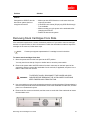
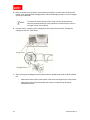
To unpack and inspect the autoloader for shipping damage
1. Clear a table or desk so that you have room to unpack the autoloader.
Unpacking and Inspecting
21