1
Using Adobe PageMaker Version 6.0, 6.5, or 7.0
Using Adobe PageMaker Version 6.0, 6.5,
or 7.0
If you use this printer under Windows 95/98/Me, Windows 2000, Windows
XP/Server 2003, or Windows NT 4.0 with Adobe PageMaker, you need to copy
the PPD file to the PageMaker folder.
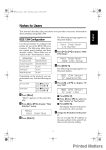
The PPD file is the file with extension “.ppd” in the folder “DRIVERS\PS\WIN9X_ME\(Language)\DISK1\” on the CD-ROM.
The “WIN9X_ME” folder, inside the “PS” folder is for Windows 95/98/Me. Use
the folder at a level appropriate for your operating system.
The third folder, “(Language)” may be substituted for an appropriate language
name.
Copy the file with the extension “.ppd” to the PageMaker folder.
• For PageMaker 6.0 default installation
The directory is “C:\PM6\RSRC\PPD4”.
• For PageMaker 6.5 default installation
The directory is “C:\PM65\RSRC\USENGLISH\PPD4”.
The “USENGLISH” may vary depending on your language selection.
• For PageMaker 7.0 default installation
The directory is “C:\PM7\RSRC\USENGLISH\PPD4”.
The “USENGLISH” may vary depending on your language selection.
4
Note
❒ If the driver is not set correctly after copying the “.ppd” file, printing may not
be performed properly.
❒ When using PageMaker, the optional features that can be selected by the
printer driver will not be active. The following procedure describes how to
activate the optional printer features.
A On the [File] menu, click [Print].
The [Print Document] dialog box appears.
B Make the necessary settings in the [Features] box.
93