1
8. Remove the securing blanking plugs from water pipes.
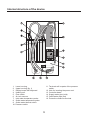
9. Connect the heater to the water distribution system (Fig. 5 service line marked 14, outlet
marked 15)
10. Switch on the water supplying the heater and check the tightness of the connections.
11. Connect the heater to the electrical wiring in accordance with Figure 4.
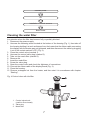
12. Connect the ribbon cable by inserting the plug with the proper side to the socked marked
“LCD”, see (Fig. 2).
13. Put on the housing and screw it with a fastening screw.
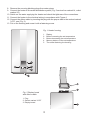
Fig. 1 Heater housing
1. 2. 3. 4. 5. Fig. 2 Display board
with ribbon cable
1. Plug
2. Socket marked “LCD”
3. Display board
3
Display
Button increasing the set temperature
Button decreasing the set temperature
Memory buttons of the set temperature
The screw fastening the housing