1
Installing the Digital Sprite 2
Check the contents of the box:
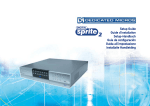
Digital Sprite 2
IR remote handset
Mains cable with three pin plug fitted (North America)
Mains cable with plug fitted (European)
Mains cable without plug fitted (other regions)
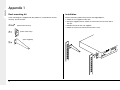
Rack mount kit (rack mount ears, rear supports, and fixing screws)
485-bus cable
Setup Guide and Operator Guide, note the Networking Guide is
stored on the unit and downloadable from the Web interface
Choosing a location for installation
Digital Sprite 2 is designed to be rack or desk mounted. The following
precautions must be taken when installing Digital Sprite 2:
• The rear supports must be used when rack mounting the unit, failure to use
these may cause damage to the unit.
• If the unit is to be installed in a closed or multi-unit rack assembly, the
maximum operating ambient temperature must not exceed 104oF (40oC).
• Ensure there is a 1" (2.54cm) gap on either side of the unit.
• Openings in the unit’s case are provided for ventilation and to prevent
overheating, these openings should not be blocked or covered.
• When stacking units, ensure there is at least a 1/2" (1.3 cm) gap between
each unit.
• Ensure the unit is not located in an area where it is likely to be subjected to
mechanical shocks.
• The unit should be located in an area with low humidity and a minimum of
dust. Avoid places like damp basements or dusty hallways.
• Ensure there is reliable earthing of the mains outlet when fitted to supply
connections other than direct connection to the branch circuit.
• When connecting the Digital Sprite to a branch circuit this must be rated
15 Amps.
ENGLISH
Before you start:
• If using external storage, refer to the relevant JBOD or RAID instructions for
placement details.
• It is recommended that a UPS (Universal Power Supply) be connected to
the unit in case of power failure. This will ensure the continuous operation
of the Digital Sprite 2.
Typical Power Ratings
Voltage (VAC)
Typical Current (amps)
Power (W)
240
0.37
88.8
110
0.54
59.4
A quick overview of digital recording
Digital multiplex recorders work in exactly the same way as analogue
multiplexers except that they use hard disks and digital tape to store video,
instead of VCR tapes. Analogue recording uses time-lapse recording to extend
the length of time recorded onto a 3-hour tape - recording fewer pictures every
second. Adjusting the number of pictures recorded every second also extends
the length of time recorded onto the hard disk of a Digital Sprite 2. However,
other factors also determine the amount of time that can be stored on the disk
of a digital multiplex recorder:
• The image quality
• The record rate
• The hard disk capacity
Image quality
Digital multiplex recorders store images in a compressed format, allowing
images to be recorded more efficiently. The higher the compression, the
smaller the file size, but the image quality will suffer. Digital Sprite 2 can
compress images between 6KB and 45KB. Kilobytes and Gigabytes are units
of storage:
1GB = 1024 Megabytes (MB)
1MB = 1024 Kilobytes (KB)
5