1
WOK installation_Mono 1.0:Intl Multi-F CT Install
31/3/10
1:26 PM
Page 10
W O L F M U LT I - F U N C T I O N C O O K T O P
C O O K T O P I N S TA L L AT I O N
Insert the cooktop into the countertop cut-out
opening. Center the cooktop in the opening
and make sure that the front edge of cooktop
is parallel to the front edge of the countertop.
Check that all required clearances are met. Use
a pencil to outline the rear edge of the cooktop
on the countertop. Remove the cooktop from
the countertop opening.
IMPORTANT NOTE: When repositioning the
cooktop in the countertop cut-out opening, lift
the entire cooktop up from the opening to
prevent scratching the countertop.
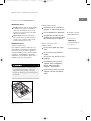
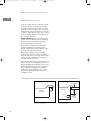
Remove the foam strip from the hardware
package. Apply the foam strip around the
bottom of the burner box flush with the edge
as shown in the illustration below.
Reinsert the cooktop into the countertop
opening. Check that the cooktop is parallel to
the front edge of the countertop. Lift the entire
cooktop to make adjustments and align the
rear edge with the pencil line.
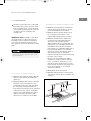
Attach the brackets to the burner box by inserting the clips into the rectangular punchouts on
the left and right side of the burner box. Insert
the 89 mm clamping screws into the brackets.
Use a screwdriver to tighten the clamping
screws against the underside of the countertop. Refer to the illustration below. Do not
overtighten screws.
Countertop
Burner Box
Cooktop
Burner Box
Foam
Strip
Bracket
Clip
Foam strip application
10
Bracket installation
89 mm
Clamping
Screw