1
SDC-10
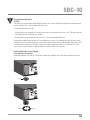
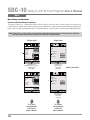
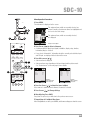
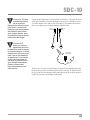
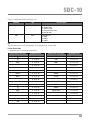
Menu Operation Procedures
STANDBY/ON
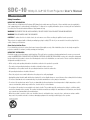
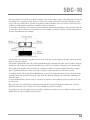
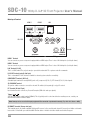
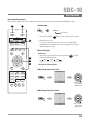
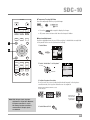
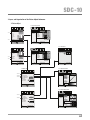
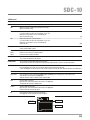
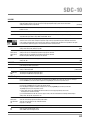
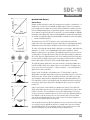
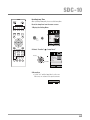
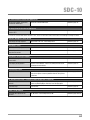
1 Press MENU
The main menu is displayed on the screen.
INPUT
OK
3
3
Picture Adjust
5
2
MENU
4
BACK
1
6
Picture Mode
Film
Color Profile
Color Temp.
Gamma
Film Tone
Contrast
Brightness
Color
Tint
Film1
Xenon1
Film1
0
0
0
Reset
Operate
Exit
MENU
ON
HDMI 2
COMP.
3D
FORMAT
3D
SETTING
ANAMO.
LENS.
CONTROL
LENS
MEMORY
LENS AP.
HIDE
Back
BACK
Select
Example: Picture Adjust
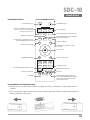
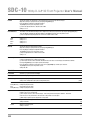
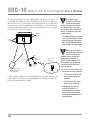
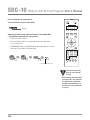
2 Press Cursor ( / ) to Select a Submenu
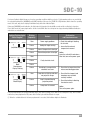
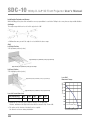
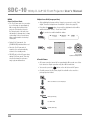
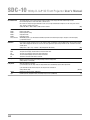
• A submenu (picture adjust, input signal, installation, display setup, function,
information) may be selected:
INPUT
HDMI 1
The submenu items, which are currently selected,
are displayed.
0
Advanced
STAND BY
The submenu items, which are currently selected, are
shown. Currently selected menu items are highlighted and
the icon is colored in orange.
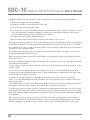
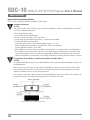
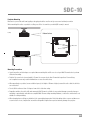
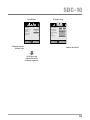
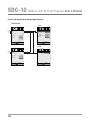
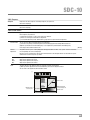
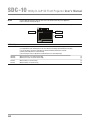
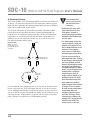
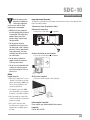
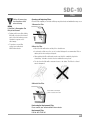
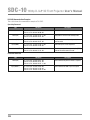
• If one selects “Information”, information about the currently selected video input
and PC input are displayed at the bottom of the menu.
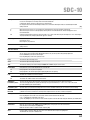
3 Press OK or cursor ( / )
• Sub-menu item is displayed.
LIGHT
3
4
2
5
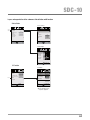
• Sub-menu items vary depending on the input signal and the picture mode.
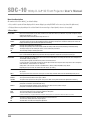
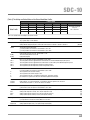
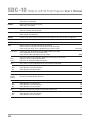
See “Content menu” on the next page for more details.
3
Information
Information
1
BACK
MENU
PICTURE MODE
FILM
CINEMA
ANIME
NATURAL
STAGE
3D
USER
INFO
C.M.D.
6
Input
:
HDMI-2
Source
:
1080p60
Deep Color
:
10bit
Lamp Time
:
160H
MENU
GAMMA
COLOR
TEMP
COLOR
P.FILE
Operate
Exit
Select
Back
BACK
Example:
Input signals other
than PC signals
Input
Resolution
H Frequency
:
PC
:
1920X1080
:
67.50kHz
V Frequency
Deep Color
:
60.0Hz
:
8bit
Lamp Time
:
160H
Operate
Exit
MENU
Select
Back
BACK
Example:
When inputting
PC signals
PIC.
ADJ.
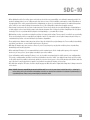
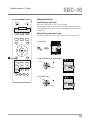
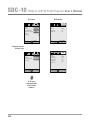
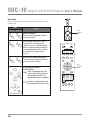
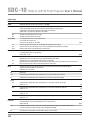
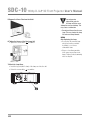
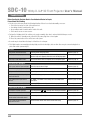
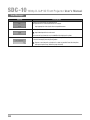
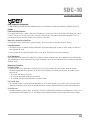
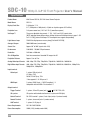
4 Press the Cursor ( / ) to Select the Items to Adjust
If the name of a submenu item is dimmed, it cannot be selected.
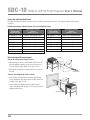
5 Press Cursor ( / ) to Change Settings
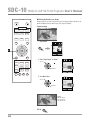
6 After Adjusting, Press BACK
Every time it is pressed, you will return to the previous menu screen.
7 Repeat Steps 6-2 to Adjust Other Items
After all adjustments are done, press MENU, and the menu disappears from the screen.
45