1
5. SERVLETEXEC APPLICATION SERVER (WINDOWS)
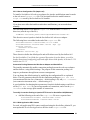
To modify Connection Pooling in NES/iWS for ServletExec/AS
•
Add the following to the beginning of the obj.conf file. Go back to Step 1
earlier in this section, copy it that line and insert a space at the end it, adding the
following immediately after and on the same line (the formatting requirements of
this page are wrapping the text to fit the page):
<instance-name>.pool-max-idle=<value> <instance-name>.poolincrement=<value>
5.5.4.2 Web Application URL Context
For each web application URL context configured using the ServletExec Admin UI, you
must add a NameTrans directive to the obj.conf file.
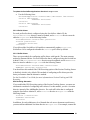
To update the applications property in obj.conf
Use the following form:
NameTrans fn=”assign-name” from=”/URL-context/*” name=”<instance-name>”
5.5.4.3 Prefix Aliases
For each prefix alias configured using the ServletExec Admin UI, you must add a
NameTrans directive to in the obj.conf file.
To update the aliases property in obj.conf
Use the following form:
NameTrans fn=”assign-name” from=”/prefix-alias/*” name=”<instance-name>”
5.5.4.4 Suffix Aliases
For each suffix alias configured using the ServletExec Admin UI, you must add a
NameTrans directive to the obj.conf file.
To update the aliases property in obj.conf
Use the following form:
NameTrans fn=”assign-name” from=”/suffix-alias/*” name=”<instance-name>”
5.5.5 Apache HTTP Server
If you installed a web server adapter for Apache HTTP Server, the installer modified
your system as described in the following sections.
5.5.5.1 ApacheModuleServletExec.dll
The ServletExec/AS web server adapter for Apache HTTP Server is implemented by the
ApacheModuleServletExec.dll library, which is copied by the ServletExec/AS
installer to the modules subdirectory of the Apache installation directory.
ServletExec 4.1 Installation Guide
57