1
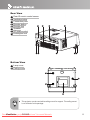
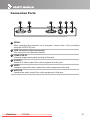
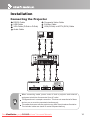
Connection Ports
1
2
3
4
5
6
1 SERIAL
When operating the projector via a computer, connect this to the controlling
computer’s RS-232C port.
2 USB Connector (Service purpose)
This connector is for firmware update.
3 COMPUTER IN
Connects image input signal (analog) to this jack.
4 S-VIDEO
Connects S-Video output from video equipment to this jack.
5 VIDEO
Connects composite video output from video equipment to this jack.
6 AUDIO IN
Connects an audio output from video equipment to this jack.
ViewSonic
PJ556D
Downloaded
From projector-manual.com
Viewsonic Manuals
10