1
I n t e g r a t i o n Te c h n i c a l N o t e
MITEL D/82 Station Set
Emulation
Integration
ii
Te c h n i c a l
Note
Edition Note
This is the first edition of the MITEL D/82 Station Set Emulation Integration Technical Note.
Information in this document applies to OneBox UM systems with version 3.0 or later.
Copyright Notice
MITEL D/82 Station Set Emulation
EN/LZT 108 6655 R1A
© Ericsson Enterprise AB 2003. All rights reserved.
No part of this document may be reproduced in any form without the written permission of the
copyright owner.
The contents of this document are subject to revision without notice due to continued progress
in methodology, design and manufacturing. Ericsson shall have no liability for any error or
damage of any kind resulting from the use of this document.
©June 2003 Ericsson Enterprise AB
EN/LZT 108 6655 R1A
MITEL D/82 Station Set Emulation
Integration
Te c h n i c a l
Note
iii
Table of Contents
Overview....................................................................................................................................... 1
References.......................................................................................................................................................... 2
Features Supported by this Integration........................................................................................................ 2
Critical Application Considerations .............................................................................................................. 4
Installation Requirements ....................................................................................................... 5
Telephone System Requirements.................................................................................................................. 5
OneBox Requirements..................................................................................................................................... 5
Programming the Telephone System ................................................................................... 6
Programming the SX-200D System with G1005 (F03.9) and Higher Software ............................... 6
Programming the DNIC Ports for OneBox.................................................................................................. 6
Subscriber Telephone Programming ............................................................................................................ 8
Programming the SX-2000 System with MS2006 (M23.2) and Higher Software............................ 9
Programming the DNIC Ports for OneBox.................................................................................................. 9
Subscriber Telephone Programming ......................................................................................................... 12
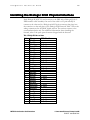
Installing the Dialogic D/82 Physical Interface ...............................................................13
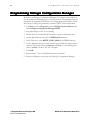
Programming Dialogic Configuration Manager ..............................................................14
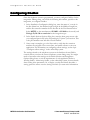
Configuring OneBox................................................................................................................15
Completing the Integration...................................................................................................16
MITEL D/82 Station Set Emulation
©June 2003 Ericsson Enterprise AB
EN/LZT 108 6655 R1A
Integration
iv
Te c h n i c a l
Note
This page is intentionally left blank.
©June 2003 Ericsson Enterprise AB
EN/LZT 108 6655 R1A
MITEL D/82 Station Set Emulation
Integration
Te c h n i c a l
Note
1
Overview
This Integration Technical Note (ITN) is written for dealers who are experienced
with OneBox UM® and are familiar with its procedures and terminology. This
document also assumes that you are familiar with the features and programming
of the MITEL SX-200D or SX-2000 telephone system.
This document describes how to integrate OneBox UM with a MITEL SX-200D
or SX-2000 telephone system, using a Dialogic D/82JCT-U PCI linecard. This
integration is a station-set emulation integration. The Dialogic D/82 linecard
emulates eight digital M430 telephone stations. These digital extensions provide
DTMF signaling and voice communication between OneBox and the MITEL
system. Calling- and called-party information is read by Dialogic from the LCD
display of the emulated telephone set and passed to OneBox at the same time
that a call is sent. The data is matched with the ringing extension and OneBox
answers with the appropriate dialog. Message Waiting Indicator (MWI) operation
is also performed over the digital station port.
Use this document in conjunction with the Installing OneBox and
Administering OneBox guides and with the OneBox online help system.
MITEL D/82 Station Set Emulation
©June 2003 Ericsson Enterprise AB
EN/LZT 108 6655 R1A
Integration
2
Te c h n i c a l
Note
References
More current information may be available from the following documents:
•
Installing OneBox
•
Administering OneBox
•
Dialogic D/82JCT-U Installation and Replacement spare parts document
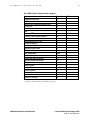
Features Supported by this Integration
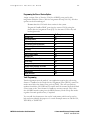
Tables 1 and 2 list the features supported with the MITEL Station Set
integration.
Table 1. Call forward to personal greeting for these call types
Divert to OneBox on…
No Answer
Busy
Forward All
Do Not Disturb
©June 2003 Ericsson Enterprise AB
EN/LZT 108 6655 R1A
Supported
Yes
Yes
Yes
Yes
MITEL D/82 Station Set Emulation
Integration
Te c h n i c a l
Note
3
Table 2. MITEL Station Set integration features supported
Feature
Automatic subscriber logon
ANI/CLI
“Announce Busy” greeting on forward busy calls
Call screening
Caller queuing
DNIS
End-to-end DTMF, attendant console
End-to-end DTMF, proprietary telephones
Fax ports
Internal calling party ID for reply
Live record, integrated
Live reply to sender
Message notification callouts
MWI, set/clear
MWI, inband/outband
Networking, analog
Overflow from OneBox to attendant
Overflow to OneBox from attendant
PBX-provided disconnect signaling
Revert to operator
Transfers, blind
Transfers, confirmed
Transfers, fully supervised
Transfers, monitored
Trunk ID for call routing
Supported
Yes
Yes
Yes
Yes
Yes
No
Yes
Yes
Yes
Yes
No
Yes
Yes
Yes
Inband
Yes
Yes
Yes
Yes
Yes
Yes
Yes
Yes
Yes
Yes
Notes
See note 1
Notes:
1. Requires separate industry-standard analog lines.
MITEL D/82 Station Set Emulation
©June 2003 Ericsson Enterprise AB
EN/LZT 108 6655 R1A
Integration
4
Te c h n i c a l
Note
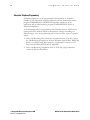
Critical Application Considerations
Known limitations or conditions within the telephone system and OneBox that
affect the integration performance are listed here. General recommendations are
provided when ways to avoid these limitations exist.
•
The Dialogic Configuration Manager defaults the PBX switch type as
Norstar. The correct PBX switch type, MITEL_DNIC_M430 must be
selected prior to starting the Dialogic service.
•
The Dialogic D/82 board is polarity sensitive. The Dialogic service may
fail to initialize the ports if the polarity of the PBX connection is reversed.
Terminate all station wiring as shown in the section, “Installing the Dialogic
D/82 Physical Interface” of this document.
•
The Lines tab must have the correct extension numbers specified in each
line.
•
Station numbers cannot use 0 as the leading digit. Non-numeric DTMF
tones cannot be used as any character in a station number. The maximum
length of a station number is ten digits.
•
Some MITEL telephone systems have automatic canceling of MWI on a
regular basis, which means that the telephone system may turn off MWI at
station sets before subscribers have called into their mailboxes and listened
to their messages.
•
OneBox cannot prevent the telephone system from turning off MWI, nor
can it determine when this happens. Enabling Refresh MWI at Daily
Maintenance on the Messaging tab can help compensate for this
functionality, which may be disabled on some systems. Switch specific
information is listed in this document.
•
Subscribers can turn on MWI at other stations and turn off their own
MWI. These features cannot be disabled.
•
Normal MWI set commands take between 4 and 8 seconds per station.
Additional Considerations for SX-200D G1005
with F03.9 or Higher
•
MWI is cleared from a subscriber telephone when it is used to call the port
or hunt group (OneBox) that set the light, even if the user does not log on
to his mailbox. MWI is also cleared when a subscriber connects via
transferred call to the port or hunt group (OneBox) that set the light. You
can compensate for this problem by changing the parameter, Preference
for Refreshing MWIs, in the Advanced Message Waiting settings of the
Integrations options dialog box.
©June 2003 Ericsson Enterprise AB
EN/LZT 108 6655 R1A
MITEL D/82 Station Set Emulation
Integration
Te c h n i c a l
Note
5
Installation Requirements
Review the following information before performing any of the procedures in
this document. To successfully install this integration, you must meet the
installation requirements both for the telephone system and OneBox.
Telephone System Requirements
•
On the SX-200D, revision G1005 F03.9 or higher software
•
On the SX-2000, revision MS2006 (M23.2) or higher software
•
One DNIC port for each integrated OneBox port
•
One Superset 430 telephone for testing
OneBox Requirements
•
A properly configured Microsoft Windows 2000 Server with Service Pack 2
telephony server platform
•
OneBox UM software version 3.0 or later
•
Ericsson software key diskette with the MITEL D/82 integration enabled.
Be prepared to specify the PBX model when ordering the integration.
•
Dialogic software version SR5.01.2 or later
•
One Dialogic D/82JCT-U port for each OneBox voice port to be
integrated
•
One Dialogic D/82-U specific PBX interface cable assembly for each
Dialogic D/82JCT-U card
•
An uninterruptible power supply and surge protection device
(recommended)
MITEL D/82 Station Set Emulation
©June 2003 Ericsson Enterprise AB
EN/LZT 108 6655 R1A
Integration
6
Te c h n i c a l
Note
Programming the Telephone System
Follow the recommendations and programming examples in this section to
program the PBX for integration with OneBox. Programming examples show
commands and parameters that are necessary for integration, but they do not
represent PBX programming in its entirety.
Programming instructions for the two MITEL systems listed below are provided
on the following pages:
SX-200D system with G1005 (F03.9) and higher software
SX-2000 system with MS2006 (M23.2) and higher software
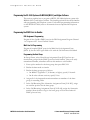
Programming the SX-200D System with G1005 (F03.9) and Higher Software
This section explains how to program a MITEL SX-200D telephone system with
G1005 (F03.9) and higher software. The installing technician should be familiar
with programming this telephone system. For detailed programming information
on the MITEL SX-200D, refer to the MITEL manuals that accompanied the
telephone system.
Programming the DNIC Ports for OneBox
Assign Extension Numbers to DNIC Ports (Form 9)
Assign an extension number to the Bay/Slot/CCT for each OneBox port. Assign
a distinct COS number to these extensions and assign the type as 430 for all
OneBox ports.
Programming the Hunt Group (Form 17)
Program the OneBox ports into a circular hunt group. Arrange for over-flow to
an operator or other group when all OneBox ports are busy. Choose an easily
remembered number; subscribers will use this number to call OneBox.
System Options Assignment (Form 4)
In System Options, configure the following options. All other settings should be
programmed as needed for your site.
Option
#02 Message lamp test enable
#07 Cancel 24-hour MWI
#20 Holiday messages
#22 Last party clear—dial tone
©June 2003 Ericsson Enterprise AB
EN/LZT 108 6655 R1A
Setting
Enable
Do not enable
Do not enable
Enable
MITEL D/82 Station Set Emulation
Integration
Te c h n i c a l
Note
7
Class of Service for OneBox DNIC ports (Form 3)
Define the following Class of Service (COS) options to the COS number
previously assigned in Form 9. All other assignments may be left at default.
Option
#203 Broker’s call
#206 Call forwarding, busy
#207 Call forwarding, don’t answer
#208 Call forwarding, external
#209 Call forwarding, follow me
#220 Do not disturb (DND)
#221 Clear all features
#229 COV VM port
#233 Never a consultee
#234 Never a forwardee
#235 Originate only
#240 Line privacy
#243 Non-busy extension
#251 Transfer dial tone
#258 Display prime as forwarder
#259 Message send
#502 Display ANI/DNIS/Class information
#504 ss420 optional Class/ANI display
#600 Superset, auto answer
#602 Superset, background music
#604 Superset, immed. Line select
#605 Superset, message
#606 Superset, enhanced answering Position
#609 Superset, night serv. Switch
#611 Superset, LIM new call ring
#612 Superset, headset operation
#613 Display ANI information only
MITEL D/82 Station Set Emulation
OneBox Ports
Do not enable
Enable
Enable
Do not enable
Enable
Enable
Enable
Do not enable
Do not enable
Do not enable
Do not enable
Enable
Do not enable
Do not enable
Enable
Do not enable
Enable
Enable
Do not enable
Do not enable
Enable
Do not enable
Enable
Do not enable
Do not enable
Do not enable
Enable
©June 2003 Ericsson Enterprise AB
EN/LZT 108 6655 R1A
Integration
8
Te c h n i c a l
Note
Trunk Programming for Call Routing (Forms 14 and 15)
Trunk assignments must be made if your application requires the call routing
feature of OneBox. Trunks follow the standard Txxx format such as [T099].
(The xxx can equal any number from 000 to 999.) If individual trunk names are
to be used, the names must retain the Txxx format. DID and Tie trunks must be
renamed from the default (Xxxx) name to the Txxx format for OneBox to
answer correctly. However, you can group trunks under one or more Txxx codes
to reduce the number of call processor mailboxes required for trunk-specific
announcements.
You can add four characters to the end of trunk names, which can be used to
help end users identify the purpose of a trunk. Example names are T001LOCL,
T002 BUS, or T003WATS.
Subscriber Telephone Programming
Subscriber telephones can be programmed at the telephone to forward to
OneBox. If the automated attendant application will use monitored transfers,
program FORWARD-NO ANSWER on subscriber telephones. If the
application will use blind transfers, program FORWARD-BUSY/RNA on
subscriber telephones.
Subscriber Station Class of Service (Form 3)
These options are critical to the proper operation of the integration. Options not listed here
can be configured as necessary for the site requirements.
Option
#229 COV VM port
#232 Message waiting setup
©June 2003 Ericsson Enterprise AB
EN/LZT 108 6655 R1A
Subscriber Extensions
Do not enable
Enable
MITEL D/82 Station Set Emulation
Integration
Te c h n i c a l
Note
9
Programming the SX-2000 System with MS2006 (M23.2) and Higher Software
This section explains how to program a MITEL SX-2000 telephone system with
MS2006 (M23.2) and higher software. The installing technician should be familiar
with programming this telephone system. For detailed programming information
on the MITEL SX-2000, refer to the manuals that accompanied the telephone
system.
Programming the DNIC Ports for OneBox
DNI Assignment Programming
Program all the OneBox DNIC ports in the DNI Assignment Program Channel
1 as “Superset 430”. Leave Channel 2 blank.
Multi-line Set Programming
Program all required DNIC ports in the Multi-line Set Assignment Form
[MU S A]. Set the ACD Agent field to No with the Call Announce field blank.
Programming the Hunt Group
In Group Forms, select Hunt Group Assignment Form [HU] and set up a
circular hunt group with the DNIC ports used with OneBox. Choose an easily
remembered number; subscribers will use this number to call OneBox.
1. Enter a pilot number for the hunt group, then press RECALL.
2. Define the hunt mode as circular.
3. Define the hunt group type as follows:
→ On MS2007 (Lightware 27, N-Stream, or higher), specify Voicemail.
→ On all other software versions, specify Voice.
4. Assign all of the integrated extension numbers as members of the hunt
group, in ascending order.
5. In the Call Rerouting First Alternative Assignment Form [CAL R F], assign
an overflow position for the hunt group.
6. In the Call Rerouting Assignment Form [CAL R AS], assign the Alternative
number (from the above step) to the hunt group to be invoked when all
DNIC ports are busy.
MITEL D/82 Station Set Emulation
©June 2003 Ericsson Enterprise AB
EN/LZT 108 6655 R1A
Integration
10
Te c h n i c a l
Note
System Options Assignment
Options here are critical to the integration. In the System Option Assignment Form
[SYS O], program the following assignments. All other assignments should be
programmed as needed for your site.
Option
Multi-line set callback
Message cancel timer [1–24 hours]
Value
blank
blank (See note 1)
Notes:
1. On versions that do not allow this field to remain blank, set it for 24.
Feature Access Code Assignment Programming
On the Feature Access Code Assignment Form [FE], make sure that the
following features are programmed. The codes shown are examples only; specify
a number appropriate for your site.
Feature Name
Primary Code
Message waiting activate
*131
Message waiting deactivate
*132
©June 2003 Ericsson Enterprise AB
EN/LZT 108 6655 R1A
MITEL D/82 Station Set Emulation
Integration
Te c h n i c a l
Note
11
Programming the Class of Service Options
Assign a unique Class of Service (COS) for all DNIC ports used in this
integration within the Class of Service Assignment Form [CLA O S]. All other
options can be left unchanged.
Do not share this COS with other stations in the system.
Program all OneBox DNIC ports into the correct COS by using the
Station Service Assignment Form [ST]. Use the same COS for day and
both night modes.
Option
ANI/DNIS trunk
Auto answer allowed
Call forwarding accept
Call forwarding (external destination)
Call forwarding (internal destination)
Call privacy
Camp-on tone security
Clear all features remote
Conference call
COV/ONS/E & M voice mail port
Do not disturb
Message waiting
Message waiting deactivate on off-hook
Multi-line set on-hook dialing
Redial facilities
Ringing line select
OneBox ports
No
No
Yes
No
Yes
Yes
Yes
Yes
Yes
No
Yes
No
No
Yes
Yes
Yes
Trunk Programming
Trunk assignments must be made if your application requires the call routing
feature of OneBox. In the Trunk Service Assignment Form [TRU S], names for
trunks must follow the format Txxx, such as [T099]. (The xxx can equal any
number from 000 to 999. DID and Tie trunks must be renamed from the default
(Xxxx) name to the Txxx format for OneBox to answer correctly. This is also
true for ISDN trunks coming into the ISDN Gateway Node. Group like trunks
together for trunk-specific routes, if required.
You can add four characters to the end of trunk names, which can be used to
help end-users identify the purpose of a trunk. Example names are T001LOCL,
T002 BUS, or T003WATS.
MITEL D/82 Station Set Emulation
©June 2003 Ericsson Enterprise AB
EN/LZT 108 6655 R1A
Integration
12
Te c h n i c a l
Note
Subscriber Telephone Programming
Subscriber telephones can be programmed at the telephone to forward to
OneBox. If the automated attendant application will use monitored transfers,
program FORWARD-NO ANSWER on subscriber telephones. If the
application will use blind transfers, program FORWARD-BUSY/RNA on
subscriber telephones.
As an alternate method of programming for subscriber stations, build a call rerouting table. This method will allow subscribers to change forwarding to a
different target. Also, the programming will not be lost in the event of a power
failure.
1. In the Call Rerouting First Alternative Assignment Form (CAL R F), assign
the OneBox hunt group pilot as the first alternative. Specify Busy, DND, and
RNA if you will be using blind transfers. Assign them to reroute on CO
lines, internal, DID, and TIE lines if applicable.
2. In the Call Rerouting Assignment Form (CAL R AS), assign subscriber
stations to the First Alternative.
©June 2003 Ericsson Enterprise AB
EN/LZT 108 6655 R1A
MITEL D/82 Station Set Emulation
Integration
Te c h n i c a l
Note
13
Installing the Dialogic D/82 Physical Interface
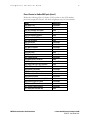
Each Dialogic D/82JCT-U card connects to the PBX with a Dialogic D/82-U
PBX interface cable assembly. One end of the cable is a 25-pair male RJ-21
connector; the other end is a Dialogic mini-D 36-pin connector that plugs into
the connector on the end plate of the Dialogic D/82 linecard. Table 3 shows the
wiring connections for the DNIC digital stations. The stations connect to the
even numbered pairs only. For additional information about installing the
linecard, refer to the spare parts document shipped with the linecard.
Table 3. Dialogic D/82 wire cut-down
Pair
1
2
3
4
5
6
7
8
9
10
11
12
13
14
15
16
Color
White/Blue
Blue/White
White/Orange
Orange/White
White/Green
Green/White
White/Brown
Brown/White
White/Slate
Slate/White
Red/Blue
Blue/Red
Red/Orange
Orange/Red
Red/Green
Green/Red
Red/Brown
Brown/Red
Red/Slate
Slate/Red
Black/Blue
Blue/Black
Black/Orange
Orange/Black
Black/Green
Green/Black
Black/Brown
Brown/Black
Black/Slate
Slate/Black
Yellow/Blue
Blue/Yellow
MITEL D/82 Station Set Emulation
DNIC 430 stations
T (Port 1)
R (Port 1)
T (Port 2)
R (Port 2)
T (Port 3)
R (Port 3)
T (Port 4)
R (Port 4)
T (Port 5)
R (Port 5)
T (Port 6)
R (Port 6)
T (Port 7)
R (Port 7)
T (Port 8)
R (Port 8)
©June 2003 Ericsson Enterprise AB
EN/LZT 108 6655 R1A
Integration
14
Te c h n i c a l
Note
Programming Dialogic Configuration Manager
By default, the Dialogic Configuration Manager for software version SR5.01.2
sets the parameter PBXSwitch type to Nortel_Norstar. This parameter must be
changed to the appropriate PBX type you are integrating with OneBox. Follow
these steps to change the parameter for each D/82JCT-U linecard installed:
1. Click Start, point to Programs, point to Dialogic System Software, and
select Dialogic Configuration Manager-DCM.
2. Stop the Dialogic service if it is running.
3. Double-click the installed D/82U linecard to open the Properties sheet.
4. On the Miscellaneous tab, select the PBXSwitch parameter.
5. In the Values list, select MITEL_DNIC_M430 as the PBXSwitch type.
6. On the Telephony Bus tab, verify that the correct PCM encoding scheme is
selected. The default value is automatic or U-Law; you must change this
value to A-Law outside of the U.S. and Japan.
7. Click OK.
8. Repeat steps 3-7 for each D/82 linecard that is installed.
9. Restart the Dialogic service and close Dialogic Configuration Manager.
©June 2003 Ericsson Enterprise AB
EN/LZT 108 6655 R1A
MITEL D/82 Station Set Emulation
Integration
Te c h n i c a l
Note
15
Configuring OneBox
Once the telephone system is programmed, you must configure OneBox for the
integration. During setup, you’ll need the following information, specific to this
integration, to configure OneBox.
1. In the Installation Configuration dialog box, enter the name of your site in
the Site Name box, the mailbox length in digits in the Mailbox Length box,
and the first extension number for the first line in the First Extension box.
Select MITEL as the manufacturer, SX-200D or SX-2000 as the model, and
Dialogic D/82 430 set emulation as the integration type.
2. In the Switch Section Options dialog box, enter the hunt group access code
you configured previously in the Programming the Telephone System section. This
is the pilot number users will dial to reach OneBox.
3. Once setup is complete, go to the Lines tab to verify that the extension
numbers are assigned to the correct lines, and enable callouts to suit your
application. For information on configuring callout settings, see the topic
“Configure callout settings,” in the online help system.
The settings related to the telephone system on the Switches tab are filled in
correctly when you select the correct telephone system during setup. You might
need to customize other settings on the Switch Sections and Integrations
Options dialog boxes to suit the requirements of each application. Refer to
Installing OneBox, Administering OneBox, or the online help system for more details
about setting these parameters. Or, to display a tooltip that briefly describes a
setting, pause the mouse over the setting for which you want more information.
MITEL D/82 Station Set Emulation
©June 2003 Ericsson Enterprise AB
EN/LZT 108 6655 R1A
Integration
16
Te c h n i c a l
Note
Completing the Integration
Now you are ready to complete the OneBox UM installation. See the guides
Installing OneBox and Administering OneBox, or the OneBox online help system, for
instructions. For general information on integrations, you may also wish to
consult “Integrating OneBox with the Telephone System,” in the Installing
OneBox guide, and the topic “Integrate the Telephony Server with the telephone
system,” in the online help system.
©June 2003 Ericsson Enterprise AB
EN/LZT 108 6655 R1A
MITEL D/82 Station Set Emulation