1
70803-IM
12/18/06
2:10 PM
Page 5
4)
Set the system switch to the HEAT position and depress the red
arrow key until the temperature set point is at least 3 degrees
above the room temperature. The LCD will display a flame icon
to indicate heat. The heating system should start within several
seconds (the system blower may not come on immediately).
5)
Set the system switch to the OFF position. The system should shut down within several seconds. The LCD
will again display only the room temperature.
6)
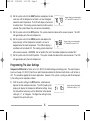
Set the system switch to the COOL position and depress the
Image shows room temperature
blue arrow key until the temperature set point is at least 3
of 78 and A/C set point of 68.
degrees below the room temperature. The LCD will display a
snowflake icon to indicate A/C. The cooling system should start
within several seconds. WARNING: Do not perform this test if the outdoor temperature is below 50 F.
7)
Set the system switch to the OFF position. The system should shut down within several seconds. The LCD
will again display only the room temperature.
Image shows room temperature
of 70 and HEAT set point of 73.
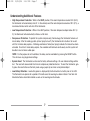
Programming The User Settings
Temperature Differential is factory set at .5 F (0.25 C) for both heating and cooling cycles. The room temperature must change .5 F (0.25 C) from the set point temperature before the thermostat will initiate a call for heat or
A/C. This should be appropriate for most applications. However, if the system is cycling on and off too frequently, the setting can be adjusted as follows.
1)
With the system setting in the OFF position, simultaneously
depress the red and blue arrow keys. The LCD (liquid crystal
display) will display the temperature differential setting. Using
the red and blue arrow keys set the differential to the desired
setting of .5, 1, or 2 degrees. The higher the setting, the less
frequently the system will cycle.
5
Image shows temperature
differential setting of 0.5.