1
70803-IM
2)
12/18/06
2:10 PM
Page 6
When the desired setting is made, release the key and the unit will automatically store the setting after 5
seconds.
Cooling Fan Time Delay is factory set at 60 seconds. When the thermostat is set in the COOL position, the
system blower will continue to circulate air for a period of 60 seconds after the compressor(s) has shut off.
This feature can be adjusted.
1)
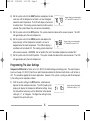
With the system setting in the OFF position, simultaneously
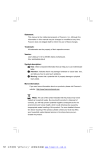
Image shows fan delay
depress the red and blue arrow keys. The LCD (liquid crystal dissetting at 60 seconds.
play) will display the temperature differential setting. Release the
keys and immediately press them again; the display will now show
the fan delay time in seconds. Use the red and blue arrow keys to set the delay time to the desired setting of 0, 30, or 60 seconds.
2)
When the desired setting is made, release the key and the unit will automatically store the setting after 5
seconds.
Operating The New Thermostat
1)
Set the System switch to either the HEAT or COOL position and the Fan switch to either the AUTO or ON
position. NOTE: In AUTO, the system blower will run only when the A/C or heat is running. In ON, the
system blower will operate continuously.
2)
Use the red and blue arrow keys to select the desired temperature set point.
3)
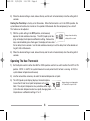
The LCD (liquid crystal display) displays the room temperature on the left and the set point temperature on the right.
Note: The set point temperature may sometimes differ slightly from the room temperature due to a rapidly changing room
temperature or a differential setting of 1 or 2.
6
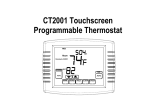
Image shows room temperature
of 78 and A/C set point of 68.