1
A31585,R22GV,/22GT/23GT/24GT/25JT
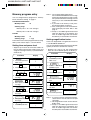
Memory program entry
You can change memory programs for memory
banks. See time cooking on page 11.
R-22GT/23GT/24GT/25JT
Memory banks
20
Cooking stage
Memory NO.1 -10 max. 3 stages
Memory NO. 11-20 max. 2 stages
R-22GV
Memory banks
10
Cooking stage
1 stage
The R-22GV oven can be programmed only using
100% power. Follow steps 1,2,3 and 7 below.
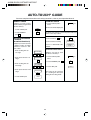
Setting time and power level
* Suppose you want to set 4 minutes at 60% for
the 1st stage and 2 minutes at 30% for the 2nd
stage for 1 serving in memory 1.(R-22GT/23GT/
24GT/25JT)
Note: 1. (For R-22GT/23GT/24GT/25JT)
Touch SELECTAPOWER twice for High
power when programming stages. If High
is the power level of the last stage, it is not
necessary to touch SELECTAPOWER
at all.
2. If you want to set memory 11-20, press
the desired number pad twice.
3. If the cooking time is over the maximum
time, the display will show “EE 9”. See
page 11.
4. At step 1, no audible signal will be heard
when the SET key is touched the first
time. An audible signal will sound when
the SET key is touched the second time.
Setting magnification factor
Ovens are shipped with a magnification factor of
1.8 for DOUBLE QUANTITY.
You can change the magnification factor for double
quantity and have it stored in the memory.
* Suppose you want to set the magnification
factor to 1.67 for double quantity in memory 1.
Procedure
Procedure
SET
x2
SET
Display
Display
1 Touch SET pad twice
within 2 sec.
x2
1 Touch SET pad twice
within 2 sec.
NO.
NO.
DOUBLE
QUANTITY
1
2 Touch number pad.
NO.
2 Touch
DOUBLE
QUANTITY pad.
1
SELECTATIME
3 Touch number pad 1.
4 0 0
3 Enter cooking time for
1st stage.
SELECTAPOWER
6
4 Enter power level in
1st stage.
2 0 0
3
6 Enter power level for
2nd stage.
SET
4 Touch SELECTATIME
pad.
x2
7 Touch SET pad twice.
X2
1 6 7
SET
5 Enter cooking time for
2nd stage.
NO. X2
SELECTATIME
5 Touch NUMBER pads
1,6 and 7.
SELECTATIME
SELECTAPOWER
NO. X2
X2
x2
6 Touch SET pad twice.
Note: 1. In case you want to change the magnification factor it must be set for each pad
separately.
2. The magnification factor can be set from
0.00 to 9.99.
3. At step 1, no audible signal will be heard
when the SET pad is touched the first
time. An audible signal will sound when
9
the SET pad is touched the second time.