1
A31585,R22GV,/22GT/23GT/24GT/25JT
OTHER CONVENIENT FEATURES
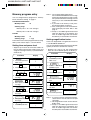
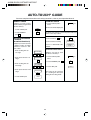
Signal setting
Demonstration Mode
There is a choice of 2 different sounds and no
sound on your oven.
To demonstrate,touch SELECTATIME, 0 and then
touch START and hold for 3 seconds.Cooking
operations can now be demonstrated with no power
in the oven. The timer will count down rapidly.
To set signal, touch the SET pad twice within 2
sec., and then touch the SIGNAL pad continuously
until you hear desired tone.
To cancel, touch SELECTATIME,then 0 and STOP/
CLEAR.
CARE AND CLEANING
Oven Exterior
The outside of your oven can be easily cleaned
with mild soap and water. Make sure to rinse
thoroughly and dry the exterior with a soft towel.
VERY IMPORTANT CAUTIONS
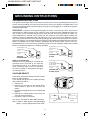
*DO NOT OPERATE the oven without the
splash cover in place.
*DO NOT REMOVE the splash cover UNLESS
THE POWER CORD IS REMOVED FROM
THE OUTLET because the stirrer fan, which
is located on the ceiling, operates for 1 minute
after the door is opened and injury could
occur.
*DO NOT REMOVE the ceramic shelf from the
oven.
Control Panel
Care should be taken in cleaning the control
panel. Open the door before cleaning to inactivate
the control panel pads.
Using a cloth dampened with water only, gently
wipe the panel until it becomes clean. Avoid the
use of excess water. Do not use any sort of
chemical or abrasive cleaner because to do so
may cause severe damage to the panel and make
programming impossible.
*DO NOT OPERATE the oven without the air
intake filter in place.
*DO NOT USE commercial oven cleaners,
abrasive or harsh cleaners or scouring pads
on any part of your microwave oven.
14