1
Content Index
Disclaimer of Warranties
4
Before You Start
5
Important Notice
Safety Precautions
Definition
5
5
5
Chapter 1.
Basic Introduction
1. Features
2. System Overview
7
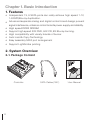
2-1. Package Content
7
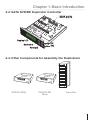
2-2. SATA DVD/BD Duplicator Controller
8
2-3. Other Components for Assembling the
Duplicator
7
8
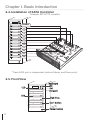
2-4. Installation of SATA Controller
9
2-5. Front View
9
Chapter 2.
Function Table
7. Utility
7-1. Information
20
20
7-2. Erase Disc
21
7-3. PreScan Source
22
7-4. Track Edit
23
7-5. Eject All Disc
23
7-6. Copy Counter
23
7-7. Update BIOS
24
7-8. PRINT LS Label
25
7-9. Verify Disc
25
8. Setup
8-1. Auto Start Time
25
25
8-2. Display Mode
25
8-3. Button Beep
26
8-4. Eject On Start
26
8-5. Reader Speed
26
8-6. Compare Speed
27
8-7. Language
27
8-8. Clear Setup
27
8-9. Advanced Setup
27
9. HDD Manager (For HDD-installed duplicator) 28
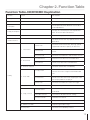
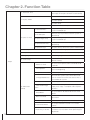
Function Table-CD/DVD/BD
Duplication 10
Chapter 3.
Quick Operation Guide
9-1. Select Image
28
9-2. Disc to Image
29
9-3. Set Reader Speed
30
9-4. Show Image Info.
30
9-5. Rename Image
30
9-6. Delete Image
31
9-7. Show HDD Info.
31
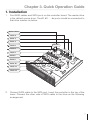
1. Installation
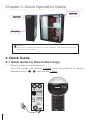
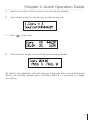
2. Quick Guide
13
9-8. Format HDD
32
14
9-9. Load & Copy
32
14
-Quick Guide for Disc-to-Disc Copy
Chapter 5.
Specification
Chapter 4.
Operation
1. Copy
2. Test
3. Compare
4. Copy & Compare
5. Set Burn Speed
6. Select Source
16
16
17
33
Appendix A. LightScribe Operation 34
38
Appendix B. Troubleshooting
-Error Message
38
18
-FAQ & Maintenance Guide
39
19
Appendix C. Do & Don't
19
42
3