1
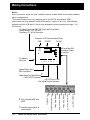
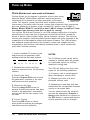
Front Panel Controls and Indicators (Normal Mode)
LCD Window Information
Vertical Rate
nearest Hz
Horizontal Rate
nearest KHz
Current
Format
Current
Test Image
Power On Indicator
802
Video
Test
Generator
Format Knob
Selects a video
signal format from
knob list
H31 219=VGA_3
V60 198=SMPTE133
Format
Image Knob
Selects a test
image (pattern)
from knob list
Image
Image
STEP
Image/ Step
Button
Draws alternate
versions of test
images
Video Gate
R
G
Outputs
Sync Gate
B
Video Gate
Buttons
Turn individual
video elements
on or off
ACS
DCS
DSS
Sync Gate
Buttons
Turn different
sync types on
and off
ON
Outputs
Button
Turns all
signal outputs
on and off
Notes:
DMT0660
Outline0
NewSeq
S1
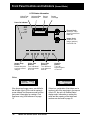
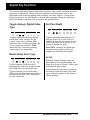
If the format and image names are shifted to
the left side of the LCD the unit is running in
a user defined Test Sequence mode from the
front panel. Information on creating a Test
Sequence using VGM software is on page
16.
•4•
Model 802 Series Quick Start Guide
H31
V60
D4C=DMT0660
1=Outline0
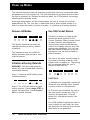
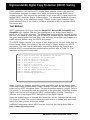
If there is a combination of two letters and a
number to left of the equal sign in the top row
of the LCD, the unit is in Detailed Status
display mode. Information on setting this
mode and the meaning of the letters and
numbers can be found on page 10.