1
Chapter 6 Rack Installation
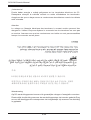
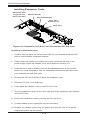
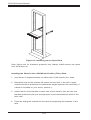
Figure 6-4: Installing into a Rack
Note: figures are for illustrative purposes only. Always install servers into racks
from the bottom up.
Installing the Chassis into a Rack
1. Confirm that chassis includes the inner rails and rail extensions. Also, confirm
that the outer rails are installed on the rack.
2. Line chassis rails with the front of the rack rails.
3. Slide the chassis rails into the rack rails, keeping the pressure even on both
sides (It may be necessary to depress the locking tabs when inserting). When
the server has been pushed completely into the rack, the locking tabs will
"click" into the locked position.
4. (Optional) Insert and tightening the thumbscrews that hold the front of the
server to the rack.
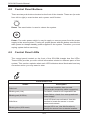
Stability hazard. The rack stabilizing mechanism must be in place, or the
rack must be bolted to the floor before you slide the unit out for servicing.
Failure to stabilize the rack can cause the rack to tip over.
6-7