1
Reference Manual
This page intentionally left blank
10%
20%
30%
40%
50%
60%
Copyright 2002, Alesis. All rights reserved
Reproduction in whole or in part is prohibited.
Specifications subject to change without notice.
All trademarks are the property of their respective holders.
7-51-0117-A
8/2002
70%
80%
90%
100%
Table of Contents
Introduction....................................................................3
Welcome! .........................................................................................................3
About the Metavox ........................................................................4
Important features of your Metavox ..........................................................4
Metavox Key Features ...................................................................................5
How to Use This Manual.............................................................6
Safety Instructions/Notices .....................................7
Important Safety Instructions (English)............................7
CE Declaration Of Conformity................................................9
FCC Compliance Statement......................................................9
Instructions de Sécurité Importantes (French) .........................................10
Lesen Sie bitte die folgende Sicherheitshinweise
(German) ..................................................................................................12
Quick Start Guide ........................................................15
If you can’t wait to get started......................................................................15
Hookup for voice modulation of a synthesizer........................................15
A quick overview of the controls ...........................................16
Rear Panel ........................................................................................................16
Connections ....................................................................17
Unpacking and Inspection............................................................................17
Installing in a Rack .........................................................................................17
Power................................................................................................................17
Connecting to the Channel Inserts of a mixing console: ........................20
Connecting to the Group Sends or Aux Send/Return of
a mixing console:.....................................................................................21
Connecting to the inserts on an instrument amplifier: ............................22
Connecting to equipment with XLR inputs and outputs:.......................23
About audio cables.........................................................................................23
Using the ModLink........................................................................24
Using the Metavox .......................................................25
About Vocoding...............................................................................25
What is Tempo Sync? ....................................................................................27
To turn Tempo Sync off:..............................................................................27
Description of Controls...............................................................28
Synthesis Input Switch ..................................................................................28
Phreeq...............................................................................................................29
Siblance.............................................................................................................29
Modulation switch..........................................................................................30
Depth................................................................................................................32
Rate ...................................................................................................................32
Reset Mod........................................................................................................33
Tap Tempo......................................................................................................33
Bypass...............................................................................................................34
Using the Foot Switch ...................................................................................34
1
Table Of Contents
Sample Settings.............................................................35
Blank Settings Templates ..............................................................................38
Troubleshooting............................................................39
Troubleshooting Index................................................................39
Avoiding ground loop noise.........................................................................41
Line conditioners and spike protectors ......................................................42
Care and Maintenance ................................................................43
Cleaning............................................................................................................43
Refer all servicing to Alesis...........................................................................43
Obtaining repair service ................................................................................44
Specifications.................................................................45
Audio Input .....................................................................................................45
Audio Output..................................................................................................45
Audio Performance........................................................................................45
Mechanical .......................................................................................................45
Index...................................................................................47
Warranty/Contact Alesis ...........................................48
Alesis Limited Warranty................................................................................48
Alesis Contact Information ..........................................................................49
2
Introduction
Welcome!
Thank you for making the Alesis Metavox a part of your studio.
Since 1984, we've been designing and building creative tools for
the audio community. We believe in our products, because we've
heard the results that creative people like you have achieved with
them. One of Alesis' goals is to make high-quality studio
equipment available to everyone, and this Reference Manual is an
important part of that. After all, there's no point in making
equipment with all kinds of capabilities if no one explains how to
use them. So, we try to write our manuals as carefully as we build
our products.
For more effective
service and product
update notices, please
register your Metavox
online at:
http://www.alesis.com/
support/warranty.htm
The goal of this manual is to get you the information you need as
quickly as possible, with a minimum of hassle. We hope we've
achieved that. If not, please drop us an email and give us your
suggestions on how we could improve future editions of this
manual.
We hope your investment will bring you many years of creative
enjoyment and help you achieve your goals.
Sincerely,
The people of Alesis
3
Introduction
About the Metavox
Your new Metavox is a member of the Alesis ModFX family of
performance effects boxes. The Metavox is a vocoder with a builtin oscillator that can be modulated by the amplitude and tone of
any input (usually a human voice) to produce unique “talking”
effects.
Each box in the line provides a different set of sound effects and
signal processing, and they are easy to arrange and connect to each
other. With a uniform, friendly, uncomplicated user interface and
high-resolution digital processing, the ModFX product line is
perfect for keyboardists, guitarists, and any other studio or live
performance artists.
Important features of your Metavox
High Resolution Processing
Internally the Metavox uses 28-bit stereo digital signal processing.
The digital-to-analog and analog-to-digital conversion is sampled
at 48kHz with 24 bits of resolution. That means you can get the
effect you want, without adding unwanted noise and distortion.
ModLink
If you’re using multiple ModFX boxes to make your own unique
effects chain, ModLink makes it easy to hookup without needing
patch cords within the chain. The nine-pin connectors built into
each side of the case enable a ModFX box to transfer digital audio
and word clock directly to another. Any number of units can be
connected together.
Vocoding of internal or external sources
The Metavox features a built-in oscillator section, complete with
several kinds of modulation, that can be controlled by an incoming
stereo signal. Alternatively, it can produce a vocoding effect on
any external source plugged into the right input, with the
controlling (voice) source plugged into the left input.
4
Introduction
Metavox Key Features
•
•
•
•
•
•
•
•
•
•
•
•
•
•
•
One-oscillator vocoder with four built-in waveforms (saw,
rectified saw, square, and noise) in a compact box
Can vocode external sources, for polyphonic vocoding of an
external synthesizer, guitar, etc.
Built-in modulation of internal oscillator by any of five
different mod sources
Tempo Sync keeps modulation in time with the music
Tap Tempo makes it easy to set the speed of modulation by
tapping a beat on the top panel
Reset Mod lets you reset the phase of any modulation shape
from its beginning
Uniform, friendly, uncomplicated user interface—no fiddling
with complicated menus or “hidden” knobs
Stereo processing via four 1/4” unbalanced connectors
ModLink port, a cable-free connection that transfers digital
audio and word clock to other ModFX units
Footswitch connection to control the bypass function
Ability to mount 3 ModFX boxes in the optional ModFX
rack adapter
Input trim control to adjust input level
Internal 28-bit digital processing
24-bit D/A and A/D conversion at 48kHz sampling rate for
quiet, distortion-free effects
External 9VAC power supply included
5
Introduction
How to Use This Manual
A little technical knowledge will help you get the most out of your
gear...it’s really pretty simple. This manual is divided into the
following sections describing the various functions and
applications for the Metavox. While it's a good idea to read
through the entire manual once carefully, those having general
knowledge about effect devices should use the table of contents to
look up specific functions.
Helpful tips and advice are
highlighted in a shaded box
like this
Chapter 1: Quick Start. If you're already experienced with effect
boxes, this will get you started using the Metavox right away. It's a
short guide to the essential elements of hooking it up and using it
for the first time. A brief tour of the front and rear panels also
directs you to the chapters focused on individual features.
Chapter 2: Connections gives detailed instructions for connecting the
Metavox to a variety of typical audio systems. It also discusses the
process of linking the Metavox with other ModFX devices.
Chapter 3: Using the Metavox explains the controls of the Metavox
and their functions.
Chapter 4: Sample Settings provides a selection of sound charts
created by the sound designers at Alesis for you to try.
Near the end of the manual are troubleshooting tips,
specifications, and an index to help you find what you're looking
for.
6
When something important
appears in the manual, an
exclamation mark (like the
one shown at left) will appear
with some explanatory text.
This symbol indicates that
this information is vital when
operating the Metavox.
Safety Instructions/Notices
Important Safety Instructions (English)
Safety symbols used in this product
This symbol alerts the user that there are important
operating and maintenance instructions in the literature
accompanying this unit.
This symbol warns the user of uninsulated voltage within
the unit that can cause dangerous electric shocks.
This symbol warns the user that output connectors contain
voltages that can cause dangerous electrical shock.
Please follow these precautions when using
this product:
1.
2.
3.
4.
5.
6.
Read these instructions.
Keep these instructions.
Heed all warnings.
Follow all instructions.
Do not use this apparatus near water.
Clean only with a damp cloth. Do not spray any liquid cleaner
onto the faceplate, as this may damage the front panel
controls or cause a dangerous condition.
7. Install in accordance with the manufacturer's instructions.
8. Do not install near any heat sources such as radiators, heat
registers, stoves, or other apparatus (including amplifiers) that
produce heat.
9. Do not defeat the safety purpose of the polarized or
grounding-type plug. A polarized plug has two blades with
one wider than the other. A grounding-type plug has two
blades and a third grounding prong. The wide blade or the
third prong are provided for your safety. When the provided
plug does not fit into your outlet, consult an electrician for
replacement of the obsolete outlet.
10. Protect the power cord from being walked on or pinched,
particularly at plugs, convenience receptacles, and the point
where they exit from the apparatus.
Continued next page
7
Important Safety Instructions
11. Use only attachments or accessories specified by the
manufacturer.
12. Use only with a cart, stand, bracket, or table designed for use
with professional audio or music equipment. In any
installation, make sure that injury or damage will not result
from cables pulling on the apparatus and its mounting. If a
cart is used, use caution when moving the cart/apparatus
combination to avoid injury from tip-over.
13. Unplug this apparatus during lightning storms or when unused
for long periods of time.
14. Refer all servicing to qualified service personnel. Servicing is
required when the apparatus has been damaged in any way,
such as when the power-supply cord or plug is damaged, liquid
has been spilled or objects have fallen into the apparatus, the
apparatus has been exposed to rain or moisture, does not
operate normally, or has been dropped.
15. This unit produces heat when operated normally. Operate in a
well-ventilated area with at least six inches of clearance from
peripheral equipment.
16. This product, in combination with an amplifier and
headphones or speakers, may be capable of producing sound
levels that could cause permanent hearing loss. Do not
operate for a long period of time at a high volume level or at a
level that is uncomfortable. If you experience any hearing loss
or ringing in the ears, you should consult an audiologist.
17. Do not expose the apparatus to dripping or splashing. Do not
place objects filled with liquids (flower vases, soft drink cans,
coffee cups) on the apparatus.
18. WARNING: To reduce the risk of fire or electric shock, do
not expose this apparatus to rain or moisture.
8
Important Safety Instructions
CE Declaration Of Conformity
See our website at:
http://www.alesis.com
FCC Compliance Statement
This device complies with Part 15 of the FCC rules. Operation is
subject to the following two conditions: (1) This device may not
cause harmful interference and (2) this device must accept any
interference received, including interference that may cause
undesired operation.
NOTE: This equipment has been tested and found to comply
with the limits for a Class B digital device, pursuant to Part 15 of
the FCC Rules. These limits are designed to provide reasonable
protection against harmful interference in a residential installation.
This equipment generates, uses and can radiate radio frequency
energy and, if not installed and used in accordance with the
instructions, may cause harmful interference to radio
communications. However, there is no guarantee that interference
will not occur in a particular installation. If this equipment does
cause harmful interference to radio or television reception, which
can be determined by turning the equipment off and on, the user is
encouraged to try to correct the interference by one or more of
the following measures:
•
Reorient or relocate the receiving antenna.
•
Increase the separation between the equipment and receiver.
•
Connect the equipment into an outlet on a circuit different
from that to which the receiver is connected.
•
Consult the dealer or an experienced radio/TV technician for
help.
9
Important Safety Instructions
Instructions de Sécurité Importantes (French)
Symboles utilisés dans ce produit
Ce symbole alèrte l’utilisateur qu’il existe des instructions
de fonctionnement et de maintenance dans la documentation
jointe avec ce produit.
Ce symbole avertit l’utilisateur de la présence d’une
tension non isolée à l’intérieur de l’appareil pouvant engendrer des
chocs électriques.
Ce symbole prévient l'utilisateur de la présence de tensions
sur les raccordements de sorties, représentant un risque
d'électrocution.
Veuillez suivre ces précautions lors de
l’utilisation de l’appareil:
1.
2.
3.
4.
5.
6.
7.
8.
9.
10.
10
Lisez ces instructions.
Gardez ces instructions.
Tenez compte de tous les avertissements.
Suivez toutes les instructions.
N’utilisez pas cet allareil à proximité de l’eau.
Ne nettoyez qu’avec un chiffon humide. Il est potentiellement
dangereux d'utiliser des pulvérisateurs ou nettoyants liquides
sur cet appareil.
Installez selon les recommandations du constructeur.
Ne pas installer à proximilé de sources de chaleur comme
radiateurs, cuisinière ou autre appareils (don’t les
amplificateurs) produisant de la chaleur.
Ne pas enlever la prise de terre du cordon secteur. Une prise
murale avec terre deux broches et une troisièrme reliée à la
terre. Cette dernière est présente pour votre sécurité. Si le
cordon secteur ne rentre pas dans la prise de courant,
demandez à un électricien qualifié de remplacer la prise.
Evitez de marcher sur le cordon secteur ou de le pincer, en
particulier au niveau de la prise, et aux endroits où il sor de
l’appareil.
Suite de la page suivante
Important Safety Instructions
11. N’utilisez que des accessoires spécifiés par le constructeur.
12. N’utilisez qu’avec un stand, ou table conçus pour l’utilisation
d’audio professionnel ou instruments de musique. Dans toute
installation, veillez de ne rien endommager à cause de câbles
qui tirent sur des appareils et leur support.
13. Débranchez l’appareil lors d’un orage ou lorsqu’il n’est pas
utilisé pendant longtemps.
14. Faites réparer par un personnel qualifié. Une réparation est
nécessaire lorsque l’appareil a été endommagé de quelque sorte
que ce soit, par exemple losrque le cordon secteur ou la prise
sont endommagés, si du liquide a coulé ou des objets se sont
introduits dans l’appareil, si celui-ci a été exposé à la pluie ou à
l’humidité, ne fonctionne pas normalement ou est tombé.
15. Puisque son fonctionement normale génère de la chaleur,
placez cet appareil au moins 15cm. des équipments
péripheriques et assurez que l’emplacement permet la
circulation de l’air.
16. Ce produit, utilisé avec un amplificateur et un casque ou des
enceintes, est capable de produite des niveaux sonores
pouvant engendrer une perte permanente de l’ouïe. Ne
l’utilisez pas pendant longtemps à un niveau sonore élevé ou à
un niveau non confortable. Si vous remarquez une perte de
l’ouïe ou un bourdonnement dans les oreilles, consultez un
spécialiste.
17. N'exposez pas l'appareil à l'égoutture ou à l'éclaboussement.
Ne placez pas les objets remplis de liquides (vases à fleur,
boîtes de boisson non alcoolique, tasses de café) sur l'appareil.
18. AVERTISSEMENT: Pour réduire le risque du feu ou de
décharge électrique, n'exposez pas cet appareil à la pluie ou à
l'humidité.
11
Important Safety Instructions
Lesen Sie bitte die folgende Sicherheitshinweise (German)
Sicherheit Symbole verwendet in diesem
Produkt
Dieses Symbol alarmiert den Benutzer, daß es wichtige
Funktionieren und Wartung Anweisungen in der Literatur gibt, die
diese Maßeinheit begleitet.
Dieses Symbol warnt den Benutzer der nicht isolierten
Spannung innerhalb der Maßeinheit, die gefährliche elektrische
Schläge verursachen kann.
Dieses Symbol warnt den Benutzer, dem Ausgabestecker
Spannungen enthalten, die gefährlichen elektrischen Schlag
verursachen können.
Folgen Sie bitte diesen Vorkehrungen, wenn
dieses Produkt verwendet wird:
1.
2.
3.
4.
5.
6.
Lesen Sie die Hinweise.
Halten Sie sich an die Anleitung.
Beachten Sie alle Warnungen.
Beachten Sie alle Hinweise.
Bringen Sie das Gerät nie mit Wasser in Berührung.
Verwenden Sie zur Reinigung nur ein weiches Tuch.
Verwenden Sie keine flüssigen Reinigungsmittel. Dies kann
gefährliche Folgen haben.
7. Halten Sie sich beim Aufbau des Gerätes an die Angaben des
Herstellers.
8. Stellen Sie das Gerät nich in der Nähe von Heizkörpern,
Heizungsklappen oder anderen Wärmequellen (einschließlich
Verstärkern) auf.
9. Verfehlen Sie nicht den Zweck des grounging Terminals auf
dem Netzstecker. Dieses Terminal wird für Ihre Sicherheit zur
Verfügung gestellt.
10. Verlegen Sie das Netzkabel des Gerätes niemals so, daß man
darüber stolpern kann oder daß es gequetscht wird.
Fortsetzung auf nächster Seite
12
Important Safety Instructions
11. Benutzen Sie nur das vom Hersteller empfohlene Zubehör.
12. Verwenden Sie ausschließlich Wagen, Ständer, oder Tische, die
speziell für professionelle Audio- und Musikinstrumente
geeignet sind. Achten Sie immer darauf, daß die jeweiligen
Geräte sicher installiert sind, um Schäden und Verletzungen zu
vermeiden. Wenn Sie einen Rollwagen benutzen, achten Sie
darauf, das dieser nicht umkippt, um Verletzungen
auszuschließen.
13. Ziehen Sie während eines Gewitters oder wenn Sie das Gerät
über einen längeren Zeitraum nicht benutzen den Netzstecher
aus der Steckdose.
14. Die Wartung sollte nur durch qualifiziertes Fachpersonal
erfolgen. Die Wartung wird notwendig, wenn das Gerät
beschädigt wurde oder aber das Stromkabel oder der Stecker,
Gegenstände oder Flüssigkeit in das Gerät gelangt sind, das
Gerät dem Regen oder Feuchtigkeit ausgesetzt war und
deshalb nicht mehr normal arbeitet oder heruntergefallen ist.
15. Dieses Gerät produziert auch im normalen Betrieb Wärme.
Achten Sie deshalb auf ausreichende Lüftung mit mindestens
15 cm Abstand von anderen Geräten.
16. Dieses Produkt kann in Verbindung mit einem Verstärker und
Kopfhörern oder Lautsprechern Lautstärkepegel erzeugen, die
anhaltende Gehörschäden verursachen. Betreiben Sie es nicht
über längere Zeit mit hoher Lautstärke oder einem Pegel, der
Ihnen unangenehm is. Wenn Sie ein Nachlassen des Gehörs
oder ein Klingeln in den Ohren feststellen, sollten Sie einen
Ohrenarzt aufsuchen.
17. Setzen Sie den Apparat nicht Bratenfett oder dem Spritzen
aus. Plazieren Sie die Nachrichten, die mit Flüssigkeiten
(gefüllt werden Blumevases, Getränkdosen, Kaffeetassen)
nicht auf den Apparat.
18. WARNING: um die Gefahr des Feuers oder des elektrischen
Schlages zu verringern, setzen Sie diesen Apparat nicht Regen
oder Feuchtigkeit aus.
13
Important Safety Instructions
This page intentionally left blank.
14
1 Quick Start Guide
If you can’t wait to get started
The Alesis Metavox is a unique product, and is inherently different
from other effects units. If you've already used a vocoder device,
this chapter is a "shorthand" guide for those who want to start
using the Metavox right away in the most popular way. If you have
questions about any of the features, don’t worry – later chapters
will unveil the mysteries of the Metavox's special features.
If you're new to
vocoding...
start with the more detailed
instructions for hookup and
operation starting in the next
chapter.
Hookup for voice modulation of a
synthesizer
1.
2.
3.
4.
5.
6.
7.
8.
9.
First, make sure the power is off to all the components
you’re connecting to: amp, mixer, and instruments.
Pull the Metavox and its power supply out of the
package.
Using a 1/4” instrument cable, plug the output of the
synthesizer into the RIGHT INPUT on the back of the
Metavox.
Plug the output of a microphone preamplifier (or the
DIRECT OUT of a mixer channel with a microphone
plugged into it) into the Metavox’s LEFT INPUT.
Connect the OUTPUTS of the Metavox to the inputs of
a mixer, powered speakers, or instrument amplifier.
Insert the power jack of the Metavox’s power adapter
into the POWER 9VAC input on the rear panel of the
Metavox and plug the power adapter into an AC outlet
(preferably on a power strip with its switch off).
The Metavox doesn’t have a POWER switch of its own. The
moment you plug in the power, its top panel LEDs will come on.
Turn the power on to the system: the keyboard, then
the Metavox’s power strip (if it’s not already on), then
the mixer, then the amp.
Turn the INPUT TRIM knob on the back of the
Metavox while talking into the microphone to adjust the
input level. The SIGNAL LED on the top panel will
light green, not red, when the level is correct.
Set the [SYNTHESIS INPUT] switch to RIGHT IN =
SYNTH. Hold a sustained keyboard sound while
talking into the microphone. (The other controls of the
Metavox have no effect in this mode.)
Left and right input
levels
Adjust your microphone
preamp so it puts out a strong
line level. The INPUT TRIM
control does not affect the
synthesizer (right input) level;
adjust the level on the
instrument itself.
For more detailed information on connecting the Metavox, see
chapter 2: Connections, especially the diagram on page 19.
15
1
Quick Start Guide
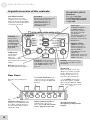
A quick overview of the controls
SYNTHESIS INPUT
This selects the internal
oscillator wave or external
input (as shown by the LEDs
next to the switch) that will be
vocoded by the input.
Reset Mod
Restarts the modulation from
the beginning of its cycle.
Generates a trigger in
TRIGGERED mode, or
changes the pattern in
PATTERN mode.
PHREEQ sets
the frequency
of the internal
oscillator when
SYNTHESIS IN
is set to SAW,
RECTIFIED or
SQUARE.
SIBILANCE
controls how
much of the
high-end
consonant sounds will be
injected into the vocoder’s
output.
BYPASS lets signal pass
through without any effects.
have effect only if the
SYNTHESIS INPUT switch
is set to SAW, RECTIFIED,
or SQUARE.
Tap Tempo
If MODULATION is
in TEMPO SYNC
mode, tap a beat on
this button, and the
speed of the
modulation will be set
at some multiple of
that beat, as set by the
RATE knob.
MODULATION
switch selects what
kind of mod source
will be applied to the
internal SAW or
SQUARE wave, and
whether the
Modulation speed is in
Tempo Sync mode (see
LEDs to the left)
RATE affects the speed of
modulation, in cooperation
with TEMPO SYNC and the
TAP TEMPO button. See
page33..
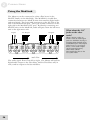
Rear Panel
16
The MODULATION
functions
Plug the power adapter in
here.
The FOOT SWITCH may be
connected to any momentary
pedal, to engage the BYPASS
function.
The
ModLink connectors let you
arrange several ModFX units
in a chain, without having to
use input and output cables
inside the chain.
INPUTS and OUTPUTS are
standard 1/4” line-level
jacks. To vocode an external
source, plug the source into
DEPTH controls how much
the internal oscillator will be
modulated.
Signal LED
When this lights green, the
Metavox is getting an input
signal. When it’s red, it’s
seeing too much level...so
turn down the instrument...
...or the TRIM control here
on the back panel. NOTE:
this controls ONLY the LEFT
input, and has no effect on the
right.
the right jack and the
microphone preamp into the
left jack.
2 Connections
Unpacking and Inspection
Your Metavox was packed carefully at the factory. The shipping
carton was designed to protect the unit during shipping. Please
retain this container in the highly unlikely event that you need to
return the Metavox for servicing.
The shipping carton should contain the following items:
•
Metavox with the same serial number as shown on the
shipping carton
•
Power Adapter
•
This instruction manual
To register your purchase, go to the Alesis website at
www.alesis.com.
Installing in a Rack
The Metavox is designed for tabletop use, but can also be installed
in a standard 19" audio equipment rack. For rack mounting,
contact your Alesis dealer for the ModFX Rack. This rack shelf
holds three ModFX units in a 3-space high 19” rack.
Power
The Metavox comes with an AC power adapter that transforms
the voltage from a standard outlet into 9 volts AC (830 mA).
Plug the small end of the power adapter cord into the Metavox’s
POWER INPUT socket and then plug the adapter itself into a
good quality, noise-free AC power source of the proper rating.
The supplied AC line adapter is designed only for the destination
to which the unit is shipped. To use the Metavox in another
country, contact your Alesis dealer for an Alesis P3 adapter
suitable for the electrical system in the country you are traveling
to.
Make sure you read the
initial Important Safety
Instructions chapter at the
front of this manual.
Avoid “popping”:
Don’t plug the power adapter
into the Metavox until all
other audio cables have been
hooked up. Make sure your
amplifier or powered
speakers are switched off
when plugging in the
Metavox to avoid damage.
17
2
Connections
Connecting audio
The Metavox will work in many different applications, whether
you are connecting an instrument directly into it, or connecting it
through a mixing console.
Signal processor vs. synthesizer
Unlike other signal processors, a vocoder is half processor, half
synthesizer. A signal processor takes an input signal and makes it
sound different. But a vocoder uses an input signal (usually from
a microphone) to control the amplitude and tone of an internal
oscillator (or an external input); none of the controlling signal is
mixed in with the output signal. Because of this, a vocoder is
usually connected in a different way from most other signal
processors. For example, it’s not likely that you’ll connect the
Metavox in the effect send/return path of a mixing console.
When connecting audio
cables and/or turning power
on and off, make sure that all
devices in your system are
turned off and the volume
controls are turned down.
Mic preamplification options
To get the classic “talking guitar” or “talking robot” sounds
associated with vocoding, you’ll probably want to use a vocal
microphone as the controlling input of the Metavox. Since
microphones are low-output devices, they must be amplified to
line level before the Metavox can “read” them. You have several
options for this:
•
•
•
•
18
Direct Out of mixer channel: Connect a microphone to a
mixer channel. Adjust the channel’s input gain (trim) in the
normal way to get a strong output. Connect the DIRECT
OUT of the mixer channel to the [LEFT INPUT] of the
Metavox. If possible, turn off any assignment switches in the
mixer channel to the groups or stereo mixes.
Outboard mic preamp: Especially for live use, it may be a
good idea to get a small mic preamp and dedicate a special
microphone just for vocoding use to it. Connect the output
of the preamp to the [LEFT INPUT] of the Metavox.
Aux send of mixer: If your mixer has an extra pre-fader aux
send or monitor send, connect the output of that mix to the
left input of the Metavox. This has the advantage of letting
several different sources be the controller.
Insert point: If you don’t have a DIRECT OUT on your
mixer, sometimes the INSERT point can act as a pre-fader
direct out by plugging a 1/4” cable in to the “first click”
(about 1/4” before the plug is all the way in) without
interrupting the signal flow to the mixer. Or, if you use a
regular insert cable connected to the input and output of the
Metavox, the microphone level will be set by the TRIM of the
channel, and the channel will “hear” the output of the
Metavox.
If you’re using a high-output
dynamic microphone, a goodquality passive line
transformer might provide
enough gain to control the
Metavox, with the [TRIM]
control up full.
Connections
2
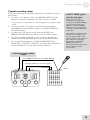
Typical vocoding setup
If you’re connecting an instrument directly to the Metavox, hook it
up this way:
1. Connect a 1/4" phone cord to the [RIGHT INPUT] of the
Metavox from the instrument you want to have vocoded.
Or, you can just use the Metavox’s own waveforms as the synthesis input
source.
2. Connect another 1/4" phone cord from the microphone
preamplifier or mixer’s direct output to the [LEFT INPUT]
(as shown below).
3. Connect two 1/4" phone cords from the [LEFT] and
[RIGHT OUTPUTS] of the Metavox to two mixer inputs.
4. If you’re connecting directly to a stereo mixer, pan the two
channels hard left and hard right to get the maximum effect.
5. To vocode the instrument, set [SYNTHESIS INPUT] to
RIGHT IN = SYNTH. Otherwise, use either the microphone
or the instrument to control the internal oscillator.
INPUT TRIM affects
only the left input
Once you’ve set your
microphone preamp gain,
crank up the [INPUT TRIM]
control on the back of the
Metavox until the SIGNAL
LED on its top panel flashes
red while you talk, then back
it off a bit.
Most guitars and basses have
relatively low output levels.
For the quietest effect, turn
up the volume on the guitar to
full. If that’s not enough,
don’t change the INPUT
TRIM of the Metavox.
Instead, plug the guitar into a
mixer channel or other
preamp first.
Instrument (synth, guitar)
output
From DIRECT OUT (mic) to [LEFT INPUT]
Outputs of Metavox to mixer inputs
Mic in
19
2
Connections
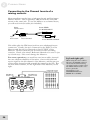
Connecting to the Channel Inserts of a
mixing console:
Most recording consoles have a jack near the mic and line inputs
labeled "Insert". This is typically a TRS jack with the send and
return on the same jack. To use the Metavox as a channel insert,
you will need an insert cable (not included).
Ring:
Insert return
Tip:
Insert send
Sleeve:
Insert Ground
Insert SEND:
To ModFX INPUT
Insert RETURN:
From ModFX OUTPUT
This cable splits the TRS insert jack into two unbalanced mono
connectors. Usually, the tip is connected to the INPUT of the
Metavox and the ring is connected to the OUTPUT of the
Metavox. However, this may be reversed on some recording
consoles. Check your mixer’s Reference Manual to be sure or just
try it both ways – this won’t damage the Metavox.
For stereo operation, you would use two insert cables, inserted
into two adjacent channels of the mixer. One would send and
receive signal to the left channel of the Metavox, and the pan pot
of that mixer channel would normally be panned to the left. Pan
the next mixer channel, for the right side of the Metavox, to the
right.
20
Left and right split
When using the insert cables
this way, the RIGHT channel
can be the instrument being
vocoded (synth or guitar) and
the LEFT channel is the voice
source (from the
microphone). Set
SYNTHESIS INPUT to
RIGHT IN = SYNTH.
Connections
2
Connecting to the Group Sends or Aux
Send/Return of a mixing console:
The Metavox is designed more for in-line processing than the
send/receive kind of processing typically used for reverb units.
However, plugging the Metavox into a Group or Aux send/return
loop will allow you to vocode a mix of several instruments, from
any mixer channel assigned to that group.
If you use mixer channels
for the returns from the
Metavox, be sure the Group
Sends for those channels are
turned off to avoid feedback.
The principle of operation is this: you use one mix bus (a group,
or auxiliary send) as the vocoding source (the modulator), and
another mix bus as the instrument mix to be processed (the
carrier). This will make it easy to select different mics to be the
controller, and vocode different instrument/synthesis sources with
those mics. This is also necessary if you want to mix some of the
original controller or instrument sound back into the main mix,
instead of just hearing the vocoded result from the Metavox.
To do this, connect a single cable from the Group or Aux Send
Out to the [LEFT/MONO] input of the Metavox. Assign a
microphone to this Group, or bring up the Aux Send on the
microphone channel only with all other aux sends down.
Connect another cable from a different Group or Aux Send to the
[RIGHT INPUT] of the Metavox. Use two separate cables to
connect the [LEFT OUTPUT] and [RIGHT OUTPUT] of the
Metavox to the left and right inputs of a Stereo Effect Return, or
to two adjacent mixer channels panned to left and right.
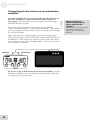
From GROUP OUT #2 (instruments)
From GROUP OUT #1 (microphones)
In this example, any
microphone anywhere in the
console assigned to Group 1
can be a vocoder control
source. Any sound mixed to
Group 2 will be vocoded by
that microphone and sent to
the output of the Metavox.
To returns
21
2
Connections
Connecting to the inserts on an instrument
amplifier:
Use this method only if you occasionally use the Metavox to
provide synthesizer sounds and noises under control of
your guitar. This method won’t let any guitar sound through
unless BYPASS is pressed.
The insert send on a guitar or bass amp is usually labeled
"effects send and return" or "insert send and return". This allows
you to preamplify your instrument before vocoding it and sending
it to the power amp.
Most guitar amps are single channel, so connect a single insert
cable from the amp to the LEFT INPUT and LEFT OUTPUT of
the Metavox. Some amps have separate “effect send” and “effect
return” jacks; for these, use standard cables. Check the manual of
your amplifier for details.
If you are using a dedicated rack-mount preamplifier, another
method would be to insert the Metavox between the preamp and
the input(s) of the power amp.
22
Never connect the
Metavox between the
power amp and the
speaker!
The high power levels created
by the power amp will
destroy the circuitry of the
Metavox.
Connections
2
Connecting to equipment with XLR inputs
and outputs:
If you are connecting the Metavox to a product with XLR
balanced inputs and outputs, you will need to convert this signal to
a 1/4” unbalanced connector. Make sure that Pin 2 of the XLR
connector is connected to the Tip of the 1/4” adapter or cable.
Watch out for high levels, however: some XLR sources put out
levels close to the maximum the Metavox can accept (about +12
dBu) even when its trim is at minimum. Lower the level of the
source if the [SIGNAL] LED flashes red.
About audio cables
The connections between the Metavox and your studio are your
music’s lifeline, so use only high quality cables. These should be
low-capacitance shielded cables with a stranded (not solid) internal
conductor and a low-resistance shield. Although quality cables
cost more, they do make a difference.
Route cables to the Metavox correctly by observing the following
precautions:
•
Do not bundle audio cables with AC power cords.
•
Avoid running audio cables near sources of
electromagnetic interference such as transformers,
monitors, computers, etc.
•
Do not place cables where they can be stepped on.
Stepping on a cable may not cause immediate damage,
but it can compress the insulation between the center
conductor and shield (degrading performance) or reduce
the cable’s reliability.
•
Avoid twisting the cable or having it make sharp, right
angle turns.
•
Never unplug a cable by pulling on the wire itself.
Always unplug by firmly grasping the body of the plug
and pulling directly outward.
Don't use line
transformers:
Many XLR-to-1/4" adapters
sold at electronics stores are
NOT adapters, but
transformers (and very low
quality transformers at that).
Don't use these on the output
of the Metavox—they're
unnecessary and generally
sound awful because they
don't have the headroom to
handle the Metavox's output.
Get a hard-wired adapter or
cable from your professional
audio dealer, or make one
yourself from components.
However, a mic-to-line
transformer might work to
provide a vocoding input to
the Metavox.
23
2
Connections
Using the ModLink
The Metavox can be connected to other effect boxes in the
ModFX family via the ModLink. The ModLink is a cable-free
connection between two ModFX units that transfers digital audio
and word clock. The 9-pin male connector on the left side of the
unit is the ModLink IN port. The 9-pin female connector on the
right side is the ModLink OUT port. By directly connecting two
ModFX units via the ModLink, audio will pass from the left-most
unit to the right-most unit.
Inputs
Master
AC adapter
Outputs
First Slave
Second Slave
Audio Flow
The audio signal flows from left to right. The Master will send its
digital audio output to the First Slave, and the First Slave will, in
turn, send its output to the Second Slave.
24
What about the 1/4”
jacks on the slave
units?
When a unit is a slave to
another unit, its audio input
jacks are disabled; it will get
its audio input digitally from
its ModLink port. The output
jacks, however, are always
active; so an audio output
can be tapped from any
linked unit, without
interrupting the flow to the
rest of the chain.
3 Using the Metavox
This section explains the technology of synthesis and vocoding
and describes the functions of the Metavox’s controls in greater
detail.
About Vocoding
The Metavox is a vocoder. Vocoders are the result of research into
the sound of the human voice, and ways to artificially synthesize
voices. One way of understanding it is to think of the Metavox as
a synthesizer whose output level and tone are controlled by an
audio input, instead of by a keyboard. Usually, but not always, that
controlling audio is from a vocal microphone. Speak into the
microphone, and the sound of the Metavox’s own synthesizer will
come on, following the volume of your voice; this is called envelope
following. The tone and pitch of the incoming signal are used to
control multiple band pass filters of the vocoder: higher pitches
excite higher band pass filters through which the synth input must
pass. Note that the pitch of the controlling signal does not
control the pitch of the synthesizer—it controls the tone only.
There are two important elements to vocoding in the Metavox:
1. The SYNTHESIS INPUT. This can be either the internal
single-oscillator synthesizer, with 3 different kinds of
waveforms (sawtooth, rectified sawtooth, or square), or a noise
generator, or it can be an external instrument plugged into the
RIGHT IN. In classic synthesis, this is referred to as the carrier.
2. The CONTROLLER input. This can be any line-level signal,
though it’s usually from a microphone preamp. In classic
synthesis, this is called the analysis signal.
The Metavox listens constantly to the controller input, derives a
multiband filter envelope follower setup from it, and applies that
setup to the synthesizer. This allows it to mimic the human vocal
sounds that make one vowel (like “a”, “e”, “i”, “o”, “u”) sound
different from one another.
But human speech also features consonants (“c”, “k”, “s”),
fricatives, and plosives. These sounds are crucial for making the
“voice” say something understandable. The Metavox’s
[SIBILANCE] control adds shaped noise to the high frequency
bands of the Synthesis filters, so that when a consonant is detected
in the Controller signal, there will be a sibilant sound in the
vocoded output, making it even more speech-like.
The most basic element of
vocoding is amplitude
control. The Metavox
“listens” to the level of the
controller signal, and makes
the carrier/synthesis signal as
loud or as soft as that input.
Every sound has its own
“envelope” or dynamic
curve; the Metavox uses that
envelope to control its output
VCA (voltage-controlled
amplifier).
25
3
Using the Metavox
The result is a unique signal processing path that puts one sound
under the control of another. The creative and commercial
possibilities of generating voice-like sounds from either the
internal synthesizer or from an external instrument are as varied as
the sound of the human voice itself. But vocoding need not stop
there. Any sound can be the controller, and any sound can be the
synthesizer. You could vocode Jimi Hendrix with the sound of
water droplets, for example.
26
Using the Metavox
3
What is Tempo Sync?
In the Metavox, Tempo Sync affects only the frequency
modulation (e.g., vibrato) of the internal waveform oscillator.
Sometimes, you’ll want the rate of the vibrato or pitch change to
match the beat of your music instead of being random. For
example, you can set the rate so that the pitch of the SAW wave
changes once per measure, or once per quarter note. The
TEMPO SYNC feature of the Alesis ModFX series not only lets
you set a tempo naturally by tapping on the TAP TEMPO button,
it can automatically adjust its speed slightly relative to a “tapped”
audio input, after setting the basic speed using the TAP button.
To use Tempo Sync:
Set the Metavox’s MODULATION section to TEMPO SYNC
mode, as follows:
1. Press the down side of the [MODULATION] rocker switch to
select the next modulation type.
You can see the type of effect by the LED lit next to the name—for
example, TRIANGLE, SAMPLE/HOLD, TRIGGERED and
so on.
2. Keep pressing the rocker switch through all the normal modes
until you enter TEMPO SYNC mode, and then advance to the
type of modulation you want.
Both the Mod Type and TEMPO SYNC LEDs will be lit. For
example, if you press the down side of the rocker switch when you’re in
PATTERN mode, the Metavox will go to TRIANGLE/TEMPO
SYNC mode. At this point, the TAP TEMPO LED will start
flashing at the last speed it was set to (or at the default tempo of 120
bpm).
3. Tap the [TAP TEMPO] button several times to set the desired
tempo.
The RATE knob is
different in Tempo
sync mode
In TEMPO SYNC mode, the
RATE knob acts as a
multiplier to the speed set by
TAP TEMPO, so you can’t
get the tempo to change
slightly by adjusting that
knob. Note that changes to
RATE won’t affect the
flashing of the TEMPO LED.
The TAP TEMPO LED will flash in time to the hits. As long as
the [RATE] control is in the center position, the modulation speed will
match the tempo.
4. If the tempo isn’t quite right, “tap” a steady, discrete beat on
any instrument connected to the input. The internal processor
will then synchronize the tapped tempo with the audio input.
The processor will make slight alterations to the tempo such
that it stays synchronized with the beat of the audio input.
To turn Tempo Sync off:
Simply press the UP side of the [MODULATION] switch
repeatedly until the Tempo Sync LED goes off, then select the
modulation waveform you want.
27
3
Using the Metavox
Description of Controls
Synthesis Input Switch
The up/down rocker switch beside the Synthesis Input label on
the left side of the unit selects the synthesis input, i.e., the
internally-generated or external sound that will be vocoded and
sent to the OUTPUTS. The LEDs next to the switch light up to
indicate the current synthesis input. There are five choices
available:
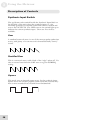
Saw
A standard sawtooth wave is one of the most popular synthesizer
waves, with plenty of overtones and a characteristically “buzzy”
sound.
Rectified Saw
This is a sawtooth wave, with a little of the “edge” taken off. It’s
also an octave lower than the SAW wave at a given PHREEQ
setting.
Square
This mode uses an internal square wave for the synthesis input.
Square waves are another popular synth waveform, because they
have a more rounded low end with more fundamental.
28
Using the Metavox
3
Noise
This mode selects a white noise generator as the sound to be
vocoded by the input. Since white noise has all frequencies at
once, the vocoder’s filters will be most noticeable on this setting.
NOISE will not be affected
by the MODULATION
controls (RATE, DEPTH,
TAP TEMPO etc.) because it
isn’t a pitched waveform.
Right In = Synth
Use this mode when you want to vocode any external input—a
polyphonic synthesizer, guitar, etc. When [SYNTHESIS
INPUT] is set to RIGHT IN = SYNTH, the right input will
be the sound that is processed, and the left input (normally a
microphone) will be the sound that controls the amplitude
and tone of the right input. In other words, the right input is
what gets vocoded, and the left input does the vocoding. See page
19 for the typical hookup.
Phreeq
The [PHREEQ] knob sets the frequency or pitch of the Metavox’s
internal waveform oscillator, so it has effect only when the
[SYNTHESIS INPUT] switch is set to SAW, RECTIFIED SAW,
or SQUARE. At full-counter clockwise rotation, the frequency is
very low (subsonic). At full clockwise, the oscillator frequency is
in the upper range of a typical keyboard.
Siblance
[SIBILANCE] adds “consonant” sound to the output of the
Metavox if there isn’t enough high-frequency information in the
synthesis input (the carrier) itself to allow the higher band-pass
filter envelopes to mimic the effect of consonants in human
speech. Technically, [SIBILANCE] mixes in noise into the high
frequency bands of the Synthesis filters, so when a high-frequency
consonant, fricative, or plosive sound appears in the controlling
input, there will be something for the higher bandpass filters to
pass along to the output in response. If the [SYNTHESIS
INPUT] is set to NOISE, the carrier signal already has enough
high-frequency content to mimic consonants.
29
3
Using the Metavox
Modulation switch
The up/down rocker switch under the MODULATION label on
the right side of the Metavox selects the waveform that will be
used to modulate the pitch of the internal sawtooth or square wave
oscillator only. This control has no effect if the [SYNTHESIS
INPUT] switch is set to NOISE or RIGHT IN = SYNTH. There
are five shapes available, as indicated by the LEDs next to the
switch:
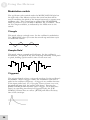
Triangle
This mode selects a triangle wave for the oscillator’s modulation.
Use TRIANGLE when you want the smooth up-and-down cycle
of traditional vibrato.
Sample/Hold
This mode selects a sample and hold wave for the oscillator’s
modulation. The pitch of the wave will jump randomly from pitch
to pitch, holding a pitch until it’s time for the next one.
Triggered
The triggered mode selects a triggered envelope for the oscillator’s
modulation. When a trigger occurs, the modulation will cause a
spike in the oscillator frequency. A trigger is any sudden increase
in the input audio level. So, if you play a heavy accent on a note,
the pitch will start high, the quickly slide down. Pressing the
[RESET MOD] button will also cause a trigger. Note that since
there’s no repeating waveform in Triggered mode, the [TAP
TEMPO] features have no effect. [RATE] will affect the decay
time of the envelope.
30
Using the Metavox
3
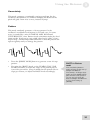
Uncertainty
This mode generates a continually varying waveform for the
oscillator’s modulation; it’s similar to Sample and Hold but the
pitch will glide from note to note, instead of jump.
Pattern
This mode randomly generates a 16-step pattern for the
oscillator’s modulation and repeats it over and over. In some
ways, it sounds like a mix of SAMPLE AND HOLD and
UNCERTAINTY, since Pattern mode sometimes makes the level
jump quickly from step to step, while other levels “glide” from
step to step. Another important difference is that the pattern will
repeat regularly until you change the pattern.
•
•
Press the [RESET MOD] button to generate a new 16-step
pattern.
Try using the [RATE] knob, or the TEMPO SYNC/TAP
TEMPO features, to make the steps of the pattern play in
sync with your music. Keep in mind that the pattern has 16
steps per 4 beats, so adjust the RATE knob accordingly.
RATE in Pattern
mode
You can think of Pattern
mode as being 4x the rate of
Sample and Hold or
Uncertainty. In Tempo Sync
mode, turn the [RATE] knob
full clockwise (1/4 speed) to
get one step per beat, the
same as Sample and Hold at
a 12 o’clock setting of
[RATE].
31
3
Using the Metavox
Depth
The [DEPTH] knob controls how much pitch modulation
(vibrato) of the above LFO waves and patterns will be applied to
the internal waveform oscillator’s SAW, RECTIFIED SAW, or
SQUARE waves.
Depth = Mod Wheel
Think of the [DEPTH]
control as being like the Mod
Wheel on a synthesizer,
applying an LFO to the pitch
of the internal oscillator,
giving it more or less vibrato.
The [RATE] controls the
speed of the LFO, and the
[MODULATION] switch
determines the waveform of
the LFO.
Rate
The [RATE] knob changes the speed of the pitch modulation of
the internal waveform synthesizer only. In normal modulation
modes (TEMPO SYNC LED off), turning the [RATE] knob alters
the rate continuously from very slow to very fast. Turn the knob
clockwise for a faster vibrato effect, counter-clockwise for a slow
pitch change.
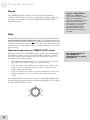
Rate knob operation in TEMPO SYNC mode
When the Metavox is in TEMPO SYNC mode, the fundamental
modulation speed is set by the TAP TEMPO function, and the
rate knob can be used to adjust that rate to an even fraction or
multiple of the current tempo:
• With the knob indicator in the 12 o’clock position, the mod
rate will be the same as tempo (i.e, quarter note).
• Turn the knob to the left to set the mod rate at a half of the
tempo (i.e., one cycle per half note), then a quarter of the
tempo (once per measure).
• Turn the knob to the right to set the modulation to twice the
tempo (eighth notes), or four times the tempo (sixteenth
notes).
The diagram below shows where you can set the [RATE] knob to
modulate the internal oscillator at different multiples of the tempo
during TEMPO SYNC mode.
32
See the description of
TAP TEMPO for
important tips on using
this feature.
Using the Metavox
3
Reset Mod
Press this button to reset the modulation as follows:
• In TRIANGLE and SAMPLE/HOLD modes, press [RESET
MOD] to start the wave from the beginning of its phase.
In Triangle, RESET starts the mod from the bottom of the wave.
• In TRIGGERED mode press this button to generate a trigger
for the modulation (sending the equivalent of a pitch envelope
to the oscillator).
• In PATTERN mode press this button to generate a new 16step pattern.
Tap Tempo
This button affects the speed of the effect whenever the
[MODULATION] switch is set to TEMPO SYNC mode. In that
mode, you can tap this button along with the music to set a new
tempo. The Tap Tempo light will flash at the current tempo.
Tap Tempo technique
For a reliable tempo setting, make several taps in a row at a
consistent speed, especially if you’re changing the tempo
drastically. Watch the flashing of the light to see the current
tempo of the Metavox.
Adjusting tempo with audio input
After the basic tempo has been set using the [TAP TEMPO]
button, it is possible to make small adjustments to the tempo via
the audio input. You do this by “tapping” on the instrument
(playing sharp chords, or beats, without sustain or notes
inbetween) at almost the same speed as the Metavox’s tempo
LED. The Metavox can derive a beat from a complex musical
input, as long as it is reasonably close to the original “tapped”
tempo. The tempo can adjust up or down about 15% from the
original tempo tapped in.
To get fast
modulations...
it isn’t necessary to tap at a
high speed if you want the
effect to modulate at eighth or
sixteenth notes. Just tap on
the quarter-note beat, then
turn the [RATE] knob to the
right to double or quadruple
the speed made by Tap
Tempo.
How Tap Tempo works with Tempo Sync and
the Rate knob
When TEMPO SYNC mode is enabled, the rate of the modulation
will be based on the tempo currently being flashed, multiplied by
the position of its [RATE] knob: when it’s in the middle position
(around “12 o’clock”), the speed of the triangle, square, pattern
etc. wave will be the same as the tempo. See the earlier
descriptions of the [RATE] knob and Tempo Sync for more
information.
33
3
Using the Metavox
Bypass
This button sends the signal directly from the input to the output
without any effect. Press [BYPASS] to check the sound of the
source without any effect from the Metavox. When the red
BYPASS LED is lit, no vocoding takes place. The Bypass
function can also be activated by the foot switch.
Since the Metavox is a digital effect, signal always passes through
the digital A/D–D/A conversion process, so that digital signal will
flow through to other effects in a ModLink chain even when
[BYPASS] is on. So, unlike old analog effects, this is not a
“hardwire” bypass switch—the Metavox must be powered on to
pass signal through, even in bypass mode. Similarly, the [TRIM]
control is always active, since it’s an analog control regulating the
level feeding the analog-to-digital converters.
Using the Foot Switch
If you need to bypass the effect totally but your hands aren’t free,
simply connect any momentary footswitch (such as those used for
keyboard sustain pedals, either NC normally closed or NO
normally open) to the [FOOT SWITCH] jack on the rear panel.
The footswitch will turn the BYPASS LED on and off.
34
4 Sample Settings
While there’s nothing like discovering new sounds for yourself, we
thought it would be a good idea to provide some sample settings
of the Metavox to help get you started. Simply set the knobs on
your Metavox so they’re at the positions shown, and press the
rocker switches so each effect is in the mode shown by the LEDs.
Feel free to modify these any way you want to suit your particular
playing style.
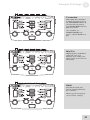
Deep Robot
A classic robo-voice,
modulated by an external
microphone. Try it with other
synthesis inputs as well.
Standard external
vocoding
None of the controls matter
except [SIBILANCE], when
[SYNTHESIS INPUT] is set
to RIGHT IN = SYNTH.
35
4
Sample Settings
Battle Star
A deeper sort of outer-space
voice; try adjusting PHREEQ
to get the precise effect you
want.
Odd Inflection
This patch uses the
TRIGGERED waveform to
“swoop” the square wave
every time the controlling
voice or instrument has a
sudden increase in gain.
Evil whisper
Using NOISE as the source
lets you hear the vocoding
effect to its fullest.
36
Sample Settings
4
Vocomotion
This setting has a rhythm to
it, which you must set using
the TAP TEMPO buttons. If
you don’t like the pattern,
press RESET MOD until you
find one you like.
As a variation, try
SAMPLE/HOLD as the
source, with the RATE set to
full.
Mod Vox
High-frequency modulation
of the Saw wave by a
Triangle wave changes the
timbre of the carrier wave in
this setting.
Blank
Experiment to find your
favorite setting and mark it
for recall here.
Photocopy the next page if
you need more settings.
37
4
Sample Settings
Blank Settings Templates
38
5 Troubleshooting
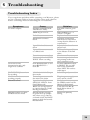
Troubleshooting Index
If you experience problems while operating your Metavox, please
use the following table to locate possible causes and solutions
before contacting Alesis Product Support for assistance.
Symptoms
No audio outputs.
Cause
No input audio(SIGNAL
LED doesn’t flash).
PHREEQ is too low.
Bad cables.
Destination is turned
down.
Input Trim knob is turned
down
Input cables are connected
to a linked unit
Power is not connected
Not enough level to LEFT
INPUT when vocoding
Can’t hear source
instrument in mix, only
single-note oscillator
SYNTHESIS INPUT isn’t
set to RIGHT IN =
SYNTH
[TAP TEMPO] button is
not working
ModLinked units are not
working properly
Distorted sound
Modulation isn’t in Tempo
Sync mode
Power dropout to one of
the units in the chain
Input level too high
(SIGNAL LED on front
panel flashes red)
RATE set at a high speed,
to a point where it sounds
like ring modulation
[RATE] knob is set high
to get 4x the Tap Tempo
rate; when you go back to
a normal mode, the RATE
jumps up high and sounds
like distortion
Distortion when you leave
TEMPO SYNC mode
Solution
Test with a known good
input.
Raise PHREEQ to “2
o’clock” or higher.
Replace the cables.
Check the connections
and the level of the mixer
or amp that the Metavox is
connected to.
Adjust the knob to the
proper level.
Connect the input cables
to the Master of the link
chain
Go take a walk
Increase output level of
mic preamp; make sure
mic is switched on etc.
Set SYNTHESIS INPUT
to RIGHT IN; you will
hear source instrument
when LEFT IN receives
audio input
Select Tempo Sync mode
Plug in a power supply to
every unit in a chain.
Turn down the source, or
the TRIM control on the
Metavox’s back panel.
Turn down the RATE
knob (below about “3
o’clock”)
Reduce the [RATE]
setting
39
5
Troubleshooting
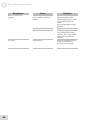
Symptoms
Buzz or hum from
outputs
Cause
Audio cables are crossing a
power cable or a power
adapter.
Bad cables
Problem with the source
AC hum
40
Ground loop
Solution
Make sure that the
Metavox and its audio
cables are kept away from
power cables and wall
warts.
Don’t wrap cable in tight
bundles.
Replace the cables
Try bypassing the Metavox
by connecting the input
cables to the output cables
and see if the problem
remains.
Place all equipment in the
studio on a common
ground (see next page)
Troubleshooting
5
Avoiding ground loop noise
In today’s studio, where it seems every piece of equipment has its
own computer chip inside, there are many opportunities for
ground loop problems to occur. These show up as hums, buzzes
or sometimes radio reception and can occur if a piece of
equipment "sees" two or more different paths to ground. While
there are methods to virtually eliminate ground loops and stray
radio frequency interference, most of the professional methods are
expensive and involve installing a separate power source just for
the sound system. Alternatively, here are some helpful hints that
professional studio installers use to keep those stray hums and
buzzes to a minimum.
KEEP ALL ELECTRONICS OF THE SOUND
SYSTEM ON THE SAME AC ELECTRICAL
CIRCUIT.
Most stray hums and buzzes happen as a result of different parts
of the sound system being plugged into outlets of different AC
circuits. If any noise generating devices such as air conditioners,
refrigerators, neon lights, etc., are already plugged into one of these
circuits, you then have a perfect condition for stray buzzes. Since
most electronic devices of a sound system don’t require a lot of
current (except for power amplifiers), it’s usually safe to run a
multi-outlet box or two from a SINGLE wall outlet and plug in all
of the components of your system there.
KEEP AUDIO WIRING AS FAR AWAY FROM AC
WIRING AS POSSIBLE.
Many hums come from audio cabling being too near AC wiring.
If a hum occurs, try moving the audio wiring around to see if the
hum ceases or diminishes. If it’s not possible to separate the audio
and AC wiring in some instances, make sure that the audio wires
don’t run parallel to any AC wire (they should only cross at right
angles, if possible).
TO ELIMINATE HUM IF THE ABOVE HAS FAILED:
1.
Disconnect the power from all outboard devices and
tape machines except for the Metavox, the mixer and
control room monitor power amp.
2.
Plug in each tape machine and outboard effects device
one at a time. If possible, flip the polarity of the plug of
each device (turn it around in the socket) until the
quietest position is found.
3.
Make sure that all of the audio cables are in good
working order. Cables with a detached ground wire will
cause a very loud hum!!
41
5
Troubleshooting
4.
Keep all cables as short as possible, especially in
unbalanced circuits.
If the basic experiments don’t uncover the source of the problem,
consult your dealer or technician trained in proper studio
grounding techniques. In some cases, a "star grounding" scheme
must be used, with the mixer at the center of the star providing the
shield ground on telescoping shields, which do NOT connect to
the chassis ground of other equipment in the system.
Line conditioners and spike protectors
Although the Metavox is designed to tolerate typical voltage
variations, in today’s world the voltage coming from the AC line
may contain spikes or transients. These can cause audible noises,
and they can stress your gear and, over time, possibly cause a
failure. There are three main ways to protect against this, listed in
ascending order of cost and complexity:
42
•
Line spike/surge protectors. Relatively inexpensive,
these are designed to protect against strong surges and
spikes, acting somewhat like fuses in that they need to
be replaced if they’ve been hit by an extremely strong
spike.
•
Line filters. These generally combine spike/surge
protection with filters that remove some line noise
(dimmer hash, transients from other appliances, etc.). A
good example is the Isobar™ series from Tripp Lite.
•
Uninterruptible power supply (UPS). This is the
most sophisticated option. A UPS provides power even
if the AC power line fails completely. Intended for
computer applications, a UPS allows you to complete an
orderly shutdown of a computer system in the event of a
power outage. In addition, the isolation it provides
from the power line minimizes all forms of
interference—spikes, noise, etc.
Troubleshooting
5
Care and Maintenance
Cleaning
Disconnect the AC cord, then use a damp cloth to clean the
Metavox’s metal and plastic surfaces. For heavy dirt, use a nonabrasive household cleaner such as Formula 409™ or Fantastik™.
DO NOT SPRAY THE CLEANER DIRECTLY ONTO THE
FRONT OF THE UNIT AS IT MAY DESTROY THE
LUBRICANTS USED IN THE SWITCHES AND CONTROLS!
Spray onto a cloth, then use cloth to clean the unit.
Refer all servicing to Alesis
We believe that the Metavox is one of the best signal processors
that can be made using current technology, and should provide
years of trouble-free use. However, should problems occur, DO
NOT attempt to service the unit yourself unless you have training
and experience. Service on this product should be performed only
by qualified technicians. NO USER-SERVICEABLE PARTS
INSIDE.
43
5
Troubleshooting
Obtaining repair service
Before contacting Alesis, check over all your connections, and
make sure you’ve read the manual.
Customers in the USA and Canada:
If the problem persists, contact Alesis and request the Product
Support department. Make sure you have the unit’s serial number
with you. Talk the problem over with one of our technicians; if
necessary, you will be given a return order (RO) number and
instructions on how to return the unit. All units must be shipped
prepaid and COD shipments will not be accepted.
For prompt service, indicate the RO number on the shipping label.
Units without an RO will not be accepted. If you do not have
the original packing, ship the unit in a sturdy carton, with shockabsorbing materials such as Styrofoam pellets (the kind without
CFCs, please) or "bubble-pack" surrounding the unit. Shipping
damage caused by inadequate packing is not covered by the Alesis
warranty.
Tape a note to the top of the unit describing the problem, include
your name and a phone number where Alesis can contact you if
necessary, as well as instructions on where you want the product
returned. Alesis will pay for standard one-way shipping back to
you on any repair covered under the terms of this warranty. Field
repairs are not authorized during the warranty period, and repair
attempts by unqualified personnel may invalidate the warranty.
Customers outside the USA and Canada:
Contact your local Alesis distributor for any warranty assistance.
The Alesis Limited Warranty applies only to products sold to users
in the USA and Canada. Customers outside of the USA and
Canada are not covered by this Limited Warranty and may or may
not be covered by an independent distributor warranty in the
country of sale. Do not return products to the factory unless you
have been given specific instructions to do so.
44
Specifications
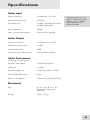
Audio Input
Input Connectors:
2 unbalanced 1/4” jacks
Maximum Input Level:
+10 dBV
Nominal Level:
-10 dBV (adjustable, left input)
-20 dBV (right input)
Input Impedance:
470kΩ
Input Converter Resolution:
24-bit, 48 kHz sampling
All measurements done over
a 22Hz – 22kHz range with a
1kHz sine wave at -1dBFS
input. Impedances are
measured at 1kHz.
Audio Output
Output Connectors:
2 unbalanced 1/4” jacks
Maximum Output Level:
+9 dBV
Output Impedance:
500Ω
Output Converter Resolution:
24-bit, 48 kHz sampling
Audio Performance
(Analog In to Analog Out)
Signal To Noise Ratio:
>100 dB A-weighted
THD+N:
< 0.005%
Frequency Response:
± 1dB from 22Hz to 22kHz
Internal DSP Resolution:
28-bit
Power Consumption:
7 Watts max (9VAC Alesis P3)
Mechanical
Size:
2.1” H x 5.8” W x 3.9” D
(53mm H x 148mm W x
98mm D)
Weight:
12.6oz. (357 g)
45
6
Specifications
This page intentionally left blank.
46
Index
amplifier, 22
Aux Send/Return, 21
BYPASS, 16, 34
with foot switch, 34
cables, 23
Cleaning, 43
CONTROLLER, 25
DEPTH, 16, 32
digital converters, 34, 45
DIRECT OUT, 18
DSP, 45
envelope, 25
external source, 4, 19
FOOT SWITCH, 16, 34
Ground Loop, 41
grounding, 7
Group Sends, 21
Hums and buzzes, 41
INPUTS, 15
INPUTS and OUTPUTS,
16
INSERT
as Direct Out for mic, 18
Insert Cables, 20
levels, 15, 16, 23
mic preamp, 18
mic transformer, 18
microphone, 15, 18, 19, 25
Mod wheel, 32
ModFX, 24
ModLink, 16, 24
MODULATION, 30
MODULATION switch, 16
Noise, 29
oscillator, 4, 28
OUTPUTS, 15
on ModLink slave units, 24
Pattern, 31
PHREEQ, 16, 29
pitch
not changed by incoming signal, 25
POWER, 15
power adapter, 17
Power cable, 7
Rack mounting, 17
RATE, 16, 32
Rectified Saw, 28
repair, 44
Reset Mod, 16, 33
in Triggered Mode, 30
RIGHT IN = SYNTH, 19, 29
Safety, 7
Sample/Hold, 30
Saw, 28
SIBILANCE, 16, 25, 29
SIGNAL LED, 15, 16, 19, 23
Square, 28
SYNTHESIS INPUT, 15, 16, 25, 28
synthesizer, 15, 18, 25
Tap Tempo, 16, 27, 33
Tempo Sync, 27
effect on RATE knob, 32
transformers, 23
Triangle, 30
Triggered, 30
by RESET MOD, 33
TRIM, 15, 16, 19
active in bypass mode, 34
Uncertainty, 31
vocoder, 4, 25
and synthesizers, 18
voice modulation, 15
XLR, 23
47
Warranty / Contact Alesis
Alesis Limited Warranty
ALESIS CORPORATION ("ALESIS") warrants this product to be free of defects
in material and workmanship for a period of one (1) year for parts and for a period of
one (1) year for labor from the date of original retail purchase. This warranty is
enforceable only by the original retail purchaser and cannot be transferred or assigned.
For the most effective service, the purchaser should register the purchase on the
ALESIS website at http://www.alesis.com/support/warranty.htm.
During the warranty period ALESIS shall, at its sole and absolute option, either repair
or replace free of charge any product that proves to be defective on inspection by
ALESIS or its authorized service representative. In all cases disputes concerning this
warranty shall be resolved as prescribed by law.
To obtain warranty service, the purchaser must first call or write ALESIS at the
address and telephone number available on the Alesis Website to obtain a Return
Authorization Number and instructions concerning where to return the unit for
service. All inquiries must be accompanied by a description of the problem. All
authorized returns must be sent to ALESIS or an authorized ALESIS repair facility
postage prepaid, insured and properly packaged. Proof of purchase must be
presented in the form of a bill of sale, canceled check or some other positive proof
that the product is within the warranty period. ALESIS reserves the right to update
any unit returned for repair. ALESIS reserves the right to change or improve design
of the product at any time without prior notice.
This warranty does not cover claims for damage due to abuse, neglect, alteration or
attempted repair by unauthorized personnel, and is limited to failures arising during
normal use that are due to defects in material or workmanship in the product.
THE ABOVE WARRANTIES ARE IN LIEU OF ANY OTHER
WARRANTIES OR REPRESENTATIONS WHETHER EXPRESS OR
IMPLIED OR OTHERWISE, WITH RESPECT TO THE PRODUCT, AND
SPECIFICALLY EXCLUDE ANY IMPLIED WARRANTIES OF FITNESS
FOR A PARTICULAR PURPOSE OR MERCHANTABILITY OR OTHER
IMPLIED WARRANTIES. Some states do not allow limitations on how long an
implied warranty lasts, so the above limitation may not apply to you.
IN NO EVENT WILL ALESIS BE LIABLE FOR INCIDENTAL,
CONSEQUENTIAL, INDIRECT OR OTHER DAMAGES RESULTING
FROM THE BREACH OF ANY EXPRESS OR IMPLIED WARRANTY,
INCLUDING, AMONG OTHER THINGS, DAMAGE TO PROPERTY,
DAMAGE BASED ON INCONVENIENCE OR ON LOSS OF USE OF THE
PRODUCT, AND, TO THE EXTENT PERMITTED BY LAW, DAMAGES
FOR PERSONAL INJURY. Some states do not allow the exclusion or limitation of
incidental or consequential damages, so the above limitation or exclusion may not
apply to you.
THIS CONTRACT SHALL BE GOVERNED BY THE INTERNAL LAWS
OF THE STATE OF CALIFORNIA WITHOUT REFERENCE TO
CONFLICTS OF LAWS. This warranty gives you specific legal rights, and you may
also have other rights required by law which vary from state to state.
This warranty only applies to products sold to purchasers in the United States of
America or Canada. The terms of this warranty and any obligations of Alesis under
this warranty shall apply only within the country of sale. Without limiting the
foregoing, repairs under this warranty shall be made only by a duly authorized Alesis
service representative in the country of sale. For warranty information in all other
countries please refer to your local distributor.
48
For more effective
service and product
update notices, please
register your Metavox
online at:
http://www.alesis.com/
support/warranty.htm
Warranty/Contact Information
Alesis Contact Information
Alesis Studio Electronics
Los Angeles, CA USA
E-mail:
Website:
[email protected]
http://www.alesis.com
Alesis Metavox Reference Manual
Revision 1.0 by Alex Souppa & Dan Tinen
Copyright 2002, Alesis. All rights reserved
Reproduction in whole or in part is prohibited. Specifications
subject to change without notice. All trademarks are the property
of their respective holders.
7-51-0117-A
8/2002
49