1
Special Functions for Business Applications
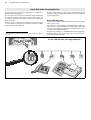
you can comfortably write, read and modify the messages. It is even
more comfortable with the program COMfort SMS bundled in the scope
of delivery.
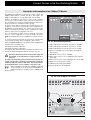
Required Configurations for Call Through
The following configurations for Call Through have to be made with
COMset:
Configure the incoming MSN as an external number that is used to call
the PBX for Call Through. This number is not to be used for the
external call distribution.
Configure the outgoing MSN out of the available external numbers that
should be presented to the called party when called via Call Through. If
you have multiple external S0 ports, you can configure an outgoing
MSN for each S0 port or deactivate S0 ports for outgoing Call Through
connections.
For safety reasons, you can time limit outgoing external Call Through
calls in the PBX. Configure the maximum duration (1-99 minutes).
The telephone numbers in the phonebooks of mobile phones are most
often entered with a plus (+) in front of the country code (e.g. +49). The
PBX can accept and use this format. Configure the country code for
this purpose.
You can also configure if Least Cost Routing for Call Through is activated.
The following configurations for Call Through have to be made with
COMtools:
The numbers of the mobile phones used and authorized for
Call Through, have to be entered as Public Short-code dialling numbers with Call Through authorization. The number presentation of
the mobile phone must be activated.
You can also configure for each individual mobile phone number if
Blocking Numbers are used.
☞
For the call data management with the PC program COMlist
the Short-code Dialling Number of the Call Through user is
stored in the column „project“.
49
Mandatory Settings for the SMS Function
The following settings are needed for the use of the SMS functions in
COMset:
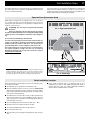
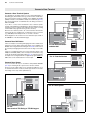
A SMS is not directly transferred to the receiver, but through a message
center (SMS center) of a network provider. For the transport of messages with the system telephone at least one SMS center (up to a maximum of 10) has to be configured in the PBX with the PC program COMset. SMS in the fixed network is currently supported by two SMS
centers: Telekom (telephone number„0193 010“) and Anny Way (telephone number „0190 01504“). The SMS call distribution has to be properly configured to distribute incoming SMS to SMS compatible telephones.
The telephone number presentation must not be restricted.
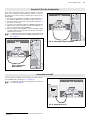
The following settings have to be made on the individual system telephones to receive SMS messages:
For receiving messages you have to be subscribed to the SMS center
used by the sender. At the SMS center of the Deutsche Telekom the
subscription can be done by sending one SMS with the text „ANMELD“
to the telephone number „8888“ (free of charge). For „Anny Way“ it is
sufficient to send one SMS with any text via this SMS center.
☞
If you did not subscribe your telephone at the transporting
SMS center, your telephone is not registered to be SMS compatible. But you are still getting your message. Instead of a
text message on the display you will receive a call with a voice message
like on other not SMS compatible telephones.
SMS in the fixed network is currently only possible on fixed network connections of Deutsche Telekom or Arcor. If you are connected to another
provider, please stay informed about changes.
Sending or receiving of SMS to/from mobile phone networks may have
some restrictions. Please stay informed about the capabilities of your
provider’s SMS center.
If more than one SMS center is configured in the PBX, you will be asked
which SMS center you like to use for sending a message. But you can
also preselect one of the existing centers for the sending.
If you have a connection between a PC and the USB interface of the telephone, you can use the bundled PC program COMfort SMS for preparing, reading, sending or storing of SMS messages.
The usage of the SMS function is described in detail in the manual of
your system telephone.
Call Groups (Teams)
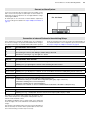
Additionally to the internal subscribers the PBX is able to manage 16
groups. Internal subscribers can be member of more than one group.
These groups can be used in order to reach e.g. the internal subscribers
of certain departments/teams (support, marketing, sales).
A group has, like an internal subscriber, an internal number, which has
to be configured under Internal Numbers in COMset. Some settings
are also handled similar to an internal subscriber. The call distribution
(External and door) can be configured in COMset for groups. The group
number can also be forwarded to an internal or external subscriber
(group call forwarding).
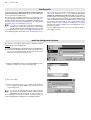
Your membership in a group is configured under Group settings in
COMset, does not mean that you are always called when your group is
called. If you do not like to be reachable via the group calling number for
a certain time but only as an individual subscriber, you will be able to
„log out“ of this group (page 52 in the user manual).
This way there are active and passive members of the group. This function can be important for members of service lines or call centers who
do not like to be available for their customers around the clock. Group
functionality is not available for a subscriber that is logged out, but only
for a certain period. There are three different modes to log in:
왎 incoming + outgoing
왎 only incoming
왎 only outgoing
A subscriber that is member of several groups can be only be „logged
in outgoing“ in one single group at the same time. If he likes to get also
the calls of the other groups in this case, he will be able to log in there
as „incoming“. Therefore he will be in the call distribution of more groups
for internal -, public exchange - and door terminal calls.
With „log in outgoing“ into a certain group, the subscriber gets a number
of features/authorizations of the group which will replace his own features/authorizations as an individual subscriber in case of outgoing
business calls:
왎 Exchange line authorization for business calls
왎 Activating of blocking/release numbers for business calls
왎 Short-Code Dialling authorization for business calls
왎 Calling number presentation for business calls
왎 Preferred exchange line for business calls
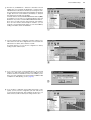
These features/authorizations are configured under Group settings in
COMset.