1
Text Part Number: 78-3224-08
Input/Output Controller Replacement
Instructions
Product Numbers: C7200-I/O-FE-MII=, C7200-I/O=, C7200-I/O-FE=, UBR7200-I/O=,
UBR7200-I/O-FE=, CISCO7202=, CISCO7204=, CISCO7206=, CISCO7204VXR=,
CISCO7206VXR=, CHAS-UBR7246=, CHAS-UBR7223=, RS7206S=
Introduction
This document explains how to remove and replace the Input/Output (I/O) controller, which can be
used in the following platforms:
•
Cisco 7200 series routers—which consist of the 2-slot Cisco 7202, 4-slot Cisco 7204 and
Cisco 7204VXR, and the 6-slot Cisco 7206
•
Cisco uBR7200 series universal broadband routers—which consist of the 3-slot Cisco uBR7223
(1 port adapter slot and 2 cable modem card slots) and the 6-slot Cisco uBR7246 (2 port adapter
slots and 4 cable modem card slots)
It includes instructions for powering down a router, removing an installed I/O controller, and
installing a new I/O controller in the router. This document also includes steps for verifying the
initialization of the installed I/O controller after you power up the router.
Note The Cisco 7206 can be used as a router shelf in a Cisco AS5800 Universal Access Server.
References to the Cisco 7200 series routers in this document include the Cisco 7206 as a router shelf
in a Cisco AS5800 Universal Access Server, unless indicated otherwise.
Contents
The following sections are included in this document:
•
•
•
•
If You Need More Information, page 2
Input/Output Controller Description, page 3
Installation Prerequisites, page 11
Removing and Replacing the Input/Output Controller, page 17
Corporate Headquarters
Cisco Systems, Inc.
170 West Tasman Drive
San Jose, CA 95134-1706
USA
Copyright © 1996–1999
Cisco Systems, Inc.
All rights reserved.
1
If You Need More Information
•
•
•
•
Troubleshooting Using the show interfaces fastethernet Command, page 37
Additional Information, page 39
FCC Class B Compliance, page 49
Cisco Connection Online, page 50
If You Need More Information
Your router and the Cisco IOS software running on it contain extensive features and functionality,
which are documented in the following resources:
•
Cisco Documentation CD-ROM package
Cisco documentation and additional literature are available in a CD-ROM package, which ships
with your product. The Documentation CD-ROM, a member of the Cisco Connection Family, is
updated monthly; therefore, it might be more up to date than printed documentation. To order
additional copies of the Documentation CD-ROM, contact your local sales representative or call
customer service. The CD-ROM package is available as a single package or as an annual
subscription.
If you are reading Cisco product documentation on the World Wide Web, you can submit
comments electronically. Click Feedback on the toolbar and select Documentation. After you
complete the form, click Submit to send it to Cisco. We appreciate your comments.
•
For Cisco IOS software configuration information and support, refer to the modular
configuration and modular command reference publications in the Cisco IOS software
configuration documentation set that corresponds to the software release installed on your Cisco
hardware.
•
For hardware installation and maintenance information on the Cisco 7200 VXR routers, refer to
the Cisco 7200 VXR Installation and Configuration Guide that shipped with your router.
•
For hardware installation and maintenance information on the Cisco 7200 routers, refer to the
following publications that shipped with your router:
— Cisco 7202 Installation and Configuration Guide
— Cisco 7204 Installation and Configuration Guide
— Cisco 7206 Installation and Configuration Guide
•
For hardware installation and maintenance information and software configuration information
on the Cisco AS5800 Universal Access Server, refer to the following publications:
— Cisco AS5800 Universal Access Server Hardware Installation and Configuration Guide
— Cisco AS5800 Universal Access Server Software Installation and Configuration Guide
•
For hardware installation and maintenance information on the Cisco uBR7200 series routers,
refer to the Cisco uBR72xx Universal Broadband Router Installation and Configuration Guide
that shipped with your router.
2 Input/Output Controller Replacement Instructions
Input/Output Controller Description
•
For international agency compliance, safety, and statutory information for wide-area network
(WAN) interfaces for the Cisco 7200 series routers, the Cisco AS5800 Universal Access Server,
and the Cisco uBR7200 series routers refer to the following publications:
— Regulatory Compliance and Safety Information for the Cisco 7200 Series Routers
— Cisco AS5800 Universal Access Server Regulatory Compliance and Safety Information.
— Regulatory Compliance and Safety Information for the Cisco uBR72xx Universal
Broadband Router.
•
For general information about documentation, refer to the “Cisco Connection Online” section on
page 50, or call customer service at 800 553-6387 or 408 526-7208. Customer service hours are
5:00 a.m. to 6:00 p.m. Pacific time, Monday through Friday (excluding Cisco-observed
holidays). You can also send e-mail to [email protected].
Note You can access Cisco IOS software configuration and hardware installation and
maintenance documentation on the World Wide Web at http://www.cisco.com,
http://www-china.cisco.com, or http://www-europe.cisco.com.
Input/Output Controller Description
The Input/Output controller shares the system memory functions and the environmental monitoring
functions with the network processing engine in the Cisco 7200 series routers and Cisco uBR7200
series routers.
The I/O controller consists of the following components:
•
Dual EIA/TIA-232 channels for local console and auxiliary ports. The console port has full data
communications equipment (DCE) functionality and a DB-25 receptacle. The auxiliary port has
full data terminal equipment (DTE) functionality and a DB-25 plug.
•
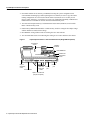
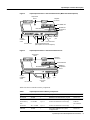
An optional Fast Ethernet port that is configurable for use at 100 megabits per second (Mbps)
full-duplex or half-duplex (half-duplex is the default). The Fast Ethernet port is equipped with
either a single MII receptacle (see Figure 1) or an MII receptacle and an RJ-45 receptacle (see
Figure 2). Although still supported by Cisco Systems, the I/O controller equipped with the single
MII receptacle was discontinued as an orderable product in May, 1998. The I/O controller
without the Fast Ethernet port is shown in Figure 3.
Note When using the I/O controller that is equipped with an MII receptacle and an RJ-45
receptacle, only one receptacle can be configured for use at a time.
You can install an I/O controller with or without a Fast Ethernet port in all Cisco 7200 series
routers (including the Cisco 7206 as a router shelf in a Cisco AS5800 Universal Access Server);
however, when you install an I/O controller with a Fast Ethernet port in a Cisco 7202, the system
software automatically disables the port.
If you order an I/O controller as a spare for a Cisco uBR7200 series router, use the product
numbers UBR7200-I/O= (without a Fast Ethernet port) or UBR7200-I/O-FE= (with a Fast
Ethernet port). These I/O controllers have the boot helper image used by a Cisco uBR7200 series
router loaded on the Flash memory SIMMs. The Cisco 7200 series I/O controller spares
(C7200-I/O-FE-MII=, C7200-I/O-FE=, and C7200-I/O=) do not have the Cisco uBR7200 series
boot helper image loaded on the Flash memory SIMMs.
Input/Output Controller Replacement Instructions
3
Input/Output Controller Description
•
Nonvolatile random-access memory (NVRAM) for storing the system configuration and
environmental monitoring logs. When replacing the I/O controller, be sure to copy the router’s
running configuration to a Trivial File Transfer Protocol (TFTP) file server so that you can
retrieve it later; otherwise, you will have to reenter your configuration manually. NVRAM uses
lithium batteries to maintain its contents when disconnected from power.
•
Two Personal Computer Memory Card International Association (PCMCIA) slots for Flash
Disks or Flash memory cards.
•
Flash memory SIMM and Flash Disks or Flash memory cards for storing the boot helper image
and the default Cisco IOS software image.
•
•
Boot ROM for storing sufficient code for booting the Cisco IOS software.
Two environmental sensors for monitoring the cooling air as it enters and leaves the chassis.
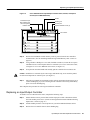
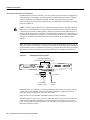
Figure 1
Input/Output Controller—with Fast Ethernet Port (Single MII Receptacle)
Temperature
sensor
Midplane
connectors
Flash SIMM U99
NVRAM U41
Temperature
sensor
Boot ROM U20
1
FAST ETHERNET INPUT/OUTPUT CONTROLLER
II
FE
M
LE
D
LE
T
M
C
P
T
C
IA
C
B
A
N
E
JE
E
B
0
LO
E
S
F
Captive
installation
screw
K
IIA
MN
E EN
E
F
T
K
E
O
LIN 45 ES
R R
J R
W W
RU K
P P
K
P IN
1O
C L
1OO
LEDs and
CPU reset
button
PC Card slots
Optional Fast Ethernet
port (MII receptacle)
4 Input/Output Controller Replacement Instructions
LE
X
U
O
A
S
N
O
C
Auxiliary
port
Console
port
H6000
T
LO
S
Input/Output Controller Description
Figure 2
Input/Output Controller—with Fast Ethernet Port (MII and RJ-45 Receptacles)
Temperature
sensor
Midplane
connectors
Flash SIMM U99
NVRAM U41
Temperature
sensor
T
1
FAST ETHERNET INPUT/OUTPUT CONTROLLER
II
LO
S
FE
M
T
E
S
5
E
J-4
R
U
R
P
C
D
LE
T
T
C
IA
JE
C
B
M
A
P
0
M
N
E
LO
E
C
N
E
II
S
5
J4
R
N
E
45
J
R
U
O
A
W
P
K
1O O
K
LIN
LE
X
R
S
N
O
C
Console
port
Auxiliary
port
Captive
installation
screw
LEDs
PC Card slots
Figure 3
H11293
Boot ROM U20
CPU reset button
Optional Fast Ethernet port
(MII receptacle and RJ-45 receptacle)
Input/Output Controller—without Fast Ethernet Port
Temperature
sensor
Midplane
connectors
Flash SIMM U99
NVRAM U41
Temperature
sensor
Boot ROM U20
1
INPUT/OUTPUT CONTROLLER
T
E
D
LE
T
M
C
P
T
C
IA
C
B
A
N
E
JE
E
0
LO
S
Captive
installation
screw
PC Card slots
U
P
C
R
E
W
O
P K
O O
S
E
R
LE
X
U
O
A
S
N
1
LED and
CPU reset
button
O
C
Auxiliary
port
H7400
T
LO
S
Console
port
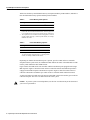
Table 1 lists the I/O controller memory components.
Table 1
Input/Output Controller Memory Components
Type
Size
Quantity
Description
Location
Boot ROM
256 KB
1
EPROM for the ROM monitor program
Socket U20
Flash SIMM
8 MB
1
Contains the default boot helper image
Socket U99
Flash memory
card
8 to 20 MB
Up to 2
Contains the default Cisco IOS image
PCMCIA
Slot 0 and slot
1
Flash Disk
40 or 110 MB
Up to 2
Contains the default Cisco IOS image
NVRAM
128 KB
1
Nonvolatile EPROM for the system
configuration file
Socket U41
Input/Output Controller Replacement Instructions
5
Input/Output Controller Description
Table 2 lists the factory-installed Flash memory card options and their product numbers, and Table 3
lists the Flash Disk memory options and their product numbers.
Table 2
Flash Memory Card Options
Memory Size1
Product Number
16 MB
MEM-I/O-FLC16M2
20 MB
MEM-I/O-FLC20M2
1
2
Refer to the Cisco AS5800 Universal Access Server documentation
listed in the “If You Need More Information” section on page 2, for
Cisco AS5800 Universal Access Server Flash memory card options.
These products are also available as Flash card upgrades. To order an
upgrade, add an equal sign (=) after the product number, for example,
MEM-I/O-FLC16M=.
Table 3
Flash Disk Memory Options
Memory Size
Product Number
40 MB
MEM-I/O-FLD40M1
110 MB
MEM-I/O-FLD110M
1
These products are also available as Flash Disk upgrades.
To order an upgrade, add an equal sign (=) after the product
number, for example, MEM-I/O-FLD110M=.
Depending on whether the Fast Ethernet port is present, up to five LEDs on the I/O controller
faceplate indicate system status; two additional LEDs indicate the status of the Flash Disk or Flash
memory cards installed in either PCMCIA slot.
Figure 4 shows the LEDs on the I/O controller with the Fast Ethernet port equipped with a single
MII receptacle. Figure 5 shows the LEDs on the I/O controller with the Fast Ethernet port that is
equipped with an MII receptacle and an RJ-45 receptacle. Figure 6 shows the LEDs on the I/O
controller without the Fast Ethernet port. Table 4 lists I/O controller LEDs and their functions.
A CPU reset button is located next to the IO power OK LED or next to the auxiliary port on the I/O
controller faceplate. The CPU reset button resets the entire system.
Caution To prevent system errors and problems, use the CPU reset button only at the direction of
your service representative.
6 Input/Output Controller Replacement Instructions
Input/Output Controller Description
I/O Controller LEDs and CPU Reset Button—with Fast Ethernet Port
(Single MII Receptacle)
SL
O
T
0
EN
AB
EN F
A E
FE BL
E
LI
N
C
K
PU
R
IO
ES
PO
ET
W
ER
O
K
LE
D
SL
O
T
1
FAST ETHERNET INPUT/OUTPUT CONTROLLER
H6523
Figure 4
I/O Controller LEDs and CPU Reset Button—with Fast Ethernet Port
(MII and RJ-45 Receptacles)
T
E
FAST ETHERNET INPUT/OUTPUT CONTROLLER
S
5
E
J-4
R
U
R
P
C
5
J4
N
E
R
5
J4 K
R
LIN
R
W
P
K
1O O
SL
O
T
1
II
M
N
E
H11294
Figure 5
T
E
S
E
5
J4
R N
E
5
J4
R INK
L
R
W
P K
IO O
U
R
P
C
SL
O
T
0
EN
AB
LE
D
II
M N
E
Input/Output Controller Replacement Instructions
7
Input/Output Controller Description
Figure 6
I/O Controller LEDs and CPU Reset Button—without Fast Ethernet Port
T
1
INPUT/OUTPUT CONTROLLER
LO
T
R
E
E
S
D
LE
T
T
C
IA
JE
C
B
M
A
N
E
E
0
U
LO
E
C
P
T
R
P
W
O
K
O
LE
U
O
A
P
IO
C
S
X
S
N
O
C
H7401
S
1
LO
S
D
LE
T
R
E
B
E
W
O K
O
S
A
N
E
T
E
0
U
LO
P
C
S
R
IO
P
Note LEDs are either on or off. The LED state (on or off), not the color, determines the status of
connection as described in Table 4. However, most LEDs are green when on, with the exception of
the IO Power LED, which is orange when in the on state.
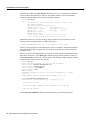
Table 4
I/O Controller LEDs
LED
Function
Enabled
Indicates that the network processing engine and the I/O controller are enabled for
operation by the system; however, it does not mean that the Fast Ethernet port on the I/O
controller is functional or enabled. This LED goes on during a successful router boot and
remains on during normal operation of the router.
IO Power OK
Indicates that the I/O controller is on and receiving DC power from the router midplane.
This LED comes on during a successful router boot and remains on during normal
operation of the router.
FE ENABLE
Indicates that the Fast Ethernet port is initialized and enabled for operation by the system.
This LED comes on after the I/O controller has been enabled and remains on during normal
operation of the router.
This LED is disabled by the system software when the I/O controller with the Fast Ethernet
port is installed in a Cisco 7202.
FE LINK
Indicates that the Fast Ethernet port has established a valid link with the network. This LED
remains off during normal operation of the router, unless there is an incoming carrier
signal.
This LED is disabled by the system software when the I/O controller with the Fast Ethernet
port is installed in a Cisco 7202.
MII EN
Indicates that the Fast Ethernet port’s MII receptacle is initialized and enabled by the
system, and is configured for operation. This LED comes on after the I/O controller has
been enabled and the MII receptacle has been configured as the media type for the Fast
Ethernet port (the RJ-45 receptacle is the default media type for the Fast Ethernet port).
This LED remains on during normal operation of the router.
This LED is disabled by the system software when the I/O controller with the Fast Ethernet
port is installed in a Cisco 7202.
8 Input/Output Controller Replacement Instructions
Input/Output Controller Description
Table 4
I/O Controller LEDs (continued)
LED
Function
RJ45 EN
Indicates that the Fast Ethernet port’s RJ-45 receptacle (the default media type for the Fast
Ethernet port) is initialized and enabled by the system. This LED comes on after the I/O
controller has been enabled and remains on during normal operation of the router.
This LED is disabled by the system software when the I/O controller with the Fast Ethernet
port is installed in a Cisco 7202.
RJ45 LINK
Indicates that the Fast Ethernet port’s RJ-45 receptacle has established a valid link with the
network. This LED remains off during normal operation of the router unless there is an
incoming carrier signal.
This LED is disabled by the system software when the I/O controller with the Fast Ethernet
port is installed in a Cisco 7202.
Slot 0 Slot 1
These LEDs indicate which PCMCIA slot is in use by coming on when either slot is being
accessed by the system. These LEDs remain off during normal operation of the router.
Note An MII LINK LED is not provided on the I/O controller because the LED is provided on
external transceivers that are required for connecting to the MII receptacle on the I/O controller. See
the “Fast Ethernet MII Connection Equipment” section on page 40 for Fast Ethernet MII connection
requirements.
Use the show diag 0 command to identify the I/O controller type (with or without the Fast Ethernet
port) that is installed in your Cisco 7200 series router or Cisco uBR7200 series router.
Note Slot 0 in Cisco 7200 series routers (including the Cisco 7206 as a router shelf in a
Cisco AS5800 Universal Access Server) and Cisco uBR7200 series routers is always reserved for
the Fast Ethernet port on the I/O controller, if present. If the I/O controller without the Fast Ethernet
port is installed in your Cisco 7200 series router or Cisco uBR7200 series router, the system
software will not display output for the show diag 0 command. If you have an I/O controller with
the Fast Ethernet port installed in your Cisco 7202 router, the system software will indicate in output
for the show diag 0 command that the Fast Ethernet port is disabled.
The following example of the show diag 0 command shows an installed I/O controller with the Fast
Ethernet port that is equipped with an MII receptacle and RJ-45 receptacle:
Router> show diag 0
Slot 0:
Fast-ethernet on C7200 I/O with MII or RJ45 port adapter, 1 port
Port adapter is analyzed
Port adapter insertion time 00:10:42 ago
Hardware revision 2.0
Board revision A0
Serial number
3511336
Part number
73-1537-03
Test history
0x0
RMA number
00-00-00
EEPROM format version 1
EEPROM contents (hex):
0x20: 01 14 02 00 00 35 94 28 49 06 01 03 00 00 00 00
0x30: 50 0000 00 FF FF FF FF FF FF FF FF FF FF FF FF
Input/Output Controller Replacement Instructions
9
Input/Output Controller Description
The following example of the show diag 0 command is from a Cisco 7202 that has an installed I/O
controller with the Fast Ethernet port. The text “Port adapter disabled” in the command output
indicates that the Fast Ethernet port on the I/O controller is disabled.
Router> show diag 0
Slot 0:
Fast-ethernet on C7200 I/O with MII or RJ45 port adapter, 1 port
Port adapter disabled
Port adapter insertion time 00:10:42 ago
Hardware revision 2.0
Board revision A0
Serial number
3511336
Part number
73-1537-03
Test history
0x0
RMA number
00-00-00
EEPROM format version 1
EEPROM contents (hex):
0x20: 01 14 02 00 00 35 94 28 49 06 01 03 00 00 00 00
0x30: 50 0000 00 FF FF FF FF FF FF FF FF FF FF FF FF
Additionally for the Cisco 7202, the following message appears in the system banner if an I/O
controller with the Fast Ethernet port is installed in the system:
%C7200-3-UNSUPPORTED: FE in slot0 is not supported on C7202 chassis
If the above message appears, the Fast Ethernet port on the I/O controller is automatically disabled.
If the above message does not appear, your Cisco 7202 has an installed I/O controller without the
Fast Ethernet port.
The RJ-45 receptacle is the default media type for the I/O controller equipped with an MII receptacle
and an RJ-45 receptacle. Use the media-type command to change the I/O controller’s media type
and the show interfaces command to verify the change. The following example configures the MII
receptacle as the media type for the I/O controller:
Router# config t
Enter configuration commands, one per line. End with CNTL/Z.
Router(config)# interface fastethernet 0/0
Router(config-if)# media-type mii
Router(config-if)# no shutdown
Router(config-if)# exit
Router(config)#
%LINEPROTO-5-UPDOWN: Line protocol on Interface FastEthernet0/0, changed
state to up
%LINK-3-UPDOWN: Interface FastEthernet0/0, changed state to up
Router# sh interface fastethernet 0/0
FastEthernet0/0 is administratively up, line protocol is up
(display text omitted)
Encapsulation ARPA, loopback not set, keepalive not set, hdx, MII
(display text omitted)
Use the media-type 100BaseX command to return the media type to the RJ-45 receptacle.
10 Input/Output Controller Replacement Instructions
Installation Prerequisites
The default transmission mode for the Fast Ethernet port on the I/O controller is half-duplex. Use
the full-duplex command to change the Fast Ethernet port’s transmission mode, and use the show
interfaces command to verify the change as follows:
Router# config t
Enter configuration commands, one per line. End with CNTL/Z.
Router(config)# interface fastethernet 0/0
Router(config-if)# full-duplex
Router(config-if)# no shutdown
Router(config-if)# exit
Router(config)#
%LINEPROTO-5-UPDOWN: Line protocol on Interface FastEthernet0/0, changed
state to up
%LINK-3-UPDOWN: Interface FastEthernet0/0, changed state to up
Router# sh interface fastethernet 0/0
FastEthernet0/0 is administratively up, line protocol is up
(display text omitted)
Encapsulation ARPA, loopback not set, keepalive not set, fdx, 100BaseTX
(display text omitted)
Use the no full-duplex command to return the Fast Ethernet port on the I/O controller to half-duplex
transmission mode.
Note In a Cisco 7206 router shelf, the interface specified in the above examples would include a
shelf number. For example, the command interface fastethernet 5/0/0 would specify the Fast
Ethernet interface on the I/O controller (slot 0) in Cisco 7206 router shelf 5. For information about
the Cisco AS5800 Universal Access Server router shelf, refer to the Cisco AS5800 Universal Access
Server documentation listed in the “If You Need More Information” section on page 2.
Note Certain Cisco hardware products have incorporated a hardware change, which for most users,
is transparent. However, an anomaly has been identified when this updated Cisco hardware is used
in conjunction with certain releases of Cisco IOS software. (See the “Troubleshooting Using the
show interfaces fastethernet Command” section on page 37 for an explanation of this anomaly and
a workaround procedure.)
Installation Prerequisites
This section provides a list of parts and tools you need to remove and replace the I/O controller in
the Cisco 7200 series routers or Cisco uBR7200 series routers. This section also includes safety and
ESD-prevention guidelines to help you avoid injury to yourself and damage to the equipment.
List of Parts and Tools
You need the following tools and parts to remove and replace the I/O controller. If you need
additional equipment, contact a service representative for ordering information:
•
•
A new I/O controller
Number 2 Phillips and a 3/16-inch, flat-blade screwdriver
Input/Output Controller Replacement Instructions
11
Installation Prerequisites
•
An 8-mm wrench or nut driver, or adjustable wrench (for connecting a grounding lug to a
Cisco uBR7200 series DC-input power supply)
•
A 7-mm wrench or nut driver, or adjustable wrench (for connecting the DC-input power lead
strain-relief cover to a DC-input power supply)
•
•
Tape (for securing the switch handle of a DC circuit breaker in the OFF position)
•
•
An antistatic mat or surface, or static-shielding bag
Your own ESD-prevention equipment or the disposable grounding wrist strap included with all
upgrade kits, FRUs, and spares
Small pliers
Software and Hardware Requirements
Table 5 lists the recommended minimum Cisco IOS software release to use the I/O controller in
supported router platforms.
Table 5
I/O Controller Software and Hardware Requirements
Router Platform
I/O Controller
With Fast Ethernet Port
(Single MII Receptacle)
With Fast Ethernet Port
(MII and RJ-45 Receptacles)
Without Fast Ethernet Port
Cisco 7200 series
• Cisco 7204VXR and
Cisco 7206VXR
Cisco IOS Release 12.0(3)T or later releases of 12.0 T
Cisco IOS Release 12.0(2)XE2 or later releases of 12.0 XE
• Cisco 7204 and
Cisco 7206
Cisco IOS Release 11.1(17)CA or later releases of 11.1CA
Cisco IOS Release 11.2(12)P or later releases of 11.2P
Cisco IOS Release 11.3(2)T or later releases of 11.3 T
Cisco IOS Release 11.3(2)AA or later releases of 11.3 AA
• Cisco 72021
Cisco IOS Release 11.1(19)CC1 or later releases of 11.1 CC
Cisco IOS Release 11.3(4)AA or later releases of 11.3 AA
• Cisco 7206 router shelf2
Cisco IOS Release 11.3(2)AA or later releases of 11.3 AA
Cisco uBR7200 series
universal broadband routers3
–4
1
2
3
4
Cisco IOS Release 11.3(6)NA or later releases of 11.3 NA
You can install an I/O controller with or without a Fast Ethernet port in a Cisco 7202; however, when you install an I/O controller with a Fast Ethernet port, the
Cisco 7202 system software automatically disables the port.
The Cisco 7206 can be used as a router shelf in a Cisco AS5800 Universal Access Server. For information about the Cisco AS5800 Universal Access Server,
refer to the Cisco AS5800 Universal Access Server documentation listed in the “If You Need More Information” section on page 2.
If you need to order a spare I/O controller for a Cisco uBR7200 series router, use the product number UBR7200-I/O-FE= (with Fast Ethernet port) or
UBR7200-I/O= (without Fast Ethernet port). These I/O controllers have the Cisco uBR7200 series boot helper image loaded on the Flash SIMMs.
Initial shipments of Cisco uBR7246 chassis that were equipped with a Fast Ethernet I/O controller might have an I/O controller with the single MII receptacle
installed. These I/O controllers are fully compatible with the router. If you need to order a spare I/O controller, use the product numbers described in the previous
footnote.
12 Input/Output Controller Replacement Instructions
Safety Guidelines
Safety Guidelines
Following are safety guidelines that you should follow when working with any equipment that
connects to electrical power or telephone wiring.
Warning Only trained and qualified personnel should be allowed to install or replace this
equipment.
Safety Warnings
Warning This warning symbol means danger. You are in a situation that could cause bodily injury.
Before you work on any equipment, be aware of the hazards involved with electrical circuitry and
be familiar with standard practices for preventing accidents. To see translations of the warnings that
appear in this publication, refer to the Regulatory Compliance and Safety Information document that
accompanied this device.
Waarschuwing Dit waarschuwingssymbool betekent gevaar. U verkeert in een situatie die
lichamelijk letsel kan veroorzaken. Voordat u aan enige apparatuur gaat werken, dient u zich bewust
te zijn van de bij elektrische schakelingen betrokken risico's en dient u op de hoogte te zijn van
standaard maatregelen om ongelukken te voorkomen. Voor vertalingen van de waarschuwingen die
in deze publicatie verschijnen, kunt u het document Regulatory Compliance and Safety Information
(Informatie over naleving van veiligheids- en andere voorschriften) raadplegen dat bij dit toestel is
ingesloten.
Varoitus Tämä varoitusmerkki merkitsee vaaraa. Olet tilanteessa, joka voi johtaa ruumiinvammaan.
Ennen kuin työskentelet minkään laitteiston parissa, ota selvää sähkökytkentöihin liittyvistä
vaaroista ja tavanomaisista onnettomuuksien ehkäisykeinoista. Tässä julkaisussa esiintyvien
varoitusten käännökset löydät laitteen mukana olevasta Regulatory Compliance and Safety
Information -kirjasesta (määräysten noudattaminen ja tietoa turvallisuudesta).
Attention Ce symbole d'avertissement indique un danger. Vous vous trouvez dans une situation
pouvant causer des blessures ou des dommages corporels. Avant de travailler sur un équipement,
soyez conscient des dangers posés par les circuits électriques et familiarisez-vous avec les
procédures couramment utilisées pour éviter les accidents. Pour prendre connaissance des
traductions d’avertissements figurant dans cette publication, consultez le document Regulatory
Compliance and Safety Information (Conformité aux règlements et consignes de sécurité) qui
accompagne cet appareil.
Warnung Dieses Warnsymbol bedeutet Gefahr. Sie befinden sich in einer Situation, die zu einer
Körperverletzung führen könnte. Bevor Sie mit der Arbeit an irgendeinem Gerät beginnen, seien Sie
sich der mit elektrischen Stromkreisen verbundenen Gefahren und der Standardpraktiken zur
Vermeidung von Unfällen bewußt. Übersetzungen der in dieser Veröffentlichung enthaltenen
Warnhinweise finden Sie im Dokument Regulatory Compliance and Safety Information
(Informationen zu behördlichen Vorschriften und Sicherheit), das zusammen mit diesem Gerät
geliefert wurde.
Avvertenza Questo simbolo di avvertenza indica un pericolo. La situazione potrebbe causare
infortuni alle persone. Prima di lavorare su qualsiasi apparecchiatura, occorre conoscere i pericoli
relativi ai circuiti elettrici ed essere al corrente delle pratiche standard per la prevenzione di incidenti.
La traduzione delle avvertenze riportate in questa pubblicazione si trova nel documento Regulatory
Compliance and Safety Information (Conformità alle norme e informazioni sulla sicurezza) che
accompagna questo dispositivo.
Input/Output Controller Replacement Instructions
13
Installation Prerequisites
Advarsel Dette varselsymbolet betyr fare. Du befinner deg i en situasjon som kan føre til
personskade. Før du utfører arbeid på utstyr, må du vare oppmerksom på de faremomentene som
elektriske kretser innebærer, samt gjøre deg kjent med vanlig praksis når det gjelder å unngå ulykker.
Hvis du vil se oversettelser av de advarslene som finnes i denne publikasjonen, kan du se i
dokumentet Regulatory Compliance and Safety Information (Overholdelse av forskrifter og
sikkerhetsinformasjon) som ble levert med denne enheten.
Aviso Este símbolo de aviso indica perigo. Encontra-se numa situação que lhe poderá causar danos
físicos. Antes de começar a trabalhar com qualquer equipamento, familiarize-se com os perigos
relacionados com circuitos eléctricos, e com quaisquer práticas comuns que possam prevenir
possíveis acidentes. Para ver as traduções dos avisos que constam desta publicação, consulte o
documento Regulatory Compliance and Safety Information (Informação de Segurança e
Disposições Reguladoras) que acompanha este dispositivo.
¡Advertencia! Este símbolo de aviso significa peligro. Existe riesgo para su integridad física. Antes
de manipular cualquier equipo, considerar los riesgos que entraña la corriente eléctrica y
familiarizarse con los procedimientos estándar de prevención de accidentes. Para ver una traducción
de las advertencias que aparecen en esta publicación, consultar el documento titulado Regulatory
Compliance and Safety Information (Información sobre seguridad y conformidad con las
disposiciones reglamentarias) que se acompaña con este dispositivo.
Varning! Denna varningssymbol signalerar fara. Du befinner dig i en situation som kan leda till
personskada. Innan du utför arbete på någon utrustning måste du vara medveten om farorna med
elkretsar och känna till vanligt förfarande för att förebygga skador. Se förklaringar av de varningar
som förkommer i denna publikation i dokumentet Regulatory Compliance and Safety Information
(Efterrättelse av föreskrifter och säkerhetsinformation), vilket medföljer denna anordning.
Electrical Equipment Guidelines
Follow these basic guidelines when working with any electrical equipment:
•
Before beginning any procedures requiring access to the chassis interior, locate the emergency
power-off switch for the room in which you are working.
•
•
•
•
Disconnect all power and external cables before moving a chassis.
•
Carefully examine your work area for possible hazards such as moist floors, ungrounded power
extension cables, and missing safety grounds.
Do not work alone when potentially hazardous conditions exist.
Never assume that power has been disconnected from a circuit; always check.
Do not perform any action that creates a potential hazard to people or makes the equipment
unsafe.
Telephone Wiring Guidelines
Use the following guidelines when working with any equipment that is connected to telephone
wiring or to other network cabling:
•
•
Never install telephone wiring during a lightning storm.
•
Never touch uninsulated telephone wires or terminals unless the telephone line has been
disconnected at the network interface.
•
Use caution when installing or modifying telephone lines.
Never install telephone jacks in wet locations unless the jack is specifically designed for wet
locations.
14 Input/Output Controller Replacement Instructions
Safety Guidelines
Electrostatic Discharge Prevention
Electrostatic discharge (ESD) damages equipment and impairs electrical circuitry. ESD occurs when
printed circuit boards are improperly handled and results in complete or intermittent failures.
The network processing engine, I/O controller, port adapters, and Cisco uBR7200 series cable
modem cards consist of a printed circuit board that is fixed in a metal carrier. Electromagnetic
interference (EMI) shielding, connectors, and a handle are integral components of the carrier.
Handle the network processing engine, I/O controller, port adapters, and Cisco uBR7200 series
cable modem cards by their carrier edges and handles; never touch the printed circuit board or
connector pins.
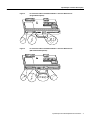
Figure 7 shows the location of a printed circuit board in a network processing engine, I/O controller,
or Cisco uBR7200 series cable modem card metal carrier. Do not touch the printed circuit board
when handling any of the components.
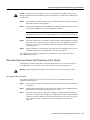
Figure 7
Handling the Network Processing Engine, the I/O Controller, and the
Cisco uBR7200 Series Cable Modem Cards—Side View
Printed circuit board
H6419
Metal carrier
Figure 8 shows the location of a printed circuit board in a port adapter metal carrier. Do not touch
the printed circuit board when handling a port adapter.
Figure 8
Handling a Port Adapter—Side View
Metal carrier
H6420
Printed circuit board
Although the metal carrier helps to protect the printed circuit boards from ESD, wear a preventive
antistatic strap whenever handling the network processing engine, I/O controller, port adapters, or
Cisco uBR7200 series cable modem cards. Ensure that the strap makes good skin contact and
connect the strap’s clip to an unpainted chassis surface to safely channel unwanted ESD voltages to
ground.
If no wrist strap is available, ground yourself by touching the metal part of the chassis.
Input/Output Controller Replacement Instructions
15
Installation Prerequisites
Caution Make sure to tighten the captive installation screws on the network processing engine,
Cisco uBR7200 series cable modem cards, and the I/O controller (use a number 2 Phillips or a
3/16-inch, flat-blade screwdriver). These screws prevent accidental removal, provide proper
grounding for the router, and help to ensure that the network processing engine, Cisco uBR7200
series cable modem cards, and the I/O controller are properly seated in the router midplane.
16 Input/Output Controller Replacement Instructions
Removing and Replacing the Input/Output Controller
Following are guidelines for preventing ESD damage:
•
Always use an ESD wrist strap or ankle strap when installing or replacing the network processing
engine, I/O controller, port adapters, or Cisco uBR7200 series cable modem cards. Ensure that
the ESD strap makes contact with your skin.
•
Handle the network processing engine, I/O controller, port adapters, or Cisco uBR7200 series
cable modem cards by their metal carrier edges and handles only; avoid touching the printed
circuit board components or any connector pins.
•
When removing the network processing engine, I/O controller, port adapters, or Cisco uBR7200
series cable modem cards, place them on an antistatic surface with the printed circuit board
components facing upward, or in a static shielding bag. If you are returning an I/O controller,
network processing engine, port adapter, or Cisco uBR7200 series cable modem card to the
factory, immediately place it in a static shielding bag.
Caution Periodically check the resistance value of the antistatic strap. The measurement should be
within the range of 1 and 10 megohms.
Removing and Replacing the Input/Output Controller
The following sections explain how to remove and replace an I/O controller in the Cisco 7200 series
routers or Cisco uBR7200 series routers:
1 Copying the Configuration File to a TFTP Server, page 17
2 Powering Down the Router and Disconnecting Input Power, page 19
3 Removing the Input/Output Controller, page 24
4 Replacing an Input/Output Controller, page 25
5 Reconnecting Input Power and Powering Up the Router, page 27
6 Downloading the Saved Configuration from the TFTP Server and Configuring the I/O
Controller’s Fast Ethernet Port, page 33
Note The procedures for removing and replacing an I/O controller in all Cisco 7200 series routers
are the same. Therefore, the illustrations and procedures in the following sections apply to the
Cisco 7200 VXR routers and the Cisco 7200 routers (including the Cisco 7206 as arouter shelf in
the Cisco AS5800 Universal Access Server) unless indicated otherwise.
The procedures for removing and replacing an I/O controller in the Cisco uBR7200 series routers
are the same as for the platforms mentioned above; however, to show differences in the chassis and
I/O controller location, separate illustrations are provided for the Cisco uBR7200 series routers.
Copying the Configuration File to a TFTP Server
Before you replace the I/O controller, be sure to copy the router’s running configuration to a Trivial
File Transfer Protocol (TFTP) file server so that you can retrieve it later; otherwise, you will have to
reenter your configuration manually.
Before copying the router’s configuration file to a TFTP file server, check the following items:
•
A console terminal is connected to the console port on the I/O controller, or a Telnet session is
established to the router.
Input/Output Controller Replacement Instructions
17
Removing and Replacing the Input/Output Controller
•
•
•
The router is connected to a network supporting a file server (remote host).
The remote host supports the TFTP application.
You have the name or address of the remote host.
Complete the following steps to copy the router’s configuration file to a remote host:
Step 1
Make sure you are at the privileged level of the EXEC command interpreter (check the
system prompt for a pound sign [#]). If the system prompt does not have a pound sign (#),
enter enable, and then your password.
Step 2
Use the ping command to check the connection between the router and the remote host.
Step 3
Enter the show running-config command to display the router’s running configuration.
Ensure that the configuration information is complete and correct. If it is not, use the
configure command to add or modify the existing configuration. Then enter the
copy running-config startup-config command to save the retrieved configuration in
NVRAM. NVRAM uses lithium batteries to maintain its contents when disconnected
from power.
Note Refer to the appropriate software documentation listed in the “If You Need More
Information” section on page 2 for descriptions of the configuration options available for
the system and individual interfaces, and for specific configuration instructions.
Step 4
Enter the copy startup-config tftp command. The EXEC command interpreter prompts
you for the name or IP address of the remote host that is to receive the configuration file.
(The prompt might include the name or address of a default file server.)
Router# copy startup-config tftp
Remote host []?
Step 5
Enter the name or IP address of the remote host. In the following example, the name of
the remote server is servername:
Router# copy startup-config tftp
Remote host []? servername
Translating "servername"...domain server (1.1.1.1) [OK]
Step 6
The EXEC command interpreter prompts you for the name of the file that will contain the
configuration. By default, the system appends -confg to the router’s name to create the
new filename. Press Return to accept the default filename, or enter a different name for
the file before pressing Return. In the following example, the default is accepted:
Name of configuration file to write [Router-confg]?
Write file Router-confg on host 1.1.1.1? [confirm]
Writing Router-confg.....
Step 7
Before the router executes the copy process, it displays the instructions you entered for
confirmation. If the instructions are not correct, enter n (no), and then Return to stop the
process. To accept the instructions, press Return, or y, and then Return; the system
begins the copy process. In the following example, the default is accepted:
Write file Router-confg on host 1.1.1.1? [confirm]
Writing Router-confg: !!!! [ok]
18 Input/Output Controller Replacement Instructions
Powering Down the Router and Disconnecting Input Power
While the router copies the configuration to the remote host, it displays a series of
exclamation points (! ! !) or periods (. . .). The !!!! and [ok] indicate that the operation is
successful. A display of . . . [timed out] or [failed] indicates a failure, which would
probably be because of a network fault or the lack of a writable, readable file on the
remote file server.
Step 8
If the display indicates that the process was successful (with the series of ! ! ! and [ok]),
the copy process is complete. The configuration file is safely stored in the temporary file
on the remote file server.
If the display indicates that the process failed (with the series of . . . as shown in the
following example) your configuration was not saved:
Writing Router-confg .....
Step 9
Repeat the preceding steps, or select a different remote file server and repeat the
preceding steps. If you are unable to copy the configuration to a remote host successfully,
contact your network administrator or see the end of this document for instructions on
contacting technical assistance.
This completes the procedure for copying the configuration file to a TFTP server. Proceed to the
section “Powering Down the Router and Disconnecting Input Power.”
Powering Down the Router and Disconnecting Input Power
Complete the steps in the following sections to power down the router and disconnect input power.
Warning This unit might have more than one power cord. To prevent the risk of electric shock,
disconnect the two power cords before servicing the unit.
Powering Down the Router
To power down a Cisco 7200 series router or Cisco uBR7200 series router, complete the following
steps:
Step 1
Facing the rear of the router, place the power switch on the power supply in the OFF (O)
position. Repeat this action if a second power supply is installed in the router.
Step 2
Observe the following items:
•
•
•
•
•
The green OK LED on the power supply turns off.
The fans stop operating.
The LEDs on the I/O controller turn off.
The LEDs on the port adapters turn off.
On a Cisco uBR7200 series router, the LEDs on the cable modem cards turn off.
Caution When the power switch on a Cisco uBR7200 series power supply is turned to the OFF (0)
position, the power supply will enter a reset cycle for ninety (90) seconds. Wait at least ninety (90)
seconds before turning the power switch back to the ON (|) position. If you do not wait the full ninety
(90) seconds, the power supply will not restart.
This completes the procedure for powering down a Cisco 7200 series router or Cisco uBR7200
series router.
Input/Output Controller Replacement Instructions
19
Removing and Replacing the Input/Output Controller
Disconnecting AC-Input Power
To disconnect AC-input power to a Cisco 7200 series router or Cisco uBR7200 series router,
complete the following steps:
Step 1
Unplug the input power cable from the power source.
Step 2
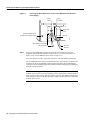
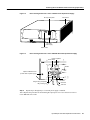
On a Cisco 7200 series router, push up on the cable-retention clip that secures the input
power cable to the router’s power supply.
On a Cisco uBR7200 series router, push the cable-retention clip to the left.
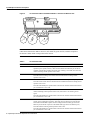
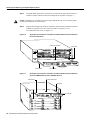
Figure 9
Unplug the other end of the input power cable from the power supply. (For a Cisco 7200
series router, see Figure 9. For a Cisco uBR7200 series router, see Figure 10.)
Disconnecting Power from a Cisco 7200 Series AC-Input Power Supply
Chassis
grounding
receptacles
Internal fans
Power supply
filler plate
AC-input
receptacle
13346
Step 3
NETWORK PROCESSING ENGINE-300
Network processing
engine
AC-input
power supply
Power switch
Figure 10
Disconnecting Power from a Cisco uBR7200 Series AC-Input Power Supply
(Cisco uBR7246 Shown)
Network
processing
engine
H10094
AC-input
power supply
AC-input receptacle
Power switch
20 Input/Output Controller Replacement Instructions
Handle
Powering Down the Router and Disconnecting Input Power
Step 4
Repeat Step 1 through Step 3 if a second power supply is installed.
This completes the procedure for disconnecting AC-input power to Cisco 7200 series router or
Cisco uBR7200 series router.
Disconnecting DC-Input Power
To disconnect DC-input power to a Cisco 7200 series router or Cisco uBR7200 series router,
complete the following steps:
Warning Before completing any of the following steps, and to prevent short-circuit or shock
hazards, ensure that power is removed from the DC circuit. To ensure that all power is OFF, locate
the circuit breaker on the panel board that services the DC circuit, switch the circuit breaker to the
OFF position, and tape the switch handle of the circuit breaker in the OFF position.
Warning When installing the unit, the ground connection must always be made first and
disconnected last.
Step 1
Turn OFF the power source and disconnect the –48V and +48V leads from the power
source. You can leave the ground cable connected.
Step 2
For a Cisco 7200 series router, remove the cable tie that secures the –48V, +48V, and
ground leads to the power supply faceplate. Save the cable tie.
Note The cable tie that accompanied your Cisco 7200 series DC-input power supply can
be removed and replaced on the power supply without the use of a tool. If you secured
the DC-input power supply leads to the power supply faceplate using a different type of
cable tie, use a wire stripper to cut that cable tie from the power supply.
For a Cisco uBR7200 series router, use a 7-mm wrench or nut driver (or adjustable
wrench) to loosen and remove the two M4 nuts from the strain-relief cover that secures
the –48V and +48V leads to the power supply faceplate. Remove the strain-relief cover.
(See Figure 11.)
Input/Output Controller Replacement Instructions
21
Removing and Replacing the Input/Output Controller
Figure 11
Removing the Strain-Relief Cover from a Cisco uBR7200 Series DC-Input
Power Supply
Power
switch
Power
receptacle
Strain-relief
cover
Captive installation screw
(on both sides of power supply)
12522
M4 nuts
M5 grounding receptacles
M5 grounding lug
+48V lead
- 48V lead
Step 3
Using a 3/16-inch flat-blade screwdriver, loosen the screw below the +48V lead
receptacle, and pull the lead from the connector (For a Cisco 7200 series router, see
Figure 12. For a Cisco uBR7200 series router, see Figure 13.)
For Cisco 7200 series routers, repeat this step for the –48V lead and the ground lead.
For Cisco uBR7200 series routers, repeat this step for the –48V lead only. Using an 8-mm
wrench or nut driver (or adjustable wrench) loosen and remove the two M5 nuts that
secure the two-hole grounding lug to the grounding receptacle, and pull the grounding lug
and lead from the receptacle.
Note The color coding of the DC-input power supply leads depends on the color coding
of the DC power source at your site. Typically, green or green/yellow is used for ground,
black is used for +48V (return), and red or white is used for –48V. Make certain the lead
color coding you choose for the DC-input power supply matches lead color coding used
at the DC power source.
22 Input/Output Controller Replacement Instructions
Powering Down the Router and Disconnecting Input Power
Figure 12
Disconnecting Power from a Cisco 7200 Series DC-Input Power Supply
DC-input receptacle
H8619
Internal fans
NETWORK PROCESSING ENGINE-150
DC-input
power supply
Power switch
Figure 13
Disconnecting Power from a Cisco uBR7200 Series DC-Input Power Supply
Power receptacle
Power switch
Handle
12107
Captive installation screw
(on both sides of power supply)
M4 studs
M5 grounding receptacles
+48V lead
M5 grounding lug
- 48V lead
Step 4
Repeat Step 1 through Step 3 if a second power supply is installed.
This completes the procedure for disconnecting DC-input power to a Cisco 7200 series router or
Cisco uBR7200 series router.
Input/Output Controller Replacement Instructions
23
Removing and Replacing the Input/Output Controller
Removing the Input/Output Controller
To remove an I/O controller from a Cisco 7200 series router or Cisco uBR7200 series router,
complete the following steps:
Note Before removing the I/O controller, save the router’s configuration to a TFTP file server. (See
the “Copying the Configuration File to a TFTP Server” section on page 17.)
Step 1
Power down the router and disconnect the input power cable. (See the “Powering Down
the Router and Disconnecting Input Power” section on page 19.)
Step 2
Attach an ESD-preventive wrist strap between you and an unfinished chassis surface.
Step 3
Disconnect the cables from the I/O controller’s console, auxiliary, and Fast Ethernet (if
present) ports. (For a Cisco 7200 series router, see Figure 14. For a Cisco uBR7200 series
router, see Figure 15.)
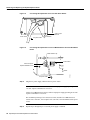
Figure 14
Cisco 7200 Series Input/Output Controller Ports, Handle, and Captive Screws
3
2
1
0
6
TOKEN RING
5
FAST ETHERNET
4
K
RJ4
LIN
MII
0
R
2
TX
RX
4
TX
RX
0
D
LE
AB
O PW
K R
1O
5
R
E J4
N 5
R
L J4
IN
K
M
E II
N
T
0
T
EC
O
EJ
SL
PC
M
C
IA
EN
Console
Handle Auxiliary port
port
Captive
Optional Fast Ethernet port
installation
(MII receptacle and RJ-45 receptacle)
screw
PC Card slots
24 Input/Output Controller Replacement Instructions
H6537
45
3
C
PU
FAST ETHERNET INPUT/OUTPUT CONTROLLER
R
J-
TX
2
1
ET
ES
II
M
FE
SL
O
T
1
Cisco 7200
Series
RX
TX
RX
TX
0
1
I/O controller
5
D
LE
AB
EN
EN
ETHERNET-10BFL
CD
LB
RC
RD
TC
TD
CD
LB
RC
RD
TC
TD
CD
LB
RC
RD
TC
TD
CD
LB
RC
RD
TC
TD
EN
FAST SERIAL
RX
3
3
2
2
1
0
LINK
1
0
3
EN
AB
LE
D
ETHERNET 10BT
Replacing an Input/Output Controller
Figure 15
Cisco uBR7200 Series Input/Output Controller Ports, Handle, and Captive
Screws (Cisco uBR7246 Shown)
Handle
Fast Ethernet port
(MII receptacle and
RJ-45 receptacle)
Auxiliary port
Console port
Captive installation screw (2)
PCMCIA slots
H11512
I/O controller
Step 4
Remove the Flash Disks or Flash memory cards (if present) from the I/O controller’s
PCMCIA slots. (See the “Installing and Removing a Flash Memory Card” section on
page 45.)
Step 5
Using a number 2 Phillips or a 3/16-inch, flat-blade screwdriver, loosen the two captive
installation screws on the faceplate of the I/O controller. (For a Cisco 7200 series router,
see Figure 14. For a Cisco uBR7200 series router, see Figure 15.)
Step 6
Grasp the I/O controller handle and carefully pull the controller from its chassis slot.
Caution Handle the I/O controller by the carrier edges and handle only; never touch the printed
circuit board components or connector pins. (See Figure 7.)
Step 7
Place the I/O controller on an antistatic surface with its components facing upward, or in
a static shielding bag. If you are returning the I/O controller to the factory, immediately
place it in a static shielding bag.
This completes the procedure for removing an installed I/O controller.
Replacing an Input/Output Controller
To install a new I/O controller in the router, complete the following steps:
Step 1
Ensure that the router is powered down and its input power cable is disconnected from
the router and the power source. (See the “Powering Down the Router and Disconnecting
Input Power” section on page 19.)
Step 2
Attach an ESD-preventive wrist strap between you and an unfinished chassis surface.
Step 3
Remove the I/O controller from its static shielding bag.
Input/Output Controller Replacement Instructions
25
Removing and Replacing the Input/Output Controller
Step 4
Using both hands, grasp the I/O controller by its metal carrier edges and orient the I/O
controller so that its printed circuit board components are upward. (See Figure 7.)
Caution Handle the I/O controller by the carrier edges and handle only; never touch the printed
circuit board components or connector pins.
Step 5
Figure 16
Align the left and right edge of the I/O controller’s printed circuit board between the I/O
controller slot guides. (For a Cisco 7200 series router, see Figure 16. For a
Cisco uBR7200 series router, see Figure 17.)
Aligning the I/O Controller’s Printed Circuit Board between the Slot Guides in
the Cisco 7200 Series
Printed circuit board
Slot guides
3
2
1
0
6
TOKEN RING
5
FAST ETHERNET
4
K
RJ4
LIN
MII
0
TX
RX
3
4
2
TX
RX
TX
RX
2
1
RX
TX
EN
0
RX
CD
LB
RC
RD
TC
TD
CD
LB
RC
RD
TC
TD
CD
LB
RC
RD
TC
TD
CD
LB
RC
EN
RD
TC
TD
5
D
LE
AB
EN
ETHERNET-10BFL
FAST SERIAL
TX
3
3
2
2
1
0
LINK
1
0
3
EN
AB
LE
D
ETHERNET 10BT
ET
ES
II
Metal carrier
Figure 17
45
H6421
C
O PW
K R
1O
R
L J4
IN 5
K
M
E II
N
R
E J4
N 5
SL
O
T
0
T
EC
EJ
PC
M
C
IA
EN
AB
LE
D
R
J-
PU
R
M
FE
SL
O
T
1
0
1
FAST ETHERNET INPUT/OUTPUT CONTROLLER
I/O controller
Aligning the I/O Controller’s Printed Circuit Board between the Slot Guides in
the Cisco uBR7200 Series (Cisco uBR7246 Shown)
Metal carrier
Printed circuit board
Slot guide
H11513
I/O controller
26 Input/Output Controller Replacement Instructions
Reconnecting Input Power and Powering Up the Router
Caution Do not align the I/O controller’s metal carrier between the slot guides. Doing so will
damage components on the I/O controller’s printed circuit board as you slide the I/O controller into
its chassis slot.
Step 6
Gently slide the I/O controller all the way into its chassis slot until you feel the connectors
make contact with the router midplane.
Step 7
Seat the I/O controller in the router midplane by tightening its captive installation screws
with a number 2 Phillips or a 3/16-inch, flat-blade screwdriver.
Note The I/O controller is not fully seated in the router midplane until you tighten its
captive installation screws (use a number 2 Phillips or a 3/16-inch flat-blade screwdriver).
Step 8
Connect the cables to the I/O controller’s console, auxiliary, and Fast Ethernet (if present)
ports. (For a Cisco 7200 series router, see Figure 14. For a Cisco uBR7200 series router,
see Figure 15.) (See the “I/O Controller Connection Equipment and Port Signaling”
section on page 39.)
Step 9
Replace Flash Disks or Flash memory cards (if present) in the PCMCIA slots. (See the
“Installing and Removing a Flash Memory Card” section on page 45.)
This completes the procedure for replacing the I/O controller in a Cisco 7200 series router or
Cisco uBR7200 series router.
Reconnecting Input Power and Powering Up the Router
The following procedures explain how to reconnect input power to a Cisco 7200 series router or
Cisco uBR7200 series router, power up the router, and verify a successful system boot.
Warning Read the installation instructions before you connect the system to its power source.
Reconnecting AC-Input Power
To reconnect AC-input power to a Cisco 7200 series router or Cisco uBR7200 series router,
complete the following steps:
Step 1
At the rear of the router, check that the power switch on the power supply is in the OFF
(O) position.
Step 2
Slide the cable-retention clip up (Cisco 7200 series) or to the left (Cisco uBR7200 series),
away from the AC receptacle, and plug in the power cable.
Step 3
Secure the cable in the power supply AC receptacle by sliding the cable-retention clip
down (Cisco 7200 series) or to the right (Cisco uBR7200 series), until it snaps around the
connector. The cable-retention clip provides strain relief for the AC power cable. (For a
Cisco 7200 series router, see Figure 18. For a Cisco uBR7200 series router, see
Figure 19.)
Input/Output Controller Replacement Instructions
27
Removing and Replacing the Input/Output Controller
Connecting AC-Input Power to a Cisco 7200 Series Router
H6848
Figure 18
Hole for nylon
cable tie
Power switch
AC power cable
Figure 19
Cable-retention
clip
Connecting AC-Input Power to a Cisco uBR7200 Series Universal Broadband
Router
Cable-retention clip
Power switch
Power receptacle
Captive installation screw
AC power cable
Step 4
H11322
Handle
Plug the AC power supply cable into the AC power source.
Note For the Cisco 7200 series routers, each AC-input power supply operating at
120 VAC requires a minimum of 5A service.
For the Cisco uBR7200 series routers, each AC-input power supply operating at 120 VAC
requires a minimum of 7A service.
We recommend powering Cisco 7200 series routers, and the Cisco uBR7200 series
routers from a 120 VAC, 15A receptacle U.S. (240 VAC, 10A international) at the power
source.
Step 5
Repeat Step 1 through Step 4 if a second power supply is installed.
28 Input/Output Controller Replacement Instructions
Reconnecting Input Power and Powering Up the Router
This completes the steps for reconnecting AC-input power to a Cisco 7200 series router or
Cisco uBR7200 series router. Proceed to the “Powering Up the Router” section on page 32.
Reconnecting DC-Input Power
To reconnect DC-input power to a Cisco 7200 series router or Cisco uBR7200 series router,
complete the following steps:
Note The color coding of the DC-input power supply leads depends on the color coding of the DC
power source at your site. Typically, green or green/yellow is used for ground, black is used for +48V
(return), and red or white is used for –48V. Make certain the lead color coding you choose for the
DC-input power supply matches the lead color coding used at the DC power source.
Warning Before completing any of the following steps, and to prevent short-circuit or shock
hazards, ensure that power is removed from the DC circuit. To ensure that all power is OFF, locate
the circuit breaker on the panel board that services the DC circuit, switch the circuit breaker to the
OFF position, and tape the switch handle of the circuit breaker in the OFF position.
Warning When installing the unit, the ground connection must always be made first and
disconnected last.
Step 1
Ensure that the –48V and +48V leads are disconnected from the power source.
Step 2
At the rear of the router, check that the power switch on the power supply is in the OFF
(O) position. (For a Cisco 7200 series router, see Figure 20. For a Cisco uBR7200 series
router, see Figure 21.)
Connecting DC-Input Power to a Cisco 7200 Series Router
Power switch
H8622
Figure 20
Cable tie
Ground lead
service loop
DC power leads
Input/Output Controller Replacement Instructions
29
Removing and Replacing the Input/Output Controller
Figure 21
Connecting DC-Input Power to a Cisco uBR7200 Series Universal Broadband
Router
Power
switch
Power
receptacle
Handle
12108
Captive
installation
screw
M5 grounding receptacles
+48V lead
M5 grounding lug
- 48V lead
Step 3
Figure 22
If necessary, use a wire stripper to strip approximately 0.55 inch (14 mm) from the –48V,
+48V, and ground leads. (See Figure 22.)
Stripping the DC-Input Leads
H8624
0.55 in.
(14 mm)
Note The ground lead for a Cisco uBR7200 series DC-input power supply consists of a
two-hole grounding lug that connects to an M5 grounding receptacle; you do not need to
strip this ground lead.
Step 4
For a Cisco 7200 series router, insert the stripped end of the ground lead all the way into
the ground lead receptacle on the DC-input power supply, and tighten the receptacle
screw using a 3/16-inch flat-blade screwdriver. (See Figure 20.)
For a Cisco uBR7200 series router, connect the two-hole grounding lug on the grounding
lead to the M5 grounding receptacles with the M5 nuts. Tighten the nuts using the 8-mm
wrench or nut driver (or adjustable wrench). (See Figure 21.)
Step 5
Insert the stripped end of the +48V lead all the way into the +48V lead receptacle and
tighten the receptacle screw using the same 3/16-inch flat-blade screwdriver. Repeat
Step 5 for the –48V lead.
30 Input/Output Controller Replacement Instructions
Reconnecting Input Power and Powering Up the Router
Note Make sure the entire stripped end of each lead is inserted all the way into its
receptacle. If any exposed wire at the stripped end of a lead is visible after inserting the
lead into its receptacle, remove the lead from the receptacle, use the wire stripper to cut
the stripped end of the lead, and repeat Step 3 through Step 5.
Step 6
After tightening the receptacle screw or nuts for the ground, +48V, and –48V DC-input
leads, secure the leads to the power supply faceplate. For the Cisco 7200 series, use the
cable tie you saved earlier in this procedure to secure the three leads.
For the Cisco uBR7200 series, run the +48V and –48V leads between the two strain-relief
studs on the power supply faceplate. (See Figure 21.)
Note For the Cisco 7200 series routers, when securing the ground, +48V, and –48V
DC-input leads to the power supply faceplate, leave a small service loop in the ground
lead to ensure that it is the last lead to disconnect from the power supply if a great deal of
strain is placed on all three leads. (See Figure 20.)
A service loop is not required in the lead attached to the grounding lug on the
Cisco uBR7200 series router because this lead is separate from the +48V and –48V leads
and is secured by two M5 nuts to the M5 receptacles.
Step 7
Figure 23
For a Cisco uBR7200 series router, replace the strain-relief cover over the +48V and
–48V leads and secure the cover to the strain-relief studs using the two M4 nuts with the
7-mm wrench or nut driver (or adjustable wrench). (See Figure 23.)
Replacing the Strain-Relief Cover on a Cisco uBR7200 Series DC-Input
Power Supply
Power
switch
Power
receptacle
Captive installation screw
(on both sides of power supply)
Strain-relief
cover
12523
M5 grounding receptacles
M5 grounding lug
- 48V lead
+48V lead
Step 8
M4 nuts
Connect the ground, +48V, and –48V leads to the power source.
Input/Output Controller Replacement Instructions
31
Removing and Replacing the Input/Output Controller
Note For the Cisco 7200 series, each DC-input power supply operating at –48 VDC in
North America requires a minimum of 13A service. Each DC-input power supply
operating at –60 VDC in the European Community requires a minimum of 8A service.
For the Cisco uBR7200 series routers, each DC-input power supply rating is 14A,
700 volt ampere (VA).
This product relies on the building’s installation for short-circuit (overcurrent) protection.
Ensure that a listed and certified fuse or circuit breaker, 35A minimum 60 VDC, is used
on all current carrying conductors.
Step 9
Repeat Step 1 through Step 8 if a second power supply is installed.
This completes the steps for reconnecting DC-input power to a Cisco 7200 series router or
Cisco uBR7200 series router.
Powering Up the Router
To power up a Cisco 7200 series or Cisco uBR7200 series router that has an installed AC-input or
DC-input power supply, complete the following steps:
Step 1
Check for the following:
•
Each port adapter is inserted in its slot, and its respective port adapter lever is in the
locked position.
•
The network processing engine and the I/O controller are inserted in their respective
slots, and their captive installation screws are tightened.
•
•
All network interface cables are connected to the port adapters.
•
•
A Flash memory card is installed in its PCMCIA slot (if present).
•
For a Cisco 7200 series router, each DC lead is connected and secured to the power
supply faceplate with a cable tie; for a Cisco uBR7200 series router, each DC lead is
connected with M5 nuts for the grounding receptacle and the strain-relief cover over
the +48V and –48V leads (DC-input power supplies only).
•
Each DC lead is connected and secured to the power source (DC-input power supplies
only).
•
Ensure the tape (that you applied earlier) is removed from the circuit breaker switch
handle, and power is restored by moving the circuit breaker handle to the ON position
(DC-input power supplies only).
•
The console terminal is turned on.
Each cable modem card is inserted in its slot, and its respective captive installation
screws are tightened (Cisco uBR7200 series only).
Each AC-input power cable is connected and secured with the cable-retention clip
(AC-input power supplies only).
Caution When the power switch on a Cisco uBR7200 series power supply is turned to the OFF (O)
position, the power supply will enter a reset cycle for ninety (90) seconds. Wait at least ninety (90)
seconds before turning the power switch back to the ON (|) position. If you do not wait the full ninety
(90) seconds, the power supply will not restart.
32 Input/Output Controller Replacement Instructions
Downloading the Saved Configuration from the TFTP Server and Configuring the I/O Controller’s Fast Ethernet Port
Step 2
At the rear of the router, place the power switch on the power supply in the ON (|)
position. Repeat this step if a second power supply is installed in the router. The green
OK LED on the power supply turns on.
Step 3
Listen for the fans; you should immediately hear them operating.
Step 4
During the boot process, observe the system’s LEDs. The LEDs on most of the port
adapters and Cisco uBR7200 series cable modem cards go on and off in irregular
sequence. Some may go on, go out, and go on again for a short time. On the I/O controller,
the IO power OK LED comes on immediately.
Step 5
Observe the initialization process. When the system boot is complete (a few seconds), the
network processing engine begins to initialize the port adapters, Cisco uBR7200 series
cable modem cards, and the I/O controller. During this initialization, the LEDs on each
port adapter behave differently (most flash on and off). The enabled LED on each port
adapter and Cisco uBR7200 series cable modem card goes on when initialization is
completed, and the console screen displays a script and system banner similar to the
following:
Cisco Internetwork Operating System Software
IOS (tm) 7200 Software (C7200-J-M), Version 11.1(9) [kpfjrgiu 100]
Copyright (c) 1986-1996 by cisco Systems, Inc.
Compiled Sun 21-Apr-96 04:10 by
This completes the procedures for connecting input power and powering up the router.
Downloading the Saved Configuration from the TFTP Server and Configuring
the I/O Controller’s Fast Ethernet Port
After you install a new I/O controller in the router and verify a successful router boot, you must
retrieve the router’s configuration from the TFTP server and copy it to NVRAM. Use the copy tftp
running-config command to copy the saved configuration from the TFTP file server. The system
prompts you for a host name and address, the name of the configuration file stored on the host, and
confirmation to reboot using the remote file.
If you replaced an I/O controller without the Fast Ethernet port with an I/O controller with the Fast
Ethernet port, you will most likely want to configure the new interface after retrieving the router’s
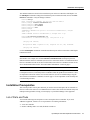
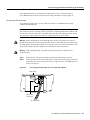
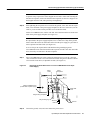
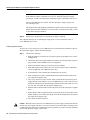
configuration from the TFTP server and copying it to NVRAM.
Before retrieving the router’s configuration file from the TFTP file server, check the following:
•
A console terminal is connected to the console port on the I/O controller, or a Telnet session is
established to the router
•
•
•
The router is connected to a network supporting a file server (remote host)
The remote host supports the TFTP application
You have the name or address of the remote host
Input/Output Controller Replacement Instructions
33
Removing and Replacing the Input/Output Controller
Before configuring the new interface on the I/O controller, be prepared with the following
information:
•
•
Protocols and encapsulations you plan to use on the new interface
Protocol specific information, such as Internet Protocol (IP) addresses if you will configure the
interface for IP routing
For complete descriptions of interface commands and the configuration options available for
Cisco 7200 series and Cisco uBR7200 series-related interfaces, refer to the documentation resources
listed in the “If You Need More Information” section on page 2.
Downloading the Saved Configuration from the TFTP Server
To retrieve the saved router configuration from the remote host, complete the following steps:
Step 1
Make sure you are at the privileged level of the EXEC command interpreter (check the
system prompt for a pound sign [#]). If the system prompt does not have a pound sign (#),
enter enable, and then your password.
Note Until you retrieve the saved configuration, the router will be running from the
default configuration in NVRAM. Therefore, any passwords that were previously
configured on the system will not be valid until you retrieve the configuration.
Step 2
Use the ping command to check the connection between the router and the remote host.
Step 3
At the system prompt, issue the copy tftp running-config command and press Return to
enter configuration mode. Specify that you will configure the system from a network
device (instead of from the console terminal, which is the default).
Router# copy tftp running-config
Step 4
The system prompts you to select a host or network configuration file. The default is host;
press Return to accept the default.
Host or network configuration file [host]?
Step 5
The system prompts you for the IP address of the host. Enter the IP address or name of
the remote host (the remote file server to which you copied the configuration file).
IP address of remote host [255.255.255.255]? 1.1.1.1
Step 6
The system prompts you for the name of the configuration file. When copying the file to
the server, the default is to use the name of the router with the suffix -confg (router-confg
in the following example). If you specified a different filename when you copied the
configuration, enter that filename; otherwise, press Return to accept the default.
Name of configuration file [router-confg]?
Step 7
Before the system reboots with the new configuration, it displays the instructions you
entered for confirmation. If the instructions are not correct, enter n (no), then press
Return to cancel the process. To accept the instructions, press Return, or y, and then
Return.
Configure using router-confg from 1.1.1.1? [confirm]
Booting router-confg from 1.1.1.1: ! ! [OK - 874/16000 bytes]
34 Input/Output Controller Replacement Instructions
Downloading the Saved Configuration from the TFTP Server and Configuring the I/O Controller’s Fast Ethernet Port
While the router retrieves and boots from the configuration on the remote host, the
console display indicates whether or not the operation was successful. A series of !!!! and
[OK] (as shown in the preceding example) indicates that the operation was successful. A
series of . . . and [timed out] or [failed] indicate a failure (which would probably be due
to a network fault or an incorrect server name, address, or filename). The following is an
example of a failed attempt to boot from a remote server:
Booting Router-confg ..... [timed out]
If the display indicates that the process was successful, proceed to the next step.
If the display indicates that the process failed, verify the name or address of the remote
server and the filename, and repeat the preceding steps. If you are unable to retrieve the
configuration, contact your network administrator or see the end of this document for
instructions on contacting Cisco technical assistance.
Step 8
Issue the show running-config command to display the currently running configuration
on the terminal. Review the display and ensure that the configuration information is
complete and correct. If it is not, verify the filename and repeat the preceding steps to
retrieve the correct file, or use the configure command to add or modify the existing
configuration. (Refer to the appropriate software documentation for descriptions of the
configuration options available for the system and individual interfaces and specific
configuration instructions.)
Step 9
When you have verified that the currently running configuration is correct, issue the
copy running-config startup-config command to save the retrieved configuration in
NVRAM. Otherwise, the new configuration will be lost when you restart the system.
This completes the procedure for downloading the saved router configuration from the remote host.
Proceed to the following section “Configuring the I/O Controller’s Fast Ethernet Port” if you
installed an I/O controller with the Fast Ethernet port. If you installed an I/O controller without the
Fast Ethernet port, this completes the procedure for replacing the I/O controller in a Cisco 7200
series router or Cisco uBR7200 series router. Proceed to the “Additional Information” section on
page 39 for additional information you might need when replacing an I/O controller in a Cisco 7200
series router or Cisco uBR7200 series router.
Configuring the I/O Controller’s Fast Ethernet Port
The following procedure explains a basic configuration for the Fast Ethernet port on the I/O
controller. In the following procedure, press the Return key after each step unless otherwise noted.
At any time you can exit the privileged level and return to the user level by entering disable at the
prompt as follows:
Router# disable
Router>
Note You can install an I/O controller with or without a Fast Ethernet port in the Cisco 7200 series
routers (including a Cisco 7206 as a router shelf in a Cisco AS5800 Universal Access Server);
however, when you install an I/O controller with a Fast Ethernet port in a Cisco 7202, the system
software automatically disables the port. Therefore, the steps in this section that explain how to
configure the I/O controller’s Fast Ethernet port do not apply to a Cisco 7202 that has an installed
I/O controller with a Fast Ethernet port.
Input/Output Controller Replacement Instructions
35
Removing and Replacing the Input/Output Controller
Note The Cisco 7200 series routers and Cisco uBR7200 series routers identify interfaces by port
adapter slot number and interface port number. Port adapter slot 0 in the Cisco 7200 series routers
and Cisco uBR7200 series routers is always reserved for the Fast Ethernet port on the I/O controller.
Therefore, the address of the Fast Ethernet port on the I/O controller (if present) in Cisco 7200 series
routers or Cisco uBR7200 series routers is always 0/0.
The Cisco 7206 router shelf identifies interfaces by shelf number, port adapter slot number, and
interface port number. The shelf number is a number assigned to the router shelf during the initial
configuration of the Cisco AS5800 Universal Access Server. Port adapter slot 0 in the Cisco 7206
router shelf is also reserved for the Fast Ethernet port on the I/O controller. Therefore, the address
of the Fast Ethernet port on the I/O controller (if present) in a router shelf is x/0/0, where x is the
shelf number. For information about the Cisco 7206 as a router shelf in a Cisco AS5800 Universal
Access Server, refer to the Cisco AS5800 Universal Access Server documentation listed in the “If
You Need More Information” section on page 2.
Step 1
At the privileged-level prompt, enter configuration mode and specify that the console
terminal will be the source of the configuration subcommands as follows:
Router# configure terminal
Enter configuration commands, one per line. End with CNTL/Z.
Router(config)#
Step 2
Specify the Fast Ethernet port on the I/O controller interface to configure by entering the
interface fastethernet 0/0 command as follows:
Router(config)# interface fastethernet 0/0
Note In a Cisco 7206 router shelf, the interface specified in Step 2 would include a shelf
number. For example, the command interface fastethernet 5/0/0 would specify the Fast
Ethernet interface on the I/O controller (slot 0) in router shelf 5.
Step 3
If IP routing is enabled on the system, assign an IP address and subnet mask to the
interface with the ip address subcommand as follows:
Router(config-int)# ip address 1.1.1.10 255.255.255.0
Step 4
If you installed an I/O controller with the Fast Ethernet port that is equipped with an MII
receptacle and an RJ-45 receptacle, use the media-type command to specify the I/O
controller’s media type; the default is the RJ-45 receptacle. The following example
configures the MII receptacle as the media type for the I/O controller:
Router(config-if)# media-type mii
Note Use the media-type 100BaseFX command to return the media type to the RJ-45
receptacle.
Step 5
Use the full-duplex command to specify full-duplex transmission mode for the Fast
Ethernet port on the I/O controller; the default is half-duplex mode. The following
example configures full-duplex mode:
Router(config-if)# full-duplex
36 Input/Output Controller Replacement Instructions
Troubleshooting Using the show interfaces fastethernet Command
Note Use the no full-duplex command to return the Fast Ethernet port on the I/O
controller to half-duplex mode.
Step 6
Change the shutdown state to up and return to configuration mode to enable the interface
as follows:
Router(config-if)# no shutdown
Router(config-if)# exit
Router(config)#
%LINEPROTO-5-UPDOWN: Line protocol on Interface FastEthernet0/0, changed
state to up
%LINK-3-UPDOWN: Interface FastEthernet0/0, changed state to up
Step 7
Press Ctrl-Z (hold down the Control key while you press Z) or enter end to exit
configuration mode and return to the EXEC command interpreter prompt as follows:
Router(config)#
Ctrl-Z
Router#
Step 8
Write the new configuration to nonvolatile memory as follows:
Router# copy running-config startup-config
[OK]
Router#
Step 9
Use the show interfaces command to verify that the interface and line protocol are in the
correct state (up) and the correct media type (MII or RJ-45) and transmission mode
(half-duplex or full-duplex) are configured on the interface. The following example
shows the I/O controller’s Fast Ethernet interface and line protocol are up, the media type
is RJ-45 (shown below as 100BaseTX), and the transmission mode is full-duplex (shown
below as fdx):
Router# sh interface fastethernet 0/0
FastEthernet0/0 is administratively up, line protocol is up
(display text omitted)
Encapsulation ARPA, loopback not set, keepalive not set, fdx, 100BaseTX
(display text omitted)
Note In a Cisco 7206 router shelf, the interface specified in this step would include a
shelf number.
This completes the procedure for a basic configuration of the Fast Ethernet port on the I/O controller.
Troubleshooting Using the show interfaces fastethernet Command
Intel Corporation recently changed the specifications for its Peripheral Component Interconnect
(PCI) Fast Ethernet hardware interface. These changes have been incorporated into certain Cisco
hardware products. For most users, this change is transparent. However, an anomaly has been
identified when this updated Cisco hardware is used in conjunction with certain releases of Cisco
IOS software. This section explains the anomaly and how to work around it.
Input/Output Controller Replacement Instructions
37
Troubleshooting Using the show interfaces fastethernet Command
Anomaly Details
When you use the Cisco IOS software show interfaces fastethernet command, the following output
is normally displayed:
Router# show interfaces fastethernet [slot/port]
FastEthernet0/0 is up, line protocol is up
Hardware is DEC21140, address is 00e0.f74f.dc00 (bia 00e0.f74f.dc00)
Internet address is 192.168.255.1
MTU 1500 bytes, BW 100000 Kbit, DLY 100 usec, rely 255/255, load 1/255
Encapsulation ARPA, loopback not set
Keepalive set (10 sec)
Half-duplex, 100Mb/s, MII
ARP type: ARPA, ARP Timeout 04:00:00
Last input never, output 00:00:06, output hang never
Last clearing of "show interface" counters never
Queueing strategy: fifo
Output queue 0/40, 0 drops; input queue 0/75, 0 drops
5 minute input rate 0 bits/sec, 0 packets/sec
5 minute output rate 1000 bits/sec, 0 packets/sec
0 packets input, 0 bytes
Received 0 broadcasts, 0 runts, 0 giants, 0 throttles
0 input errors, 0 CRC, 0 frame, 0 overrun, 0 ignored
0 watchdog, 0 multicast
0 input packets with dribble condition detected
51 packets output, 11872 bytes, 0 underruns
0 output errors, 0 collisions, 3 interface resets
0 babbles, 0 late collision, 0 deferred
0 lost carrier, 0 no carrier
0 output buffer failures, 0 output buffers swapped out
When you enter this command using Cisco IOS Release 11.1(10) or older, or Release 11.2(4) or
older with updated Cisco hardware, the “overrun” field (shown in bold in the output above) is always
zero.
If you use this command because you are troubleshooting potential network problems, you may be
expecting to see a number in the overrun field.
Anomaly Workaround
To work around this problem, issue one of the following Cisco IOS software commands to obtain an
overrun value. The command is different for each supported platform:
•
Cisco 7500 series routers — Access the VIP console where the affected hardware resides and
issue the following command:
Router# if-con c
•
Cisco 7200 series routers — Issue the following command:
Router# show controller fastethernet FE-slot number/0
38 Input/Output Controller Replacement Instructions
Additional Information
The following output is normally displayed:
Hardware is DEC21140
dec21140_ds=0x603531A0, registers=0x4D800000, ib=0x300612C0
rx ring entries=64, tx ring entries=128
rxring=0x300613C0, rxr shadow=0x603532C0, rx_head=5, rx_tail=0
txring=0x30061800, txr shadow=0x60353400, tx_head=33, tx_tail=33, tx_count=0
PHY link up
Far End Fault Indication (For FX Interface): OFF
CSR0=0xFE02E080, CSR3=0x300613C0, CSR4=0x30061800, CSR5=0xFC660000
CSR6=0x320CA002, CSR7=0xFFFFA261, CSR8=0xE0400000, CSR9=0xFFFDC3FF
CSR11=0xFFFE0000, CSR12=0xFFFFFF09, CSR15=0xFFFFFEC8
DEC21140 PCI registers:
bus_no=2, device_no=0
CFID=0x00091011, CFCS=0x22800006, CFRV=0x02000022, CFLT=0x0000FF00
CBIO=0x08312001, CBMA=0x01800000, CFIT=0x28140100, CFDA=0x00000000
MII registers:
Register 0x00:
2000 784F 2000 5C01 0081 0000 0000 0000
Register 0x08:
0000 0000 0000 0000 0000 0000 0000 0000
Register 0x10:
0000 0000 0000 0009
0000 0001 8060
Register 0x18:
8020 0820 0000 3800 A3B9
:
<additional information omitted>
:
The field that determines overrun is “CSR8” (shown in bold in the output above). This field is in
hexadecimal format. To determine an overrun value, take the first four (high-order) digits, drop the
first one from the left, convert the remaining three digits to the decimal equivalent, and then divide
that number in half.
In the example above, there are overflows recorded in CSR8=0xE0400000. To determine the
overflow value from this example, take the first four (high-order) digits (E040), drop the first digit
(E), and convert the remaining number (040) to the decimal equivalent (64). Then divide that number
in half. The overrun value in this example is 32.
Additional Information
This section includes additional information that you might need when replacing an I/O controller
in a Cisco 7200 series router or Cisco uBR7200 series router.
I/O Controller Connection Equipment and Port Signaling
This section contains connection equipment and pinout information for the console, auxiliary, and
Fast Ethernet ports on the I/O controller.
Note You can install an I/O controller with or without a Fast Ethernet port in the Cisco 7200 series
routers (including a Cisco 7206 as a router shelf in a Cisco AS5800 Universal Access Server);
however, when you install an I/O controller with a Fast Ethernet port in a Cisco 7202, the system
software automatically disables the port. Therefore, the Fast Ethernet port connection equipment and
pinout information in this section does not apply to a Cisco 7202 that has an installed I/O controller
with a Fast Ethernet port.
Input/Output Controller Replacement Instructions
39
Additional Information
Fast Ethernet MII Connection Equipment
The MII receptacle on the I/O controller is a 40-pin, D-shell type connector that is configurable for
100 megabits per second (Mbps). The MII receptacle supports IEEE 802.3u interfaces compliant
with the 100BASE-X and 100BASE-T standards. The MII connection requires an external
transceiver that permits connection to multimode fiber for 100BASE-FX or 100BASE-T4 physical
media. (See Figure 24.)
Caution Before connecting the transceiver to the MII receptacle on the I/O controller, check the
MII transceiver’s documentation (or with the transceiver’s manufacturer) to ensure the transceiver
responds to physical sublayer (PHY) address 0; otherwise, anomalies with the MII connection on
the I/O controller might occur. (PHY address 0 is defined in the section 22.2.4.4 “PHY Address” of
the IEEE 802.3u specification.) If present, we recommend using the transceiver’s “Isolation Mode”
setting if you are unable to determine if the transceiver responds to physical sublayer (PHY)
address 0.
Note To determine if an MII transceiver that is already connected to the MII receptacle on the I/O
controller responds to PHY address 0, ensure the I/O controller’s Fast Ethernet port is configured as
up and the MII receptacle is configured as the media type, then disconnect the transceiver from the
MII receptacle. If the Fast Ethernet port goes down, the transceiver responds to PHY address 0.
Figure 24
Fast Ethernet Port Connection
ET
ES
R
PU
C
5
J-4
FAST ETHERNET INPUT/OUTPUT CONTROLLER
P
W
K R
H6853
O
R
J
IN 45
K
1O
L
II
M
N
E
R
E J4
N 5
0
T
T
EC
O
EJ
SL
PC
M
C
IA
EN
AB
LE
D
R
SL
FE
O
M
T
II
1
Optional Fast Ethernet port
(MII receptacle and RJ-45 receptacle)
MII cable
To transceiver,
repeater, or DTE
or
RJ-45 cable
To repeater
or DTE
Depending on the type of media you use between the MII connection and your switch or hub, the
network side of your 100BASE-T transceiver should be appropriately equipped with ST-type
connectors (for optical fiber), BNC connectors, and so forth.
Figure 25 shows the pin orientation of the MII receptacle on the I/O controller.
The MII receptacle uses 2-56 screw-type locks, called jackscrews, to secure the cable or transceiver
to the receptacle. MII cables and transceivers have knurled thumbscrews that you fasten to the
jackscrews on the MII receptacle and tighten with your fingers. Use the jackscrews to secure your
MII cable to the MII receptacle.
40 Input/Output Controller Replacement Instructions
I/O Controller Connection Equipment and Port Signaling
Figure 25
MII Receptacle
H6538
Pin 1
Jackscrew
Pin 21
Table 6 lists the pinouts and signals for the I/O controller MII receptacle.
Table 6
MII Receptacle Pinout
Pin1
In
Out
I/O
Description
14–17
–
Yes
–
Transmit Data (TxD)
12
Yes
–
–
Transmit Clock (Exactly)2
11
–
Yes
–
Transmit Error (Tx_ER)
13
–
Yes
–
Transmit Enable (Tx_EN)
3
–
Yes
–
MII Data Clock (MDC)
4–7
Yes
–
–
Receive Data (RxD)
9
Yes
–
–
Receive Clock (Rx_CLK)
10
Yes
–
–
Receive Error (Rx_ER)
8
Yes
–
–
Receive Data Valid (Rx_DV)
18
Yes
–
–
Collision (COL)
19
Yes
–
–
Carrier Sense (CRS)
2
–
–
Yes
MII Data Input/Output (MDIO)
22–39
–
–
–
Common (ground)
1, 20, 21,
40
–
–
–
+5.0 volts (V)
1
2
Any pins not indicated are not used.
Exactly and Rx_CLK are provided by the external transceiver.
Fast Ethernet RJ-45 Connection Equipment
The RJ-45 receptacle on the I/O controller is configurable for 100 megabits per second (Mbps) and
supports IEEE 802.3, Ethernet, and IEEE 802.3u interfaces complaint with 10BASE-T and
100BASE-TX specifications.
The RJ-45 receptacle supports standard straight-through and crossover Category 5 UTP (RJ-45)
cables. (See Figure 24.) Cisco Systems does not supply Category 5 UTP cables; these cables are
available commercially.
Figure 26 shows the RJ-45 receptacle and plug. Table 7 lists the pinouts and signals for the RJ-45
receptacle.
Input/Output Controller Replacement Instructions
41
Additional Information
RJ-45 Receptacle and Plug
H2936
Figure 26
87654321
RJ-45 connector
Warning To avoid electric shock, do not connect safety extra-low voltage (SELV) circuits to
telephone-network voltage (TNV) circuits. LAN ports contain SELV circuits, and WAN ports
contain TNV circuits. Some LAN and WAN ports both use RJ-45 connectors. Use caution when
connecting cables
Table 7
RJ-45 Receptacle Pinouts
Pin
Description
1
Receive Data + (RxD+)
2
RxD–
3
Transmit Data + (TxD+)
6
TxD–
Note Referring to the RJ-45 pinout in Table 7, proper common-mode line terminations should be
used for the unused Category 5, UTP cable pairs 4/5 and 7/8. Common-mode termination reduces
electromagnetic interference (EMI).
Depending on your I/O controller RJ-45 interface cabling requirements, use the pinouts shown in
Figure 27 and Figure 28 for straight-through and crossover twisted-pair cable connections.
Straight-Through Cable Pinout, I/O Controller RJ-45 Connection to an End
Station or DTE
Ethernet port
End station
3 TxD+
3 RxD+
6 TxD–
6 RxD–
1 RxD+
1 TxD+
2 RxD–
2 TxD–
42 Input/Output Controller Replacement Instructions
H10416
Figure 27
I/O Controller Connection Equipment and Port Signaling
Crossover Cable Pinout, I/O Controller RJ-45 Connection to an End Station or
DTE
Ethernet port
Hub
3 TxD+
3 TxD+
6 TxD–
6 TxD–
1 RxD+
1 RxD+
2 RxD–
2 RxD–
H10417
Figure 28
To identify the RJ-45 cable type, hold the two ends of the cable next to each other so you can see the
colored wires inside the ends, as shown in Figure 29.
RJ-45 Cable Identification
H5663
Figure 29
Examine the sequence of colored wires to determine the type of RJ-45 cable, as follows:
•
•
Straight-through—The colored wires are in the same sequence at both ends of the cable.
Crossover—The first (far left) colored wire at one end of the cable is the third colored wire at the
other end of the cable.
Console and Auxiliary Port Connection Equipment
The I/O controller has two EIA/TIA-232 ports: a DCE-mode console port and a DTE-mode auxiliary
port. The console port is a DCE DB-25 receptacle for connecting a data terminal. The auxiliary port
is a DTE DB-25 plug for connecting a modem or other DCE device (such as a CSU/DSU or other
router) to your router. (See Figure 30.)
Note Both the console and auxiliary ports are asynchronous serial ports; any devices connected to
these ports must be capable of asynchronous transmission. (Asynchronous is the most common type
of serial device; for example, most modems are asynchronous devices.)
Before connecting a terminal to the console port, configure the terminal to match the router console
port as follows: 9600 baud, 8 data bits, no parity, 2 stop bits (9600 8N2). You need an EIA/TIA-232
DCE console cable to connect the terminal to the console port. After you establish normal router
operation, you can disconnect the terminal.
Input/Output Controller Replacement Instructions
43
Additional Information
You must supply your own interface cable between the auxiliary port and the equipment you are
connecting. For console and auxiliary port pinouts, see the “Console Port Signals” section on
page 44 and the “Auxiliary Port Signals” section on page 45.
Figure 30
Console and Auxiliary Port Connections
ET
ES
II
C
5
FAST ETHERNET INPUT/OUTPUT CONTROLLER
H6539
P
O W
K R
R
J
IN 45
K
1O
L
II
M
N
E
R
E J4
N 5
T
0
SL
O
T
EJ
EC
PC
M
C
IA
EN
AB
LE
D
R
J-4
Console
port
PU
R
M
FE
SL
O
T
1
Auxiliary
port
Modem
Console terminal
Console Port Signals
Both Data Set Ready (DSR) and Data Carrier Detect (DCD) are active when the system is running.
The Request To Send (RTS) signal tracks the state of the Clear To Send (CTS) input. The console
port does not support modem control or hardware flow control. Table 8 lists the signals used on the
console port. The console port requires a straight-through EIA/TIA-232 cable.
Table 8
Console Port Signals
Pin
Signal
Direction
Description
1
GND
–
Ground
2
TxD
<—
Transmit Data
3
RxD
—>
Receive Data
6
DSR
—>
Data Set Ready (always on)
7
GND
–
Ground
8
DCD
—>
Data Carrier Detect (always
on)
44 Input/Output Controller Replacement Instructions
Installing and Removing a Flash Memory Card
Auxiliary Port Signals
Table 9 lists the signals used on the auxiliary port. The auxiliary port supports hardware flow control
and modem control.
Table 9
Auxiliary Port Signals
Pin
Signal
Direction
Description
2
TxD
—>
Transmit Data
3
RxD
<—
Receive Data
4
RTS
—>
Request To Send (used for hardware flow control)
5
CTS
<—
Clear To Send (used for hardware flow control)
6
DSR
<—
Data Set Ready
7
Signal Ground
–
Signal Ground
8
CD
<—
Carrier Detect (used for modem control)
20
DTR
—>
Data Terminal Ready (used for modem control only)
Installing and Removing a Flash Memory Card
The I/O controller has two PCMCIA slots: slot 0 (lower) and slot 1 (upper). (See Figure 31.)
Note For procedures that explain how to remove and replace the PCMCIA Flash Disk, refer to the
Using the PCMCIA Flash Disk document that accompanies every Flash Disk shipped from the
factory.
Note To avoid potential problems when inserting spare Flash memory cards in your router, we
recommend that you reformat all of your Flash memory cards using the recommended minimum
Cisco IOS software release for your platform during your regularly scheduled service times. (See
Table 5 on page 12.)
The “Reformatting a Flash Memory Card” section on page 47, explains how to reformat a Flash
memory card.
To install a Flash memory card in either PCMCIA slot, complete the following steps:
Step 1
Orient the Flash memory card so that its connector end faces the appropriate slot. (See
Figure 31a.)
Step 2
Carefully guide the card into the slot until it mates with the slot’s connector, and the eject
button for the slot pops out toward you. (See Figure 31b.)
Input/Output Controller Replacement Instructions
45
Additional Information
Note Flash memory cards do not insert all the way into the PCMCIA slots on the I/O
controller; the end of the card protrudes from the I/O controller faceplate. Do not attempt
to force the card past this point.
Some older Flash memory cards might have foil tape attached to the outside edge of the
card. If you insert one of these Flash cards into the upper PCMCIA slot (slot 1) of an I/O
controller installed in a Cisco uBR7200 series router, it might be difficult to remove the
card. You should either use a new Flash memory card that does not have the foil tape,
remove the foil tape from the older Flash card, or if necessary, use small pliers to remove
the Flash card.
This completes the procedure for installing a Flash memory card in either PCMCIA slot.
To remove a Flash memory card from either PCMCIA slot, complete the following steps:
Step 1
Press the ejector button on the slot. (See Figure 31c.)
Step 2
Grasp the card and pull it from the slot.
Step 3
Place the card in an antistatic bag.
This completes the procedure for removing a Flash memory card in either PCMCIA slot.
46 Input/Output Controller Replacement Instructions
Reformatting a Flash Memory Card
Figure 31
Installing and Removing a Flash Memory Card
a
OT
1
SL
T
D
EC
LE
EJ
AB
EN
OT
0
SL
b
OT
1
SL
T
D
EC
LE
EJ
AB
EN
OT
0
SL
c
OT
1
SL
T
D
LE
AB
EC
EJ
OT
0
SL
H6437
EN
Reformatting a Flash Memory Card
Depending on the circumstances, you might need to use a Flash memory card from another system
to copy images or backup configuration files; however, you cannot boot from a Flash memory card
that was formatted on another type of system. You must reformat the card before you can use it as a
boot source.
Note For procedures that explain how to remove and replace the PCMCIA Flash Disk, refer to the
Using the PCMCIA Flash Disk document that accompanies every Flash Disk shipped from the
factory.
Note To avoid potential problems when inserting spare Flash memory cards in your router, we
recommend that you reformat all of your Flash memory cards using the recommended minimum
Cisco IOS software release for your platform during your regularly scheduled service times. (See
Table 5 on page 12.)
Input/Output Controller Replacement Instructions
47
Additional Information
Caution The following formatting procedure erases all information on the Flash memory card. To
prevent the loss of important data that might be stored on a Flash memory card, proceed carefully.
If you want to save the data on a Flash memory card, copy the data to a server before you format the
card.
The formatting procedure assumes the following:
•
•
You have already booted your Cisco 7200 series router or Cisco uBR7200 series router.
You have access to a TFTP server (meaning you know its name and have connectivity to it) and
at least one interface is available over which you can access this server, or a secondary Flash
memory card.
Note To ensure access to a TFTP server, you will need to configure at least one network interface
using the setup command facility. Refer to the Configuration Fundamentals Configuration Guide
publication for instructions on how to configure network interface using the setup command facility.
•
You know the filename of the image you want you want to copy to the TFTP server or onto the
secondary Flash memory card.
Use the following procedure to reformat a Flash memory card:
Step 1
Insert the Flash memory card into slot 0. (If slot 0 is not available, use slot 1.) See the
“Installing and Removing a Flash Memory Card” section on page 45.
Step 2
Copy all the files on the Flash memory card to a TFTP server or a secondary Flash
memory card. The following example is for copying files to a TFTP server:
Router> enable
Password: <password>
Router# copy slot0:image.name tftp
Enter destination file name [image.name]: image.name
CCCCCCCCCCCCCCCCCCCCCCCCCCCCCCCCCCCCCCCCCCCCCCCCCCCCCCCCCCCCCCCCCCCCCCCCCCCCCCCC
CCCCCCCCCCCCCCCCCCCCCC
Address or name of remote host [tftp.server.name]? tftp.server.name
!!!!!!!!!!!!!!!!!!!!!!!!!!!!!!!!!!!!!!!!!!!!!!!!!!!!!!!!!!!!!!!!!!!!!!!!!!!!!!!!
!!!!!!!!!!!!!!!!!!!!
Router#
Step 3
To reformat the Flash memory card, use the format slot0: (or format slot1:) command
as follows:
Router# format slot0:
All sectors will be erased, proceed? [confirm]
Enter volume id (up to 30 characters): MyNewCard
Formatting sector 1
Format device slot0 completed
Router#
Step 4
Copy the files you saved to the TFTP server back to the Flash memory card as follows:
Router# copy tftp slot0
Enter source filename: image.name
20575008 bytes available on device slot0, proceed? [confirm]
address or name of remote host [tftp.server.name]? tftp.server.name
loading new.image from tftp.server.name (via Ethernet1/0):!!!!!!!
!!!!!!!!!!!!!!!!!!!!!!!!!!!!!!!!!!!!!!!!!!!!!!!!!!!!!!!!!!!!!!!!!!!!!!!!!!!!!!!!
!!!!!!!!!!!!!!!!!!!!!!!!!!!!!!!!!!!!!!!!!!!!!!!!!!!!!!!!!!!!!!!!!!!!!!!!!!!!!!!!
!!!!!!!!!!!!!!!!!!!!!!!!!!!!!!!!!!!!!!!!!!!!!!!!!!!!!!!!!!!!!!!!!!!!!!!!!!!!!!!!
!!!!!!!!!!!!!!!!!!!!!!!!!!!!!!!!!!!!!!!!!!!!!!!!!!!!!!!!!!!!!!!!!!!!!!!!!!!!!!!!
48 Input/Output Controller Replacement Instructions
FCC Class B Compliance
!!!!!!!!!!!!!!!!!!!!!!!!!!!!!!!!!!!!!!!!!!!!!!!!!!!!!!!!!!!!!!!!!!!!!!!!!!!!!!!!
!!!!!!!!!!!!!!!!!!!!!!!!!!!!!!!!!!!!!!!!!!!!!!!!!!!!!!!!!!!!!!!!!!!!!!!!!!!!!!!!
!!!!!!!!!!!!!!!!!!!!!!!!!!!!!!!!!!!!!!!!!!!!!!!!!!!!!!!!!!!!!!!!!!!!!!!!!!!!!!!!
!!!!!!!!!!!!!!!!!!!!!!!!!!!!!!!!!!!!!!!!!!!!!!!!!!!!!!!!!!!!!!!!!!!!!!!!!!!!!!!!
[OK - 7799951/15599616 bytes]
CCCCCCCCCCCCCCCCCCCCCCCCCCCCCCCCCCCCCCCCCCCCCCCCCCCCCCCCCCCCCCCCCCCCCCCCCCCCCCCC
CCCCCCCCCCCCCCCCCCCCCCCCCCCCCCCCCCCCCCCCCCCCCCCCCCCCCCCCCCCCCCCCCCCCCCCCCCCCCCCC
CCCCCCCCCCCCCCCCCCCCCCCC
Router#
The Flash memory card is now reformatted and ready to use.
FCC Class B Compliance
The equipment described in this document generates and may radiate radio-frequency energy. If it
is not installed in accordance with Cisco’s installation instructions, it may cause interference with
radio and television reception. This equipment has been tested and found to comply with the limits
for a Class B digital device in accordance with the specifications in part 15 of the FCC rules. These
specifications are designed to provide reasonable protection against such interference in a residential
installation. However, there is no guarantee that interference will not occur in a particular
installation.
You can determine whether your equipment is causing interference by turning it off. If the
interference stops, it was probably caused by the Cisco equipment or one of its peripheral devices.
If the equipment causes interference to radio or television reception, try to correct the interference
by using one or more of the following measures:
•
•
•
•
Turn the television or radio antenna until the interference stops.
Move the equipment to one side or the other of the television or radio.
Move the equipment farther away from the television or radio.
Plug the equipment into an outlet that is on a different circuit from the television or radio. (That
is, make certain the equipment and the television or radio are on circuits controlled by different
circuit breakers or fuses.)
Modifications to this product not authorized by Cisco Systems, Inc. could void the FCC approval
and negate your authority to operate the product.
Input/Output Controller Replacement Instructions
49
Cisco Connection Online
Cisco Connection Online
Cisco Connection Online (CCO) is Cisco Systems’ primary, real-time support channel. Maintenance
customers and partners can self-register on CCO to obtain additional information and services.
Available 24 hours a day, 7 days a week, CCO provides a wealth of standard and value-added
services to Cisco’s customers and business partners. CCO services include product information,
product documentation, software updates, release notes, technical tips, the Bug Navigator,
configuration notes, brochures, descriptions of service offerings, and download access to public and
authorized files.
CCO serves a wide variety of users through two interfaces that are updated and enhanced
simultaneously: a character-based version and a multimedia version that resides on the World Wide
Web (WWW). The character-based CCO supports Zmodem, Kermit, Xmodem, FTP, and Internet
e-mail, and it is excellent for quick access to information over lower bandwidths. The WWW version
of CCO provides richly formatted documents with photographs, figures, graphics, and video, as well
as hyperlinks to related information.
You can access CCO in the following ways:
•
•
•
•
•
WWW: http://www.cisco.com
WWW: http://www-europe.cisco.com
WWW: http://www-china.cisco.com
Telnet: cco.cisco.com
Modem: From North America, 408 526-8070; from Europe, 33 1 64 46 40 82. Use the
following terminal settings: VT100 emulation; databits: 8; parity: none; stop bits: 1; and
connection rates up to 28.8 kbps.
For a copy of CCO’s Frequently Asked Questions (FAQ), contact [email protected]. For
additional information, contact [email protected].
Note If you are a network administrator and need personal technical assistance with a Cisco
product that is under warranty or covered by a maintenance contract, contact Cisco’s Technical
Assistance Center (TAC) at 800 553-2447, 408 526-7209, or [email protected]. To obtain general
information about Cisco Systems, Cisco products, or upgrades, contact 800 553-6387,
408 526-7208, or [email protected].
Documentation CD-ROM
Cisco documentation and additional literature are available in a CD-ROM package, which ships with
your product. The Documentation CD-ROM, a member of the Cisco Connection Family, is updated
monthly. Therefore, it might be more current than printed documentation. To order additional copies
of the Documentation CD-ROM, contact your local sales representative or call customer service.
The CD-ROM package is available as a single package or as an annual subscription. You can also
access Cisco documentation on the World Wide Web at http://www.cisco.com,
http://www-china.cisco.com, or http://www-europe.cisco.com.
If you are reading Cisco product documentation on the World Wide Web, you can submit comments
electronically. Click Feedback in the toolbar and select Documentation. After you complete the
form, click Submit to send it to Cisco. We appreciate your comments.
50 Input/Output Controller Replacement Instructions
Documentation CD-ROM
You can access CCO in the following ways:
•
•
•
•
•
WWW: http://www.cisco.com
WWW: http://www-europe.cisco.com
WWW: http://www-china.cisco.com
Telnet: cco.cisco.com
Modem: From North America, 408 526-8070; from Europe, 33 1 64 46 40 82. Use the
following terminal settings: VT100 emulation; databits: 8; parity: none; stop bits: 1; and
connection rates up to 28.8 kbps.
For a copy of CCO’s Frequently Asked Questions (FAQ), contact [email protected]. For
additional information, contact [email protected].
This document is to be used in conjunction with the documents listed in the “If You Need More Information” section.
Access Registrar, AccessPath, Any to Any, AtmDirector, CCDA, CCDE, CCDP, CCIE, CCNA, CCNP, CCSI, CD-PAC, the Cisco logo, Cisco Certified Internetwork Expert logo, CiscoLink,
the Cisco Management Connection logo, the Cisco NetWorks logo, the Cisco Powered Network logo, Cisco Systems Capital, the Cisco Systems Capital logo, Cisco Systems Networking
Academy, the Cisco Technologies logo, ControlStream, Fast Step, FireRunner, GigaStack, IGX, JumpStart, Kernel Proxy, MGX, Natural Network Viewer, NetSonar, Network Registrar,
Packet, PIX, Point and Click Internetworking, Policy Builder, Precept, RouteStream, Secure Script, ServiceWay, SlideCast, SMARTnet, StreamView, The Cell, TrafficDirector, TransPath,
ViewRunner, VirtualStream, VisionWay, VlanDirector, Workgroup Director, and Workgroup Stack are trademarks; Changing the Way We Work, Live, Play, and Learn, Empowering the
Internet Generation, The Internet Economy, and The New Internet Economy are service marks; and Asist, BPX, Catalyst, Cisco, Cisco IOS, the Cisco IOS logo, Cisco Systems, the Cisco
Systems logo, the Cisco Systems Cisco Press logo, Enterprise/Solver, EtherChannel, EtherSwitch, FastHub, FastLink, FastPAD, FastSwitch, IOS, IP/TV, IPX, LightStream, LightSwitch,
MICA, NetRanger, Registrar, StrataView Plus, Stratm, TeleRouter, and VCO are registered trademarks of Cisco Systems, Inc. in the U.S. and certain other countries. All other trademarks
mentioned in this document are the property of their respective owners. (9904R)
Copyright © 1996–1999, Cisco Systems, Inc.
All rights reserved. Printed in USA.
Input/Output Controller Replacement Instructions
51
Documentation CD-ROM
52 Input/Output Controller Replacement Instructions