1
26
MicroMAX System User Manual
Version 4.A
To Connect the Camera Power/Camera Signal Cables (5 MHz only):
1. Verify that the Controller power is OFF.
Note: When installing the cable assembly at the Controller, the 15-pin Camera
Power connector must be installed before the 40-pin Camera Signal connector. If
removing the cable assembly, this sequence is reversed.
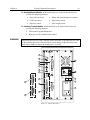
2. Connect male end of the Camera Power cable to the “Camera Power” port on the
back of the Controller and move the slide latch over to lock the connector in place.
3. Connect male end of the Camera Signal cable to the “Camera Signal” port on the
back of the Controller and make sure that the spring-loaded latch is locking the
connector in place.
4. Connect the female end of the Camera Power cable to the Camera and move the slide
latch over to lock the connector in place.
5. Connect the female end of the Camera Signal cable to the Camera and make sure that
the spring-loaded latch is locking the connector in place.