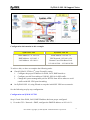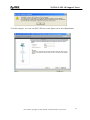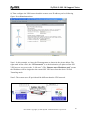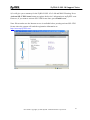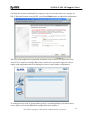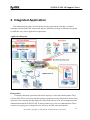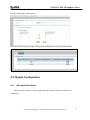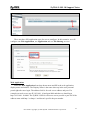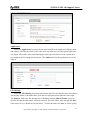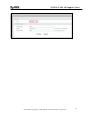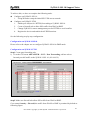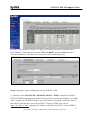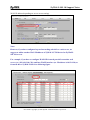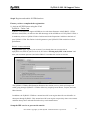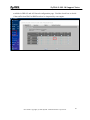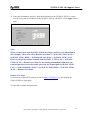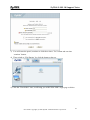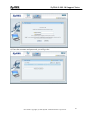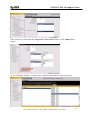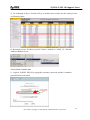
1
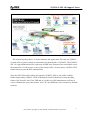
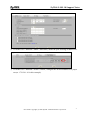
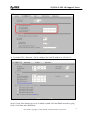
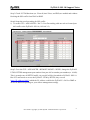
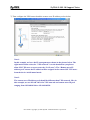
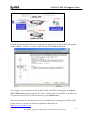
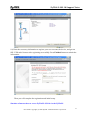
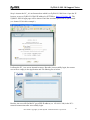
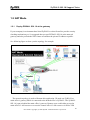
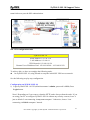
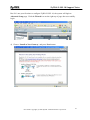
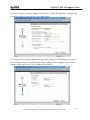
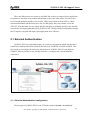
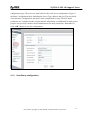
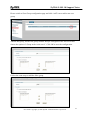
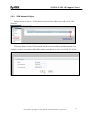
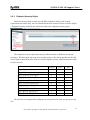
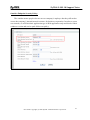
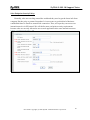
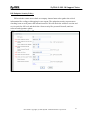
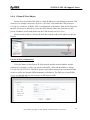
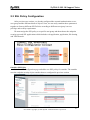
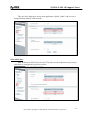
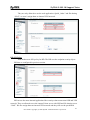
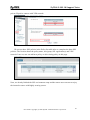
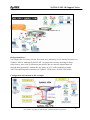
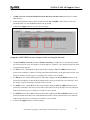
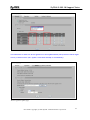
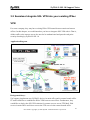
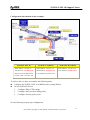
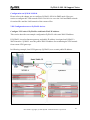
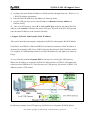
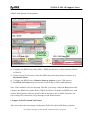
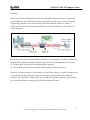
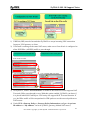
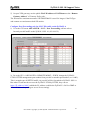
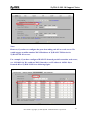
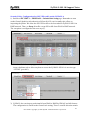
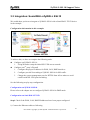
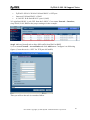
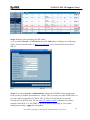
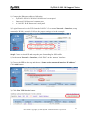
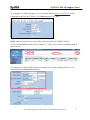
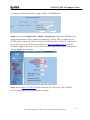
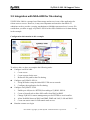
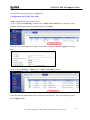
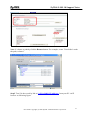
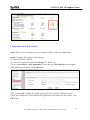
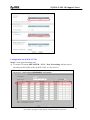
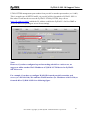
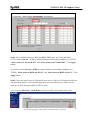
ZyWALL SSL 10 Support Notes ZyWALL SSL 10 Integrated SSL-VPN Appliance Support Notes Revision 2.01 April. 2007 1 All contents copyright (c) 2006 ZyXEL Communications Corporation. ZyWALL SSL 10 Support Notes INDEX 1. Deployment ............................................................................................................................ 4 1.1 DMZ Zone.................................................................................................................... 4 1.1.1 Deploy ZYWALL SSL 10 in DMZ zone........................................................ 4 1.2 NAT Mode.................................................................................................................. 20 1.2.1 Deploy ZYWALL SSL 10 at the gateway .................................................... 20 2. Integrated Application .......................................................................................................... 29 2.1 External Authentication.............................................................................................. 30 2.1.1 External Authentication configuration ............................................................ 30 2.1.2 User/Group configuration ............................................................................ 31 2.2 Objects Configuration ................................................................................................ 33 2.2.1 SSL Application Object................................................................................ 33 2.2.2 VPN Network Object ................................................................................... 37 2.2.3 Endpoint Security Object ............................................................................. 38 2.2.4 Private IP Pool Object .................................................................................. 42 2.3 SSL Policy Configuration .......................................................................................... 43 3. SSL VPN Solution................................................................................................................ 47 3.1 UTM Integration: ZyWALL UTM+ZyWALL SSL10 ............................................... 47 3.2 Seamless Integrate SSL VPN into your existing IPSec VPN..................................... 56 3.3 Integration: SonicWALL+ZyWALL SSL10 .............................................................. 67 3.4 Integration: Netscreen+ZyWALL SSL10................................................................... 71 3.5 Integration with NSA-2400 for file sharing ............................................................... 75 4. Best Practice: Stronger Password Security .......................................................................... 86 4.1 Using Two-factor authentication solution to provide stronger (FIPS 140 compliant) security: SSL10+Authenex .............................................................................................. 86 5. FAQ ...................................................................................................................................... 94 A. ZyWALL General FAQ ............................................................................................... 94 A01. How to access ZyWALL SSL10 web GUI? .................................................... 94 A02. What do I need to use the ZyWALL?.............................................................. 94 A03. What is PPPoE?............................................................................................... 94 A05. Does the ZyWALL support PPPoE?................................................................ 95 A06. How do I know I am using PPPoE? ................................................................ 95 A07. Why does my Internet Service Provider use PPPoE? ..................................... 95 A08. How can I configure the ZyWALL?................................................................ 95 A09. What can we do with ZyWALL?..................................................................... 96 2 All contents copyright (c) 2006 ZyXEL Communications Corporation. ZyWALL SSL 10 Support Notes A10. Does ZyWALL support dynamic IP addressing? ............................................ 96 A11. What is the difference between the internal IP and the real IP from my ISP?. 96 A12. How does e-mail work through the ZyWALL?............................................... 96 A13. What DHCP capability does the ZyWALL support?....................................... 97 A14. How do I used the reset button, more over what field of parameter will be reset by reset button?................................................................................................ 97 A15. My ZyWALL can not get an IP address from the ISP to connect to the Internet, what can I do? ............................................................................................ 97 A16. What is BOOTP/DHCP? ................................................................................. 98 B. Firmware Upgrade FAQ .............................................................................................. 99 B01. How to perform the firmware upgrade on ZyWALL SSL10? ......................... 99 C. Registration for Service Activation FAQ..................................................................... 99 C01. Why do I have to register?............................................................................... 99 C02. In addition to registration, what can I do with myZyXEL.com?..................... 99 C03. How to activate the SSL-VPN license?......................................................... 100 D. SSL VPN FAQ........................................................................................................... 100 D01. Matrix table for the SSL VPN terms ............................................................. 100 D02. Why cannot some web pages displayed correctly? ....................................... 100 D03. SSL VPN vs. PPTP VPN? ............................................................................. 101 D04. What is the order of user authentication? ...................................................... 101 E. EPC(End Point Check) FAQ...................................................................................... 101 E1. What is EPC on ZyWALL SSL10?.................................................................. 101 E2. What are the checking items of EPC on ZyWALL SSL 10? ........................... 102 3 All contents copyright (c) 2006 ZyXEL Communications Corporation. ZyWALL SSL 10 Support Notes 1. Deployment SSL topology encapsulates the sensitive data in SSL protocol to secure the communication between SSL client and SSL server via several encryption, authentication, and secret exchange method. ZyWALL SSL 10 which acts as a SSL server and easily to integrate with the existed firewall (ex. ZyWALL or 3rd party firewall) to provide SSL VPN solution. Depending on your current network topology, we have two suggestions for the deployment of ZYWALL SSL 10. 1.1 DMZ Zone 1.1.1 Deploy ZYWALL SSL 10 in DMZ zone To deploy the ZYWALL SSL 10 to a network environment, people may ask where is the suggestion to put the device in the existing network. If the environment matches the following two criteria, put the SSL10 in DMZ zone is recommended. y y Customers who already installed a ZyWALL or a third party’s firewall, like SonicWALL TZ170 or Juniper 5GT ZyWALL UTM or the third party’s firewall provides security inspection such as Anti-Virus/IDP/firewall. See following figure to show you the topology for example. 4 All contents copyright (c) 2006 ZyXEL Communications Corporation. ZyWALL SSL 10 Support Notes The network topology above is used to illustrate this application. We used one ZyWALL as main office’s gateway which is connected to the branch office’s ZyWALL. The ZyWALL SSL 10 is put behind main office’s gateway at DMZ zone. Remote users could either access the main office’s LAN resource or access the remote office’s LAN resource via IPSec VPN tunnel after user pass the SSL authentication. Since the SSL VPN traffic will be decrypted by ZyWALL SSL 10, the traffic could be further inspected by ZyWALL UTM or third party firewall which has security checking features like firewall, Anti-Virus, IDP and etc. In this way, MIS administrator will take it easy to eliminate the worry that remote “trust” PC may distribute virus or attacks to internal network. 5 All contents copyright (c) 2006 ZyXEL Communications Corporation. ZyWALL SSL 10 Support Notes Configuration information in this example: ZyWALL UTM ZyWALL SSL 10 WAN Address: 172.120.1.10 DMZ Address: 192.168.3.1 LAN Address: 192.168.1.1 WAN Address: 192.168.3.2 VPN Network: 192.168.1.0/24 Remote Users IP Address Pool: 192.168.10.200 ~ 192.168.10.250 To achieve this, we have to complete the following tasks: z Check ZyWALL UTM or 3rd party Firewall’s setting 1. Configure the proper IP address for WAN, LAN, DMZ interfaces. 2. Configure port 443 forwarding to ZyWALL SSL10 for SSL traffic. 3. Change the system management port for HTTPS from 443 to others to avoid conflict with SSL VPN port forwarding. z On ZyWALL SSL 10, using Wizard to setup the initial SSL VPN access network. See the following step-by-step configuration. Configuration on ZyWALL UTM Step1. Check if the WAN, LAN, DMZ IP address has been proper configured. 1) Go to the GUI > Network > DMZ, configure the DMZ IP address as 192.168.3.1. 6 All contents copyright (c) 2006 ZyXEL Communications Corporation. ZyWALL SSL 10 Support Notes 2) Go to the GUI > Network > DMZ > Port Roles, define the port 4 belongs to DMZ zone. 3) Go to the GUI > Network > WAN > WAN1, configure the WAN IP address as a proper one(ex. 172.120.1.10 in this example). 7 All contents copyright (c) 2006 ZyXEL Communications Corporation. ZyWALL SSL 10 Support Notes 4) Go to the GUI > Network > LAN, configure the LAN IP address as 192.168.1.1. Step2. Check if the Internet access is available on both LAN and DMZ network by ping from a LAN host and a DMZ host. 8 All contents copyright (c) 2006 ZyXEL Communications Corporation. ZyWALL SSL 10 Support Notes Step3. Check if UTM functions (ex. Firewall, Anti-Virus, and IDP) are enabled and without blocking the SSL traffic from WAN to DMZ. Step4. Setup the port forwarding for SSL traffic. 1) Go to the GUI > ADVANCED > NAT > Port Forwarding, add one rule to forward port 443 traffic to the ZyWALL SSL 10 (192.168.3.2) Step5. Go to the GUI > ADVANCED > REMOTE MGMT > WWW, change the ZyWALL UTM’s HTTPS management port number from port 443 to another port number(ex. 10443). This is to make sure all HTTPS traffic via port 443 will be forwarded to ZyWALL SSL 10. But if IT staff needs to access the ZyWALL UTM by HTTPS, they can use https://IP_address:10443 (which the IP_address could be the ZyWALL’s LAN or DMZ or WAN IP address depending on your remote management setting). 9 All contents copyright (c) 2006 ZyXEL Communications Corporation. ZyWALL SSL 10 Support Notes Note: However, if you have configured a port-forwarding-rule 443 to a web server. We would suggest to utilize another WAN IP address of ZyWALL UTM device for ZyWALL SSL10’s access. For example, if you have configured WAN1 IP forward port 443 to another web server, (ex. 192.168.3.10). We could use WAN2 interface (ex. IP address is 10.59.1.30) to forward 443 to ZyWALL SSL10 as following figure. 10 All contents copyright (c) 2006 ZyXEL Communications Corporation. ZyWALL SSL 10 Support Notes Configuration on ZyWALL SSL 10 1) Access ZyWALL SSL10 via https://192.168.1.1 by default, login by entering username and password (default is admin/1234). Press Login button. Note1: Depending on if you want to clean the HTTP cache after perform the tasks. If you are using your PC to configure ZyWALL SSL 10 without any security concern, leave it just as default ‘I am connecting via my own computer’. Otherwise, choose ‘I am connecting via Public computer’ instead. Note2: Please ensure you turn on JavaScript and ActiveX control setting on your browser. 2) Then press Yes button to accept the system alert. 3) If you are the first time to configure ZyWALL SSL 10, the following page will be shown. Choose Setup Wizard button to enter wizard. 11 All contents copyright (c) 2006 ZyXEL Communications Corporation. ZyWALL SSL 10 Support Notes But if it’s not your first time to configure ZyWALL SSL 10, the system will login to Advanced Setup page. Click the Wizard icon on the right top of page after successfully login. 4) Choose the default "Install on Gateway’s DMZ Port" and press Next button. 12 All contents copyright (c) 2006 ZyXEL Communications Corporation. ZyWALL SSL 10 Support Notes 13 All contents copyright (c) 2006 ZyXEL Communications Corporation. ZyWALL SSL 10 Support Notes 5) Then choose "Static" for the device’s WAN IP assignment for this example. Configure the IP address setting as shown below. Press Next button. 6) We create one SSL VPN user for this example. Enter the username and password. Press Next button. 14 All contents copyright (c) 2006 ZyXEL Communications Corporation. ZyWALL SSL 10 Support Notes 7) Then configure the VPN network and the remote users IP address pool as below. Note1: In this example, we have the IP arrangement as shown in the picture below. The right mark in blue color, the “VPN network” is as the destination you plan to allow SSL VPN users to access to(as the “LAN zone”). The “Remote users IP address pool” means the IP address will be assigned to the remote SSL VPN users from the device in full tunnel mode. Note2: The remote users IP address pool should be different than VPN network. Like in this example, we use 192.168.1.0/24 for VPN network and remote users IP pool ranging from 192.168.10.200 to 192.168.10.250. 15 All contents copyright (c) 2006 ZyXEL Communications Corporation. ZyWALL SSL 10 Support Notes 8) Then the system will remind you to remember configure the firmwall and UTM setting on the ZyWALL UTM or 3rd party’s UTM firewall. Press Next button then. 9) It will give you a summery for the ZyWALL SSL 10’s WAN IP setting. Press Activate SSL-VPN License button to register the device’s information to myZyXEL.com. However, if you want to activate SSL-VPN license later, press Finish button. Note: Please make sure the Internet access is available before pressing activate SSL-VPN license since the system will send the registration information to http://www.myZyXEL.com. 16 All contents copyright (c) 2006 ZyXEL Communications Corporation. ZyWALL SSL 10 Support Notes 10) Enter the necessary information to register your user account, the device, and get ten SSL-VPN node licenses after registering successfully. Press Finished button to submit the information. Then you will complete the registration and initial setup. Simulate a Internet host to access ZyWALL SSL 10 via the ZyWALL 17 All contents copyright (c) 2006 ZyXEL Communications Corporation. ZyWALL SSL 10 Support Notes Step1: Assume the PC_A is an Internet host which is at ZyWALL’s WAN site. Open the IE browser to access ZyWALL’s WAN IP address by HTTPS(ex. https://172.120.1.10). The ZyWALL SSL10 login page will be shown. Enter the username/password we just created (ex. sharno/1234 in this example.) It allows the PC_A to access internal resource. But after it successfully login, the remote user will see empty in the Application and File Sharing list as below. Besides, the user will find his PC got a PPP IP address (ex. 192.168.1.200) in the PC’s network connections after successfully login. 18 All contents copyright (c) 2006 ZyXEL Communications Corporation. ZyWALL SSL 10 Support Notes The user can open the application tool to access the internal application server if he knows how to access. For example, a FTP server IP is 192.168.1.240. He can open the FTP tool(ex. CuteFTP) to access the server. If IT stuff would like to pre-configure some access links for remote user’s quick view, he needs further configuration. Please refer to chapter 2 for the detail. 19 All contents copyright (c) 2006 ZyXEL Communications Corporation. ZyWALL SSL 10 Support Notes 1.2 NAT Mode 1.2.1 Deploy ZYWALL SSL 10 at the gateway If your company’s environment hasn’t had ZyWALL or other firewall to provide security checking mechanism yet, it’s suggested that you put ZYWALL SSL 10 at the network gateway and also perform the NAT feature to translate the private IP address to public. See following figure to show you the topology for example. The network topology is used to illustrate this application. We used one ZyWALL as main office’s gateway which is connected to the branch office’s ZyWALL. The ZyWALL SSL 10 is put at behind the main office’s gateway. Remote users could either access the main office’s LAN resource or access the remote office’s LAN resource via IPSec VPN 20 All contents copyright (c) 2006 ZyXEL Communications Corporation. ZyWALL SSL 10 Support Notes tunnel after user pass the SSL authentication. SSL VPN configuration table ZyWALL SSL 10 WAN Address: 172.120.1.10 LAN Address: 192.168.1.1 VPN Network: 192.168.1.0/24 Remote Users IP Address Pool: 192.168.10.200 ~ 192.168.10.250 To achieve this, we have to complete the following tasks: z On ZyWALL SSL 10, using Wizard to setup the initial SSL VPN access network. See the following step-by-step configuration. Configuration on ZyWALL SSL 10 1) Login ZyWALL SSL 10 GUI (default username is admin; password is 1234). Press Login button. Note1: Depending on if you want to clean the HTTP cache after perform the tasks. If you are using your PC to configure ZyWALL SSL 10 without any security concern, leave it just as default ‘I am connecting via my own computer’. Otherwise, choose ‘I am connecting via Public computer’ instead. 21 All contents copyright (c) 2006 ZyXEL Communications Corporation. ZyWALL SSL 10 Support Notes Note2: Please ensure you turn on JavaScript and ActiveX control setting on your browser. 2) Then press Yes button to accept the system alert. 3) If you are the first time to configure ZyWALL SSL 10, the following page will be shown. Choose Setup Wizard button to enter wizard. 22 All contents copyright (c) 2006 ZyXEL Communications Corporation. ZyWALL SSL 10 Support Notes But if it’s not your first time to configure ZyWALL SSL 10, the system will login to Advanced Setup page. Click the Wizard icon on the right top of page after successfully login. 4) Choose “Install as New Gateway“ and press Next button. 23 All contents copyright (c) 2006 ZyXEL Communications Corporation. ZyWALL SSL 10 Support Notes 5) In this example, we choose “Static” for the device ‘s WAN IP assignment. Configure the IP address setting as shown below. Press Next button. 6) Configure the LAN IP assignment and the DHCP setting. Press Next button. It will pop up a warning message to remind you the LAN IP address will be changed. Your LAN PC needs to release and renew a new IP address from DHCP. 24 All contents copyright (c) 2006 ZyXEL Communications Corporation. ZyWALL SSL 10 Support Notes 7) In this example, we create one SSL VPN user as the figure below. Press Next button. 25 All contents copyright (c) 2006 ZyXEL Communications Corporation. ZyWALL SSL 10 Support Notes 8) Then configure the VPN network and the remote users IP address pool as following figure. Press Next button then. Note1: In this example, we have the IP arrangement as shown in the picture below. The right mark in blue color, the “VPN network” is as the destination you plan to allow SSL VPN users to access to(as the “LAN zone”). The “Remote users IP address pool” means the IP address will be assigned to the remote SSL VPN users from the device in Full Tunneling mode. Note2: The remote users IP pool should be different than the VPN network. 26 All contents copyright (c) 2006 ZyXEL Communications Corporation. ZyWALL SSL 10 Support Notes 9) It will give you a summery for the ZyWALL SSL 10’s LAN and WAN IP setting. Press Activate SSL-VPN License button to register the device’s information to myZyXEL.com. However, if you want to activate SSL-VPN license later, press Finish button. Note: Please make sure the Internet access is available before pressing activate SSL-VPN license since the system will send the registration information to http://www.myZyXEL.com. 27 All contents copyright (c) 2006 ZyXEL Communications Corporation. ZyWALL SSL 10 Support Notes 10) Enter the necessary information to register your user account, the device, and get 10 SSL-VPN node licenses on myZyXEL.com. Press Finish button to submit the information. Then you will complete the registration and initial setup. It allows a remote user to use ‘test/1234’ to connect to internal. But when a remote user successful login, he will see empty in the Application and File Sharing list since it needs further configuration. To configure more users or groups and to specify a certain application for remote user’s access, please refer to the additional configuration in the chapter 2. 28 All contents copyright (c) 2006 ZyXEL Communications Corporation. ZyWALL SSL 10 Support Notes 2. Integrated Application The authentication, policy and end point security requirement is the three essential elements to build up the SSL connection and give different privilege to different user/group to fulfill the vary access application requirement. Application Diagram: Background: A company has daily operation with travel employee, sales and outside partner. They will use SSL VPN to access the internal system to gather necessary information for business operation. The company already deployed a Microsoft AD server for user management and authentication and the ZyWALL SSL10 also used this server for user authentication. There are three user groups pre configured in the AD; they are RD, sales and outsider. 29 All contents copyright (c) 2006 ZyXEL Communications Corporation. ZyWALL SSL 10 Support Notes There are different access resources available like web server and web base application for partner to check the new product information or place the order online. For sales, they travel around globalize and they can use SSL VPN connect back to head office to check internal information and the latest price list. For RD group, they may remote access the office PC from his home in case urgent and also checking or updating the file to the internal network for developing and sharing. By ZyWALL SSL 10 object based configuration design, the IT engineer can plan and deploy this application more effective. 2.1 External Authentication ZyWALL SSL10 can smoothly deploy in a network environment which already had a central user database like Microsoft Activate Directory, RADIUS or LDAP available. User don’t need to reconfigure the same user information in ZyWALL SSL10 local database. ZyWALL SSL10 provides a user friendly interface to configure the external database connection. 2.1.1 External Authentication configuration Please login to ZyWALL SSL10 web GUI and switch to System > AAA Server 30 All contents copyright (c) 2006 ZyXEL Communications Corporation. ZyWALL SSL 10 Support Notes configuration page. There are two main block for the AAA server configuration. Upper is the Basic Configuration block including the Server Type, address and port. The next block is the Advance Configuration; this part is more complicated to setup. The AD’ detail parameters are configured in this section and this information is confidential for data protect purpose and you may consult with AD administrator for these parameters. Remember to click “OK” button to save the configuration. 2.1.2 User/Group configuration 31 All contents copyright (c) 2006 ZyXEL Communications Corporation. ZyWALL SSL 10 Support Notes Please switch to User/Group configuration page and click “add” icon to add a new user group. Add the RD group, because the group member had pre-configured in the AD server thus choose the option of “Group in the AAA server”. Click OK to save the configuration. Follow the same steps to add the Sales group. 32 All contents copyright (c) 2006 ZyXEL Communications Corporation. ZyWALL SSL 10 Support Notes Finally, adding the outsider group. We can check the user/group general page and found the three groups already settled. 2.2 Objects Configuration 2.2.1 SSL Application Object Please switch to Object > SSL Application and click the Add icon to add a new application. 33 All contents copyright (c) 2006 ZyXEL Communications Corporation. ZyWALL SSL 10 Support Notes There are three SSL application types for user to configure. In this scenario, we will configure one Web Application, one Application and one File Sharing services. Web Application: Select the Web Application from drop down menu and fill in the web application display name and address. The Display Name is the name show up in the user personal portal right after user login. The address field is for web server address and port. For example our web server uses IP 192.168.1.10 and port 8080 and then we should type http://192.168.1.10:8080. The ZyWALL SSL10 will access server port 80 or port 443 if the address starts with http:// or https:// and doesn’t specific the port number. 34 All contents copyright (c) 2006 ZyXEL Communications Corporation. ZyWALL SSL 10 Support Notes Application: Select the Application from drop down menu and fill in the application display name and address. The Display Name is the name show up in the user personal portal right after user login. We provide some predefined application types and user also can custom their own application via setting portal and port. The Address field is the application server IP address. File Sharing: Select the File Sharing from drop down menu and fill in the display name and address. The Display Name is the name show up in the user personal portal right after user login. The Address field is the file sharing server IP address and the Shared Folder is used to specific the shared folder name. Please be noticed; fill in the folder name straight like doc/ when share server is Windows OS and add a ‘/’ before the name like /doc/ in Linux system. 35 All contents copyright (c) 2006 ZyXEL Communications Corporation. ZyWALL SSL 10 Support Notes 36 All contents copyright (c) 2006 ZyXEL Communications Corporation. ZyWALL SSL 10 Support Notes 2.2.2 VPN Network Object Please switch to Object > VPN Network and click the Add icon to add a new VPN network. Fill in the Name for this VPN network and the network address and the netmask. For example, we have one subnet called RD_subnet and address is 192.168.2.0/255.255.255.0. 37 All contents copyright (c) 2006 ZyXEL Communications Corporation. ZyWALL SSL 10 Support Notes 2.2.3 Endpoint Security Object End Point security help to make sure the SSL client have achieve the security requirement and ensure they won’t be threatened the SSL network. Please switch to Object > Endpoint Security and click the Add icon to add a new endpoint security policy. The endpoint security requirement may be different based on different user/group privileges. We must apply the most strict security policy to the user/group that has the full access right to internal network. Below I list the endpoint security requirement matrix table for this scenario. outsider sales RD Check Windows Version ν ν ν Check Windows Service Pack Version ν ν ν Check Windows Auto Update × ν ν Check Personal Firewall Name × × ν Check Personal Firewall Version × × × Check Anti Virus manufactory × ν ν Check Anti Virus Version × ν ν Check Anti Virus Auto Protect × × ν Check Browser manufactory × × × Check Browser Version × × × We will start to configure three endpoint security policies for each user/group one by one. 38 All contents copyright (c) 2006 ZyXEL Communications Corporation. ZyWALL SSL 10 Support Notes Outsider Endpoint Security Policy: The outsider means people who are not our company’s employee but they still need to access the company’s internal network resource for business cooperation. In order to secure our network; we will limit their application type in Web application only and checks if their windows version and service pack follow our policy. 39 All contents copyright (c) 2006 ZyXEL Communications Corporation. ZyWALL SSL 10 Support Notes Sales Endpoint Security Policy: Normally, sales are traveling around the world and they need to get the latest info from company like the price or partner list update. It is not secure to get this kind of business confidential data via Email or normal web connection. Thus, we hope they can access our internal network via SSL tunnel. We will define more end point security requirements because sales are not only allowed to access web application also some internal resources. 40 All contents copyright (c) 2006 ZyXEL Communications Corporation. ZyWALL SSL 10 Support Notes RD Endpoint Security Policy: RD needs the remote access back to company internal network to gather the critical information like coding or debugging in case urgent. The endpoint security requests more checking items to well protect the internal network. We will check the windows version and service pack for OS level and check the client security like personal firewall, antivirus software and signature update. 41 All contents copyright (c) 2006 ZyXEL Communications Corporation. ZyWALL SSL 10 Support Notes 2.2.4 Private IP Pool Object Private IP pool provides SSL client a virtual IP address for the linkage to internal VPN network. For example, the private IP pool is 192.168.2.x/24 subnet and VPN network is 192.168.1.x/24 subnet. ZyWALL SSL 10 will dispatch an IP address from private IP pool to the SSL client who is allowed to access the VPN network. Thus, the client can use this private IP address to talk with the host in the VPN network and vice versa. Please switch to Object > Private IP Pool and click the Add icon to add a new private IP pool. Private IP Pool configuration: Fill in the Name for this Private IP Pool network and the network address and the netmask. For example, we have one subnet called SSL_client and the address is subnet 192.168.2.0/255.255.255.0. The DNS option is used when customer have an internal DNS server to resolve the internal FQDN hostname to IP address. The DNS server and WINS server are optional and it is not necessary to fill in these fields. 42 All contents copyright (c) 2006 ZyXEL Communications Corporation. ZyWALL SSL 10 Support Notes 2.3 SSL Policy Configuration After pervious two sections, we already configured the external authentication server, user group and the different kinds of objects. Now, we can easily combine these parameters together to form up different SSL Policies according to different user/group’s access privilege and security requirement. We must assign the SSL policy to a specific user/group and then choose the endpoint security type and SSL applications which includes web application, application, file sharing and VPN network. Outsider SSL Policy Switch to SSL configuration page and add a new SSL policy for outsider. The outsider uses the endpoint security object outsider that we configured in previous section. 43 All contents copyright (c) 2006 ZyXEL Communications Corporation. ZyWALL SSL 10 Support Notes They are only allowed to use the web application “Quick_Order” and we won’t assign them an internal VPN network. Sales SSL Policy Add another new SSL policy for sales. The sales use the endpoint security object sales that we configured in previous section. 44 All contents copyright (c) 2006 ZyXEL Communications Corporation. ZyWALL SSL 10 Support Notes They are only allowed to use the web application “Quick_Order” and file sharing “NAS”; we won’t assign them an internal VPN network. RD SSL Policy Add another new SSL policy for RD. The RD uses the endpoint security object RD that we configured in previous section. RD can use the most internal application like security telnat connection-SSH and VPN network. They are allowed to use the internal Linux server with SSH and file sharing server “NAS”. We also assign them an internal VPN network and they will use the predefined 45 All contents copyright (c) 2006 ZyXEL Communications Corporation. ZyWALL SSL 10 Support Notes private IP pool to connect with VPN network. We can see three SSL policies in the Policy list table after we complete the three SSL policies. The list also shows the policy name, user/group, SSL application(s) and VPN network. Later on, user can add new policy or edit existing policy in this page. Now, we already finished the SSL environment setup and the remote user can start to enjoy the internal resource with highly security protect. 46 All contents copyright (c) 2006 ZyXEL Communications Corporation. ZyWALL SSL 10 Support Notes 3. SSL VPN Solution In the chapter one, we describe the integration of ZyWALL and SSL VPN. Furthermore, you could integrate a ZyWALL UTM and ZyWALL SSL 10 so that the traffic could be secure inspected first by ZyWALL UTM functions like Anti-Virus/IDP before ZyWALL SSL10’s authentication. Beyond this, we could establish a VPN tunnel between the Main office’s ZyWALL UTM and the remote office’s so the SSL remote user will access the remote office’s resource via central management. 3.1 UTM Integration: ZyWALL UTM+ZyWALL SSL10 One of IT staff’s headache, virus/intrusion could always reach internal network even though they secure the network gateway with access control rules and apply all the latest service pack or signature update on server hosts. The reason is usually because user’s notebook may access Internet from home or from some unsecured place. The virus may infect user’s notebook because you think you just open a normal file. The intrusion may be injected to your notebook silently because user access internet without aware of a vulnerability is in his/her notebook. So for those trusted user but untrusted notebook/PC, IT staff needs to apply the mechanism to block those virus/intrusions when they want to access company’s internal recourse. We would suggest to integrate a ZyWALL SSL10 with a ZyWALL UTM or 3rd party’s UTM firewall. The AV/IDP function will block abnormal traffic when virus or intrusions are detected. Application Diagram: 47 All contents copyright (c) 2006 ZyXEL Communications Corporation. ZyWALL SSL 10 Support Notes Background Story: ZyCompany has a security concern for remote users when they access internal resources via ZyWALL SSL10. Although ZyWALL SSL 10 can provide security checking for those trusted users, some virus or intrusions may still be able to reach the internal network through those trusted PCs without the user aware of it. IT staff would like to enable Anti-Virus/IDP inspection functions on ZyWALL UTM device for SSL-VPN traffic. Configuration information in this example: 48 All contents copyright (c) 2006 ZyXEL Communications Corporation. ZyWALL SSL 10 Support Notes To achieve this, we have to complete the following tasks: z Configure on ZyWALL SSL 10 1. Using Wizard to setup the initial SSL VPN access network. z Configure on ZyWALL UTM 1. Enable port 443(service HTTPS) forwarding to ZyWALL SSL10. 2. Create a firewall rule to allow SSL traffic from WAN to DMZ. 3. Change ZyWALL’s remote management port for HTTPS to avoid conflict. 4. Register the device and enable the AV/IDP functions. See the following step-by-step configuration. Configuration on ZyWALL SSL10 Please refer to the chapter one to configure ZyWALL SSL10 in DMZ mode. Configuration on ZyWALL UTM Step1. Create port forwarding rule. 1) Go to the GUI menu ADVANCED > NAT > Port Forwarding, add one rule to forward port 443 traffic to the ZyWALL SSL 10 (192.168.3.2) Step2. Make sure firewall rule allow SSL traffic from WAN to DMZ. Go to menu Security > Firewall, the traffic from WAN1 to DMZ is permitted by default as following figure. 49 All contents copyright (c) 2006 ZyXEL Communications Corporation. ZyWALL SSL 10 Support Notes However, if you found it’s “Reject” or “Drop”, you need to create one exception rule in Rule Summary. Choose packet direction “WAN1 to DMZ”, and press Insert button to enter the information. After that, you will get the result as following figure. Step3. Change the remote management port on ZyWALL UTM 1). Switch to menu ADVANCED > REMOTE MGMT > WWW, change the ZyWALL UTM’s HTTPS management port number from port 443 to another port number (ex. 10443). This is to make sure all HTTPS traffic via port 443 will be forwarded to ZyWALL SSL 10. But when IT staff needs to access the ZyWALL UTM by HTTPS, they can use https://IP_address:10443 (which the IP_address could be the ZyWALL’s LAN or DMZ or 50 All contents copyright (c) 2006 ZyXEL Communications Corporation. ZyWALL SSL 10 Support Notes WAN IP address depending on server access setting). Note: However, if you have configured a port-forwarding-rule 443 to a web server, we suggest to utilize another WAN IP address of ZyWALL UTM device for ZyWALL SSL10’s access. For example, if you have to configure WAN1 IP forward port 443 to another web server, (ex. 192.168.3.10). We could use WAN2 interface (ex. IP address is 10.59.1.30) to forward 443 to ZyWALL SSL10 as following figure. 51 All contents copyright (c) 2006 ZyXEL Communications Corporation. ZyWALL SSL 10 Support Notes Step4. Register and enable AV/IDP functions Ensure you have completed the registration. 1) Activate AV/IDP license using the iCard ZyNOS 4 + Turbo Card ZyWALL UTM started to support AV/IDP service with latest firmware 4.00(ZyWALL 5 UTM start from 4.01(WZ.0)). In order to take full advantage of the AV/IDP service in ZyWALL UTM, it is mandatory to have a ZyWALL Turbo Card inserted in the Expansion Card Slot at the back of your ZyWALL UTM. This Turbo Card will guarantee your ZyWALL UTM can deliver its best performance. IDP/AV License Activation In Registration page, register your account if you already have an account exist in myZyXEL.com, then all you have to do is, first select “Existing myZyXEL.com account” and enter your username password, and select IDP/AV 3 months trial version to activate The ZyWALL UTM has IDP (Intrusion Detection Prevention) service, which will inspect all traffic going through ZyWALL 5 UTM to effectively stop/drop most Worms, Trojans, DoS and DDoS attacks. In addition, the ZyWALL UTM has a stream based AV scan engine that will scan all traffics as them pass through ZyWALL. This stream based AV scan engine can precisely detect virus/worms and then destroy these infected files before they reach intranet hosts. Setup the IDP service to prevent the attacks 52 All contents copyright (c) 2006 ZyXEL Communications Corporation. ZyWALL SSL 10 Support Notes 1. In IDP->General, check the Enable Intrusion Detection and Prevention check box to enable IDP function. 2. In the traffic direction matrix, check all the send to LAN and DMZ’s check boxes to have the inbound traffic to LAN and DMZ interfaces be protected. 3. Click on the Apply button to save the above settings. Setup the ANTI-VIRUS service to inspect if the receiving file infected 1. In ANTI-VIRUS->General, check the Enable Anti-Virus to enable the AV function and enable Zip File Scan to force the AV engine to scan the Zip file. ZyWALL can’t inspect the Zip file when it protected by password. 2. For FTP service, check all check boxes that traffic sending to LAN and DMZ interfaces to be protected accordingly, so that the FTP file upload/download traffic can be protected from the virus infection. And the system can give a warning to IT staff if a virus is found. 3. For HTTP service, check all check boxes that traffic sending to LAN and DMZ interfaces to be protected accordingly, so that the Web surfing traffic can be protected from virus infection. And the “Log” can give a warning to IT staff if virus is found. 4. For POP3 service, check all check boxes that traffic sending to LAN and DMZ interfaces to be protected, so that the LAN users receive POP3 mails traffic can be protected from virus infection. And the system can give a warning to IT staff if a virus is found. 5. For SMTP service, check all check boxes that traffic sending to LAN and DMZ interfaces to be protected so that the remote users send SMTP mails traffic can be protected from virus infection. And the system can give a warning to IT staff if a virus is found. 6. Click on the Apply button to save the settings. 53 All contents copyright (c) 2006 ZyXEL Communications Corporation. ZyWALL SSL 10 Support Notes Note: Remember to make sure the AV signatures are most updated thereby the ZyWALL UTM AV engine can stay in the best status. (The “update” can be done manually or automatically). The AV signature update page 54 All contents copyright (c) 2006 ZyXEL Communications Corporation. ZyWALL SSL 10 Support Notes 55 All contents copyright (c) 2006 ZyXEL Communications Corporation. ZyWALL SSL 10 Support Notes 3.2 Seamless Integrate SSL VPN into your existing IPSec VPN For some company, they may have existing IPSec VPN tunnel between main and remote offices. In this chapter, we would introduce you how to integrate SSL VPN with it. That is, all the traffic to the remote access also need to be authenticated and pass the end-point security checking by ZyWALL SSL 10. Application Diagram: Background Story: ZyCompany implements two ZyWALL devices in main office and in remote branch office. IT staff would like to establish the IPSec VPN between two offices. Furthermore, they would like to deploy the SSL VPN solution for remote users to access FTP, Mail, Web servers in main office and also to access the FTP server in the remote branch office. 56 All contents copyright (c) 2006 ZyXEL Communications Corporation. ZyWALL SSL 10 Support Notes Configuration information in this example: ZyWALL SSL 10 ZyWALL A (main) ZyWALL B (remote) y WAN Address: 192.168.3.2 y WAN Address: 172.120.1.10 y WAN Address: 172.120.2.10 y VPN Network: 192.168.0.0/16 y DMZ Address: 192.168.3.1/24 y LAN Address: 192.168.9.1/24 y Remote Users IP Address Pool: y LAN Address: 192.168.1.1/24 192.168.1.200~ 192.168.1.250 To achieve this, we have to complete the following tasks: z Configure the ZyWALL SSL 10 in DMZ mode by using Wizard z On two ZyWALL devices 1. Configure IPSec VPN settings 2. Configure NAT port forwarding policy 3. Configure Security policy rules . See the following step-by-step configuration. 57 All contents copyright (c) 2006 ZyXEL Communications Corporation. ZyWALL SSL 10 Support Notes Configuration on ZyWALL SSL10 Please refer to the chapter one to configure ZyWALL SSL10 in DMZ mode. However, notice to configure the VPN network as192.168.0.0/16 to cover the LAN and DMZ network for main office and the LAN network of the remote office. VPN Configuration on two ZyWALL devices Configure VPN rules if ZyWALLs with Static WAN IP Address This section describes an example configuration ZyWALL with static WAN IP address. If ZyWALL is used as Internet gateway and public IP address is assigned on ZyWALL’s WAN interface. ZyWALL uses this public WAN IP address for terminating the VPN tunnels from remote VPN gateways. In following example, local VPN gateway (ZyWALL) uses a static public IP address. 58 All contents copyright (c) 2006 ZyXEL Communications Corporation. ZyWALL SSL 10 Support Notes 1) Configure the static Public IP address to WAN interface through Network > WAN1 (or 2) > WAN IP Address Assignment 2) Enter the WAN IP address as My Address in Gateway Policy 3) On peer VPN gateway, use the same IP address as Remote Gateway Address in Gateway Policy 4) On Local VPN gateway, select IP as the Local IP Type and enter the public WAN IP address as the content of identify. On remote VPN peer, select IP as the Peer ID Type and enter the same IP address as the content of identify. Configure ZyWALL with Dynamic WAN IP Address This section describes an example configuration ZyWALL with dynamic WAN IP address. If ZyWALL uses PPPoE or Ethernet/DHCP for its Internet connection, WAN IP address is dynamically assigned by ISP. Since ZyWALL has no idea about its WAN IP address before it is assigned, it is difficult/impossible to use WAN IP Address for My Address in Gateway Policy. To overcome this problem, Dynamic DNS can be used to resolving the VPN gateway. When new IP address is assigned to ZyWALL’s WAN interface, ZyWALL will updates the related record in DDNS server. Therefore the peer VPN gateway can resolve ZyWALL’s IP address to make a VPN tunnel. In following example, local VPN gateway (ZyWALL) uses a dynamic WAN IP address 59 All contents copyright (c) 2006 ZyXEL Communications Corporation. ZyWALL SSL 10 Support Notes (PPPoE with dynamic IP assignment). 4) Configure the DDNS entry under DNS-> DDNS and bind it to a WAN interface (WAN1 or WAN2). 5) Under Gateway Policy menu, select the DDNS entry from drop-down list and use it as My Domain Name. 6) Configure the DDNS entry in Remote Gateway Address on peer VPN gateway. 7) Both DNS and E-mail can be used as the Local ID & Peer ID for authentication. Note: If Hi-Available (HA) for incoming VPN HA is necessary, enable the HA option while configure the DDNS entry under DNS-> DDNS ZyWALL will update its DDNS entry with another WAN interface when the specified WAN interface is not available. Therefore, the next coming VPN connection will go through second WAN interface. Configure ZyWALL behind NAT Router This section describes an example configuration ZyWALL behind NAT Router (Internet 60 All contents copyright (c) 2006 ZyXEL Communications Corporation. ZyWALL SSL 10 Support Notes Gateway). NAT routers sit on the border between private and public (Internet) networks, converting private addresses in each IP packet into legally registered public ones. NAT is commonly supported by Internet access routers that sit at the network edge. However, IPSec is NAT-sensitive protocol which means modification on IPSec traffic may cause failure of VPN connection. By far the easiest way to combine IPSec and NAT is to completely avoid these problems by locating IPSec endpoints in public address space. This can be accomplished in two ways: 1) Perform NAT on a device located behind IPSec gateway 2) Use an IPSec gateway for both IPSec (VPN) and NAT (Internet Access). However, in some situation, it is inevitable to locate IPSec gateway in public IP address and it must be placed behind the NAT router. For example, the NAT router has a different interface (e.g. leased line, ISDN) which are not supported by IPSec gateway. This example gives some guideline for configuring ZyWALL behind NAT router. 61 All contents copyright (c) 2006 ZyXEL Communications Corporation. ZyWALL SSL 10 Support Notes 1) UDP 500 (IKE) must be forwarded to ZyWALL to accept incoming VPN connection from peer VPN gateway or client. 2) If Firewall is running on the same NAT router, make sure a firewall rule is configured to allow IKE/IPSec (AH/ESP) traffic to pass-through. Configuration on Local ZyWALL Configuration on Peer VPN gateway WAN->WAN1 or WAN2 VPN->VPN Rule (IKE) on ZyWALL 4 3 VPN->VPN Rule (IKE) on ZyWALL VPN->VPN Rule (IKE) on ZyWALL 5 6 3) On ZyWALL, enable “NAT Traversal” no matter if the front NAT router supports NAT Traversal (IPSec pass-through) or not. With this option enabled, ZyWALL can detect if it is placed behind NAT when peer VPN entity also support NAT Traversal function. If yes, the IPSec traffic will be encapsulated in UDP packet to avoid traversal problem on NAT routers. 4) Under VPN->Gateway Policy-> Gateway Policy Information configure the private IP address as “My Address” on local ZyWALL gateway (behind NAT router). 62 All contents copyright (c) 2006 ZyXEL Communications Corporation. ZyWALL SSL 10 Support Notes 5) On peer VPN gateway, use the public WAN IP address of NAT Router as the “Remote Gateway Address” of Gateway Policy rule. The ID must be consistent no matter if IP/DNS/EMAIL is used. So long as if the ID Type and content are consistent on both VP entities. Configure Port Forwarding rule for SSL VPN traffic on the ZyWALL A 1) Go to the GUI menu ADVANCED > NAT > Port Forwarding, add one rule to forward port 443 traffic to the ZyWALL SSL 10 (192.168.3.2) 2). Go to the GUI > ADVANCED > REMOTE MGMT > WWW, change the ZyWALL UTM’s HTTPS management port number from port 443 to another port number (ex. 10443). This is to make sure all HTTPS traffic via port 443 will be forwarded to ZyWALL SSL 10. But when IT staff needs to access the ZyWALL UTM by HTTPS, they can use https://IP_address:10443 (which the IP_address could be the ZyWALL’s LAN or DMZ or WAN IP address depending on server access setting). 63 All contents copyright (c) 2006 ZyXEL Communications Corporation. ZyWALL SSL 10 Support Notes Note: However, if you have to configure the port-forwarding-rule 443 to a web server. We would suggest to utilize another WAN IP address of ZyWALL UTM device for ZyWALL SSL10’s access. For example, if you have configured WAN1 IP forward port 443 to another web server, (ex. 192.168.3.10). We could use WAN2 interface (ex. IP address is 10.59.1.30) to forward 443 to ZyWALL SSL10 as following figure. 64 All contents copyright (c) 2006 ZyXEL Communications Corporation. ZyWALL SSL 10 Support Notes Security Policy Configuration for SSL VPN traffic on the ZyWALL A 1). Switch to SECURITY > FIREWALL > Default Rule Setup page. Remember to turn on the firewall global switch otherwise all firewall ACL won’t actually take effect on inspecting the packet. We allow the SSL VPN traffic to be forwarded to ZyWALL SSL10 at DMZ network. Thus, we Drop all traffic except SSL traffic from WAN to DMZ network. The exception is configured at the next step (2). 2) Switch to Rule Summary page and select the packet direction from WAN to DMZ then insert a dedicate rule to allow any host to access the ZyWALL SSL10 via service type “HTTPS” (port 443). 3) ZyWALL also can inspect packet/mails from WAN to DMZ by IDP/AV and AS features. The configuration is similar to the firewall rule setting. There is a traffic direction matrix 65 All contents copyright (c) 2006 ZyXEL Communications Corporation. ZyWALL SSL 10 Support Notes available in IDP/AV and AS General configuration page. Used the check box to decide if the traffic from WAN to DMZ needs to be inspected by scan engine. 66 All contents copyright (c) 2006 ZyXEL Communications Corporation. ZyWALL SSL 10 Support Notes 3.3 Integration: SonicWALL+ZyWALL SSL10 We would show you how to integrate a ZyWALL SSL10 with a SonicWALL TZ170 device in the example. Configuration information in this example: To achieve this, we have to complete the following tasks: z Configure on ZyWALL SSL 10 1. Using Wizard to setup the initial SSL VPN access network. z Configure on 3rd party’s Firewall 1. Configure the proper IP address for WAN, LAN, DMZ interfaces. 2. Configure port 443 forwarding to ZyWALL SSL10 for SSL traffic. 3. Change the system management port for HTTPS from 443 to others to avoid conflict with SSL VPN port forwarding. See the following step-by-step configuration. Configuration on ZyWALL SSL10 Please refer to the chapter one to configure ZyWALL SSL10 in DMZ mode. Configuration on SonicWALL TZ170 Step1. Check if the WAN, LAN, DMZ IP addresses have been proper configured. 1) Connect the Ethernet cables as following 67 All contents copyright (c) 2006 ZyXEL Communications Corporation. ZyWALL SSL 10 Support Notes y y y ZyWALL SSL10’s WAN ÅÆ SonicWALL’s OPT port Internet ÅÆ SonicWALL’s WAN A LAN PC ÅÆ SonicWALL’s port1 (LAN) 2) Login SonicWALL’s web GUI form the LAN PC. Go to menu Network > Interface, setup WAN, LAN, DMZ to the proper setting as in the example. Step2. Add one firewall rule to allow SSL traffic from WAN to DMZ. 1) Go to menu Firewall > Access Rules and click Add button. Configure it as following figure. (Create the service “SSL” for TCP port 443 traffic) Then you will see the rule is created as follow. 68 All contents copyright (c) 2006 ZyXEL Communications Corporation. ZyWALL SSL 10 Support Notes Step3. Setup the port forwarding for SSL traffic. 1) Go to menu Network > NAT Policies and click Add button. Configure it as following figure. So any inbound traffic to https://172.120.1.10 will be forwarded to the ZyWALL SSL10. Step4. Go to menu System > Administration, change the HTTPS Port for management from port 443 to another port number(ex. 10443). This is to make sure all HTTPS traffic via port 443 will be forwarded to ZyWALL SSL 10. But if IT staff needs to access the SonicWALL by HTTPS, they can use https://IP_address:10443 (which the IP_address might be SonicWALL’s LAN, DMZ or WAN IP address depending on your remote management setting). Apply the setting then. 69 All contents copyright (c) 2006 ZyXEL Communications Corporation. ZyWALL SSL 10 Support Notes Step5. Access https://172.120.1.10 from an Internet PC’s IE browser. The ZyWALL SSL10’s login page will be displayed for your to login. 70 All contents copyright (c) 2006 ZyXEL Communications Corporation. ZyWALL SSL 10 Support Notes 3.4 Integration: Netscreen+ZyWALL SSL10 We would show you how to integrate a ZyWALL SSL10 with a Netscreen 5GT device in the example. Configuration information in this example: To achieve this, we have to complete the following tasks: z Configure on ZyWALL SSL 10 1. Using Wizard to setup the initial SSL VPN access network. z Configure on 3rd party’s Firewall 1. Configure the proper IP address for WAN, LAN, DMZ interfaces. 2. Configure port 443 forwarding to ZyWALL SSL10 for SSL traffic. 3. Change the system management port for HTTPS from 443 to others to avoid conflict with SSL VPN port forwarding. See the following step-by-step configuration. Configuration on ZyWALL SSL10 Please refer to the chapter one to configure ZyWALL SSL10 in DMZ mode. Configuration on Netscreen 5GT Step1. Check if the WAN, LAN, DMZ IP addresses have been proper configured. 71 All contents copyright (c) 2006 ZyXEL Communications Corporation. ZyWALL SSL 10 Support Notes 1) Connect the Ethernet cables as following y ZyWALL SSL10’s WAN ÅÆ Netscreen’s trust port1 y Internet ÅÆ Netscreen’s untrust port y A LAN PC ÅÆ Netscreen’s trust port2 2) Login Netscreen’s web GUI form the LAN PC. Go to menu Network > Interface, setup untrust(for WAN), trust(for LAN) to the proper settings as in the example. Step2. Create a virtual IP and setup the port forwarding for SSL traffic. 1) In the menu Network > Interface, click “Edit” on the ‘untrust’ interface. 2) Choose the VIP on the top and choose “Same as the untrusted interface IP address”. Click Add button. 3) Click New VIP Service button. 72 All contents copyright (c) 2006 ZyXEL Communications Corporation. ZyWALL SSL 10 Support Notes 4) Configure it as following figure. So any inbound traffic to https://172.120.1.10 will be forwarded to the ZyWALL SSL10. Click OK button after it’s done. Step3. Add one firewall rule to allow SSL traffic from WAN to ZyWALL SSL10. 1) Go to menu Policies, choose from “Untrust” to “Trust” zone and click the New button at the top corner. 2) Configure it as shown in the figure in red shape below. Other settings just leave it as default and click Advanced button then. 73 All contents copyright (c) 2006 ZyXEL Communications Corporation. ZyWALL SSL 10 Support Notes 3) Configure the destination NAT setting as follow. Click OK button. Step4. Go to menu Configuration > Admin > Management, change the HTTPS Port for management from port 443 to another port number(ex. 10443). This is to make sure all HTTPS traffic via port 443 will be forwarded to ZyWALL SSL 10. But if IT staff needs to access the Netscreen by HTTPS, they still can use https://IP_address:10443 (which the IP_address might be Netcreen’s LAN or WAN IP address depending on your management setting). Apply the setting then. Step5. Access https://172.120.1.10 from an Internet PC’s IE browser. The ZyWALL SSL10’s login page will be displayed for your login. 74 All contents copyright (c) 2006 ZyXEL Communications Corporation. ZyWALL SSL 10 Support Notes 3.5 Integration with NSA-2400 for file sharing ZyXEL NSA-2400 is a storage host. Data storage and access is one of the application for remote users to access. However, it may store important and sensitive data which IT administer need to provide a security mechanism to forbidden un-trusted user’s access. We would show you how to apply a ZyWALL SSL10 with a NSA-2400 device for data sharing in the example. Configuration information in this example: To achieve this, we have to complete the following tasks: z Configure on NSA-2400 1. Create a user. 2. Create a quota for the user. 3. Define the file path for the file sharing. z Configure on ZyWALL SSL 10 1. Using Wizard to setup the initial SSL VPN access network. 2. Configure the application for file sharing z Configure on ZyWALL UTM 1. Enable port 443(service HTTPS) forwarding to ZyWALL SSL10. 2. Create a firewall rule to allow SSL traffic from WAN to DMZ. 3. Change ZyWALL’s remote management port for HTTPS to avoid conflict. 4. Allow NetBIOS between WAN and DMZ, DMZ and LAN, LAN and WAN. 5. Create one static route for Full tunnel mode access. z Simulate remote user login 75 All contents copyright (c) 2006 ZyXEL Communications Corporation. ZyWALL SSL 10 Support Notes See the following step-by-step configuration. Configuration on ZyXEL NSA-2400 Step1. Login the GUI and create a user 1) Go to GUI menu Sharing > Users, click “Add a New Local User” to add user ‘Tom’ with the limited quota (here we limit his quota as 200MB). Enter the user’s information as follow. Leave other settings as default. Apply the setting then. 2) Go to menu Sharing > Shares, press ‘Add a New Share’ button. Enter the sharing information and give full access to the user, Tom. See following figure. Press Apply button. 76 All contents copyright (c) 2006 ZyXEL Communications Corporation. ZyWALL SSL 10 Support Notes Note: It’s better to path by click the Browse button. For example, create ‘Tom-folder’ under the path, volume1. Step2. Test if it does work by link to \\<NSA-2400’s IP-address> from your PC via IE browser as following figure. 77 All contents copyright (c) 2006 ZyXEL Communications Corporation. ZyWALL SSL 10 Support Notes Configuration on ZyWALL SSL10 Step1. Please refer to the chapter one to configure ZyWALL SSL10 in DMZ mode. Step2. Configure SSL setting for file sharing. 1) Login to ZyWALL SSL10 2) Create one username in menu User/Group. Ex. Tom/1234. 3) Go to menu Object > SSL Application, choose the type ‘File Sharing’ and configure other information as below. Click OK button. 4) Go to menu SSL, modify the existed setting which we created via Wizard just now. Check the available user(Tom) and the SSL application(Tom-folder) we just created. Click OK button. 78 All contents copyright (c) 2006 ZyXEL Communications Corporation. ZyWALL SSL 10 Support Notes Configuration on ZyWALL UTM Step1. Create port forwarding rule. 4) Go to the GUI menu ADVANCED > NAT > Port Forwarding, add one rule to forward port 443 traffic to the ZyWALL SSL 10 (192.168.3.2) 79 All contents copyright (c) 2006 ZyXEL Communications Corporation. ZyWALL SSL 10 Support Notes Step2. Make sure firewall rule allow SSL traffic from WAN to DMZ. Go to menu Security > Firewall, the traffic from WAN1 to DMZ is permitted by default as following figure. However, if you found it’s “Reject” or “Drop”, you need to create one exception rule in Rule Summary. Choose packet direction “WAN1 to DMZ”, and press Insert button to enter the information. After that, you will get the result as following figure. Step3. Change the remote management port on ZyWALL UTM 1). Switch to menu ADVANCED > REMOTE MGMT > WWW, change the ZyWALL 80 All contents copyright (c) 2006 ZyXEL Communications Corporation. ZyWALL SSL 10 Support Notes UTM’s HTTPS management port number from port 443 to another port number (ex. 10443). This is to make sure all HTTPS traffic via port 443 will be forwarded to ZyWALL SSL 10. But when IT staff needs to access the ZyWALL UTM by HTTPS, they can use https://IP_address:10443 (which the IP_address could be the ZyWALL’s LAN or DMZ or WAN IP address depending on server access setting). Note: However, if you have configured a port-forwarding-rule 443 to a web server, we suggest to utilize another WAN IP address of ZyWALL UTM device for ZyWALL SSL10’s access. For example, if you have to configure WAN1 IP forward port 443 to another web server, (ex. 192.168.3.10). We could use WAN2 interface (ex. IP address is 10.59.1.30) to forward 443 to ZyWALL SSL10 as following figure. 81 All contents copyright (c) 2006 ZyXEL Communications Corporation. ZyWALL SSL 10 Support Notes Step4. Allow NetBIOS between WAN and DMZ, DMZ and LAN, LAN and WAN 1) Go to menu Network > LAN, to enable Windows Networking (NetBIOS over TCP/IP) “Allow between LAN and WAN1” and “Allow between LAN and DMZ”. Click Apply button. 2) Switch to menu Network > DMZ, to enable Windows Networking (NetBIOS over TCP/IP) “Allow between DMZ and WAN1” and “Allow between DMZ and LAN”. Click Apply button. Step5. Create one static route for Full tunnel mode access. (Only for Full tunnel mode users and when they need to access internal application servers by themselves. That is access those server NOT through ZyWALL SSL10 portal.) 1) Go to menu Advanced > Static Route, click the modify icon to add a static route. 82 All contents copyright (c) 2006 ZyXEL Communications Corporation. ZyWALL SSL 10 Support Notes 2) Enter the information as below. Note the destination is the ZyWALL SSL10’s remote user IP. The gateway IP address is the ZyWALL SSL10’s WAN IP. Click Apply button then. Note: When a remote user login ZyWALL SSL10, he will get one IP(ex. 192.168.10.200 in this example). The access will be Remote user client >> ZyWALL UTM’s WAN >> ZyWALL UTM’s DMZ >> ZyWALLSSL10’s WAN >> ZyWALL UTM’s LAN. However, the packet will be returned from ZyWALL UTM’s LAN >> ZyWALL UTM’s WAN >> Remote user client. So the routing information is added for the returned packets to force the traffic goes back via original path (ZyWALL UTM’s LAN >> ZyWALLSSL10’s WAN >> ZyWALL UTM’s DMZ >> ZyWALL UTM’s WAN >> Remote user client). Remote User login 1) Remote user open an IE browser to link to https://172.120.1.10, it will display the ZyWALL SSL10 login page. 2) Enter the username and password. 83 All contents copyright (c) 2006 ZyXEL Communications Corporation. ZyWALL SSL 10 Support Notes 3) You will enter the portal, continue to click three times ‘Yes’ button and one time ‘continue’ button. 4) Then switch to ‘File Sharing’ by click the button at the top. . 5) Click the ‘Tom-folder’ icon, it will bring you to the NSA-2400’s login page as below. 84 All contents copyright (c) 2006 ZyXEL Communications Corporation. ZyWALL SSL 10 Support Notes 6) Enter the username and password, you will get the 85 All contents copyright (c) 2006 ZyXEL Communications Corporation. ZyWALL SSL 10 Support Notes 4. Best Practice: Stronger Password Security Sometimes, your password may be compromised by people-in-the-back or by brute-attack. There are many ways to strong your password like you use a very long (ex.12-digit password ) or a hard-to-guess password(ex. %#@9kersy62). ZyWALL SSL10 provides another solution with two-factor authentication. It’s with an authenex server and token kits. User needs to enter not only the username and password but also the numbers generated from a trusted token. Without entering a valid number from token, user will always fail to log in. 4.1 Using Two-factor authentication solution to provide stronger (FIPS 140 compliant) security: SSL10+Authenex To achieve the scenario, we need to complete following tasks. y Configure the ZyWALL SSL10 to use external RADIUS server for user authentication y Configure the Authenex Server to accept the communication with ZyWALL SSL10 and assign the token bound with the user y Simulate the access from a remote user Configuration on ZyWALL SSL10 Step1. Create a group 86 All contents copyright (c) 2006 ZyXEL Communications Corporation. ZyWALL SSL 10 Support Notes Note: To use two-factor authentication, it’s required to create a “group”, rather than to create a “user”. 1). Go to GUI > User/Group > Group, create a group by clicking the add icon. 2). In this example, we create the group “testzywall” and choose the member from the AAA server as following figure. Click OK. Step2. Create a File Sharing 1). Go to GUI > Object > SSL Application, create one application rule by clicking the add icon. 2). Choose type with File_Sharing and fill out the FTP server’s IP address as following. Fill out the file server information as following. Click OK then. 87 All contents copyright (c) 2006 ZyXEL Communications Corporation. ZyWALL SSL 10 Support Notes Step3. Setup AAA server 1) Go to GUI > System > AAA Server, choose RADIUS for the server type and fill out the other information as following. Click OK then. Step3. Create a SSL policy 1). Go to GUI > SSL > Policy, create a SSL policy by clicking the add icon. Check the user and the file sharing application that we just created. Click Ok. 88 All contents copyright (c) 2006 ZyXEL Communications Corporation. ZyWALL SSL 10 Support Notes Configuration on Authenex Server 1). Connect to the Authenex Server via http://IP-address:8080/asas/ where the IP address is the server’s IP address you can reach from your network. If you access the server from the same host, you could use “localhost” or “127.0.0.1” for the IP address. After the IP address, append with “:8080/asas/” where the 8080 is the server’s default port number. Login the server by type the password you set. 89 All contents copyright (c) 2006 ZyXEL Communications Corporation. ZyWALL SSL 10 Support Notes 2). Go to Server Configuration > Add NAS Entry, create a NAS Entry by filling out the ZyWALL SSL10’s information as following figure. Click Add button then. Note: It’s mandatory to set “11” for the field of RADIUS Attribute to ensure the communication properly between ZyWALL SSL10 and the Authenex server. 3). Go to Manage Users > Add User, create a user ‘guest’ and binds it with the group ‘testzywall’ and the resource ‘zywallssl10’ we just created. Click Add button. 90 All contents copyright (c) 2006 ZyXEL Communications Corporation. ZyWALL SSL 10 Support Notes Then edit the user and check the Assign only Users A-Keys option. Click Update User button. 4). Go to Manage A-Keys > Assign A-Keys. Bind a certain token’s A-key to the user. 91 All contents copyright (c) 2006 ZyXEL Communications Corporation. ZyWALL SSL 10 Support Notes 5). Go to Manage A-Keys > Search A-Keys, search the user to make sure the setting is done as following figure. 6). Restart the service by choose your PC’s Start > Authenex > ASAS_3.0 > Restart Authenex Radius Server Access from a remote user 1). Login to ZyWALL SSL10 by typing the username, password and the six number generated from your token. 92 All contents copyright (c) 2006 ZyXEL Communications Corporation. ZyWALL SSL 10 Support Notes 2). After successful login, you could see the file sharing link from the interface. Double click it to access the file server. 93 All contents copyright (c) 2006 ZyXEL Communications Corporation. ZyWALL SSL 10 Support Notes 5. FAQ A. ZyWALL General FAQ A01. How to access ZyWALL SSL10 web GUI? You can connect your PC to ZyWALL SSL10 LAN port with Ethernet cable and get the IP address automatically from DHCP. Open web browser and connect to its GUI through IP address (default is http://192.168.1.1). The default administration username is “admin”, and password is “1234”. A02. What do I need to use the ZyWALL? You need an xDSL modem or cable modem with an Ethernet port to use the ZyWALL. The ZyWALL has two Ethernet ports: LAN port and WAN port. You should connect the computer to the LAN port and connect the external modem to the WAN port. If the ISP uses PPPoE Authentication you need the user account to enter in the ZyWALL. A03. What is PPPoE? PPPoE stands for Point-to-Point Protocol over Ethernet that is an IETF draft standard specifying how a computer interacts with a broadband modem (i.e. xDSL, cable, wireless, etc.) to achieve access to the high-speed data networks via a familiar PPP dialer such as 'Dial-Up Networking' user interface. PPPoE supports a broad range of existing applications and service including authentication, accounting, secure access and configuration management. 94 All contents copyright (c) 2006 ZyXEL Communications Corporation. ZyWALL SSL 10 Support Notes A05. Does the ZyWALL support PPPoE? Yes. The ZyWALL supports PPPoE encapsulation. A06. How do I know I am using PPPoE? PPPoE requires a user account to login to the provider's server. If you need to configure a user name and password on your computer to connect to the ISP you are probably using PPPoE. If you are simply connected to the Internet when you turn on your computer, you probably are not. You can also check your ISP or the information sheet given by the ISP. Please choose PPPoE as the encapsulation type in the ZyWALL if you are using PPPoE service provided by your ISP. A07. Why does my Internet Service Provider use PPPoE? PPPoE emulates a familiar Dial-Up connection. It allows your ISP to provide services using their existing network configuration over the broadband connections. Besides, PPPoE supports a broad range of existing applications and service including authentication, accounting, secure access and configuration management. A08. How can I configure the ZyWALL? Telnet remote management- CLI command line Web browser- web server embedded for easy configurations 95 All contents copyright (c) 2006 ZyXEL Communications Corporation. ZyWALL SSL 10 Support Notes A09. What can we do with ZyWALL? Browse the World Wide Web (WWW), send and receive individual e-mail, and up/download data on the internet. These are just a few of many benefits you can enjoy when you put the whole office on-line with the ZyWALL Internet Access Sharing Router. A10. Does ZyWALL support dynamic IP addressing? The ZyWALL supports both static and dynamic IP address from ISP. A11. What is the difference between the internal IP and the real IP from my ISP? Internal IPs is sometimes referred to as virtual IPs. They are a group of up to 255 IPs that are used and recognized internally on the local area network. They are not intended to be recognized on the Internet. The real IP from ISP, instead, can be recognized or pinged by another real IP on the internet. The ZyWALL Internet Access Sharing Router works like an intelligent router that route between the virtual IP and the real IP. A12. How does e-mail work through the ZyWALL? It depends on what kind of IP you have: Static or Dynamic. If your company has a domain name, it means that you have a static IP address. Suppose your company's e-mail address is [email protected]. Joe and Debbie will be able to send e-mail through ZyWALL Internet Access Sharing Router using [email protected] and [email protected] respectively as their e-mail addresses. They will be able to retrieve their individual private and secure e-mail, if they have been assigned the proper access right. If your company does not have a domain name, it means that your ISP provides you with a 96 All contents copyright (c) 2006 ZyXEL Communications Corporation. ZyWALL SSL 10 Support Notes dynamic IP address. Suppose your company's e-mail address is [email protected]. Jane and John will be able to send e-mail through ZyWALL Internet Access Sharing Router using "jane"<[email protected]> and "john"<[email protected]> respectively as their e-mail addresses. Again, they will be able to retrieve their individual private and secured e-mail, if they have been assigned the proper access right. A13. What DHCP capability does the ZyWALL support? The ZyWALL supports DHCP client on the WAN port and DHCP server on the LAN port. The ZyWALL's DHCP client allows it to get the Internet IP address from ISP automatically. The ZyWALL's DHCP server allows it to automatically assign IP and DNS addresses to the clients on the local LAN. A14. How do I used the reset button, more over what field of parameter will be reset by reset button? You can used a sharp pointed object insert it into the little reset hole beside the power connector. Press down the reset button and hold down for approx 10 second, the unit will be reset. When the reset button is pressed the device's all parameter will be reset back to factory default. The default IP address is 192.168.1.1, Password 1234, ESSID Wireless. A15. My ZyWALL can not get an IP address from the ISP to connect to the Internet, what can I do? Currently, there are various ways that ISPs control their users. That is, the WAN IP is provided only when the user is checked as an authorized user. The ISPs currently use three ways: 97 All contents copyright (c) 2006 ZyXEL Communications Corporation. ZyWALL SSL 10 Support Notes 1. Check if the 'MAC address' is valid 2. Check if the 'Host Name' is valid, e.g., @home If you are not able to get the Internet IP from the ISP, check which authentication method your ISP uses and troubleshoot the problem as described below. 1. Your ISP checks the 'MAC address' Some ISPs only provide an IP address to the user with an authorized MAC address. This authorized MAC can be the PC's MAC which is used by the ISP for the authentication. So, if a new network card is used or the ZyWALL is attached to the cable modem directly, the ISP will reject the DHCP discovery from this MAC, thus no IP is assigned by the ISP. The ZyWALL supports to clone the MAC from the first PC the ISP installed to be its WAN MAC. To clone the MAC from the PC you need to enter that PC's IP in WAN menu of the ZyWALL web configurator. 2. Your ISP checks the 'Host Name' Some ISPs take advantage of the 'host name' message in a DHCP packet such as @home to do the authentication. When first installing, the ISP's tech people configure the host name as the 'Computer Name' of the PC in the 'Networking' settings. When the ZyWALL is attached to the cable modem to connect to the ISP, we should configure this host name in the ZyWALL's system (menu 1). A16. What is BOOTP/DHCP? BOOTP stands for Bootstrap Protocol. DHCP stands for Dynamic Host Configuration Protocol. Both are mechanisms to dynamically assign an IP address for a TCP/IP client by the server. In this case, the ZyWALL Internet Access Sharing Router is a BOOTP/DHCP server. WinXP/2000 and WinNT clients use DHCP to request an internal IP address, while WFW and WinSock clients use BOOTP. TCP/IP clients may specify their own IP or utilize BOOTP/DHCP to request an IP address. 98 All contents copyright (c) 2006 ZyXEL Communications Corporation. ZyWALL SSL 10 Support Notes B. Firmware Upgrade FAQ B01. How to perform the firmware upgrade on ZyWALL SSL10? It could be done by web GUI(menu Maintenance > Firmware) or by FTP (ftp to the ZyWALL SSL10’s IP address ex. ftp://192.168.1.1 and upgrade the firmware by using command “put 1.00(AQH.0)C0.bin ras” which the “1.00(AQH.0)C0.bin” is the firmware file name. After firmware upgrade, the system will restart to take the new firmware effect. C. Registration for Service Activation FAQ C01. Why do I have to register? 1. If you wanted to use the free SSL-VPN of ZyWALL, your have to activate it from within myZyXEL.com. After activating, it will allow up to 10 users to login via SSL connection. 2. If you purchased iCard for a security service, you must activate the security service from within myZyXEL.com. You could upgrade the license to allow up to 25 users to login via SSL connection. C02. In addition to registration, what can I do with myZyXEL.com? 1. Access firmware and security service updates. 2. Get ZyWALL alerts on services, firmware, and products. 3. Manage (activate, change or delete) your ZyWALL security services online. In summary, myZyXEL.com delivers a convenient, centralized way to register all your ZyWALL security appliances and security services. It eliminates the hassle of registering individual ZyWALL appliances and upgrades to streamline the management of all your ZyWALL security services. Instead of registering each ZyWALL product individually, using myZyXEL.com you have a 99 All contents copyright (c) 2006 ZyXEL Communications Corporation. ZyWALL SSL 10 Support Notes single user profile where you can manage all your product registration and service activation. C03. How to activate the SSL-VPN license? You need to buy an iCard for SSL-VPN 10 notes or 25 notes first to get a valid license key. Login the ZyWALL SSL10 via GUI > Registration menu. Enter your user account information and the license key. It will activate the SSL-VPN applications for 10 users or 25 users. D. SSL VPN FAQ D01. Matrix table for the SSL VPN terms Modes for SSL VPN Corresponding setting in ZyWALL SSL10 Reverse Proxy Mode Choose Web-Application type or File-Sharing type in GUI menu SSL application Port Forwarding Mode Choose Application type in GUI menu SSL application Full Tunnel Mode / Network Extension Mode Configure in GUI menu VPN network and Private IP Pool. Or configure SSL VPN via Wizard. D02. Why cannot some web pages displayed correctly? There are some notes when you are using Reverse Proxy mode. (1)The URL-rewriting method does not work perfect on all case. For example it can not rewrite the URL in JavaScript, VBScript, and dynamically constructed URLs. (2)Some applications, like Applets, Flash, do not work since them need to connect to the external server. (3)We cannot guarantee every web pages in the world to be able to display correctly. We recommend using full tunneling mode to display all pages properly. 100 All contents copyright (c) 2006 ZyXEL Communications Corporation. ZyWALL SSL 10 Support Notes D03. SSL VPN vs. PPTP VPN? Here we compare the characteristic between SSL VPN and PPTP VPN. SSL VPN PPTP VPN Users need to Pre-Install Software? No (Using browser) No (Using native MS client) Users need to configure? No Yes (at least 5 steps to setup) Has Access Control? Yes No Can check the Endpoint's Security? Yes No D04. What is the order of user authentication? For user authentication, system will check the local database on ZyWALL SSL 10 > User/Group first. If no any user or group matched, it will check the external database which is defined in AAA server. E. EPC(End Point Check) FAQ E1. What is EPC on ZyWALL SSL10? EPC stands for End Point Check(a.k.a. EPS-End Point Security). The EPC is a centrally managed method of monitoring and maintaining client-system security. It will verify that the client PC is compliant with security policy defined by administrator before granting access. The ZyWALL SSL 10 provides endpoint security features such as client integrity checking, browser cache cleaner, and support for many versions of antivirus and firewall software. If the protection configured requires a specific process not to be running, the system can ask the user to halt the process. 101 All contents copyright (c) 2006 ZyXEL Communications Corporation. ZyWALL SSL 10 Support Notes E2. What are the checking items of EPC on ZyWALL SSL 10? The EPC will follow the security policy defined by administrator to check the client's device to ensure the device is secure before it connects to the network. On ZyWALL SSL 10, the checking items include: [1] General checks(Windows platform only) - Operating system service pack versions - Security patches - Browser versions - Application versions and patch versions - Personal Firewalls (versions, active/inactive) - Anti-Virus software (versions, active/inactive) - Rogue processes [2] Customizable checks(Windows platform only) - Registry entries - File system entries - Process table entries [3] Session Information Protection - Cleaning browser caches, history, cookies, credentials (IE only) - Disabling auto-completion [4] Web-page protection - Encrypted view-source (IE only) 102 All contents copyright (c) 2006 ZyXEL Communications Corporation.