1
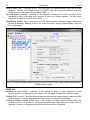
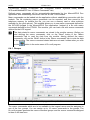
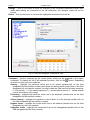
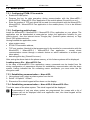
12 ETHM-1 Plus SATEL DLOADX program: ”Structure” window ”Hardware” tab ”Keypads” branch ”DloadX (RS-232)” item. Settings of the virtual keypad available in the GUARDX program, web browser or mobile phone can be programmed using: LCD keypad: SERVICE MODE STRUCTURE HARDWARE LCD KEYPADS SETTINGS GUARDX ADDR. n [n = module address], DLOADX program: ”Structure” window ”Hardware” tab ”Keypads” branch [module name] branch ”GuardX/MobileKPD” item (Fig. 7). For description of the keypad parameters and options, please refer to the programming manual for INTEGRA / INTEGRA Plus control panel (only some of these parameters and options are available for the virtual keypad). 6.2.2 Module connected to VERSA control panel You can use the virtual keypad in the DLOADX program. Parameters and options of the virtual keypad cannot be configured. 6.3 User functions [INTEGRA / INTEGRA Plus] If the MOBILEKPD-2 / MOBILEKPD-2 PRO application is used in the mobile phone, the virtual keypad allows you to quickly start user functions after entering the code and pressing an arrow key. The functions can be assigned to individual keys using: LCD keypad: SERVICE MODE STRUCTURE HARDWARE LCD KEYPADS SETTINGS [module name] CODE+ARROWS, DLOADX program: ”Structure” window ”Hardware” tab ”Keypads” branch [module name] ”User functions definition” tab (Fig. 8). Fig. 8. Program DLOADX: "User functions definition" tab. 6.4 Macro commands [INTEGRA / INTEGRA Plus] The MOBILEKPD-2 PRO application allows to control the alarm system by means of macro commands, thus making it possible to quickly and easily run a number of different functions by touching just a few keys. The macro commands can be defined in the DLOADX program