1
3. Description
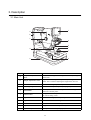
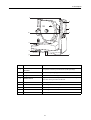
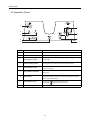
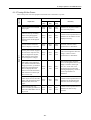
3.1 Main Unit
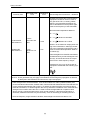
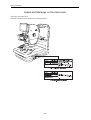
f
a
b
c
g
h
i
d
j
e
Symbol
k
Name
Function
a
Diopter compensation
lever
Used when the target is not brought into focus by turning the
focus knob.
b
Height adjustment mark
Adjust so that the height of the patient’s eye is aligned with this
mark. This is used for adjusting the height of the chin rest.
c
Focus knob
Used for focusing on patient’s eye.
d
Panel lighting
Illuminates the operation panel (see page 6) area.
e
Lift handles
To carry the camera, hold these parts at the left and right of the
main unit’s bottom panel.
f
LCD monitor
Displays the anterior eye and retina observation screens as well
as various setting screen.
g
Digital Camera
Take fundus images (sold separately)
h
Digital camera cover
Covers the terminal of the digital camera.
i
Shutter release button
Press this button to take an image.
j
Operation lever
Aligns the camera with the patient’s eye.
k
Operation panel
3.2 Operation Panel (see page 6)
-4-