1
LCD COLOUR TELEVISION
ENGLISH
LC-30AA1H
LC-37AA1H
ENGLISH
OPERATION MANUAL
Contents
Contents …………………………………………………… 1
Dear SHARP customer …………………………………… 2
Important Safety Precautions ………………………… 2
Supplied accessories …………………………………… 5
Preparation ………………………………………………… 6
Where to place the System …………………………… 6
Setting the System …………………………………… 7
Removing the stand and speaker …………………… 11
Setting the Display on the wall ……………………… 12
Setting the AVC System with the stand …………… 12
Inserting the batteries ………………………………… 13
Using the remote control unit ………………………… 13
Cautions regarding remote control unit ……… 13
Part names ………………………………………………… 14
Display ………………………………………………… 14
AVC System …………………………………………… 16
Remote control unit …………………………………… 17
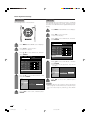
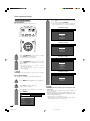
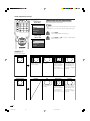
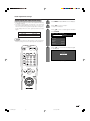
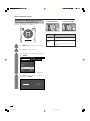
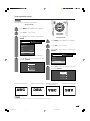
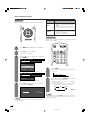
Watching TV ……………………………………………… 18
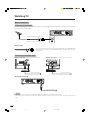
Basic connection ……………………………………… 18
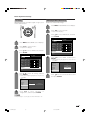
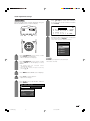
Connecting to an antenna ……………………… 18
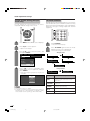
Connecting to the power outlet ………………… 18
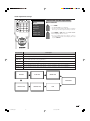
Turning on the power ………………………………… 19
Turning off the power ………………………………… 19
Simple button operations for changing channels … 20
Using Flashback (A) on the remote control unit … 20
Simple button operation for changing
volume/sound …………………………………… 21
Basic adjustment settings ……………………………… 24
AV input mode menu items …………………………… 24
PC input mode menu items ………………………… 24
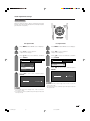
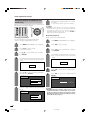
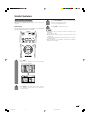
Auto installation ……………………………………… 25
Programme setup ……………………………………… 27
Auto search ……………………………………… 27
Manual setting for each channel ……………… 28
Search tuning ………………………………… 29
Fine tuning …………………………………… 29
Colour system ……………………………… 30
Sound system (Broadcasting system) …… 30
Labelling channels ………………………… 30
Skipping channels ………………………… 31
Setting the child lock ……………………… 31
Sort ………………………………………………… 32
Booster …………………………………………… 33
Language setting for on-screen display …………… 34
Picture adjustments …………………………………… 35
C.M.S. (Colour Management System) ………… 36
Colour temperature ……………………………… 37
Black ……………………………………………… 37
Monochrome ……………………………………… 38
Film mode ………………………………………… 38
I/P setting ………………………………………… 39
DNR (Digital Noise Reduction) ………………… 39
Audio adjustment ……………………………………… 40
Sound adjustment ……………………………… 40
Dolby Virtual ……………………………………… 40
Power Control ………………………………………… 41
Power Control for AV source …………………… 41
Power Control for PC source …………………… 43
Using external equipment ……………………………… 44
Watching a DVD image ……………………………… 45
Connecting a DVD player ……………………… 45
Displaying a DVD image ………………………… 45
Watching a VCR image ……………………………… 46
Connecting a VCR ……………………………… 46
Displaying a VCR image ………………………… 46
Enjoying a game console and viewing camcorder
images …………………………………………… 47
Connecting a game console or camcorder …… 47
Displaying an image of the game console or
camcorder …………………………………… 47
Viewing an image from a PC ………………………… 48
Connecting a PC ………………………………… 48
Displaying an image from a PC ………………… 48
Connecting external speakers ……………………… 49
Selecting speakers ……………………………… 50
Useful adjustment settings ……………………………… 51
Image position (AV input mode only) ……………… 51
Moving the picture on the screen …………………… 52
Auto Sync. adjustment (PC input mode only) ……… 53
Fine Sync. adjustment (PC input mode only) ……… 53
Input signal source …………………………………… 54
Input Label …………………………………………… 55
Colour system setting (AV input mode only) ……… 56
AV mode selection …………………………………… 56
WIDE mode (for AV input mode) …………………… 57
WIDE mode (for PC input mode) …………………… 58
Input signal (PC input mode only) …………………… 59
Selecting Full Mode display
(for AV input mode) (LC-30AA1H only) ………… 60
Rotate …………………………………………………… 61
Audio out ……………………………………………… 62
Sleep timer …………………………………………… 62
Cool climate …………………………………………… 63
Password setting for child lock (TV mode only) …… 64
Useful features …………………………………………… 65
Dual screen functions ………………………………… 65
Appendix ………………………………………………… 67
Troubleshooting ……………………………………… 67
PC compatibility chart ………………………………… 68
RS-232C port specifications ………………………… 69
Specifications ………………………………………… 71
Optional accessories ………………………………… 71
Dimensional drawings …………………………………… 72
1
LC-37AA1H(E)-a
1
03.11.6, 8:12 AM
Dear SHARP customer
Thank you for your purchase of the SHARP LCD colour TV product. To ensure safety and many years of troublefree operation of your product, please read the Important Safety Precautions carefully before using this product.
Important Safety Precautions
Electricity is used to perform many useful functions, but it can also cause personal injuries and property
damage if improperly handled. This product has been engineered and manufactured with the highest
priority on safety. However, improper use can result in electric shock and/or fire. In order to prevent potential
danger, please observe the following instructions when installing, operating and cleaning the product. To
ensure your safety and prolong the service life of your LCD colour TV product, please read the following
precautions carefully before using the product.
1.
Read instructions—All operating instructions must be read and understood before the product is operated.
2.
Keep this manual in a safe place—These safety and operating instructions must be kept in a safe place for
future reference.
3.
Observe warnings—All warnings on the product and in the instructions must be observed closely.
4.
Follow instructions—All operating instructions must be followed.
5.
Attachments—Do not use attachments not recommended by the manufacturer. Use of inadequate attachments
can result in accidents.
6.
Power source—This product must operate on a power source specified on the specification label. If you are
not sure of the type of power supply used in your home, consult your dealer or local power company.
7.
AC cord protection—The AC cords must be routed properly to prevent people from stepping on them or
objects from resting on them. Check the cords at the plugs and product.
8.
Overloading—Do not overload AC outlets or extension cords. Overloading can cause fire or electric shock.
9.
Entering of objects and liquids—Never insert an object into the product through vents or openings. High
voltage flows in the product, and inserting an object can cause electric shock and/or short internal parts. For
the same reason, do not spill water or liquid on the product.
10. Servicing—Do not attempt to service the product yourself. Removing covers can expose you to high voltage
and other dangerous conditions. Request a qualified service person to perform servicing.
11. Repair—If any of the following conditions occurs, unplug the AC cord from the AC outlet, and request a
qualified service person to perform repairs.
a.
b.
c.
d.
When the AC cord or plug is damaged.
When a liquid was spilled on the product or when objects have fallen into the product.
When the product has been exposed to rain or water.
When the product does not operate properly as described in the operating instructions.
Do not touch the controls other than those described in the operating instructions. Improper adjustment
of controls not described in the instructions can cause damage, which often requires extensive adjustment
work by a qualified technician.
e. When the product has been dropped or damaged.
f. When the product displays an abnormal condition. Any noticeable abnormality in the product indicates
that the product needs servicing.
12. Replacement parts—In case the product needs replacement parts, make sure that the service person uses
replacement parts specified by the manufacturer, or those with the same characteristics and performance as
the original parts. Use of unauthorized parts can result in fire, electric shock and/or other danger.
13. Safety checks—Upon completion of service or repair work, request the service technician to perform safety
checks to ensure that the product is in proper operating condition.
14. Wall or ceiling mounting—When mounting the product on a wall or ceiling, be sure to install the product
according to the method recommended by the manufacturer.
2
LC-37AA1H(E)-a
2
03.11.6, 8:12 AM
Important Safety Precautions
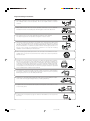
• Cleaning—Unplug the AC cord from the AC outlet before cleaning the product.
Use a damp cloth to clean the product. Do not use liquid cleaners or aerosol
cleaners.
• Water and moisture—Do not use the product near water, such as bathtub,
washbasin, kitchen sink, laundry tub, swimming pool and in a wet basement.
• Do not place vases or any other water-filled containers on this product.
The water may spill onto the product causing fire or electric shock.
• Stand—Do not place the product on an unstable cart, stand, tripod or table. Doing
so can cause the product to fall, resulting in serious personal injuries as well as
damage to the product. Use only a cart, stand, tripod, bracket or table recommended
by the manufacturer or sold with the product. When mounting the product on a
wall, be sure to follow the manufacturer’s instructions. Use only the mounting
hardware recommended by the manufacturer.
• When relocating the product placed on a cart, it must be moved with utmost care.
Sudden stops, excessive force and uneven floor surface can cause the product to
fall from the cart.
• Ventilation—The vents and other openings in the cabinet are designed for ventilation.
Do not cover or block these vents and openings since insufficient ventilation can
cause overheating and/or shorten the life of the product. Do not place the product
on a bed, sofa, rug or other similar surface, since they can block ventilation openings.
This product is not designed for built-in installation; do not place the product in an
enclosed place such as a bookcase or rack, unless proper ventilation is provided
or the manufacturer’s instructions are followed.
• The LCD panel used in this product is made of glass. Therefore, it can break when
the product is dropped or applied with impact. Be careful not to be injured by
broken glass pieces in case the LCD panel breaks.
• Heat sources—Keep the product away from heat sources such as radiators, heaters,
stoves and other heat-generating products (including amplifiers).
• To prevent fire or shock hazard, do not place the AC power cord under the TV set
or other heavy items.
• To prevent fire, never place any type of candle or naked flames on the top or near
the TV set.
3
LC-37AA1H(E)-a
3
03.11.6, 8:12 AM
Important Safety Precautions
LC-37AA1H
The LCD panel is a very high technology product with 3,147,264 thin film transistors, giving you fine picture
details.
Occasionally, a few non-active pixels may appear on the screen as a fixed point of blue, green or red.
Please note that this does not affect the performance of your product.
LC-30AA1H
The LCD panel is a very high technology product with 2,949,120 thin film transistors, giving you fine picture
details.
Occasionally, a few non-active pixels may appear on the screen as a fixed point of blue, green or red.
Please note that this does not affect the performance of your product.
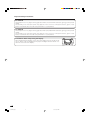
Precautions when transporting the Display
When transporting the Display, never carry it by holding onto the speakers. Be
sure to always carry the Display by two people holding it with two hands—one
hand on each side of the display.
4
LC-37AA1H(E)-a
4
03.11.6, 8:12 AM
Supplied accessories
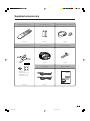
Make sure the following accessories are provided with the product.
Remote control unit (g1)
“AA” size battery (g2)
Cable clamp (Large g1, Small g1)
Page 13
Page 13
Page 8
Stand unit (for AVC System) (g1)
System cable (g1)
Antenna cable (g1)
Page 7
Page 18
AC cord (g2)
Operation manual
Stand (g1)
Stand cushion (g4)
Stand spacer (g4)
Stand screw (g2)
Page 12
LC-30AA1H
LC-37AA1H
Page 7
5
LC-37AA1H(E)-a
5
03.11.6, 8:12 AM
Preparation
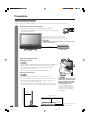
Where to place the System
“System” means the Display and AVC System. First select the location where to place the System.
1
Selecting the location of the System
• Select a place with no direct sunlight and good ventilation.
• The Display and the AVC System are connected by the system cable.
(See page 7 for details.)
If you want to keep a longer distance between the
Display and AVC System, please purchase the optional
system cable AN-07SC1 (about 7 meters). (See page 71.)
IMPORTANT
• You cannot use external speakers when you are using the optional
system cable (AN-07SC1).
System cable
AVC System
Display
2
Setting the System in place
Handling the Display
CAUTION
• The LC-37AA1H Display weighs about 25 kg and the LC-30AA1H
Display weighs about 20 kg. Move it with two or more people.
• Do not remove the stand from the Display unless using an
optional bracket to mount it.
• Keep enough space above and behind the Display.
Handling the AVC System
CAUTION
• Do not put a VCR or other device on the AVC System.
CAUTION
• Keep enough space above and on the sides of the AVC System.
• Do not block the ventilation openings on the top and left side,
and the exhaust fan on the right side.
• Do not spread a thick cloth beneath the AVC System, or cover it
with one, as this can cause overheating and result in malfunction.
Adjust the screen with both
hands. Put one hand on the
Display and tilt the screen
while steadying the stand
with your other hand.
You can adjust the screen
vertically up to 4 degrees
forward or 6 degrees backward, or rotate 10 degrees
horizontally.
10 cm
or more
Keep enough space
5 cm or more
5 cm or more
on both sides
There is an exhaust fan
on the right side.
6
LC-37AA1H(E)-a
6
03.11.6, 8:12 AM
Preparation
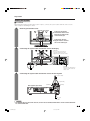
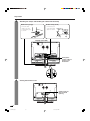
Setting the System
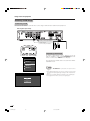
H LC-37AA1H
After putting the Display and the AVC System in place, connect the system cables and AC cords. Use the
cable clamps for bundling the cables.
1
Removing the terminal cover
Display (rear view)
Press the two hooks
toward the centre of the
Display and remove the
cover toward you.
Press down the two
upper hooks to remove
the cover toward you.
2
Connecting the system cable and the AC cord to the Display
(WHITE)
Connect the plug into the
terminal and secure it by
tightening the thumb screws.
(BLACK)
System cable
(GREY)
Connect the plug firmly
until the hooks on both
sides click.
AC cord
3
Connecting the system cable and the AC cord to the AVC System
System cable
(WHITE)
AVC System (rear view)
(BLACK)
(GREY)
AC cord
CAUTION
• TO PREVENT RISK OF ELECTRIC SHOCK, DO NOT TOUCH UN-INSULATED PARTS OF ANY CABLES WITH THE
AC CORD CONNECTED.
7
LC-37AA1H(E)-a
7
03.11.6, 8:12 AM
Preparation
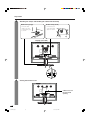
4
Attaching the clamps and bundling the cables with the clamp
Cable clamp (Large)
Cable clamp (Small)
Insert the cable
clamp in the hole
on the Display leg
as shown.
Peel off the seal
on the back and
attach as shown.
Display (rear view)
5
Closing the terminal cover
Cables come out
from the small
opening.
8
LC-37AA1H(E)-a
8
03.11.6, 8:12 AM
Preparation
Setting the System
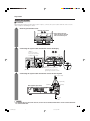
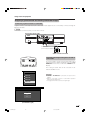
H LC-30AA1H
After putting the Display and the AVC System in place, connect the system cables and AC cords. Use the
cable clamps for bundling the cables.
1
Removing the terminal cover
Display (rear view)
Press down the four
upper hooks to remove
the cover toward you.
2
Connecting the system cable and the AC cord to the Display
(GREY)
Connect the plug
firmly until the hooks
on both sides click.
System cable
(BLACK)
3
(WHITE)
Connect the plug into the
terminal and secure it by
tightening the thumb screws.
AC cord
Connecting the system cable and the AC cord to the AVC System
System cable
(WHITE)
AVC System (rear view)
(BLACK)
(GREY)
AC cord
CAUTION
• TO PREVENT RISK OF ELECTRIC SHOCK, DO NOT TOUCH UN-INSULATED PARTS OF ANY CABLES WITH THE
AC CORD CONNECTED.
9
LC-37AA1H(E)-a
9
03.11.6, 8:12 AM
Preparation
4
Attaching the clamps and bundling the cables with the clamp
Cable clamp (Large)
Cable clamp (Small)
Insert the cable
clamp in the hole
on the Display leg
as shown.
Peel off the seal
on the back and
attach as shown.
Display (rear view)
Arrange the
system cable as
shown in the
illustration.
5
Closing the terminal cover
Cables come out
from the small
opening.
10
LC-37AA1H(E)-a
10
03.11.6, 8:12 AM
Preparation
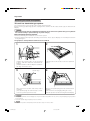
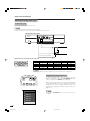
Removing the stand and speaker
This unit has detachable type speaker.
You can detach the system speaker when using external speaker.
Before removing (or attaching) speaker, unplug the AC cord from the AC outlet and the system cable from the
Display.
CAUTION
• When using the TV with the supplied stand attached, do not remove the speaker. Doing so may disturb
the balance leading to product damage or personal injury.
Before attaching/removing speaker
• Before performing work make sure to turn off the System.
• Before performing work spread cushioning over the base area to lay the Display on. This will prevent it from
being damaged.
The graphics in the explanation below use the LC-37AA1H.
2
1
Unfasten the screws used to secure the stand
in place, and then detach the stand from the
Display.
(Hold the stand so it will not drop the stand from
the edge of the base area.)
3
Speaker plug
Take hold of the speaker and slowly slide it
sideways.
(The speaker plugs are still inserted, so make
sure not to pull the speaker too far.)
Unfasten the screws used to secure the speaker in
place.
4
Remove the speaker plugs from the terminal on the
Display.
(Do not remove the plug by pulling the cord.)
Now the speaker can be removing from the Display.
CAUTION
• The speaker terminals on the Display are only for the attached speaker. Do not connect any third party plug or speaker
to the terminal.
• Insert the speaker plug completely into the terminal.
NOTE
• To attach the speaker and stand, perform the above steps in reverse order.
11
LC-37AA1H(E)-a
11
03.11.6, 8:13 AM
Preparation
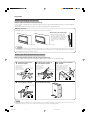
Setting the Display on the wall
Using an optional bracket to mount the Display
• You can ask a qualified service personnel about using an optional AN-37AG1 bracket to mount the Display
to the wall.
• Carefully read the instructions that come with the bracket before beginning work.
Hanging on the wall
AN-37AG1 wall mount bracket. (See the bracket instructions for details.)
About setting the Display angle
5°
• You can set the Display on the
wall up to 5 degrees forward
when the speaker is attached and
up to 20 degrees forward when
the speaker is not attached. Do
not set the angle outside those
ranges.
Vertical mounting
Angular mounting
CAUTION
• Installing the LCD Colour TV requires special skill that should only be performed by qualified service personnel.
Customers should not attempt to do the work themselves. SHARP bears no responsibility for improper mounting or
mounting that results in accident or injury.
Setting the AVC System with the stand
How to install the AVC System vertically using the stand unit.
• Use the supplied stand unit for installing the AVC System vertically in an upright position.
1
Stick each spacer to the
stand as shown.
Peel each spacer
away from the
paper and attach
to the four bulging
areas on the stand.
Stand
spacer
2
Attach each cushion to
the stand as shown.
Peel each cushion
away from the
paper and attach
to the four areas at
the bottom.
Bulge
Bulge
4
3
Stand cushion
Attaching point
Fit the stand to the AVC
System.
Insert the stand into the AVC
System, making sure that the
thick and thin bulges of the
stand align with the big and
small holes on the AVC
System.
Thin bulge
Small
hole
Big hole
Attaching point
Attach the stand using the
stand screws as shown.
Thick
bulge
The AVC System installed
vertically with the stand.
Stand screw
NOTE
• When mounting the AVC System vertically, always use the supplied stand. Be careful not to block vent holes when
standing up directly on the floor or a flat surface as this can result in equipment failure.
12
LC-37AA1H(E)-a
12
03.11.6, 8:13 AM
Preparation
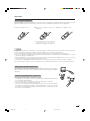
Inserting the batteries
Before using the System for the first time, insert two “AA” size batteries (supplied). When the batteries become
depleted and the remote control fails to operate, replace the batteries with new “AA” size batteries.
1
Open the battery cover.
2
Insert two supplied “AA” size
batteries.
3
Close the battery cover.
+
_
_
+
• Place batteries with their terminals
corresponding to the (e) and (f)
indications in the battery compartment.
CAUTION
Improper use of batteries can result in chemical leakage or explosion. Be sure to follow the instructions below.
• Place the batteries with their terminals corresponding to the (e) and (f) indications.
• Do not mix batteries of different types. Different types of batteries have different characteristics.
• Do not mix old and new batteries. Mixing old and new batteries can shorten the life of new batteries or cause
chemical leakage in old batteries.
• Remove batteries as soon as they have worn out. Chemicals that leak from batteries can cause a rash. If you
find any chemical leakage, wipe thoroughly with a cloth.
• The batteries supplied with this product may have a shorter life expectancy due to storage conditions.
• If you will not be using the remote control unit for an extended period of time, remove the batteries from it.
Using the remote control unit
Use the remote control unit by pointing it towards the remote sensor window.
Objects between the remote control unit and sensor window may prevent proper
operation.
Cautions regarding remote control unit
• Do not expose the remote control unit to shock.
In addition, do not expose the remote control unit to liquids, and do not place
in an area with high humidity.
• Do not install or place the remote control unit under direct sunlight.
The heat may cause deformation of the unit.
• The remote control unit may not work properly if the remote sensor window of
the Display is under direct sunlight or strong lighting. In such case, change
the angle of the lighting or Display, or operate the remote control unit closer to
the remote sensor window.
13
LC-37AA1H(E)-a
13
03.11.6, 8:13 AM
Part names
Display
H LC-37AA1H
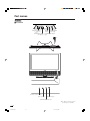
VOLUME buttons
( il/k )
CHANNEL buttons
(CHs/r)
INPUT
button
MAIN POWER
button (X)
STANDBY/ON button
(B)
Remote control sensor
OPC sensor
OPC indicator*
STANDBY/ON indicator
*OPC: Optical Picture Control
(See pages 41 and 43.)
14
LC-37AA1H(E)-a
14
03.11.6, 8:13 AM
Part names
Display
H LC-30AA1H
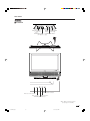
VOLUME buttons
( il/k )
INPUT
button
CHANNEL buttons
(CHs/r)
Remote control sensor
OPC sensor
MAIN POWER
button (X)
STANDBY/ON button
(B)
SLEEP timer indicator
OPC indicator*
STANDBY/ON indicator
*OPC: Optical Picture Control
(See pages 41 and 43.)
15
LC-37AA1H(E)-a
15
03.11.6, 8:13 AM
Part names
AVC System
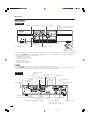
Front view
Headphone
(When connecting headphones,
the sound from the speakers is
muted.)
PC INPUT terminal (AUDIO) INPUT 4 terminal (VIDEO)
STANDBY/ON indicator
X (POWER) button
PC INPUT terminal
(ANALOG RGB)
CLEAR*
INPUT 4 terminals (AUDIO)
INPUT 4 terminal (S-VIDEO)
(How to open the door)
* If the AVC System is switched on but it does not appear to be operating correctly, it may need resetting. In this
case, press CLEAR, shown in the diagram, lightly with the end of a ballpoint pen or other pointed object.
This will reset the System as shown below.
•
•
•
•
•
•
AV MODE resets to USER.
TV channel resets to channel 1.
Dual screen resets to normal.
Audio setting initialises.
Dolby Virtual resets to OFF.
Image position is initialised.
NOTE
• Pressing CLEAR will not work if the System is in standby mode (indicator lights red).
• Pressing CLEAR will not delete channel preset or password. See page 64 for resetting the password when you know it.
See page 75 for initialising to the factory preset values when you forget your password.
Rear view
INPUT 3 terminals
(AUDIO)
INPUT 3 terminals
(Y, PB, PR)
INPUT 3 terminal
(VIDEO)
INPUT 3 terminal
(S-VIDEO)
ANTENNA INPUT
terminal
MONITOR OUTPUT terminal
(S-VIDEO)
MONITOR OUTPUT terminal (VIDEO)
INPUT 1 terminals
(Y, PB, PR)
INPUT 1
terminal
(S-VIDEO)
INPUT 1
terminal
(VIDEO)
RS-232C terminal
INPUT 1 terminals
(AUDIO)
EXTERNAL
SPEAKER
terminals
INPUT 2 terminal
(VIDEO)
INPUT 2 terminal INPUT 2 terminals
(AUDIO)
(S-VIDEO)
MONITOR OUTPUT terminals (AUDIO)
DISPLAY OUTPUT1
terminal
DISPLAY OUTPUT2
terminal
DISPLAY OUTPUT3
terminal
DC OUTPUT terminal
AC INPUT terminal
(Terminal for expanded
functionality in the near future.)
16
LC-37AA1H(E)-a
16
03.11.6, 8:13 AM
Part names
Remote control unit
1
2
3
11
12
13
14
1
2
3
4
5
6
7
8
9
15
16
4
5
6
7
8
9
17
10
11
10
18
12
19
13
20
14
15
16
17
18
19
20
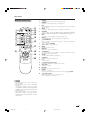
POWER
To switch the power on and off. (See page 19.)
FREEZE
Change the still image mode. (See page 66.)
P&P
Set the dual picture mode. Press P&P again to return to normal view.
(See page 65.)
WIDE
Change the wide image mode. (See pages 57 and 58.)
AV MODE
Select a video setting. AV MODE (USER, STANDARD, DYNAMIC,
MOVIE, GAME) PC MODE (USER, STANDARD) (See page 56.)
MPX
Select the sound multiplex mode. (See page 23.)
Dolby V*
Select Virtual Dolby Surround settings. (See page 22.)
A (FLASHBACK)
Press to return to the previous channel in normal viewing mode.
(See page 20.)
il/ik (VOLUME)
Set the volume. (See page 21.)
MENU
Display the menu screen.
DISPLAY
Display the channel information.
TV/VIDEO/PC
Select an input source. (TV, INPUT 1, INPUT 2, INPUT 3, INPUT 4,
PC) (See page 45–48 and 54.)
SLEEP
Set the SLEEP TIMER. (See page 62.)
e (MUTE)
Mute the sound. (See page 21.)
0–9
Set the channel.
o (Digit for channel select)
Change the digits of the selected TV channel.
CHa/CHb
Select the channel.
RETURN
Return to the previous menu screen.
ENTER
Execute a command.
Return to the initial image position after moving with a/b/c/d.
a/b/c/d (Cursor)
Select a desired item on the setting screen.
Move the picture on the screen.
NOTE
• When using the remote control unit, point it
at the Display.
• Manufactured under license from BBE
Sound, Inc.
Licensed by BBE Sound, Inc. under
USP4638258, 5510752 and 5736897. BBE
and BBE symbol are registered trademarks
of BBE Sound, Inc.
* Manufactured under license from Dolby
Laboratories. “Dolby”, “Pro Logic” and the
double-D symbol are trademarks of Dolby
Laboratories.
17
LC-37AA1H(E)-a
17
03.11.6, 8:13 AM
Watching TV
Simple operations for watching a TV programme
Basic connection
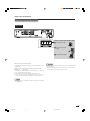
Connecting to an antenna
To enjoy a clearer picture, use an outdoor antenna. The following is a brief explanation of the types of connections
that are used for coaxial cable.
Standard DIN45325 plug (IEC169-2)
75-ohm coaxial cable (round cable)
Antenna cable
If your outdoor antenna uses a 75-ohm coaxial cable with a standard DIN45325
plug (IEC 169-2), plug it into the ANTENNA INPUT terminal at the rear of the
AVC System.
Connecting to the power outlet
Display (rear view)
* This picture is for LC-37AA1H.
Display (rear view)
* This picture is for LC-30AA1H.
Plug in to wall outlet.
Plug in to wall outlet.
AVC System (rear view)
Plug in to wall outlet.
NOTE
• Always turn off the main power of Display and AVC System when connecting the AC cords.
• Disconnect the AC cords from the AC outlet, Display and AVC System if the System will not be used for a long period of
time.
18
LC-37AA1H(E)-b
18
03.11.6, 8:14 AM
Watching TV
Turning on the power
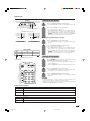
Display
1
Press X (MAIN POWER) on the Display.
• The STANDBY/ON indicator on the Display flashes red.
B (STANDBY/ON) button
X (MAIN POWER)
2
Press X (POWER) on the AVC System.
• The System turns the power on.
• The STANDBY/ON indicator on the Display lights up
green and the one on the AVC System lights up green.
• If the STANDBY/ON indicators still light up red, press
POWER on the remote control unit or B (STANDBY/
ON) button on the Display to turn the System on.
STANDBY/ON indicator
When turning the AVC System on first
1
Press X (POWER) on the AVC System.
2
Press X (MAIN POWER) on the Display.
LC-30AA1H
LC-37AA1H
• The System turns the power on.
• The STANDBY/ON indicator on the Display lights up
green and the one on the AVC System lights up green.
• If the STANDBY/ON indicators still light up red, press
POWER on the remote control unit or B (STANDBY/
ON) button on the Display to turn the System on.
AVC System
STANDBY/ON indicator
X (POWER)
• The STANDBY/ON indicator on the AVC System lights
up red.
Turning off the power
1
Press POWER on the remote control unit or B
(STANDBY/ON) button on the Display.
• The System enters standby mode and the image on the
screen disappears.
• Both STANDBY/ON indicators change from green to red.
2
Press X (POWER) on the AVC System.
3
Press X (MAIN POWER) on the Display.
• The STANDBY/ON indicator on the AVC System turns
off and the one on the Display flashes red.
• The STANDBY/ON indicator on the Display gradually
turns off.
NOTE
• If you are not going to use this System for a long period of time, be
sure to remove the AC cords from the power outlet.
• Weak electric power is still consumed even when both X (MAIN
POWER) and X (POWER) are turned off.
Display status indicator
Off
Power off
Flashing red
AVC System does not turn on or its AC cord is disconnected.
Red
The System is in standby mode.
Green
The System is on.
AVC System status indicator
Off
Power off
Red
Only the AVC System is in standby mode or the System is in standby mode.
Green
The System is on.
19
LC-37AA1H(E)-b
19
03.11.6, 8:14 AM
Watching TV
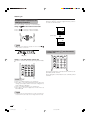
Simple button operations for
changing channels
Channel display
Channel display changes approximately after 3
seconds as shown below.
You can change channels in several ways.
a/b
bon the remote control unit
Using CHa
SAT.1
12
PAL
I
• Press CHa
a to increase channel number.
b to decrease channel number.
• Press CHb
(Example)
SAT.1
12
MONO
NOTE
a
• CHs/r on the Display operates the same as CHb
b/a
on the remote control unit.
Using Flashback (A) on the remote
control unit
CHs/r
Using 0 – 9 on the remote control unit
Select the channels directly by pressing buttons 0 to
9.
Press A to switch the currently tuned channel to the
previously tuned channel.
Press A again to switch back to the currently tuned
channel.
a
To select a 1-digit channel (e.g. channel 2):
• Press 2. If “2” is indicated and the picture does not
change, press o to switch over to the 1-digit select
mode and press 2 again.
To select a 2-digit channel (e.g. channel 12):
• Press o to set the 2-digit select mode. Press 1,
followed by 2.
NOTE
• Complete this procedure within 3 seconds, otherwise the
selection will not be made on the 2-digit channel mode.
20
LC-37AA1H(E)-b
20
03.11.6, 8:14 AM
Watching TV
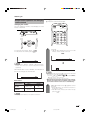
Simple button operation for changing
volume/sound
Using e on the remote control unit
e mutes the current sound output.
Changing the volume
You can change the volume on the Display or on the
remote control unit.
k
il
l/k
1
• To increase the volume, press i k
k.
l.
• To decrease the volume, press il
Press e.
• “e” has been displayed on the screen for 30
minutes, and the sound is silenced.
Mute
0
20
NOTE
• “TV”, “INPUT1”, “INPUT2”, “INPUT3”, “INPUT4” and “PC”
modes can each store volume adjustment values
separately.
When “Audio Out” is set to “Variable”, the indicator on
the screen changes as shown below.
NOTE
• Within 30 minutes of pressing e, mute can be cancelled
by using one of the two methods below.
f /ie
e, MPX, CHa
a /CHb
b, 0 – 9, TV/VIDEO/
• Pressing if
PC or A can also cancel the mute.
• Changing channels can also cancel the mute.
20
• Mute will be cancelled after 30 minutes have elapsed.
However, the System will not suddenly output a loud
sound as the volume level is set to 0 automatically.
Audio status
Audio out
Output device
Speaker
MONITOR
OUTPUT
Fixed
Variable
Variable sound
Mute
Constant as
specified
Variable sound
2
Within 30 minutes, Press e again to cancel
the mute.
• Before 30 minutes, the volume level returns to
the previous setting.
• After 30 minutes, increase the volume level by
pressing ie.
NOTE
• See page 62 for details on the audio out function.
21
LC-37AA1H(E)-b
21
03.11.6, 8:14 AM
Watching TV
Using Dolby V on the remote control unit
Dolby V produces Dolby virtual effect from the
speakers.
Each time you press Dolby V, the mode changes
between ON and OFF.
Dolby Virtual sound options
• ON: Makes it possible to enjoy natural, realistic
surround sound.
• OFF: Outputs the normal sound.
Dolby Virtual : OFF
Dolby Virtual : ON
NOTE
• You can have the same settings by choosing “Dolby
Virtual” on the menu items. (See page 40.)
22
LC-37AA1H(E)-b
22
03.11.6, 8:14 AM
Watching TV
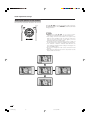
Using MPX on the remote control unit
In the TV mode of A2 TV broadcasts
When receiving a stereo signal
Each time you press MPX, the mode switches between
STEREO and MONO.
Stereo mode
BBC2
99
STEREO
In the NICAM TV broadcasts
When receiving a stereo signal
Each time you press MPX, the mode switches between
NICAM STEREO and MONO.
Stereo mode
BBC2
99
BBC2
99
MONO
When receiving a bilingual signal
Each time you press MPX, the mode switches among
CH A, CH B and CH AB.
NICAM
STEREO
Bilingual mode
BBC2
99
BBC2
99
CH A
MONO
BBC2
99
When receiving a bilingual signal
Each time you press MPX, the mode switches among
NICAM CH A, NICAM CH B, NICAM CH AB and
MONO.
Bilingual mode
CH B
BBC2
99
BBC2
99
NICAM
CH A
CH AB
When receiving a monaural signal
When you press MPX, “MONO” displays.
Monaural mode
BBC2
99
BBC2
99
NICAM
CH B
MONO
BBC2
99
NICAM
CH AB
NOTE
• When no signal is input, the sound mode will display
“MONO”.
• “BBC2” and “99” are tentative network name and channel.
BBC2
99
MONO
When receiving a monaural signal
Each time you press MPX, the mode switches between
NICAM MONO and MONO.
Monaural mode
BBC2
99
NICAM
MONO
BBC2
99
MONO
23
LC-37AA1H(E)-b
23
03.11.6, 8:14 AM
Basic adjustment settings
AV input mode menu items
List of AV menu items to help you with operations
Picture
Contrast ................................................. Page 35
Brightness ............................................. Page 35
Colour .................................................... Page 35
Tint ......................................................... Page 35
Sharpness ............................................. Page 35
Advanced
C.M.S. .......................................... Page 36
Colour Temp ............................... Page 37
Black ........................................... Page 37
Monochrome .............................. Page 38
Film Mode ................................... Page 38
I/P Setting ................................... Page 39
DNR ............................................. Page 39
Audio
Treble ..................................................... Page 40
Bass ....................................................... Page 40
Balance .................................................. Page 40
Dolby Virtual .......................................... Page 40
Speaker .................................................. Page 50
PC input mode menu items
List of PC menu items to help you with operations
Picture
Contrast ................................................. Page 35
Brightness ............................................. Page 35
Red ......................................................... Page 35
Green ...................................................... Page 35
Blue ........................................................ Page 35
C.M.S. ..................................................... Page 36
Audio
Treble ..................................................... Page 40
Bass ....................................................... Page 40
Balance .................................................. Page 40
Dolby Virtual .......................................... Page 40
Speaker .................................................. Page 50
Power Control
Power Save ............................................ Page 43
Power Management .............................. Page 43
Power Control
Setup
Power Save ............................................ Page 41
No Signal Off ......................................... Page 42
No Operation Off ................................... Page 42
Setup
Auto Installation ............................ Pages 25-26
Programme Setup ......................... Pages 27-32
Child Lock .............................................. Page 64
Position .................................................. Page 51
Full Mode* .............................................. Page 60
Rotate ..................................................... Page 61
Language ............................................... Page 34
Input Signal ........................................... Page 59
Auto Sync. ............................................. Page 53
Fine Sync. .............................................. Page 53
Rotate ..................................................... Page 61
Language ............................................... Page 34
Option
Audio Out ............................................... Page 62
Cool Climate .......................................... Page 63
* Full Mode is only displayed for LC-30AA1H.
Option
Input Select ........................................... Page 54
Input Label ............................................. Page 55
Audio Out ............................................... Page 62
Cool Climate .......................................... Page 63
Colour System ...................................... Page 56
Booster .................................................. Page 33
24
LC-37AA1H(E)-c
24
03.11.6, 8:16 AM
Basic adjustment settings
Auto installation
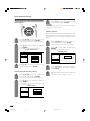
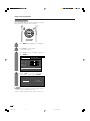
4
You can run auto installation, even after setting up the
preset channels.
If you already set the password for child lock,
enter it here. If not, enter the factory preset
password “1234”.
• See page 64 for setting password.
– – – –
Enter your 4-digit password with 0 - 9 on the
remote control unit.
5
Press c/d to select “Yes”, and then press
ENTER.
Yes
6
1
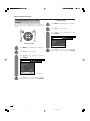
Press MENU and the MENU screen displays.
2
Press c/d to select “Setup”.
3
Press a/b to select “Auto Installation”, and
then press ENTER.
No
Press a/b to select the desired language
listed on the screen, and then press ENTER.
After this setting, auto search starts with the
following order.
1 Automatic channel searching
2 Automatic channel labelling
3 Automatic channel sorting
You do not need to do anything during the
auto search. (Go to the next page.)
NOTE
MENU
[Setup ... Auto Installation]
Setup
• The illustrations and on-screen displays in this manual
are for explanation purposes and may vary slightly from
the actual operations.
Option
Auto Installation
Programme Setup
Child Lock
Position
Full Mode
[Mode1]
Rotate
[Normal]
Language
[English]
• Full Mode is only displayed for LC-30AA1H.
25
LC-37AA1H(E)-c
25
03.11.6, 8:16 AM
Basic adjustment settings
Automatic channel searching
Channel auto search finds all channels viewable in
your area.
01 55.25
02 85.25
03 102.25
NOTE
• If no channel is found, “No programme found.” displays.
And the auto installation finishes.
26
LC-37AA1H(E)-c
26
03.11.10, 9:40 AM
Basic adjustment settings
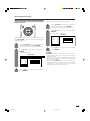
Programme setup
4
You can run the auto installation procedure again at
any time, by accessing the Setup menu, then
Programme Setup. Channels can be tuned
automatically or manually.
Press a/b to select “Auto Search”, and then
press ENTER.
Auto Search
Manual Adjust
Sort
Yes
5
No
Press c/d to select “Yes”, and then press
ENTER.
• Auto search starts with the following order.
1 Automatic channel searching
2 Automatic channel labelling
3 Automatic channel sorting
Auto search
NOTE
You can also automatically search TV channels by
performing the procedure below. This is the same
function as from “Automatic channel searching” to
“Automatic channel sorting” in auto installation on page
26.
1
Press MENU and the MENU screen displays.
2
Press c/d to select “Setup”.
3
Press a/b to select “Programme Setup”,
and then press ENTER.
If you already set the password for child lock,
enter it here. If not, enter the factory preset
password “1234”.
• See page 26 for details.
• See page 64 for setting password.
MENU
[Setup ... Programme Setup]
Setup
Option
Auto Installation
Programme Setup
Child Lock
Position
Full Mode
[Mode1]
Rotate
[Normal]
Language
[English]
• Full Mode is only displayed for LC-30AA1H.
27
LC-37AA1H(E)-c
27
03.11.6, 8:16 AM
Basic adjustment settings
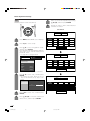
Programme Setup “Manual” menu
Manual setting for each channel
You can set some channel items manually. They are
Search, Fine (TV frequency), Colour sys., Sound sys.,
Label (Network name), Skip and Lock (Child Lock).
01 SAT.1
02 PR07
03 KABEL
Next
You can select one of the following settings.
1
Press MENU and the MENU screen displays.
2
Press c/d to select “Setup”.
3
Press a/b to select “Programme Setup”,
and then press ENTER.
If you already set the password for child lock,
enter it here. If not, enter the factory preset
password “1234”.
1 Search (See page 29.)
2 Fine (See page 29.)
3 Colour system (See page 30.)
4 Sound system (See page 30.)
5 Label (See page 30.)
6 Skip (See page 31.)
7 Lock (See page 31.)
• See page 64 for setting password.
MENU
[Setup ... Programme Setup]
Setup
Option
Auto Installation
Programme Setup
Child Lock
Position
Full Mode
[Mode1]
Rotate
[Normal]
Language
[English]
• Full Mode is only displayed for LC-30AA1H.
4
Press a/b to select “Manual Adjust”, and
then press ENTER.
Auto Search
Manual Adjust
Sort
Yes
5
No
Press c/d to select “Yes”, and then press
ENTER.
28
LC-37AA1H(E)-c
28
03.11.6, 8:16 AM
Basic adjustment settings
Manual setting for each channel (continued)
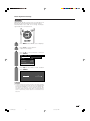
Search tuning
1
Press a/b/c/d to select the channel you
want to edit, and then press ENTER.
• The selected channel information displays.
2
Press a/b to select “Search”, and then
press ENTER.
[Setup ... Programme Setup ... Manual Adjust]
MENU
Search
Fine
[179.25]
Colour sys.
[AUTO]
Sound sys.
[B/G]
Label
3
[SAT.1]
179.25
MHz
NEXT
Skip
[Off]
STORE
Lock
[Off]
CANCEL
Press a/b to select item and press ENTER.
• NEXT: Search the next channel.
• STORE: Memorise the current display channel.
• CANCEL: Returns to the previous screen. (The
search result is not stored.)
Fine tuning
1
Press a/b/c/d to select the channel you
want to edit, and then press ENTER.
• The selected channel information displays.
2
Press a/b to select “Fine”, and then press
ENTER.
3
Press c/d to adjust the frequency, and then
press ENTER.
• Adjust while checking the background picture
as a reference.
Search
Fine
[179.25]
Colour sys.
[AUTO]
Sound sys.
[B/G]
Label
179.25
MHz
[SAT.1]
Skip
[Off]
Lock
[Off]
• Instead of the above, you can also set by
directly entering the frequency number of the
channel with 0 – 9.
a
• 179.25 MHz: Press 1 s 7 s 9 s 2 s 5 s
ENTER.
• 49.25 MHz: Press 4 s 9 s 2 s 5 s ENTER.
29
LC-37AA1H(E)-c
29
03.11.6, 8:16 AM
Basic adjustment settings
Manual setting for each channel (continued)
3
Colour system
Press a/b to select the optimum sound
system, and then press ENTER.
NOTE
• If you adjust this setting, please check the colour system
information. (See left column.)
Labelling channels
1
When a TV channel sends its Network Name, the auto
installation detects the information and assigns a name
to it. However, you can change individual channel
names.
Press a/b/c/d to select the channel you
want to edit, and then press ENTER.
• The selected channel information displays.
2
1
• The selected channel information displays.
Press a/b to select “Colour sys.”, and then
press ENTER.
• Receivable colour systems are listed.
2
[Setup ... Programme Setup ... Manual Adjust]
Labelling menu
Search
Search
Fine
[179.25]
Colour sys.
[AUTO]
Sound sys.
[B/G]
Label
[SAT.1]
Skip
[Off]
Lock
[Off]
Fine
[179.25]
AUTO
Colour sys.
[AUTO]
PAL
Sound sys.
SECAM
Label
NTSC 3.58
NTSC 4.43
Press a/b to select the optimum colour
system, and then press ENTER.
Sound system (Broadcasting system)
1
Press a/b to select “Label”, and then press
ENTER.
• Alphabets and numbers are listed.
Colour system menu
MENU
3
Press a/b/c/d to select the channel you
want to edit, and then press ENTER.
Press a/b/c/d to select the channel you
want to edit, and then press ENTER.
[B/G]
[SAT.1]
Skip
[Off]
Lock
[Off]
[AUTO]
[B/G]
Label
[SAT.1]
Skip
[Off]
Lock
[Off]
B/G
D/K
I
M
30
LC-37AA1H(E)-c
30
+
–
.
_
0
6
7
8
9
1
2
3
4
5
BACK
END
• The name can be 5 characters or less.
Sound menu
Sound sys.
U V W X Y Z
CLEAR
Repeat the above until the name is fully spelt
out.
Search
[179.25]
J
4
• Receivable sound systems (Broadcasting
systems) are listed.
Colour sys.
I
L M N O P Q R S T
Press a/b/c/d to select each character
of the new name for the channel, and then
press ENTER.
Press a/b to select “Sound sys.”, and then
press ENTER.
Fine
K
3
• The selected channel information displays.
2
A B C D E F G H
03.11.6, 8:17 AM
Basic adjustment settings
Manual setting for each channel (continued)
Setting the child lock
You can block the viewing of any channel.
Skipping channels
1
Press a/b/c/d to select the channel you
want to edit, and then press ENTER.
• The selected channel information displays.
2
Press a/b to select “Lock”, and then press
ENTER.
• Child lock menu displays.
Lock menu
Search
Channels with “Skip” set to “On” are passed over when
using CHa/CHb even if selected while watching the
image from the TV.
Fine
[179.25]
Colour sys.
[AUTO]
Sound sys.
[B/G]
Label
1
Press a/b/c/d to select the channel you
want to edit, and then press ENTER.
Off
On
[SAT.1]
Skip
[Off]
Lock
[Off]
• The selected channel information displays.
2
3
Press a/b to select “Skip”, and then press
ENTER.
NOTE
• Skip menu displays.
Skip menu
MENU
[Setup ... Programme Setup ... Manual Adjust]
Search
Fine
[179.25]
Colour sys.
[AUTO]
Sound sys.
[B/G]
Label
3
Off
On
[SAT.1]
Skip
[Off]
Lock
[Off]
Press a/b to set “Lock” to “On”, and then
press ENTER.
• Even when this function is switched “On”, it will not work if
a password has not been set. See page 64 for details on
password setting.
• When “Lock” is set to “On” for a channel, “Child Lock Has
Been Activated.” displays , and the image and sound of
the channel is blocked.
• When pressing ENTER while “Child Lock Has Been
Activated.” displays, password input menu will display.
Inputting the correct password lifts the child lock
temporarily until the power is turned off.
Press a/b to set “Skip” to “On”, and then
press ENTER.
31
LC-37AA1H(E)-c
31
03.11.6, 8:17 AM
Basic adjustment settings
Sort
7
Move it to the desired position by pressing
a/b/c/d, and then press ENTER.
8
Repeat the steps 6 and 7 until all desired
channels are sorted.
Channel positions can be sorted freely.
Sort menus
01 SAT.1
1
01 SAT.1
02 KABEL
03
04
Press MENU and the MENU screen displays.
06
2
Press c/d to select “Setup”.
3
Press a/b to select “Programme Setup”,
and then press ENTER.
If you already set the password for child lock,
enter it here. If not, enter the factory preset
password “1234”.
Next
• See page 64 for setting password.
MENU
01 SAT.1
[Setup ... Programme Setup]
Setup
02 KABEL
Option
Auto Installation
01 SAT.1
02 KABEL
Programme Setup
Child Lock
Position
Full Mode
[Mode1]
Rotate
[Normal]
Language
[English]
Next
• Full Mode is only displayed for LC-30AA1H.
4
Press a/b to select “Sort”, and then press
ENTER.
• The channels are listed. Black ones are set
“Skip” to “Off” and blue are set “Skip” to “On”.
01 KABEL
Auto Search
Manual Adjust
Sort
01 KABEL
Yes
02 SAT.1
No
Next
5
Press c/d to select “Yes”, and then press
ENTER.
6
Press a/b/c/d to select the channel you
want to move, and then press ENTER.
32
LC-37AA1H(E)-c
32
03.11.6, 8:17 AM
05
Basic adjustment settings
Booster
When set to “AUTO”, picture noise is reduced for TV
broadcast signal strength from moderate regions.
Automatically sets to “Off” for a strong electrolytic
signal that has a constant level.
1
Press MENU and the MENU screen displays.
2
Press c/d to select “Option”.
• Option menu displays.
3
Press a/b to select “Booster”, and then
press ENTER.
MENU
[Option ... Booster]
Option
[Fixed]
Audio Out
Cool Climate
4
[Off]
Colour System
[AUTO]
Booster
[AUTO]
Press c/d to select “Auto” or “Off”, and then
press ENTER.
AUTO
Off
NOTE
• In regions with pronounced changes in TV signal strength
or very strong signal strength, the effect is negligible and
may produce instability. In such case, turn the setting “Off”.
The built-in TV booster cannot handle regions with
extremely weak signal strength. After consulting with the
store of purchase, please attach an external booster
antenna.
33
LC-37AA1H(E)-c
33
03.11.6, 8:17 AM
Basic adjustment settings
Language setting for on-screen
display
You can also select a language from setup menu.
Select from among 3 languages: English, Chinese and
Arabic.
PC Input mode
1
Press MENU and the MENU screen displays.
2
Press c/d to select “Setup”.
3
Press a/b to select “Language”, and then
press ENTER.
MENU
[Setup ... Language]
Setup
Option
Input Signal
Auto Sync.
Fine Sync.
AV Input mode
1
Rotate
[Normal]
Language
[English]
Press MENU and the MENU screen displays.
4
2
Press c/d to select “Setup”.
3
Press a/b to select “Language”, and then
press ENTER.
MENU
Press a/b to select the desired language
listed on the screen, and then press ENTER.
[Setup ... Language]
Setup
Option
Auto Installation
Programme Setup
Child Lock
Position
[Mode1]
Full Mode
Rotate
[Normal]
Language
[English]
• Full Mode is only displayed for LC-30AA1H.
4
Press a/b to select the desired language
listed on the screen, and then press ENTER.
34
LC-37AA1H(E)-c
34
03.11.6, 8:17 AM
Basic adjustment settings
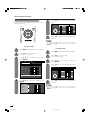
Picture adjustments
1
Press MENU and the MENU screen displays.
2
Press c/d to select “Picture”.
Adjust the picture to your preference with the following
picture settings.
• Picture menu displays.
3
Press a/b to select a specific adjustment
item.
4
Press c/d to adjust the item to your desired
position.
NOTE
• For resetting all adjustment items to the factory preset
values, press a/b to select “Reset”, and then press
ENTER.
Adjustments items for AV source
MENU
Adjustments items for PC source
MENU
[Picture]
Picture
Audio
USER
Contrast
[Picture]
Picture
Audio
USER
[+30] –30
+40
Contrast
[+30]
0
+40
Brightness [0]
–30
+30
Brightness [0]
–30
+30
Colour
[0]
–30
+30
Red
[0]
–30
+30
Tint
[0]
–30
+30
Green
[0]
–30
+30
Sharpness [0]
–10
+10
Blue
[0]
–30
+30
Advanced
C. M. S.
Reset
Reset
Selected item
cbutton
dbutton
Selected item
cbutton
dbutton
Contrast
For less contrast
For more contrast
Contrast
For less contrast
For more contrast
Brightness
For less brightness
For more brightness
Brightness
For less brightness
For more brightness
Colour
For less colour
intensity
For more colour
intensity
Red
For weaker red
For stronger red
Tint
Skin tones become
purplish
Skin tones become
greenish
Green
For weaker green
For stronger green
Sharpness
For less sharpness
For more sharpness
Blue
For weaker blue
For stronger blue
NOTE
• Select “Advanced” and then press ENTER to set “C.M.S.”,
“Colour Temp”, “Black”, “Monochrome”, “Film Mode”, “I/P Setting”
or “DNR”. See pages 36 to 39.
35
LC-37AA1H(E)-d
35
03.11.6, 8:19 AM
Basic adjustment settings
C.M.S. (Colour Management System)
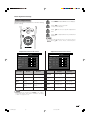
5
Colour tone is managed using the six-colour
adjustment setting.
Press a/b to select a specific adjustment
item.
C. M. S.
Changing reds
closer to
magenta or yellow.
R
[ 0]
–30
+30
Y
[ 0]
–30
+30
G
[ 0]
–30
+30
C
[ 0]
–30
+30
B
[ 0]
–30
+30
M
[ 0]
–30
+30
Reset
6
Press c/d to adjust the item to your desired
position.
NOTE
• For resetting all adjustment items to the factory preset
values, press a/b to select “Reset”, and then press
ENTER.
AV input mode
1
2
1
Press MENU and the MENU screen displays.
2
Press c/d to select “Picture”.
Press c/d to select “Picture”.
• Picture menu displays.
3
PC input mode
Press MENU and the MENU screen displays.
• Picture menu displays.
Press a/b to select “Advanced”, and then
press ENTER.
MENU
[Picture ... Advanced]
Picture
Press a/b to select “C.M.S.”, and then
press ENTER.
4
Press a/b to select a specific adjustment
item.
Audio
USER
0
+40
Brightness [0]
–30
+30
Colour
[0]
–30
+30
Tint
[0]
–30
+30
Sharpness [0]
–10
+10
Contrast
3
[+30]
MENU
[Picture ... C. M. S]
Changing reds
closer to
magenta or yellow.
Advanced
Reset
R
[ 0]
–30
+30
Y
[ 0]
–30
+30
G
[ 0]
–30
+30
C
[ 0]
–30
+30
B
[ 0]
–30
+30
M
[ 0]
–30
+30
Reset
4
Press a/b to select “C.M.S.”, and then press
ENTER.
5
Press c/d to adjust the item to your desired
position.
C. M. S.
Colour Temp
R
[ 0]
–30
+30
Black
Y
[ 0]
–30
+30
Monochrome
G
[ 0]
–30
+30
Film Mode
C
[ 0]
–30
+30
I/P Setting
B
[ 0]
–30
+30
DNR
M
[ 0]
–30
+30
NOTE
• For resetting all adjustment items to the factory preset
values, press a/b to select “Reset”, and then press
ENTER.
36
LC-37AA1H(E)-d
36
03.11.6, 8:19 AM
Basic adjustment settings
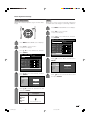
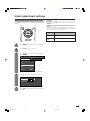
Colour temperature
Black
Adjusts the colour temperature to give the best white
image.
Allows you to select a level for automatic adjustment
of a black areas of the image to suit viewing conditions.
1
Press MENU and the MENU screen displays.
2
Press c/d to select “Picture”.
• Picture menu displays.
3
Press a/b to select “Advanced”, and then
press ENTER.
MENU
1
[Picture ... Advanced]
Picture
Audio
Press MENU and the MENU screen displays.
USER
0
+40
Brightness [0]
–30
+30
Colour
[0]
–30
+30
Tint
[0]
–30
+30
Sharpness [0]
–10
+10
Contrast
2
Press c/d to select “Picture”.
• Picture menu displays.
3
Press a/b to select “Advanced”, and then
press ENTER.
[+30]
Advanced
MENU
[Picture ... Advanced]
Picture
Reset
Audio
USER
4
Press a/b to select “Black”, and then press
ENTER.
0
+40
Brightness [0]
–30
+30
Colour
[0]
–30
+30
Tint
[0]
–30
+30
Black
Sharpness [0]
–10
+10
Monochrome
Contrast
[+30]
C. M. S.
Colour Temp
Off
Film Mode
Advanced
High
Low
I/P Setting
Reset
4
DNR
Press a/b to select “Colour Temp”, and then
press ENTER.
C. M. S.
5
Press a/b to select the desired level, and
then press ENTER.
Colour Temp
Black
High
Monochrome
Mid-High
Film Mode
Mid
I/P Setting
Mid-Low
DNR
Low
5
Press a/b to select the desired level, and
then press ENTER.
Selected item
High
Mid-High
Mid
Mid-Low
Low
Description
White with Bluish tone
White with Reddish tone
37
LC-37AA1H(E)-d
37
03.11.6, 8:19 AM
Basic adjustment settings
Monochrome
Film mode
For viewing a video in monochrome.
Automatically detects a film-based source (originally
encoded at 24 frames/second), analyses it then
recreates each still film frame for high-definition picture
quality.
1
Press MENU and the MENU screen displays.
2
Press c/d to select “Picture”.
• Picture menu displays.
3
Press a/b to select “Advanced”, and then
press ENTER.
MENU
1
[Picture ... Advanced]
Picture
Press MENU and the MENU screen displays.
Audio
USER
2
Press c/d to select “Picture”.
• Picture menu displays.
3
0
+40
Brightness [0]
–30
+30
Colour
[0]
–30
+30
Tint
[0]
–30
+30
Sharpness [0]
–10
+10
Contrast
Press a/b to select “Advanced”, and then
press ENTER.
MENU
Advanced
[Picture ... Advanced]
Picture
[+30]
Reset
Audio
USER
0
+40
Brightness [0]
–30
+30
Colour
[0]
–30
+30
Tint
[0]
–30
+30
Sharpness [0]
–10
+10
Contrast
[+30]
4
Press a/b to select “Film Mode”, and then
press ENTER.
• Some items may be greyed out. They are not
selectable.
C. M. S.
Colour Temp
Advanced
Black
Monochrome
Reset
Film Mode
On
Off
I/P Setting
4
DNR
Press a/b to select “Monochrome”, and
then press ENTER.
C. M. S.
5
Colour Temp
Black
Press c/d to select “On”, and then press
ENTER.
Monochrome
On
Film Mode
Off
• Set the Film Mode to “On” manually to detect a film-based
source (originally encoded 24 frames/second) when input
source has vertical frequency of 50 Hz (e.g. PAL, SECAM
etc.) .
I/P Setting
DNR
5
NOTE
Press c/d to select “On”, and then press
ENTER.
38
LC-37AA1H(E)-d
38
03.11.6, 8:19 AM
Basic adjustment settings
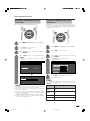
I/P setting
DNR (Digital Noise Reduction)
Adjusting the image and input signal can give you a
more beautiful picture.
Produces a clearer video image.
1
Press MENU and the MENU screen displays.
2
Press c/d to select “Picture”.
• Picture menu displays.
3
Press a/b to select “Advanced”, and then
press ENTER.
MENU
[Picture ... Advanced]
Picture
1
USER
Press MENU and the MENU screen displays.
0
+40
Brightness [0]
–30
+30
Colour
[0]
–30
+30
Tint
[0]
–30
+30
Sharpness [0]
–10
+10
Contrast
2
Press c/d to select “Picture”.
• Picture menu displays.
3
Press a/b to select “Advanced”, and then
press ENTER.
MENU
Reset
Audio
4
USER
0
+40
Brightness [0]
–30
+30
Colour
[0]
–30
+30
Tint
[0]
–30
+30
Sharpness [0]
–10
+10
Contrast
[+30]
Advanced
[Picture ... Advanced]
Picture
Audio
[+30]
Press a/b to select “DNR”, and then press
ENTER.
• Some items may be greyed out. They are not
selectable.
C. M. S.
Colour Temp
Black
Film Mode
Advanced
High
Low
I/P Setting
Reset
4
Off
Monochrome
DNR
Press a/b to select “I/P Setting”, and then
press ENTER.
• Some items may be greyed out. They are not
selectable.
5
Press a/b to select the desired level, and
then press ENTER.
C. M. S.
Colour Temp
Black
Monochrome
Interlace
Film Mode
Progressive
I/P Setting
DNR
5
Press c/d to select “Interlace” or
“Progressive”, and then press ENTER.
NOTE
• The I/P Setting is set to Progressive when Film Mode is “On”.
39
LC-37AA1H(E)-d
39
03.11.6, 8:20 AM
Basic adjustment settings
Audio adjustment
Dolby Virtual
You can also produce Dolby Virtual effects from the
“Audio” setting.
Sound adjustment
You can adjust the sound quality to your preference
with the following settings.
1
Press MENU and the MENU screen displays.
2
Press c/d to select “Audio”.
3
Press a/b to select “Dolby Virtual”, and
then press ENTER.
• Audio menu displays.
MENU
[Audio ... Dolby Virtual]
Audio
Power control
USER
1
Press MENU and the MENU screen displays.
Treble
[0]
–15
+15
Bass
[0]
–15
+15
Balance
[0]
L
R
Dolby Virtual
2
Press c/d to select “Audio”.
Speaker
• Audio menu displays.
Reset
MENU
[Off]
[Detachable]
[Audio]
Audio
Power control
4
USER
Treble
[0]
–15
+15
Bass
[0]
–15
+15
Balance
[0]
L
R
[Off]
Dolby Virtual
Speaker
Press c/d to select the desired level, and
then press ENTER.
On
Off
[Detachable]
Reset
3
4
Press a/b to select a specific adjustment
item.
Press c/d to adjust the item to your desired
position.
Selected item
cbutton
NOTE
• You can choose Dolby Virtual by pressing Dolby V on the
remote control unit. See page 22 for Dolby Virtual.
• Balance is greyed out when Dolby Virtual is set to “On”.
dbutton
Treble
For weaker treble
For stronger treble
Bass
For weaker bass
For stronger bass
Balance
Decrease audio from Decrease audio from
the right speaker
the left speaker
NOTE
• For resetting all adjustment items to factory preset values,
press a/b to select “Reset”, press ENTER, press c/d
to select “Yes”, and then press ENTER.
• Audio menu items are greyed out when Audio output is
variable or when headphones are in use.
• Balance is greyed out when Dolby Virtual is set to “On”.
40
LC-37AA1H(E)-e
40
03.11.6, 8:21 AM
Basic adjustment settings
Power Control
Power Control setting allows you to reduce the display
brightness to save energy.
Power control for AV source
Power save
When set to “Manual” or “Auto”, power consumption
is reduced by decreasing backlight brightness.
1
Press MENU and the MENU screen displays.
2
Press c/d to select “Power Control”.
• Power control menu displays.
3
Press a/b to select “Power Save”, and then
press ENTER.
[Power control ... Power Save]
MENU
Power control
[Manual]
Power Save
4
Setup
No Signal Off
[Disable]
No Operation Off
[Disable]
Press c/d to select the desired backlight
brightness, and then press ENTER.
Manual
[+8]
–8
+8
Auto
NOTE
• When setting to “Auto”, the OPC indicator lights up green,
senses the surrounding light and automatically adjusts
the backlight brightness. Make sure no object obstructs
the OPC sensor, which could affect its ability to sense
surrounding light.
• Power Save can be set differently for AV input mode and
PC input mode.
41
LC-37AA1H(E)-e
41
03.11.6, 8:21 AM
Basic adjustment settings
No signal Off
No operation Off
When set to “Enable”, the power will automatically shut
down if no signal inputs for 15 minutes.
When set to “Enable”, the power will automatically shut
down if there is no operation for 3 hours.
1
Press MENU and the MENU screen displays.
1
Press MENU and the MENU screen displays.
2
Press c/d to select “Power Control”.
2
Press c/d to select “Power Control”.
3
Press a/b to select “No Signal Off”, and
then press ENTER.
3
Press a/b to select “No Operation Off”, and
then press ENTER.
• Power control menu displays.
MENU
[Power control ... No Signal Off]
Power control
MENU
[Power control ... No Operation Off]
Power control
Setup
[Manual]
Power Save
No Signal Off
[Disable]
No Signal Off
[Disable]
No Operation Off
[Disable]
No Operation Off
[Disable]
Press c/d to select “Enable”, and then
press ENTER.
Enable
4
Press c/d to select “Enable”, and then
press ENTER.
Disable
Enable
• Five minutes before the power shuts down,
remaining time displays every minute.
NOTE
•
• “Disable” is factory preset value.
42
42
Disable
Five minutes before the power shuts down,
remaining time displays every minute.
NOTE
• “Disable” is factory preset value.
• When a TV programme finishes, and the AVC System
receives signal input, this function may not operate.
LC-37AA1H(E)-e
Setup
[Manual]
Power Save
4
• Power control menu displays.
03.11.6, 8:21 AM
Basic adjustment settings
Power management
Power Control for PC source
Power Control allows you to reduce display brightness
and save energy.
When set, the power will automatically shut down.
1
Press MENU and the MENU screen displays.
2
Press c/d to select “Power control”.
3
Press a/b to select “Power Management”,
and then press ENTER.
• Power control menu displays.
MENU
[Power control ... Power Management]
Power control
Power Save
Power Management
Power save
1
Press MENU and the MENU screen displays.
2
Press c/d to select “Power Control”.
4
Setup
[Manual]
[Off]
Press a/b to select “Mode1” or “Mode2”,
and then press ENTER.
Off
• Power control menu displays.
Mode1
3
Mode2
Press a/b to select “Power Save”, and then
press ENTER.
[Power control ... Power Save]
MENU
Power control
Power Save
Selected item
[Off]
Off
• No power management
• Factory preset value.
Mode1
• If no signal inputs for 8 minutes, the power
shuts down.
• Even if you start using the PC and the signal
inputs again, the System stays off.
• The System turns on again by pressing B
(STANDBY/ON) button on the Display or
POWER on the remote control unit. (See
page 19.)
Mode2
• If no signal inputs for 8 seconds, the power
shuts down.
• When you start using the PC and the signal
inputs again, the System turns on.
Press c/d to select the desired backlight
brightness, and then press ENTER.
Manual
Description
[Manual]
Power Management
4
Setup
[+8]
–8
+8
Auto
NOTE
• When setting to “Auto”, the OPC indicator lights up green,
senses the surrounding light and automatically adjusts
the backlight brightness. Make sure no object obstructs
the OPC sensor, which could affect its ability to sense
surrounding light.
• Power Save can be set differently for AV input mode and
PC input mode.
43
LC-37AA1H(E)-e
43
03.11.6, 8:22 AM
Using external equipment
You can connect many types of external equipment to your System, like a VCR, DVD player, HDTV tuner, PC,
game console and camcorder. To view external source images, select the input source from TV/VIDEO/PC on
the remote control unit or INPUT on the Display.
HDTV tuner
DVD player
AVC System
(rear view)
AV Receiver
VCR
AVC System
(front view)
Game console/Camcorder
PC
CAUTION
• To protect all equipment, always turn off the AVC System before connecting to a VCR, DVD player, HDTV tuner, PC, game
console, camcorder or other external equipment.
NOTE
• Please refer to the relevant operation manual (DVD player, PC, etc.) carefully before making connections.
44
LC-37AA1H(E)-f
44
03.11.6, 8:23 AM
Using external equipment
Watching a DVD image
Connecting a DVD player
You can use the INPUT 1 terminal when connecting to a DVD player and other audiovisual equipment.
Component cable (commercially available)
AVC System (rear view)
When using
component cable,
select
“COMPONENT” for
“Input Select” in the
menu.
AV cable (commercially available)
S-video cable
(commercially available)
DVD player
Displaying a DVD image
To watch a DVD image, select “INPUT1” from “INPUT
SOURCE” menu using TV/VIDEO/PC on the remote
control unit or INPUT on the Display.
The setting is stored and can be selected in the “INPUT
SOURCE” menu.
INPUT SOURCE
TV
INPUT1
INPUT2
INPUT3
INPUT4
PC
MENU
[Option ... Input Select]
NOTE
• Each time TV/VIDEO/PC is pressed, the input source
toggles.
• If the DVD image does not come in clearly, you may need
to change the input signal type setting on the “Input Select”
menu.
• Refer to your DVD player operation manual for the signal
type.
• See page 54 for how to select the signal type.
• Below are signal types used for COMPONENT connection.
480i (60Hz), 480p (60Hz), 580i (50Hz), 580p (50Hz), 720p
(60Hz)1, 1080i (50Hz2/60Hz)
1 Auto-detects video signal frequency.
2 1080i (50Hz) corresponds to a SMPTE275M signal.
(Horizontal frequency is 28.125kHz.)
AUTO
COMPONENT
S-Video
Video
(For INPUT1 signal)
45
LC-37AA1H(E)-f
45
03.11.6, 8:23 AM
Using external equipment
Watching a VCR image
Connecting a VCR
You can use the INPUT 2 terminal when connecting a VCR and other audiovisual equipment.
AVC System (rear view)
AV cable (commercially available)
S-video cable
(commercially available)
VCR
Displaying a VCR image
INPUT SOURCE
TV
INPUT1
To watch a VCR image, select “INPUT2” from the
“INPUT SOURCE” menu using TV/VIDEO/PC on the
remote control unit or INPUT on the Display.
The setting is stored and can be selected in the “INPUT
SOURCE” menu.
INPUT2
INPUT3
INPUT4
PC
MENU
[Option ... Input Select]
NOTE
• Each time TV/VIDEO/PC is pressed, the input source
toggles.
• If the VCR image does not come in clearly, you may need
to change the input signal type setting on the “Input Select”
menu.
• Refer to your VCR operation manual for the signal type.
• See page 54 for how to select the signal type.
AUTO
S-Video
Video
(For INPUT2 signal)
46
LC-37AA1H(E)-f
46
03.11.6, 8:23 AM
Using external equipment
Enjoying a game console and viewing camcorder images
Connecting a game console or camcorder
A game console, camcorder and some other audiovisual equipment are conveniently connected using the
INPUT 4 terminals.
NOTE
• The S-video terminal has priority over the video terminals.
AVC System (front view)
AV cable
(commercially available)
S-video cable
(commercially available)
Game console/Camcorder
Displaying an image of the game console or
camcorder
To connect a game console or view a camcorder, select
“INPUT4” from the “INPUT SOURCE” menu using TV/
VIDEO/PC on the remote control unit or INPUT on the
Display.
The setting is stored and can be selected on the
“INPUT SOURCE” menu.
INPUT SOURCE
TV
INPUT1
INPUT2
INPUT3
NOTE
• Each time TV/VIDEO/PC is pressed, the input source
toggles.
• Refer to your game console or camcorder operation
manual for the signal type.
• See page 54 for how to select the signal type.
INPUT4
PC
MENU
[Option ... Input Select]
AUTO
S-Video
Video
(For INPUT4 signal)
47
LC-37AA1H(E)-f
47
03.11.6, 8:23 AM
Using external equipment
Viewing an image from a PC
Connecting a PC
Use the PC terminals to connect a PC.
NOTE
• The PC input terminals are DDC1/2B-compatible.
• Refer to page 68 for a list of PC signals compatible with the System.
AVC System (front view)
RGB cable
(commercially available)
ø 3.5 mm stereo minijack cable
(commercially available)
PC
Signal names for 15-pin mini D-sub connecter
5
4
10
15
13
12
Pin No.
1
2
3
4
5
1
6
7
8
9
14
2
3
11
Signal name
R
G
B
Not connected
CSYNC
Pin No.
6
7
8
9
0
Signal name
GND (Ground)
GND (Ground)
GND (Ground)
+5V
GND (Ground)
Pin No.
q
w
e
r
t
Signal name
Not connected
SDA
HD
VD
SCL
NOTE
• Macintosh adaptor may be required for use for some Macintosh computers.
Displaying an image from a PC
To view an image from a PC, select “PC” from the
“INPUT SOURCE” menu using TV/VIDEO/PC on the
remote control unit or INPUT on the Display.
When connecting to a PC, the correct input signal type
is automatically detected. (See page 59.) If the PC
image does not come in clearly, you may need to set
the Auto Sync. adjustment in the “Setup” menu. (See
page 53.)
INPUT SOURCE
TV
INPUT1
NOTE
• Each time TV/VIDEO/PC is pressed, the input source
toggles.
INPUT2
INPUT3
INPUT4
PC
48
LC-37AA1H(E)-f
48
03.11.6, 8:23 AM
Using external equipment
Connecting external speakers
Rear view
How to connect the speaker cable
1 Push down the tab.
2 Insert the end of the
cable.
3 Put the lid back down.
When using external speakers
• Change the speaker setting to external speakers. (See
page 50.)
Make sure to connect the speaker jack and cable
polarity (L, +) properly
•
•
•
•
CAUTION
• Make sure external speakers have 4 ohm and 10 watt
specifications.
• Connect the plus/minus jacks with the correct cables.
Incorrect connection may cause a short.
The speaker jacks have plus (L) and minus (+) polarity.
Plus is red and minus is black.
The cables are also divided into plus and minus.
When connecting the left/right speakers, be sure to
connect the plus/minus jacks with the correct cables.
NOTE
• Unplug the AC cord from the AC outlet before installing
the speakers.
49
LC-37AA1H(E)-f
49
03.11.6, 8:23 AM
Using external equipment
Selecting speakers
You can output audio using the supplied speakers
(detachable) or other external speakers.
1
Press MENU and the MENU screen displays.
2
Press c/d to select “Audio”.
• Audio menu displays.
3
Press a/b to select “Speaker”, and then
press ENTER.
MENU
[Audio ... Speaker]
Audio
Power control
USER
Treble
[0]
–15
+15
Bass
[0]
–15
+15
Balance
[0]
L
Dolby Virtual
R
[Off]
[Detachable]
Speaker
Reset
4
Press c/d to select “External” or
“Detachable”, and then press ENTER.
External
Detachable
NOTE
• Audio menu items are greyed out when Audio output is
variable or when headphones are in use.
• Balance is greyed out when Dolby Virtual is set to “On”.
50
LC-37AA1H(E)-f
50
03.11.6, 8:23 AM
Useful adjustment settings
Image position (AV input mode only)
For adjusting a picture’s horizontal and vertical
position.
NOTE
• For resetting all adjustment items to the factory preset
values, press a/b to select “Reset”, and then press
ENTER.
• Adjustments are stored separately according to input
source.
• You can easily move the image position as shown on page
52, but when the power is switched off the image will return
to the previously memorised position.
Selected item
1
Press MENU and the MENU screen displays.
2
Press c/d to select “Setup”.
3
Press a/b to select “Position”, and then
press ENTER.
Description
H-Pos.
Centres the image by moving it to the left or
right.
V-Pos.
Centres the image by moving it up or down.
[Setup ... Position]
MENU
Setup
Option
Auto Installation
Programme Setup
Child Lock
Position
Full Mode
[Mode1]
Rotate
[Normal]
Language
[English]
• Full Mode is only displayed for LC-30AA1H.
4
Press a/b to select “H-Pos.” or “V-Pos.”.
H-Pos.
[0]
–10
+10
V-Pos.
[0]
–20
+20
Reset
5
Press c/d to adjust the item to your desired
position.
51
LC-37AA1H(E)-g
51
03.11.6, 8:24 AM
Useful adjustment settings
Moving the picture on the screen
You can move the picture around on the screen.
Press a/b/c/d to move an image on the screen to
the desired position. Press ENTER to return to the initial
image position.
NOTE
• While pressing a/b/c/d, an on-screen image,
“Adjusting Position” displays to the desired position.
• This setting cannot be stored. Once the System shuts
down or enters standby mode, the setting is erased. To
move the picture around the screen again, you must
perform the above procedure again.
• The image position setting using the steps on page 51
can be stored. Select either according to your objectives.
• “TV”, “INPUT1”, “INPUT2”, “INPUT3” and “INPUT4” can
each adjust the image position setting on this page. The
same for WIDE modes.
• An on-screen image from a PC source cannot be moved
around.
• Even when the image fills the screen, its position can be
adjusted with this function.
52
LC-37AA1H(E)-g
52
03.11.6, 8:24 AM
Useful adjustment settings
Auto Sync. adjustment (PC input
mode only)
For automatically adjusting the PC image.
1
Press MENU and the MENU screen displays.
2
Press c/d to select “Setup”.
Fine Sync. adjustment (PC input
mode only)
Ordinarily you can easily adjust the picture as
necessary to change image position using Auto Sync.
In some cases, however, manual adjustment is needed
to optimise the image.
1
Press MENU and the MENU screen displays.
2
Press c/d to select “Setup”.
3
Press a/b to select “Fine Sync.”, and then
press ENTER.
4
Press a/b to select the specific
adjustment item.
• Setup menu displays.
3
Press a/b to select “Auto Sync.”, and then
press ENTER.
4
Press c/d to select “Yes”, and then press
ENTER.
• Auto Sync. starts and “Adjusting the image”
displays.
MENU
[Setup ... Auto Sync.]
Yes
No
H-Pos.
[90]
–
+
V-Pos.
[39]
–
+
Clock
[90]
–
+
Phase
[20]
–
+
Reset
5
Press c/d to adjust the item to your
desired position.
30%
NOTE
• For resetting all adjustment items to the factory preset
values, press a/b to select “Reset”, and then press
ENTER.
NOTE
• When Auto Sync. is successful, “Auto Sync. completed
successfully” displays. If not, Auto Sync. failed.
• Auto Sync. may fail even if “Auto Sync. completed
successfully” displays.
• Auto Sync. is likely to succeed when an input PC image
has wide vertical stripes (ex. pattern with high contrast
stripes, or cross-hatched).
It may fail when an input PC image is solid (low contrast).
• Be sure to connect the PC to the AVC System and switch
it on before starting Auto Sync.
Description
Selected item
H-Pos.
Centres the image by moving it to the left or
right.
V-Pos.
Centres the image by moving it to up or
down.
Clock
Adjusts the clock frequency.
Phase
Adjusts the clock phase.
53
LC-37AA1H(E)-g
53
03.11.6, 8:24 AM
Useful adjustment settings
Input signal source
4
Input selection
Press a/b to select a signal type you want
to set, and then press ENTER.
• If the selected signal type is incorrect, an image
does not display or no colour image displays.
Can use for selecting the input source.
For INPUT 1 signal
MENU
[Option ... Input Select]
AUTO
COMPONENT
S-Video
Video
For INPUT 2 signal
MENU
[Option ... Input Select]
AUTO
S-Video
Video
1
Press TV/VIDEO/PC on the remote control
unit or INPUT on the Display.
For INPUT 3 signal
• INPUT SOURCE menu displays.
2
MENU
[Option ... Input Select]
Press TV/VIDEO/PC on the remote control
unit or INPUT on the Display to select the
input source.
AUTO
COMPONENT
• An image from the selected source
automatically displays.
• You can also select the input source by
pressing a/b.
S-Video
Video
NOTE
For INPUT 4 signal
• Some items may be greyed out. They are not selectable.
MENU
[Option ... Input Select]
Input signal setting
For setting the signal type of external equipment.
AUTO
S-Video
1
Press MENU and the MENU screen displays.
2
Press c/d to select “Option”.
• Option menu displays.
3
Press a/b to select “Input Select”, and then
press ENTER.
MENU
[Option ... Input Select]
Option
Input Select
Input Label
Video
NOTE
• If no (colour) image displays, try to change the other
signal type.
• Check the operation manual of the external equipment
for the signal type.
• Below are signal types used for COMPONENT connection.
480i (60Hz), 480p (60Hz), 580i (50Hz), 580p (50Hz), 720p
(60Hz)1, 1080i (50Hz2/60Hz)
1 Auto-detects video signal frequency.
2 1080i (50Hz) corresponds to a SMPTE275M signal.
(Horizontal frequency is 28.125kHz.)
[Fixed]
Audio Out
Cool Climate
Colour System
[Off]
[AUTO]
54
LC-37AA1H(E)-g
54
03.11.6, 8:25 AM
Useful adjustment settings
Input Label
6
Lets you set the input terminal displayed using the
INPUT SOURCE menu or channel display.
Press a/b/c/d to select each character
of the new name for the channel, and then
press ENTER.
DVD
A
K
U
0
7
B
L
V
1
C
M
W
2
D
N
X
3
E
O
Y
4
F
P
Z
5
G
Q
+
6
H I J CLEAR
R S T BACK
– . _
7 8 9 END
Repeat the above until the name is fully spelt
out, and then press ENTER.
• The name can be 6 characters or less.
INPUT SOURCE
TV
DVD
INPUT2
INPUT3
INPUT4
1
PC
Press TV/VIDEO/PC on the remote control
unit or INPUT on the Display.
• INPUT SOURCE menu displays.
2
Press TV/VIDEO/PC on the remote control
unit or INPUT on the Display to select
INPUT1.
(Example)
NOTE
• The name you input will not be translated.
• TV and PC are fixed.
• An image from the selected source
automatically displays.
• You can also select the input source by
pressing a/b.
3
Press MENU and the MENU screen displays.
4
Press c/d to select “Option”.
• Option menu displays.
5
Press a/b to select “Input Label”, and then
press ENTER.
MENU
[Option ... Input Label]
Option
Input Select
Input Label
[Fixed]
Audio Out
Cool Climate
Colour System
[Off]
[AUTO]
55
LC-37AA1H(E)-g
55
03.11.6, 8:25 AM
Useful adjustment settings
Colour system setting (AV input
mode only)
Yo u can change the colour system to one that is
compatible with the image on the screen.
1
Press MENU and the MENU screen displays.
AV mode selection
AV mode gives you five viewing options to choose from
to best match the system environment, which can vary
due to factors like room-brightness, type of programme
watched or the type of image input from external
equipment.
1
Press AV MODE.
• Present AV mode displays.
2
Press c/d to select “Option”.
• Option menu displays.
3
2
• The mode changes as shown below.
Press a/b to select “Colour System”, and
then press ENTER.
MENU
Press AV MODE again before the mode
displayed on the screen disappears.
AV input mode
[Option ... Colour System]
Option
AV MODE: USER
AV MODE: STANDARD
AV MODE: GAME
AV MODE: DYNAMIC
Input Select
Input Label
[Fixed]
Audio Out
Cool Climate
Colour System
[Off]
[AUTO]
AV MODE: MOVIE
4
Press a/b to select a compatible video
signal system of your equipment, and then
press ENTER.
PC input mode
AV MODE: STANDARD
AV MODE: USER
• Some items may be greyed out. They are not
selectable.
AUTO
Description
Selected item
PAL
SECAM
NTSC 3.58
USER
Allows the user to customise settings as
desired. You can set the mode for each
input source.
STANDARD
For a highly defined image in a normally
bright room
DYNAMIC
For a clear-cut image emphasising high
contrast for sports viewing
MOVIE
For a movie
GAME
Lowers image brightness for easier viewing.
NTSC 4.43
NOTE
• Factory preset value is “AUTO”.
• If “AUTO” is selected, colour system for each channel is
automatically set. If an image does not display clearly,
select another colour system (e.g. PAL, NTSC 4.43).
56
LC-37AA1H(E)-g
56
03.11.6, 8:25 AM
Useful adjustment settings
WIDE MODE
Normal
Full 14:9
Zoom 14:9
WIDE mode (for AV input mode)
Manual Selection
1
• The WIDE MODE menu displays.
• The menu lists the wide mode options selectable
for the type of video signal currently received.
Panorama
Full
Cinema 16:9
Cinema 14:9
Press WIDE.
2
Press WIDE or a/b while the WIDE MODE
menu displays on the screen.
• As you toggle down the options, each is
immediately reflected on the Display. No need
to press ENTER.
Description
Selected item
Normal
For 4:3 “standard” pictures. A side bar appears on each side.
Full 14:9
For 14:9 squeeze pictures. A thin side bar appears on each side.
Zoom 14:9
For 14:9 letterbox pictures. A thin side bar appears on each side, and you may also see bars on
the top and bottom with some programmes.
Panorama
In this mode the picture is progressively stretched toward each side of the screen.
Full
For 16:9 squeeze pictures.
Cinema 16:9
For 16:9 letterbox pictures. Bars may appear on the top and bottom with some programmes.
Cinema 14:9
For 14:9 letterbox pictures. Bars may appear on the top and bottom with some programmes.
Normal
Full 14:9
Zoom 14:9
Panorama
Cinema 14:9
Cinema 16:9
Full
57
LC-37AA1H(E)-h
57
03.11.6, 8:27 AM
Useful adjustment settings
a
Input signal
(640m480)
WIDE MODE
Normal
Full
Dot by Dot
Cinema
Input signal
(1024m768)
WIDE mode (for PC input mode)
You can select the screen size.
NOTE
• Connect the PC before making adjustments. (See page
48.)
• Selectable screen size may vary with input signal type.
1
Press WIDE.
• The WIDE MODE menu displays.
2
WIDE MODE
Press WIDE or a/b to select a desired item
on the menu.
Full
Dot by Dot
Cinema
a
Screen size images.
Input Signal
Normal
640g480
Keeps the original
aspect ratio in a full
screen display.
Input Signal
Normal
1024g768
Full
An image fully fills
the screen.
Full
An image fully fills
the screen.
Dot by Dot
Cinema
Detects the
resolution of the
signal and displays
an image with the
same number of
pixels on the screen.
Keeps the original
aspect ratio in a full
screen display. The
top and bottom of
the image is slightly
cropped.
Dot by Dot
Cinema
Detects the
resolution of the
signal and displays
an image with the
same number of
pixels on the screen.
Keeps the original
aspect ratio in a full
screen display. The
top and bottom of
the image is slightly
cropped.
58
LC-37AA1H(E)-h
58
03.11.6, 8:27 AM
Useful adjustment settings
Input signal (PC input mode only)
• Some input signals may have to be registered manually
to display properly.
• The pairs of input signals (resolutions) in the list below
are not distinguishable when received. In such case, you
have to set the correct signal manually. After setting once,
it will display when the same signal (resolution) is input
again.
640g400
720g400
640g480
848g480
1024g768
1280g768
1
Press MENU and the MENU screen displays.
2
Press c/d to select “Setup”.
• Setup menu displays.
3
Press a/b to select “Input Signal” and then
press ENTER.
MENU
[Setup ... Input Signal]
Setup
Option
Input Signal
Auto Sync.
NOTE
Fine Sync.
• You can only select the “Input Signal” on the Setup menu
when receiving one of the 6 input signals listed above.
4
Rotate
[Normal]
Language
[English]
Press a/b to select the desired input signal
on the display.
640 x 480
848 x 480
(Example)
59
LC-37AA1H(E)-h
59
03.11.6, 8:27 AM
Useful adjustment settings
Selecting Full Mode display (for AV
input mode) (LC-30AA1H only)
Full Mode screen
Full mode “Mode1”
Full mode “Mode2”
Select the display type in Full Mode.
Description
Selected item
1
Press MENU and the MENU screen displays.
2
Press c/d to select “Setup”.
3
Press a/b to select “Full Mode”, and then
press ENTER.
MENU
Mode1
Projects 16:9 squeeze image evenly over
entire screen.
Mode2
Displays a 16:9 squeeze image without
distortion.
However, black bands appear at the top
and bottom.
[Setup ... Auto Installation]
Setup
Option
Auto Installation
Programme Setup
Child Lock
Position
Full Mode
[Mode1]
Rotate
[Normal]
Language
[English]
• Full Mode is only displayed for LC-30AA1H.
4
Press c/d to select “Mode1” or “Mode2”,
and then press ENTER.
Mode 1
Mode 2
60
LC-37AA1H(E)-h
60
03.11.6, 8:27 AM
Useful adjustment settings
Rotate
You can set the orientation of the picture.
AV input mode
1
Press MENU and the MENU screen displays.
2
Press c/d to select “Setup”.
3
Press a/b to select “Rotate”, and then press
ENTER.
MENU
[Setup ... Rotate]
Setup
PC input mode
1
Press MENU and the MENU screen displays.
2
Press c/d to select “Setup”.
3
Press a/b to select “Rotate”, and then press
ENTER.
Option
Auto Installation
Programme Setup
Child Lock
Position
Full Mode
[Mode1]
Rotate
[Normal]
Language
[English]
MENU
[Setup ... Rotate]
Setup
Option
• Full Mode is only displayed for LC-30AA1H.
Input Signal
4
Auto Sync.
Press a/b to select the desired mode, and
then press ENTER.
Fine Sync.
Rotate
[Normal]
Language
[English]
Normal
Mirror
Upside Down
4
Press a/b to select the desired mode, and
then press ENTER.
Rotate
Normal
Mirror
Upside Down
Rotate
[Mirror]: mirror image.
CBA
ABC
[Upside Down]: upside
down image.
ABC
[Rotate]: rotated image.
ABC
[Normal]: normal image.
NOTE
• If you choose “Mirror” or “Rotate”, the sound orientation also changes.
61
LC-37AA1H(E)-h
61
03.11.6, 8:27 AM
Useful adjustment settings
Audio out
Description
Selected item
Allows you to select what controls the audio output.
Fixed
• Sound via speakers is adjusted with
il/k on the remote control unit or the
Display.
• Sound via the MONITOR OUTPUT terminal
is not adjustable and constantly outputs.
Variable
• Sound via the MONITOR OUTPUT terminal
is adjusted with il/k on the remote
control unit or the Display.
• Sound via speakers is muted.
Sleep timer
Allows you to set a time when the TV automatically
switches to standby.
1
Press MENU and the MENU screen displays.
2
Press c/d to select “Option”.
• Option menu displays.
3
Press a/b to select “Audio Out”, and then
press ENTER.
MENU
[Option ... Audio Out]
Option
Input Select
Input Label
[Fixed]
Audio Out
Cool Climate
Colour System
[Off]
1
[AUTO]
• Remaining time displays when sleep timer has
been set.
(On-screen display for AV input mode.)
MENU
[Option ... Audio Out]
Sleep Timer: Remain 120
Option
[Fixed]
Audio Out
2
(On-screen display for PC input mode.)
Each time you press SLEEP, the remaining
time switches as shown below.
Press c/d to select “Fixed” or “Variable”,
and then press ENTER.
• When the time has been set, countdown
automatically starts.
• Five minutes before the preset of time expires,
the remaining time displays each minute.
Cool Climate
4
Press SLEEP.
[Off]
30
0
Fixed
60
90
120
(minutes)
Variable
NOTE
• Select “0” by pressing SLEEP to cancel the sleep timer.
• When the sleep timer is working, its indicator on the
Display lights red.
NOTE
• Audio menu items are greyed out when Audio output is
set to “Variable”.
62
LC-37AA1H(E)-h
62
03.11.6, 8:28 AM
Useful adjustment settings
Cool climate
Improves LCD response when viewing fast-moving
images. The effect is greater at low room temperatures
(at or below 15˚C/59˚F).
AV input mode
PC input mode
1
Press MENU and the MENU screen displays.
1
Press MENU and the MENU screen displays.
2
Press c/d to select “Option”.
2
Press c/d to select “Option”.
• Option menu displays.
3
• Option menu displays.
Press a/b to select “Cool Climate”, and then
press ENTER.
MENU
3
[Option ... Cool Climate]
MENU
Option
[Option ... Cool Climate]
Option
[Fixed]
Audio Out
Input Select
Cool Climate
Input Label
[Off]
[Fixed]
Audio Out
Cool Climate
4
[Off]
Colour System
4
Press a/b to select “Cool Climate”, and then
press ENTER.
[AUTO]
Press c/d to select “On”, and then press
ENTER.
Press c/d to select “On”, and then press
ENTER.
On
On
Off
Off
NOTE
• Cool climate may cause image noise. If this occurs turn
the function “Off”.
• Cool Climate can be set differently for AV input mode and
PC input mode.
NOTE
• Cool climate may cause image noise. If this occurs turn
the function “Off”.
• Cool Climate can be set differently for AV input mode and
PC input mode.
63
LC-37AA1H(E)-h
63
03.11.6, 8:28 AM
Useful adjustment settings
Password setting for child lock (TV
mode only)
Allows you to use a password to protect certain settings
from being accidentally changed.
7
Enter the same 4-digit number as in step 5
to confirm.
• “The new password is registered.” displays.
NOTE
• To view a locked channel (Lock setting in Programme
Setup “Manual” is set to “On”), you must enter a password.
(See page 31.) When you select a locked channel, a
password prompt message pops up. Press ENTER to
display the password input window.
Reset the password
Allows you to reset your password.
Changing a password
You can change the factory preset password
“1234” to another 4-digit number you like.
1
Press MENU and the MENU screen displays.
1
Press MENU and the MENU screen displays.
2
Press c/d to select “Setup”.
2
Press c/d to select “Setup”.
3
Press a/b to select “Child Lock”, and then
press ENTER.
4
If you already set the password, enter it here.
If not, enter the factory preset password
“1234”.
• Setup menu displays.
3
4
Press a/b to select “Child Lock”, and then
press ENTER.
If you already set the password, enter it here.
If not, enter the factory preset password
“1234”.
– – – –
– – – –
5
Press a/b to select “Change password”,
and then press ENTER.
5
Press a/b to select “Reset”, and then press
ENTER.
6
Press c/d to select “Yes”, and then press
ENTER.
Change password
Change password
Reset
Reset
6
New Password
– – – –
Reconfirm
– – – –
Enter the 4-digit number as a password using
0 – 9.
Change password
Reset
New Password
– – – –
Reconfirm
– – – –
Yes
NOTE
• As a precautionary measure, make a note of your
password and keep it in a familiar place. If you lose or
forget your password, initialise the System to return
all settings except for the TV channel settings to factory
preset values. (See page 75.)
64
LC-37AA1H(E)-h
64
No
03.11.6, 8:28 AM
Useful features
Dual screen functions
3
Allows you to display two pictures on the screen at
one time.
Dual screen
• A selected image displays.
4
You can display two same-sized pictures except when
inputting from a PC INPUT terminal.
Press TV/VIDEO/PC to select another input
source on the active screen.
Press P&P to exit dual screen.
NOTE
• This function does not work under the following input
conditions:
1PC INPUT mode,
2Two pictures from the same source (e.g. INPUT 1 and
INPUT 1),
3Two pictures with different vertical frequency (e.g. PAL
and PAL-60).
• When this function is not available, “No dual screen display
available.” will display.
1
Press P&P.
• Dual screen displays and a selected input
source image displays.
z
z
2
Press c/d to set either screen to be active.
• “z” displays on the active screen, which has
sound output.
65
LC-37AA1H(E)-i
65
03.11.6, 8:29 AM
Useful features
Picture and still image
You can display two same-sized pictures – one moving
and one still – when inputting from an AV source.
1
Press FREEZE.
• A moving image displays on the left screen and
a still image displays on the right screen. The
still image is one frame captured from a moving
image at the moment you press FREEZE.
FREEZE
2
Update the still image by pressing ENTER.
• Each time you press ENTER, the image on the
right screen updates.
3
Press FREEZE to exit still image.
NOTE
• This function does not work in PC input mode.
• When this function is not available, “No still image display
available.” will display.
• The still image automatically goes out after 30 minutes.
66
LC-37AA1H(E)-i
66
03.11.6, 8:29 AM
Appendix
Troubleshooting
Problem
Possible Solution
• No power.
• Make sure the Display and the AVC System are connected correctly. (See page
7.)
• Check if you pressed POWER on the remote control unit. (See page 19.)
If the indicator on the Display lights up red, press B (STANDBY/ON) button.
• Is the AC cord disconnected? (See page 18.)
• Has the main power been turned on? (See page 19.)
• Unit cannot be operated.
• External influences such as lightning, static electricity, etc., may cause improper
operation. In this case, operate the unit after first turning the power of the Display
and the AVC System, or unplugging the AC cord and re-plugging it in after 1 or
2 minutes.
• Remote control unit does not
operate.
•
•
•
•
• Picture is cut off.
• Is the image position correct? (See pages 51 and 52.)
• Are screen mode adjustments such as picture size made correctly? (See pages
57 to 59.)
• Strange colour, light colour, or
dark, or colour misalignment.
•
•
•
•
• Power is suddenly turned off.
• The unit’s internal temperature has increased.
Remove any objects blocking vent or clean.
• Check the power control setting. (See pages 42 and 43.)
• Check the sleep timer setting. (See page 62.)
• No picture.
•
•
•
•
•
• No sound.
• Is the volume too low? (See page 21.)
• Is “Variable” selected in “Audio Out”? (See page 62.)
• Is correct speaker output (“External” or “Detachable”) selected in “Speaker”?
(See page 50.)
• During Auto search, the sound system should automatically be detected.
However, auto-detect may not find some signals, in which case choose Manual.
(See page 30.)
• Picture is not clear.
• No sound. (Even though the
System is receiving bilingual and
stereo signals, there is no sound
and the mode menu does not
display.)
• The Auto search (or Auto Installation) automatically searches for compatible
sound systems, but may not detect them depending on electric field conditions.
In that case, adjust to optimum sound system position by following directions on
page 30.
Are batteries inserted with polarity (e, f) aligned? (See page 13.)
Are batteries worn out? (Replace with new batteries.)
Are you using it under strong or fluorescent lighting?
Is a fluorescent light illuminated to remote control sensor?
Adjust the picture tone. (See pages 35 to 39 and 63.)
Is the room too bright? The picture may look dark in a room that is too bright.
Check the colour system setting. (See pages 30 and 56.)
Check the input signal setting. (See page 54.)
Is connection to other components correct? (See pages 44 to 48.)
Is correct input signal source selected after connection? (See page 54.)
Is the correct input selected? (See page 54.)
Is a non-compatible signal being input? (See page 68.)
Is picture adjustment correct? (See pages 35 to 39.)
Cautions regarding use in high and low temperature environments
• When the unit is used in a low temperature space (e.g. room, office), the picture may leave trails or appear
slightly delayed. This is not a malfunction, and the unit will recover when the temperature returns to normal.
• Do not leave the unit in a hot or cold location. Also, do not leave the unit in a location exposed to direct sunlight
or near a heater, as this may cause the cabinet to deform and the LCD panel to malfunction.
Storage temperature: –20°C to +60°C (–4°F to +140°F).
67
LC-37AA1H(E)-j
67
03.11.6, 8:31 AM
Appendix
PC compatibility chart
Resolution
Frequency
640g400
85 Hz
720g400
70 Hz
Remarks
85 Hz
640g480
60 Hz
65 Hz
Macintosh 13 (67 Hz)
72 Hz
75 Hz
85 Hz
800g600
56 Hz
60 Hz
72 Hz
75 Hz
85 Hz
832g624
74.5 Hz
1024g768
60 Hz
Macintosh 16
70 Hz
75 Hz
Macintosh 19
85 Hz
1280g768
60 Hz
1280g1024
60 Hz
1366g768*
60 Hz
* LC-37AA1H only.
Apple and Macintosh are registered trademarks
of Apple Computer, Inc.
DDC is a registered trademark of Video Electronics
Standards Association.
Power Management is a registered trademark of
Sun Microsystems, Inc.
VGA and XGA are registered trademarks of
International Business Machines Co., Inc.
68
LC-37AA1H(E)-j
68
03.11.6, 8:31 AM
Appendix
RS-232C port specifications
PC Control of the System
• When a program is set, the display can be controlled from the PC using the RS-232C terminal.
The input signal (PC/AV) can be selected, the volume can be adjusted and various other adjustments and
settings can be made, enabling automatic programmed playing.
• Attach an RS-232C cable cross-type (commercially available) to the supplied Din/D-Sub RS-232C for the
connections.
NOTE
• This operation system should be used by a person who is accustomed to using PCs.
Communication conditions
Set the RS-232C communications settings on the PC to match the display’s communications conditions. The
display's communications settings are as follows:
Baud rate:
Data length:
Parity bit:
Stop bit:
Flow control:
9,600 bps
8 bits
None
1 bit
None
Communication procedure
Send the control commands from the PC via the RS-232C connector.
The Display operates according to the received command and sends a response message to the PC.
Do not send multiple commands at the same time. Wait until the PC receives the OK response before sending
the next command.
Command format
Eight ASCII codes e CR
C1 C2 C3 C4 P1 P2 P3
Command 4-digits
P4
Parameter 4-digits
Command 4-digits: Command. The text of four characters.
Parameter 4-digits: Parameter 0 – 9, x, blank, ?
Return code
Parameter
Input the parameter values, aligning left, and fill with blank(s) for the remainder. (Be sure that four values are input for the
parameter.)
When the input parameter is not within an adjustable range, “ERR” returns. (Refer to “Response code format”.)
No problem to input any numerical value for “x” on the table.
0
0
0
0
–
3
0
1
0
0
0
0
5
9
5
When “?” is input for some commands, the present setting value responds.
?
?
?
?
?
69
LC-37AA1H(E)-j
69
03.11.6, 8:31 AM
Appendix
Response code format
Normal response
O
K
Return code (0DH)
Problem response (communication error or incorrect command)
E
R
R
Return code (0DH)
Commands
CONTROL ITEM
CONTROL
CONTENTS
COMMAND PARAMETER
_
_
POWER SETTING
P O W R 0
INPUT SELECTION A
I
T G D x
I
T V D 0
_
_
I
T V D *
*
I
A V D *
_
I
P C D x
I
N P 1 0
_
_
I
N P 1 1
_
I
N P 1 2
I
_
CONTROL ITEM
WIDE MODE
CONTROL
CONTENTS
COMMAND PARAMETER
W I
D E 0
_
_
_
TOGGLE
INPUT SWITCHING (TOGGLE)
W I
D E 1
_
_
_
NORMAL (AV)
_
TV (CHANNEL FIXED)
W I
D E 2
_
_
_
FULL 14:9 (AV)
_
_
TV (CHANNEL SELECTION) (1 – 99)
W I
D E 3
_
_
_
ZOOM 14:9 (AV)
_
_
INPUT1 – 4 (1 – 4)
W I
D E 4
_
_
_
PANORAMA (AV)
PC
W I
D E 5
_
_
_
FULL (AV)
_
INPUT1 (AUTO)
W I
D E 6
_
_
_
CINEMA 16:9 (AV)
_
_
INPUT1 (COMPONENT)
W I
D E 7
_
_
_
CINEMA 14:9 (AV)
_
_
_
INPUT1 (S-VIDEO)
W I
D E 8
_
_
_
NORMAL (PC)
N P 1 3
_
_
_
INPUT1 (VIDEO)
W I
D E 9
_
_
_
FULL (PC)
I
N P 2 0
_
_
_
INPUT2 (AUTO)
W I
D E 1 0
_
_
DOT BY DOT (PC)
I
N P 2 1
_
_
_
INPUT2 (S-VIDEO)
W I
D E 1 1
_
_
CINEMA (PC)
I
N P 2 2
_
_
_
INPUT2 (VIDEO)
A C D V 0
_
_
_
TOGGLE
I
N P 3 0
_
_
_
INPUT3 (AUTO)
A C D V 1
_
_
_
ON
I
N P 3 1
_
_
_
INPUT3 (COMPONENT)
A C D V 2
_
_
_
OFF
I
N P 3 2
_
_
_
INPUT3 (S-VIDEO)
T W I
N 0
_
_
_
DUAL SCREEN OFF
I
N P 3 3
_
_
_
INPUT3 (VIDEO)
T W I
N 1
_
_
_
DUAL SCREEN ON
I
N P 4 0
_
_
_
INPUT4 (AUTO)
D C C H *
*
_
_
DIRECT CHANNEL (1 – 99)
I
N P 4 1
_
_
_
INPUT4 (S-VIDEO)
C H U P x
CHANNEL UP
I
N P 4 2
_
_
_
INPUT4 (VIDEO)
C H D W x
CHANNEL DOWN
A V M D 0
_
_
A V M D 1
_
_
_
STANDARD
A V M D 2
_
_
_
DYNAMIC
A V M D 3
_
_
_
MOVIE
A V M D 4
_
_
_
GAME
A V M D 5
_
_
_
USER
VOLUME
V O L M *
*
_
_
VOLUME (0 – 60)
POSITION
H P O S
*
*
*
_
H-POSITION (AV) (10 – 10)
H P O S
*
*
*
_
H-POSITION (PC) (0 – 180)
V P O S
*
*
*
_
V-POSITION (AV) (20 – 20)
V P O S
*
*
*
_
V-POSITION (PC) (0 – 99)
C L C K
*
*
*
_
CLOCK (0 – 180)
P H S E
*
*
*
_
PHASE (0 – 40)
INPUT SELECTION B
AV MODE
SELECTION
POWER OFF (STANDBY)
Dolby Virtual
DUAL SCREEN
CHANNEL
TOGGLE
NOTE
• If an underbar (_) appears in the parameter column, enter a space.
• If an asterisk (*) appears, enter a value in the range indicated in brackets under CONTROL CONTENTS.
70
LC-37AA1H(E)-j
70
03.11.6, 8:31 AM
Appendix
Specifications
Item
37o LCD COLOUR TV, Model:LC-37AA1H
30o LCD COLOUR TV, Model:LC-30AA1H
LCD panel
37o Advanced Super View & BLACK TFT LCD
30o Advanced Super View & BLACK TFT LCD
Number of dots
3,147,264 dots (1366 g 768 g 3 dots)
2,949,120 dots (1280 g 768 g 3 dots)
Video Colour System
PAL/SECAM/NTSC 3.58/NTSC 4.43/PAL 60
TV
Function
TV-standard (CCIR)
PAL: B/G, D/K, I SECAM: B/G, D/K NTSC: M
Receiving
Channel
VHF/UHF
44.25-863.25 MHz
CATV
Hyper-band, S1–S41ch
TV-Tuning System
Auto Preset 99 ch
STEREO/BILINGUAL
NICAM/A2
Brightness
430 cd/m2
Backlight
60,000 hours (at Manual 0 position)
Viewing angles
H : 170° V : 170°
Audio amplifier
10W g 2
Speakers
Ø 8 cm 2pcs, Ø 2.5 cm 2pcs
Terminals
Rear
AVC
System
INPUT 1
AV in, S-VIDEO in, COMPONENT VIDEO in
INPUT 2
AV in, S-VIDEO in
INPUT 3
AV in, S-VIDEO in, COMPONENT VIDEO in
ANTENNA 75 q Din Type
MONITOR OUTPUT Audio (Variable, Fixed), S-VIDEO out, VIDEO out
DC OUTPUT
DC 6.5V 7W MAX
SP OUTPUT
External speaker output terminal (L and R)
Front INPUT 4
S-VIDEO, AV in
PC INPUT 15 Pin mini D-Sub, Audio in (Ø 3.5mm jack)
Headphones
Ø 3.5mm jack
OSD language
English/Chinese/Arabic
Power Requirement
AC 110–240 V, 50/60 Hz
Power
Consumption
AVC System
34 W (0.9 W Standby)
Display
135 W (0.9 W Standby)
Weight
AVC System
5.4 kg (w/o stand), 5.5 kg (with stand)
Display
13.1 kg (Display only)
16.9 kg (Display only)
16.1 kg (with Display and speakers)
20.4 kg (with Display and speakers)
25.0 kg (with Display, speakers and stand) 20.1 kg (with Display, speakers and stand)
92 W (0.3 W Standby)
Operation manual, Remote control unit (g1), System cable (g1), AC cord
(g2), “AA” size battery (g2), Stand unit (g1), Cable clamp (Large g1, Small
g1), Antenna cable (g1)
Accessories
• As a part of policy of continuous improvement, SHARP reserves the right to make design and specification changes for
product improvement without prior notice. The performance specification figures indicated are nominal values of production
units. There may be some deviations from these values in individual units.
Optional accessories
The listed optional accessories are available for the LCD
colour TV. Please purchase them at your nearest shop.
• Additional optional accessories may be available in near
future. When purchasing, please read the newest
catalogue for compatibility and check the availability.
No.
Part name
Part number
1
Wall mount bracket
AN-37AG1
2
System cable
(7 meters)
AN-07SC1
IMPORTANT
• You cannot use external speakers when you are using the
optional system cable (AN-07SC1).
LC-37AA1H(E)-j
71
03.11.10, 9:42 AM
71
Dimensional drawings
Display
Unit: mm
305
H LC-37AA1H
545
90
82
948
784
62
130
5
495.5
298.5
462.8
821.6
200
85
200
72
LC-37AA1H(E)-j
72
03.11.6, 8:31 AM
Dimensional drawings
Display
Unit: mm
305
H LC-30AA1H
545
88
79
766
58
422
385.8
608
497
644.2
100
18.5
100
73
LC-37AA1H(E)-j
73
03.11.6, 8:31 AM
Dimensional drawings
AVC System
Unit: mm
250
5
95
183
365
180
430
74
LC-37AA1H(E)-j
74
03.11.6, 8:31 AM
HOW TO SET THE FACTORY PRESETS
Press and hold down CLEAR on the AVC System while it is in standby mode. Then press B (STANDBY/ON)
button on the Display or POWER on the remote control unit to turn the System on.
All setting items (except TV channel) return to the factory presetting.
NOTE
• Running the factory presetting operation also reset the password to the factory preset “1234”.
You can run the Auto Installation again by using the following steps.
1
2
3
4
5
Turn on the power of the Display and the AVC System.
Press MENU. (Make sure the menu screen displays.)
Press c/d to select “Setup”.
Press a/b to select “Auto Installation”, and then press ENTER.
The password setting screen displays, you need to enter the factory preset password “1234”.
– – – –
6
Press c/d to select “Yes”, and then press ENTER.
Yes
No
The password is
.
NOTE
• As a precautionary measure, make a note of your password above, scissor it from this manual, and keep it in a familiar
place.
75
LC-37AA1H(E)-j
75
03.11.6, 8:31 AM