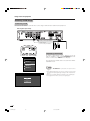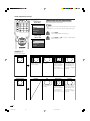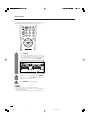
1
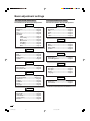
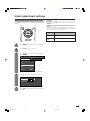
Basic adjustment settings
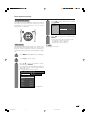
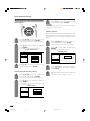
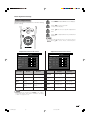
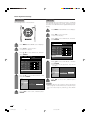
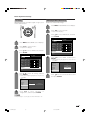
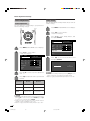
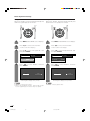
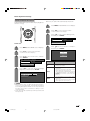
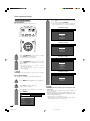
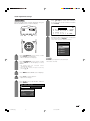
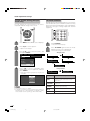
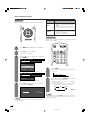
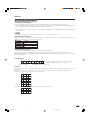
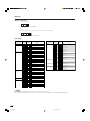
Colour temperature
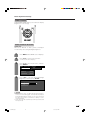
Black
Adjusts the colour temperature to give the best white
image.
Allows you to select a level for automatic adjustment
of a black areas of the image to suit viewing conditions.
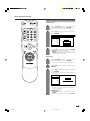
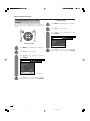
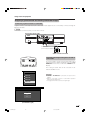
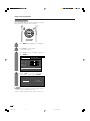
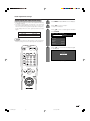
1
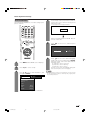
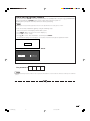
Press MENU and the MENU screen displays.
2
Press c/d to select “Picture”.
• Picture menu displays.
3
Press a/b to select “Advanced”, and then
press ENTER.
MENU
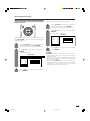
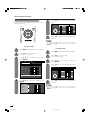
1
[Picture ... Advanced]
Picture
Audio
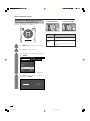
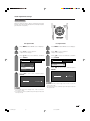
Press MENU and the MENU screen displays.
USER
0
+40
Brightness [0]
–30
+30
Colour
[0]
–30
+30
Tint
[0]
–30
+30
Sharpness [0]
–10
+10
Contrast
2
Press c/d to select “Picture”.
• Picture menu displays.
3
Press a/b to select “Advanced”, and then
press ENTER.
[+30]
Advanced
MENU
[Picture ... Advanced]
Picture
Reset
Audio
USER
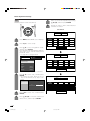
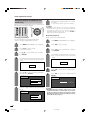
4
Press a/b to select “Black”, and then press
ENTER.
0
+40
Brightness [0]
–30
+30
Colour
[0]
–30
+30
Tint
[0]
–30
+30
Black
Sharpness [0]
–10
+10
Monochrome
Contrast
[+30]
C. M. S.
Colour Temp
Off
Film Mode
Advanced
High
Low
I/P Setting
Reset
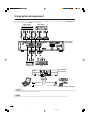
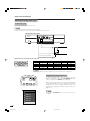
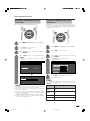
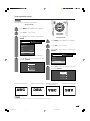
4
DNR
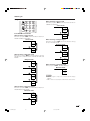
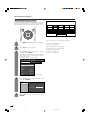
Press a/b to select “Colour Temp”, and then
press ENTER.
C. M. S.
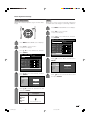
5
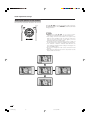
Press a/b to select the desired level, and
then press ENTER.
Colour Temp
Black
High
Monochrome
Mid-High
Film Mode
Mid
I/P Setting
Mid-Low
DNR
Low
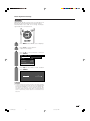
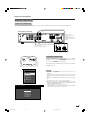
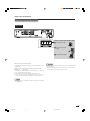
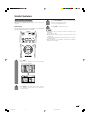
5
Press a/b to select the desired level, and
then press ENTER.
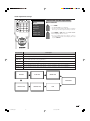
Selected item
High
Mid-High
Mid
Mid-Low
Low
Description
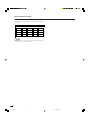
White with Bluish tone
White with Reddish tone
37
LC-37AA1H(E)-d
37
03.11.6, 8:19 AM