1
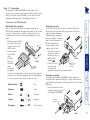
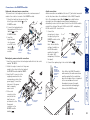
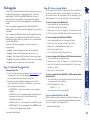
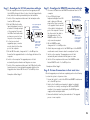
Stage C – Connections Monitor (video) Blue Keyboard Purple Mouse or Speaker or SPK Light green Microphone or MIC Pink (or maroon) Twisted pair connection The link between the LOCAL and REMOTE modules is made via twisted pair cable, specified to Category 5 or higher. Ensure that the total twisted pair cable length (including patch boxes) does not exceed 200 metres. 1 Insert the connector from the twisted pair cable link into the socket marked ‘TO REMOTE’. Mid green Twisted pair cable connector LOCAL Serial cable connection The Gold Extender set offers the option to attach an RS232 serial device (such as a touch screen input) via the remote link. The link supports software or hardware handshaking up to a maximum baud rate of 56Kb/s. To make the serial connection between the LOCAL module and your computer system, use the supplied serial link cable. 1 Attach male connector of the serial link cable to the 9 pin port on the LOCAL module, LOCAL labelled . Male connector 2 Connect the other for the serial end of the serial link cable link cable to the appropriate serial port of the computer system. KVM+A multi-cable connection Most of the connections between the computer system and the LOCAL module are made via the supplied multi-cable. This has a single connection to the module, is two metres in length and splits out to the keyboard, video, mouse, microphone and speaker ports of the system. 1 Attach the supplied KVM+A multi-cable to the 25-way socket at the end of the LOCAL module. 2 At the other end of the KVM+A cable, attach the keyboard, LOCAL mouse and Main connector video, for the KVM+A microphone multi-cable and speaker connectors to the appropriate sockets at the rear of the computer system. On most systems the appropriate ports should be labelled and colour coded in a similar way to the cable connectors: Connections at the LOCAL module The naming of the LOCAL and REMOTE modules relate to their proximity to the computer system. Hence, the LOCAL module connects directly to the system, while the REMOTE is at the other end of the twisted pair cable and attaches to the keyboard, mouse, etc. 7