1
Home Page
Table of Contents
6
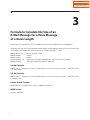
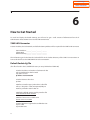
How to Get Started
To install and deploy the E-Mail Gateway you will need to get a small amount of information from the IT
Administrator about the Mail Server and the LAN environment.
SVMi LAN Connector
A Static IP address, the Subnet Mask, and Default Gateway Address will be required for the SVMi's LAN connector.
Static IP Address: ______ . ______ . ______ . ______
Subnet Mask:
______ . ______ . ______ . ______
Default Gateway:______ . ______ . ______ . ______
This information gets loaded into the Socket.CFG file in the Sockets Directory of the SVMi. For instructions on
how to edit this file see the SVM/SVMi E-Series documentation.
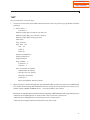
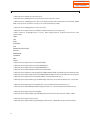
Default Socket.cfg File
(This file is found in the C:\SOCKETS Directory on every SVMi-8E and SVMi-16E)
# Set the IP address and number of subnet mask bits
# To use DHCP, replace this line with:
# ip address 0.0.0.1
ip address 10.10.108.6/24
# Set the IP time to live value
ip ttl 64
# Define an interface type 'packet driver' called 'if0'
# Class is 'dix', MTU = 1500, interrupt 60h, IRQ=10
interface pdr if0 dix 1500 12 0x60 10
# Define the default gateway used by interface 'if0'
route add default if0 10.10.108.5
# Define a host to use as a DNS server
domain server 10.10.108.5
# Set the Maximum Segment Size and Window size
tcp mss 1460
tcp window 2920
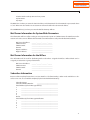
10